“My iPhone went dead!” At AppleToolBox we’ve heard this horror story many times over the years. And we know how to fix it.
The story goes something like this: you charged your iPhone fully, but when you tried turning it on, it just sits there. Nothing on and everything off. Your iPhone is bricked! None of the buttons do anything, and the screen is totally blank.
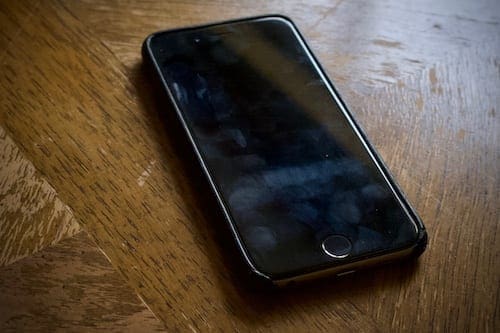
Eugh, when my iPhone 6S doesn’t turn on, I can see how gross the screen is!
Although things look bleak, don’t give up hope yet! There’s still plenty you can try to fix your dead iPhone. And we’ve laid it all out below.
Any iOS device could suddenly stop charging and turning on, from iPhone XS to iPad Pro. However, the iPhone 6 and 6S seem to encounter this problem more frequently than anything else.
Whatever device has stopped turning on, the instructions to fix it are the same.
A failed piece of hardware, like a battery or logic board, that needs to be replaced.
We’ve explained how to troubleshoot each of these causes in the steps below. Make sure you follow them to find why your iPhone won’t charge or turn on and how to fix it.
How do you fix an iPhone that won’t charge or turn on?
While this problem can affect any device, it seems particularly problematic for iPhone 6 and iPhone 6S. If your device has suddenly died, follow the troubleshooting steps below to fix it.
The instructions are the same for any iOS device, from iPhone 6 to iPhone XS Max.
Step 1: Charge your dead iPhone for at least an hour
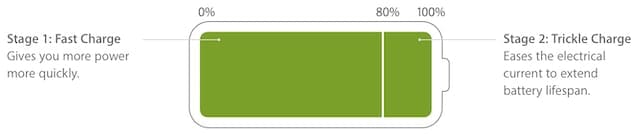
Thanks to Apple’s lithium-ion batteries, it normally doesn’t take long to get a significant charge on your iPhone. However, if your battery is completely dead, you might need to charge your iPhone for much longer.
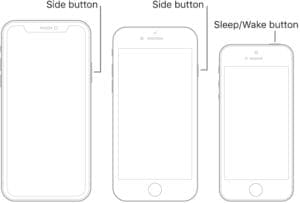
Apple says a healthy battery should charge to 80% quickly.Hold this button to power on your iPhone. Image from Apple Support.
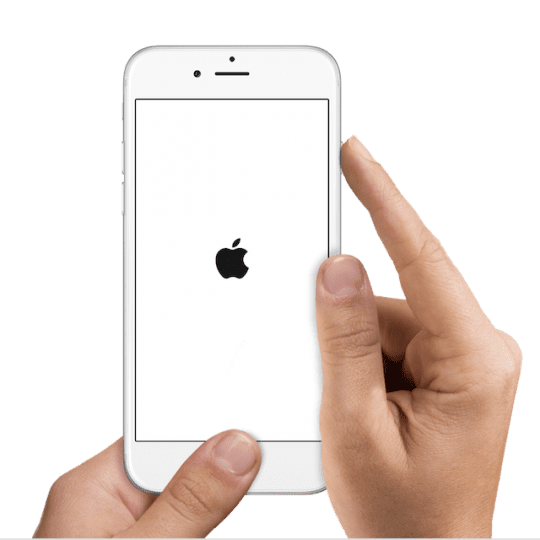
Keep your iPhone on charge for at least an hour. After that time, try turning it on again by holding the Sleep/Wake button, sometimes also called the Side or Power button.
If this works, there might be a problem with your charger or iPhone battery which made it take so long to power on. Perhaps your battery is coming to the end of its life and needs replacing by Apple.
How do you know if your iPhone is charging when it’s dead?
There isn’t an easy way to tell if your iPhone is charging when it’s completely dead. All you can do is wait for an appropriate amount of time before attempting to power it on again.
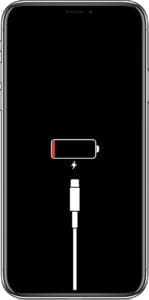
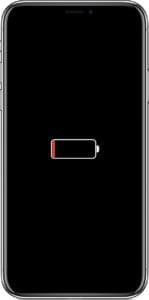
If the low power screen appears on your iPhone — a black screen with a red battery — you can tell if it’s charging by the presence of a lightning connector.
This iPhone is not charging.This iPhone is charging.
When a lightning connector appears beneath the battery, your iPhone is not charging.
When there’s no lightning connector beneath the battery, your iPhone is charging fine.
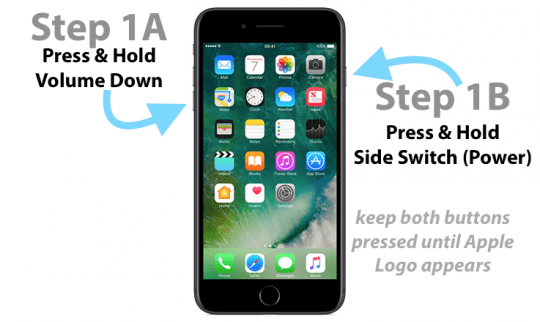
Step 2: Perform a hard reset on your iPhone
A hard reset — sometimes called a forced restart —might revive your dead iPhone by forcing it to turn on. It does not delete any data from the iPhone.
The instructions for a hard reset became more complicated when Apple replaced the mechanical Home button on the iPhone 7, then removed the Home button entirely on the iPhone X.
But it is possible to test your cable and power adapter to make sure they can charge an iPhone.
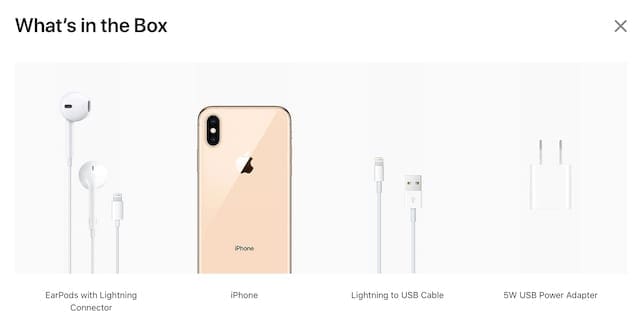
Use the original lightning cable and power adapter that came with your iPhone. If you don’t have them, or they are damaged, make sure you’re using official MFi-licensed accessories.
Use the original charging accessories that came in the box with your iPhone. Image from Apple.
Inspect your lightning cable and power adapter for signs of damage, like kinks in the cable or scorch marks on the adapter. Don’t use damaged accessories.
Inspect the lightning port on your iPhone for lint and debris. Carefully clear it out with an antistatic brush — take care not to damage the delicate connectors inside.
Try using a different cable, a different adapter, and a different power outlet on the wall. Also, try charging a different iOS device. If any of this works, you should be able to find out where the problem lies.
Step 4: Connect your dead iPhone to iTunes
It’s possible your iPhone is already turned on, but the screen is still blank. Signs of this are when your iPhone still rings or vibrates but doesn’t show anything onscreen. When this happens, you might be able to fix it by restoring the device using iTunes.
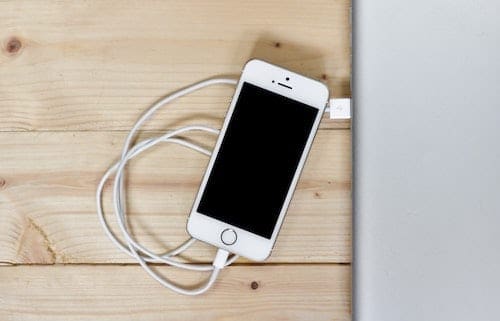
Connect your iPhone to iTunes even if it shows no signs of life.
Even if your iPhone seems completely dead and powerless, connect it to a computer running the latest version of iTunes anyway. You might still be able to restore it.
You should try to make a backup before restoring your device.
How do I make a back up on my dead iPhone?
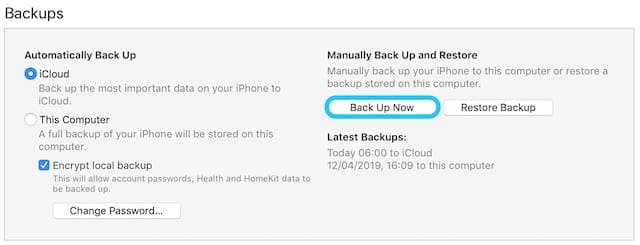
If iTunes recognizes your iPhone, it might give you the option to make a new back up.
If you can’t make a backup and don’t want to lose your data, stop here and contact a data recovery specialist for more help.
If iTunes recognizes your iPhone, click to back up now.
How do I restore my dead iPhone using iTunes?
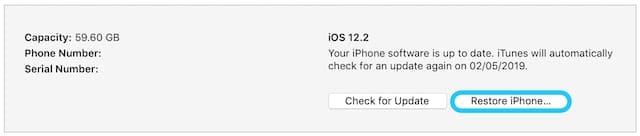
If iTunes recognizes your iPhone, click the Summary tab to see an option to Restore your device. This erases your iPhone and returns it to factory settings.
Click Restore iPhone… to erase the content and reset your iPhone to factory settings.
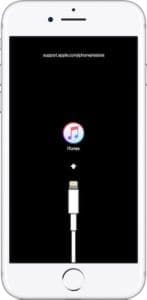
This forces it into Recovery Mode, which should allow iTunes to restore your device.
Step 5: Put your iPhone into DFU mode
This iPhone is in Recovery Mode — in DFU mode nothing appears onscreen.
DFU mode is the final troubleshooting step for software related issues on your iPhone. If it still doesn’t turn on or charge and appears completely dead — DFU mode might be able to help.
DFU stands for Device Firmware Update. Using iTunes, it forces your device to erase and reinstall every piece of software and firmware. This makes it the deepest possible restore you can do.
Even Apple Geniuses struggle to put an iPhone into DFU mode on the first try. Don’t be afraid to repeat the instructions a couple of times if you aren’t sure you got it right. If anything at all appears on the screen at the end — your iPhone is not in DFU mode.
Connect your iPhone to iTunes using a lightning-to-USB cable.
Press and hold the Sleep/Wake and Volume Down buttons.
After 8 seconds, release the Sleep/Wake button but keep holding the Volume Down button.
iTunes should detect a device in Recovery Mode, click Restore.
How do I enter DFU mode on iPhone 6, iPhone 6S, or earlier?
Connect your iPhone to iTunes using a lightning-to-USB cable.
Press and hold the Sleep/Wake and Home buttons.
After 8 seconds, release the Sleep/Wake button but keep holding the Home button.
iTunes should detect a device in Recovery Mode, click Restore.
Step 6: Get more help from Apple Support
By now, it looks like your iPhone doesn’t turn on because of a hardware problem. Amongst other possibilities, this could be due to a failed battery or logic board. It could also be the result of liquid damage.
The iPhone 6 and 6S appear to be prone to logic board failure which is why so many of them die. (Not all of them mind you, mine is almost four years old still going strong!)
Whatever you suspect the cause is, do not attempt to open or repair the iPhone yourself.
Doing so voids any existing warranty or consumer law — Apple won’t even offer a paid repair if they find out you attempted one yourself.
Use the iPhone button on Apple’s Get Support website for help with your dead iPhone.
If your iPhone is free from physical damage and less than a year old or covered by AppleCare+, Apple should offer you a free repair under their warranty. Otherwise, ask about Consumer Law in your country for other options.
Dan writes tutorials and troubleshooting guides to help people make the most of their technology. Before becoming a writer, he earned a BSc in Sound Technology, supervised repairs at an Apple Store, and even taught English in China.
my phone is drain in a month i tried to connect to itunes but its not working my phone is super drained and if i charge it theres nothing pop up the red battery something what will i gonna do
My iPhone 6s is not working for days
And it contents of so much important files and i have annual exam can you guys do any thing there is no apple service sender near us
I was using a iPhone 7 and a iPhone 8 last night and when my power went off for the pole replacement both were not working
plugging into the chargers has no effect
Great! Thank your article, I have the same problem recently, and i search several ios system recovery software like joyoshare ultfix on net, but i still hesitate whether it is safe to use, cause i never use this software before.
Now, with your article, i get a lot of methods to repair my iPhone,it helps me a lot.
So it’s been really hot, at least for where I live, over the past couple of days. Yesterday though, my phone (iPhone 6s) kept overheating every time I used it, especially when charging. I had to keep it on an icepack to cool it down, and I received multiple (around 3) overheating warnings, but each time I would cool it down. It was incredibly hot to the touch right under the camera and flashlight. Eventually the whole middle of my touch screen was unusable, as I couldn’t scroll through websites or press on anything, although the top and bottom tool bars were usable. By this I mean that I could refresh the page and switch between tabs, though I couldn’t actually interact with the websites/pages. I decided the best course of action was to turn my phone off completely, let it cool down overnight, and try using it in the morning. When morning time came, it wouldn’t charge or turn on at all. I left it on the charger for roughly 45mins and nothing happened. I’ve yet to try some of the more serious solutions recommended, but I’m scared I’ve lost my second phone! Please help!
i used my iPhone 7+ just for 6 months and now its dead it won’t do anything. I tried all the hard reset and iTunes restore solution but iPhone won’t even show on the iTunes. I took it in for a repair and they tried to change battery, screen and charging system but the iPhone still won’t power on. Does this mean I nolonger have a phone at all?
my iPhone (6s) was having battery problems lately but last night it reached 100% and died, the battery symbol says that it is charging so I left it charging all night and it’s still dead, the screen still says that the phone is actually charging.
I tried a hard reset, hold it for at least 30 sec.
I am worried that I will lose my photos and contacts.
It is so terrible that my iPhone 7, which is just a month after purchasing it from USA, turned screen into blank (or went dead) while charging it.
Now, my screen shows nothing but only blank.
How can I fix it?
it has been just a month and giving such a terrible problem.
If possible, we’d like you to try recovery mode on your iPhone 6S.
If that doesn’t work or isn’t possible, there is a know shutdown issue with certain iPhone 6DS models. Please type your serial number into this Apple’s recall site to see if your iPhone 6S qualifies for the recall. If so, Apple replaces your battery for free.
If your iPhone 6S is not a listed product under recall, it’s still possible that the battery is to blame and needs replaced. Replacing a battery costs $49 USD plus shipping–significantly cheaper than a new device.
Hello, I bought a previously owned iPhone 6SPLUS in December 2018 from eBay when I was in the USA for Christmas, used it while I was there, came back to Nigeria and used it for a couple of weeks then it went dead.
I try the force reset and also tried to restore on iTunes still didn’t work, the phone has been dead for almost 3 weeks now, what can I do please!
My iphone 6 plus has become responsive after dieing. I charged the iphone after it had died,but the screen remained black. I carried out a hard reset using the home and sleep/awake buttons and the phone still remained unresponsive. I switched to ring mode from silent mode using the top left button and as usual the phone was unresponsive. When i connect to itunes, i get a messgase stating i should enter the passcode, but i cant due to the black screen. Any solution this problem?
My iPhone has been having problems since it was Six months old and the no questions asked warranty from at and t is a joke. It is past the two year warranty and looks like it got bricked now. I have an Apple Watch that is paired to the horrid phone.is there a way to unpair it.i really think I’m done with Apple. The new phone don’t have a headphone jack so that is not ever going to be updated with me. Trust me I would already have the new phone….I have been so disappointed in the six s that I think I need to find an alternative at this point.
Sorry that you’ve had so much trouble with your iPhone, that’s terrible. And it must feel so frustrating and maddening to be caught in such a position.
In regards to your Watch, you can indeed use it with another iPhone. In order to pair your Apple Watch with your new iPhone, you first need to erase your Apple Watch manually.
To do so, follow these steps:
On your Apple Watch, go to: Home screen (via a single press on the Digital Crown) > Settings (cog icon) > General > Reset > Erase all Content and Settings.
Then pair it to your new iPhone via, choosing to Restore from Backup, if available.
My iPhone 6s had a problem which was covered due to it happening within a year of purchase. I then had a logic board problem with the reconditioned iPhone 6s provided me which caused my phone to die within the year, again. When taken to the Apple Store I was told reconditioned phones were not covered under the 1-year warranty. Within a week, both my daughters and husbands iPhone 6s died. We didn’t even have these phones for 2 years! Why doesn’t Apple recall phones that obviously have faulty parts?! Is it an Apple or is it a Lemon???
I’m sorry to hear about all your problems with the iPhone 6S model. Many of our readers and some of our staff still love their trusty iPhone 6S–so we’d like to think these symptoms are not widespread. However, your family’s experience certainly makes it seem so.
I recommend you call Apple Support directly and speak with a manager. Tell them your story–and about all 3 phones having issues. Let them know how disappointed you are with the product and that (if it’s true) no mentioned that your reconditioned iPhone 6S would no longer have a valid warranty. They may do nothing. But it’s worth a try!
Considering this paragraph shouldn’t Apple take care of phone. For some reason, the iPhones 6 & 6s models are more prone to failure on their logic boards. Proceed with caution and above all, DO NOT OPEN THE IPHONE! YOU VOID THE WARRANTY.
I believe Apple should take care it
We agree. We’re putting out information that our readers provide us–and that is that more users report problems with their iPhone 6/6S logic boards than other iPhone models. Apple will take care of any iPhone 6 or 6S that’s covered under warranty (Apple Care.) It gets a lot more tricky when phones get off warranty–these problems often result in users paying for repairs themselves.
My IPHONE 4S suddenly started dying faster and faster every day. It finally got to the point that it wouldn’t start up even after charging. Occasionally I would have to do a hard startup, but it continued to die and finally got so temperamentally that even sometimes a hard start wouldn’t work. I took it to our local phone company and they did an analysis on it and claimed it was not the battery. I’m skeptical as the phone is in pretty good shape. Could it still be the battery? Should I invest in a new battery or a new phone?
My apple 4s v purchsd in dubai n in india my child pressed lock fr several times so it lockd .by tat v frmatted tat .by tat ma handset not w
Switching on n v kpt lik tat nly fr 3 yrs . Nw v r trying to repair tat .so i tried bt al r tlng board complnt bt onthng ma handset getting charged .pls give solution
same – iphone 4 just sitting on desk and suddenly dead even though it had been fully charged and i had just unplugged it from charger. hard reset worked but phone very slow – have been having some issues with it lately such as touchscreen unresponsive and everything really slow to load, sometimes i couldn’t even turn the thing off! this has just made me re-think keeping the phone and looking at a new one which is frustrating as i have just started a new plan for 2 years grrrr
My iPhone 4s died to low battery and will no longer charge. Ive tried several cables and outlets. When holding down power and home buttons it just shows me the ”connect to charger” symbol, no matter how long i hold it. Is my phone now useless our is there a way for me to fix it without taking it to an apple store?
Hi. my friends iphone 4 just crashed. I tried the hold down hone and sleep button for 30 sec but nothing worked. shes really sad and i need ways to make her phone work. HELP?
my iphone 4 is suddenly dead, when calling to this phone after dead it hear ringing sound but my phone (iphone 4) still is on dead condition after sometime when i calling to this number it says that phone is switched off.. I required your kind help in this regard..
It worked! My phone was just sitting on my table. I had used it 30 minutes before. It wouldn’t turn on. It didn’t need a charge. I followed your suggestion and it worked!! Any chance it will happen again?
This may not be the best place to ask but, I have been looking for a place to take my Mac for repair. Does anyone have any info on this apple repair service? They’re located in West Los Angeles, which is only 5 minutes from my apartment. It’s called – Mac Repair Los Angeles, 11322 Santa Monica Blvd, Ste B Los Angeles, CA 90025 (310) 966-9099.
My iphone 4 has completely died! My issue is that the lock.button does not work. I had the white button that provides the manual lock. I have tried to plug the phone in & itunes won’t start up or recognise my phone. Help!
yep thx it worked for me too.. i wasnt worried cuz i knew i would find a solution online.
I tried hard reset for some seconds it didnt work but i did for about 40 and it finally worked.
:DDDDDDD
Today my friend borrowed my iphone4 to make a phone call and after she gave it back to me, the screen stayed black, even though it had enough battery..
I have a iPhone 3GS. It has stopped working. It has a white screen and when I’m connecting to iTunes it is showing nothing but an error message “We’re sorry, we are unable to continue with your activation at this time.” I don’t understand what this is. The phone was working perfectly. Although it did fall from my hand before this white screen happened. People told to change the screen, but this is no screen problem. Pls Help.
heyy…..someone please answer asap!! my phone wont charge..it turns on but everytime i connect it it shows the symbol as iff its charging to turn back on but it wont…….my phone has not turned on in a while….how do i fix it???!!!
I had the same thing happen to me today. Except I was not using any applications -in fact the phone was not in use at all. Simply sitting on my desk. I went to click it on and look up something and got NOTHING.
I did try the process that was suggested -it worked. But I am concerned that it might happen again. Has anyone heard of this occurring repeatedly. My phone is about a year and a half old. My FIRST iphone and I am a bit disappointed if a phone won’t last longer than that-or even give you a warning that something imminent might occur.
Makes me want to venture to… dare I say… another company!
HI just did it thought i was screwed but it worked thanks for the help ,,mine died or froze on a black screen ,,it told me low batt ,i was just playing a hd 3d game and the phone was very warm . i think from the research i have done all the iphones that are doing this are over heating. think we need a cooling fan apple
None of those “solutions” have worked for me. Took it to the crApple store. They couldn’t get it to do anything. I was pretty bummed until they offer me the opportunity to “swap” the phone out and it would only cost me $200 (for a phone I purchased new for $199.99). I wasn’t bummed anymore… I was pissed. I didn’t take advantage of the wonderful opportunity crApple extended. Wonder how far an iPhone 4 will fly if I throw overhand and follow through? Any guesses?
On 21st Nov’11 I have installed iOS directly on my iPhone4 after receiving the update reminder. Suddenly found my phone shut off automatically after download is complete. After a minute or so I could swhitch on the mobile. The same evening my iPhone4 went dead completely. It can not be detected by iTunes nor it response to any while connect to charger. My phone is fully charged. It is dead because I have downloaded iOS ? Or there may be any other reason??? Need help ….
Worked this time & thanks but hope this does not become a regular activity or I will reconsider phones….hubby got Samsung same time I got iPhone & he hasn’t had any issues yet. We will see how often I have to reboot this way.















my phone is drain in a month i tried to connect to itunes but its not working my phone is super drained and if i charge it theres nothing pop up the red battery something what will i gonna do
My iPhone 6s is not working for days
And it contents of so much important files and i have annual exam can you guys do any thing there is no apple service sender near us
I was using a iPhone 7 and a iPhone 8 last night and when my power went off for the pole replacement both were not working
plugging into the chargers has no effect
Right after my phone force restarted it instantly died
Great! Thank your article, I have the same problem recently, and i search several ios system recovery software like joyoshare ultfix on net, but i still hesitate whether it is safe to use, cause i never use this software before.
Now, with your article, i get a lot of methods to repair my iPhone,it helps me a lot.
I’m using iPhone 7 and this morning it was dead after updates last night. It should be Apple responsibility to fix their products
You can add that if your phone is charging the battery will warm up. So if its charging you will be able to feel the warmth.
So it’s been really hot, at least for where I live, over the past couple of days. Yesterday though, my phone (iPhone 6s) kept overheating every time I used it, especially when charging. I had to keep it on an icepack to cool it down, and I received multiple (around 3) overheating warnings, but each time I would cool it down. It was incredibly hot to the touch right under the camera and flashlight. Eventually the whole middle of my touch screen was unusable, as I couldn’t scroll through websites or press on anything, although the top and bottom tool bars were usable. By this I mean that I could refresh the page and switch between tabs, though I couldn’t actually interact with the websites/pages. I decided the best course of action was to turn my phone off completely, let it cool down overnight, and try using it in the morning. When morning time came, it wouldn’t charge or turn on at all. I left it on the charger for roughly 45mins and nothing happened. I’ve yet to try some of the more serious solutions recommended, but I’m scared I’ve lost my second phone! Please help!
i used my iPhone 7+ just for 6 months and now its dead it won’t do anything. I tried all the hard reset and iTunes restore solution but iPhone won’t even show on the iTunes. I took it in for a repair and they tried to change battery, screen and charging system but the iPhone still won’t power on. Does this mean I nolonger have a phone at all?
could just be the charger
hi,
my iPhone (6s) was having battery problems lately but last night it reached 100% and died, the battery symbol says that it is charging so I left it charging all night and it’s still dead, the screen still says that the phone is actually charging.
I tried a hard reset, hold it for at least 30 sec.
I am worried that I will lose my photos and contacts.
what should I do?
It is so terrible that my iPhone 7, which is just a month after purchasing it from USA, turned screen into blank (or went dead) while charging it.
Now, my screen shows nothing but only blank.
How can I fix it?
it has been just a month and giving such a terrible problem.
Hi Tshering,
We suggest trying iTunes and try a restore or if needed a DFU Mode Restore.
Did you purchase this iPhone 7 as new or was it previously owned?
If new, you should be covered under Apple’s 1-year warranty–in that case, contact Apple Support in your home country. Have your proof of purchase available.
I’m so confused.
Over the past few days, my iPhone 6s has worked completely fine but last night it died and my charger (which was a bit dodgy) wasn’t charging it.
Well, the symbol that says its charging showed up but I left it charging overnight and I woke up to nothing but a black screen.
I left it alone for a while and it showed up with the symbol telling me to charge it.
So I thought perhaps it was my charger.
I used my sister’s charger which is brand new and received nothing but a black screen.
I’ve tried to force it to restart but I’m still left with nothing.
Typical iPhone, they always break but have no clue what brought this on- the breakage for me is usually self-inflicted but nope. nothing.
Anyone got any tips on what I should do? I can’t really afford a new phone rn. Btw my warranty has run out -__-.
Hi Holly,
Sorry, this is happening to you!
Do you have access to a computer with iTunes?
If possible, we’d like you to try recovery mode on your iPhone 6S.
If that doesn’t work or isn’t possible, there is a know shutdown issue with certain iPhone 6DS models. Please type your serial number into this Apple’s recall site to see if your iPhone 6S qualifies for the recall. If so, Apple replaces your battery for free.
If your iPhone 6S is not a listed product under recall, it’s still possible that the battery is to blame and needs replaced. Replacing a battery costs $49 USD plus shipping–significantly cheaper than a new device.
My iPhone 6 bought in January, with an extended warranty is dead.
Two years and two months is too short a life to justify the cost of an Apple product.
it was very well looked after as I’d intended to trade it in ‘ on a new one.
Any comeback?
Hello, I bought a previously owned iPhone 6SPLUS in December 2018 from eBay when I was in the USA for Christmas, used it while I was there, came back to Nigeria and used it for a couple of weeks then it went dead.
I try the force reset and also tried to restore on iTunes still didn’t work, the phone has been dead for almost 3 weeks now, what can I do please!
Hi Mary,
Sorry about your iPhone 6S Plus. That’s terrible!
Please see this article about DFU Mode–give that a try, using iTunes.
Liz
My iphone 6 plus has become responsive after dieing. I charged the iphone after it had died,but the screen remained black. I carried out a hard reset using the home and sleep/awake buttons and the phone still remained unresponsive. I switched to ring mode from silent mode using the top left button and as usual the phone was unresponsive. When i connect to itunes, i get a messgase stating i should enter the passcode, but i cant due to the black screen. Any solution this problem?
My iPhone has been having problems since it was Six months old and the no questions asked warranty from at and t is a joke. It is past the two year warranty and looks like it got bricked now. I have an Apple Watch that is paired to the horrid phone.is there a way to unpair it.i really think I’m done with Apple. The new phone don’t have a headphone jack so that is not ever going to be updated with me. Trust me I would already have the new phone….I have been so disappointed in the six s that I think I need to find an alternative at this point.
Hi Adrienne,
Sorry that you’ve had so much trouble with your iPhone, that’s terrible. And it must feel so frustrating and maddening to be caught in such a position.
In regards to your Watch, you can indeed use it with another iPhone. In order to pair your Apple Watch with your new iPhone, you first need to erase your Apple Watch manually.
To do so, follow these steps:
On your Apple Watch, go to: Home screen (via a single press on the Digital Crown) > Settings (cog icon) > General > Reset > Erase all Content and Settings.
Then pair it to your new iPhone via, choosing to Restore from Backup, if available.
Liz
Is it an Apple or is it a Lemon?!
My iPhone 6s had a problem which was covered due to it happening within a year of purchase. I then had a logic board problem with the reconditioned iPhone 6s provided me which caused my phone to die within the year, again. When taken to the Apple Store I was told reconditioned phones were not covered under the 1-year warranty. Within a week, both my daughters and husbands iPhone 6s died. We didn’t even have these phones for 2 years! Why doesn’t Apple recall phones that obviously have faulty parts?! Is it an Apple or is it a Lemon???
Hi Jeia,
I’m sorry to hear about all your problems with the iPhone 6S model. Many of our readers and some of our staff still love their trusty iPhone 6S–so we’d like to think these symptoms are not widespread. However, your family’s experience certainly makes it seem so.
I recommend you call Apple Support directly and speak with a manager. Tell them your story–and about all 3 phones having issues. Let them know how disappointed you are with the product and that (if it’s true) no mentioned that your reconditioned iPhone 6S would no longer have a valid warranty. They may do nothing. But it’s worth a try!
Keep us posted,
Liz
Considering this paragraph shouldn’t Apple take care of phone. For some reason, the iPhones 6 & 6s models are more prone to failure on their logic boards. Proceed with caution and above all, DO NOT OPEN THE IPHONE! YOU VOID THE WARRANTY.
I believe Apple should take care it
Hi Jincy,
We agree. We’re putting out information that our readers provide us–and that is that more users report problems with their iPhone 6/6S logic boards than other iPhone models. Apple will take care of any iPhone 6 or 6S that’s covered under warranty (Apple Care.) It gets a lot more tricky when phones get off warranty–these problems often result in users paying for repairs themselves.
Liz
My iPhone 5s just went dead and was resurrected by your sound advice. Thanks a heap.
I just used this fix on my 6s and it worked great. Thanks Dave
BTW, that was my iPhone 6 it worked on, thanks!
It worked!! Can’t thank you enough!
My IPHONE 4S suddenly started dying faster and faster every day. It finally got to the point that it wouldn’t start up even after charging. Occasionally I would have to do a hard startup, but it continued to die and finally got so temperamentally that even sometimes a hard start wouldn’t work. I took it to our local phone company and they did an analysis on it and claimed it was not the battery. I’m skeptical as the phone is in pretty good shape. Could it still be the battery? Should I invest in a new battery or a new phone?
thanks, just tried and it worked perfectly!!
That worked !! Awesome!!! Thank you.
Hard boot worked! My iPhone 4 is working perfectly!Hope its not a recurring defect!
Thanks for the solution. Appreciate it!
FANTASTICO! I was worried for 1 minute, then the suggestion above really worked!
So grateful, thanks!
My apple 4s v purchsd in dubai n in india my child pressed lock fr several times so it lockd .by tat v frmatted tat .by tat ma handset not w
Switching on n v kpt lik tat nly fr 3 yrs . Nw v r trying to repair tat .so i tried bt al r tlng board complnt bt onthng ma handset getting charged .pls give solution
thanks, it worked.
Thank you ,I worked a treat.
Kind regards, maureen
Thanks. Worked for me.
same – iphone 4 just sitting on desk and suddenly dead even though it had been fully charged and i had just unplugged it from charger. hard reset worked but phone very slow – have been having some issues with it lately such as touchscreen unresponsive and everything really slow to load, sometimes i couldn’t even turn the thing off! this has just made me re-think keeping the phone and looking at a new one which is frustrating as i have just started a new plan for 2 years grrrr
Please..help me
I tried all type of sujjested options…it is not working or turned on…
what to do…it went dead…
Thanks. Worked!
Thank you so much! It works, even on unlocked iPhone 4
It worked for me.
My iPhone 4s died to low battery and will no longer charge. Ive tried several cables and outlets. When holding down power and home buttons it just shows me the ”connect to charger” symbol, no matter how long i hold it. Is my phone now useless our is there a way for me to fix it without taking it to an apple store?
Hi. my friends iphone 4 just crashed. I tried the hold down hone and sleep button for 30 sec but nothing worked. shes really sad and i need ways to make her phone work. HELP?
my iphone 4 is suddenly dead, when calling to this phone after dead it hear ringing sound but my phone (iphone 4) still is on dead condition after sometime when i calling to this number it says that phone is switched off.. I required your kind help in this regard..
Yeeeaaahhhhh it worked
Yeeeaaahhhhh it worked
It worked! My phone was just sitting on my table. I had used it 30 minutes before. It wouldn’t turn on. It didn’t need a charge. I followed your suggestion and it worked!! Any chance it will happen again?
OMG! I panicked without my phone. I tried everything and nothing worked until I tried the fix listed here. It worked!!!!! Thanks!
This may not be the best place to ask but, I have been looking for a place to take my Mac for repair. Does anyone have any info on this apple repair service? They’re located in West Los Angeles, which is only 5 minutes from my apartment. It’s called – Mac Repair Los Angeles, 11322 Santa Monica Blvd, Ste B Los Angeles, CA 90025 (310) 966-9099.
My iphone 4 has completely died! My issue is that the lock.button does not work. I had the white button that provides the manual lock. I have tried to plug the phone in & itunes won’t start up or recognise my phone. Help!
yep thx it worked for me too.. i wasnt worried cuz i knew i would find a solution online.
I tried hard reset for some seconds it didnt work but i did for about 40 and it finally worked.
:DDDDDDD
Thanks so much!!!! Badly need my phone for work =)
Today my friend borrowed my iphone4 to make a phone call and after she gave it back to me, the screen stayed black, even though it had enough battery..
Why can not i see the solutions ??
thanks:)
I have a iPhone 3GS. It has stopped working. It has a white screen and when I’m connecting to iTunes it is showing nothing but an error message “We’re sorry, we are unable to continue with your activation at this time.” I don’t understand what this is. The phone was working perfectly. Although it did fall from my hand before this white screen happened. People told to change the screen, but this is no screen problem. Pls Help.
thanks! phone back in order!
Thank you it works. Yes Apple need to research and fix this problem. we pay to much for these phones
Thanks for the fix.it worked for me.. iPhone 4 running iOS 6
heyy…..someone please answer asap!! my phone wont charge..it turns on but everytime i connect it it shows the symbol as iff its charging to turn back on but it wont…….my phone has not turned on in a while….how do i fix it???!!!
try a new cable
Thank you—instructions revived my dead phone
Thanks it worked .
Thanks that worked 🙂
I had the same thing happen to me today. Except I was not using any applications -in fact the phone was not in use at all. Simply sitting on my desk. I went to click it on and look up something and got NOTHING.
I did try the process that was suggested -it worked. But I am concerned that it might happen again. Has anyone heard of this occurring repeatedly. My phone is about a year and a half old. My FIRST iphone and I am a bit disappointed if a phone won’t last longer than that-or even give you a warning that something imminent might occur.
Makes me want to venture to… dare I say… another company!
Thanks that worked!
HI just did it thought i was screwed but it worked thanks for the help ,,mine died or froze on a black screen ,,it told me low batt ,i was just playing a hd 3d game and the phone was very warm . i think from the research i have done all the iphones that are doing this are over heating. think we need a cooling fan apple
None of those “solutions” have worked for me. Took it to the crApple store. They couldn’t get it to do anything. I was pretty bummed until they offer me the opportunity to “swap” the phone out and it would only cost me $200 (for a phone I purchased new for $199.99). I wasn’t bummed anymore… I was pissed. I didn’t take advantage of the wonderful opportunity crApple extended. Wonder how far an iPhone 4 will fly if I throw overhand and follow through? Any guesses?
On 21st Nov’11 I have installed iOS directly on my iPhone4 after receiving the update reminder. Suddenly found my phone shut off automatically after download is complete. After a minute or so I could swhitch on the mobile. The same evening my iPhone4 went dead completely. It can not be detected by iTunes nor it response to any while connect to charger. My phone is fully charged. It is dead because I have downloaded iOS ? Or there may be any other reason??? Need help ….
Worked this time & thanks but hope this does not become a regular activity or I will reconsider phones….hubby got Samsung same time I got iPhone & he hasn’t had any issues yet. We will see how often I have to reboot this way.