You’ve got a brand new iPad and you’re excited to use it, but where is the manual? We get this question from our readers all the time! If you’ve never used an Apple product before, knowing how what you can do sometimes will take a long time. Even if you already have an iPhone, Mac, or Apple Watch, iPads are slightly different and will therefore need a bit of a learning curve.
There are two different places you can find the iPad manual or User Guide: On Apple’s website or in the iBooks store. We talk you through both of those options below.
How to Read the iPad User Guide on Apple’s Website
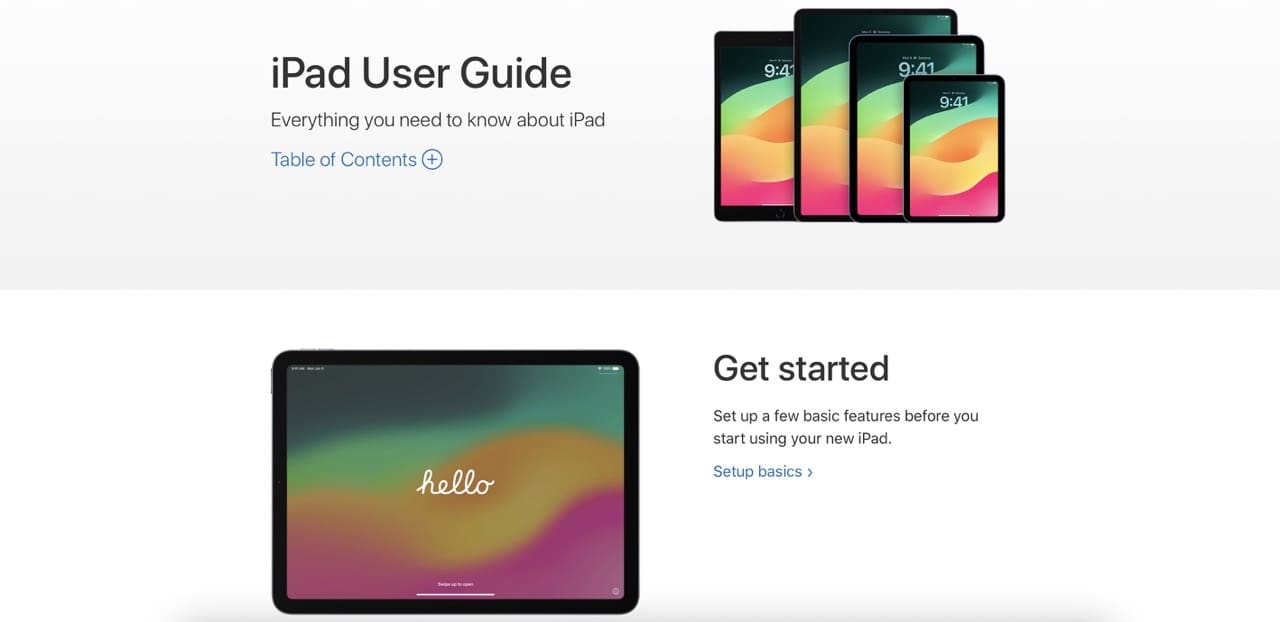
Whatever device you’re using, you can read the user guide for your iPad through Apple’s website. If you’re feeling brave enough, you could even do it on your iPad.
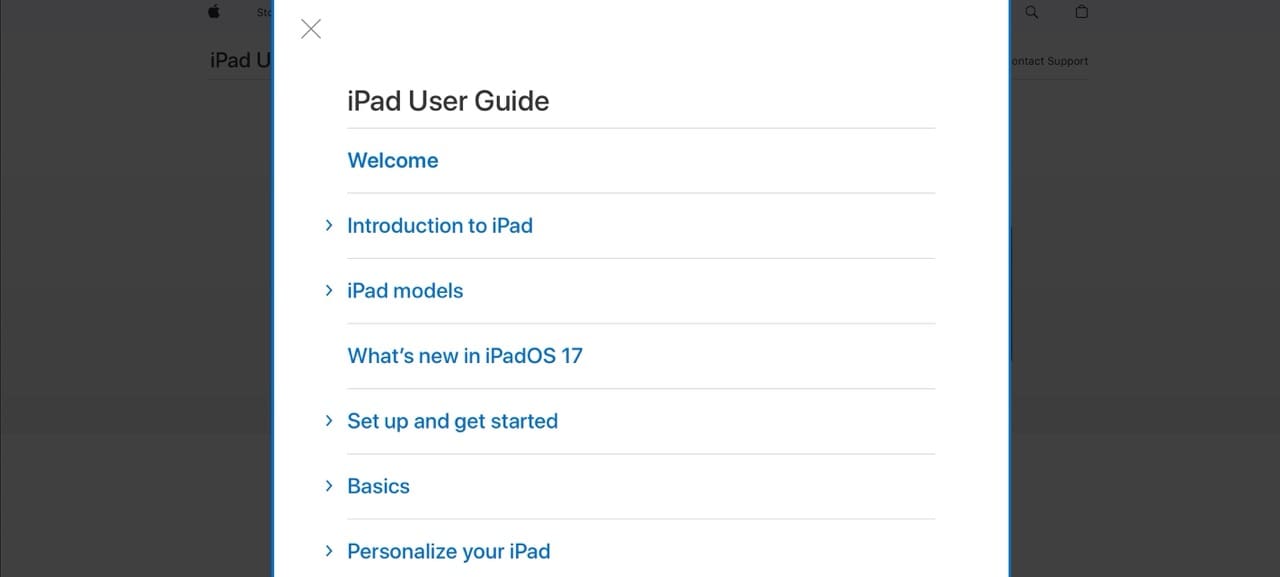
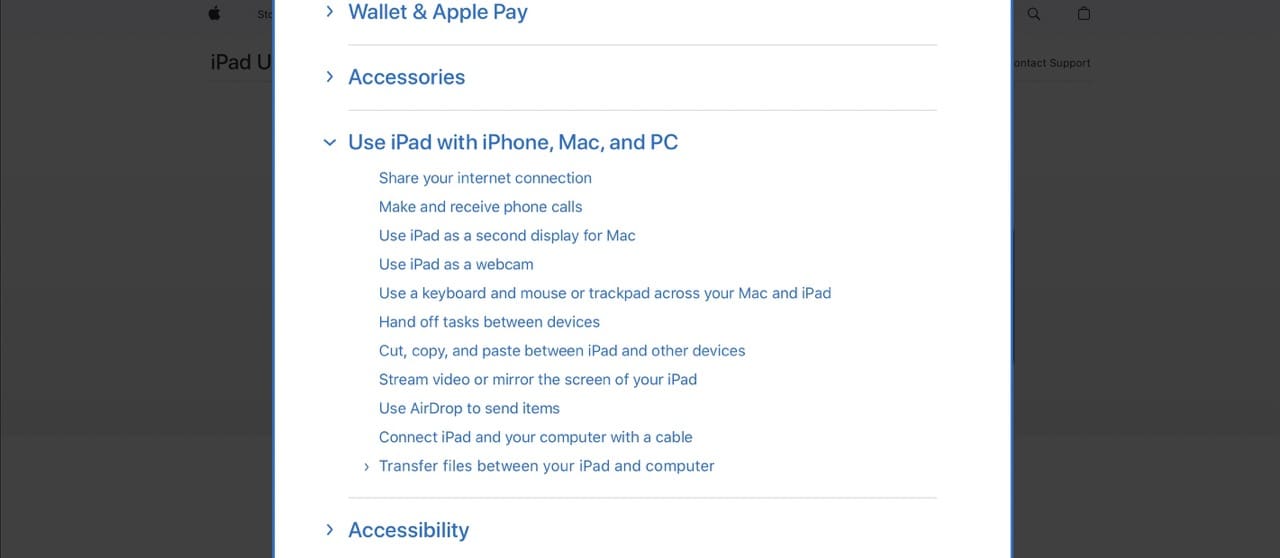
On the Apple website, you can expand the Table of Contents section to read more about several topics. For example, you can learn what’s new in the latest version of iPadOS and how to use your iPad with other Apple devices.
When you expand each section, you’ll find links to numerous other pages as well.
How to Download the iPad User Guide in the Books App
You may not know this yet, but you can read books on your iPad. All kinds of books: including your iPad User Guide. If you plan to read it from cover to cover, the iBooks app on your iPad is probably the best way to do it.
After you download the iPad User Guide, you can even read it without the internet!
When researching for this guide, we couldn’t find a user guide in the Books app to iPadOS 17. So, users with the latest iPadOS software should consider using the Apple website instead.
Follow the steps below to download the iPad User Guide in Apple Books:
If you haven’t done so already, finish your iPad setup. This starts with the “Hello” page and ends when you reach the Home screen on your iPad.
Open the Books app.
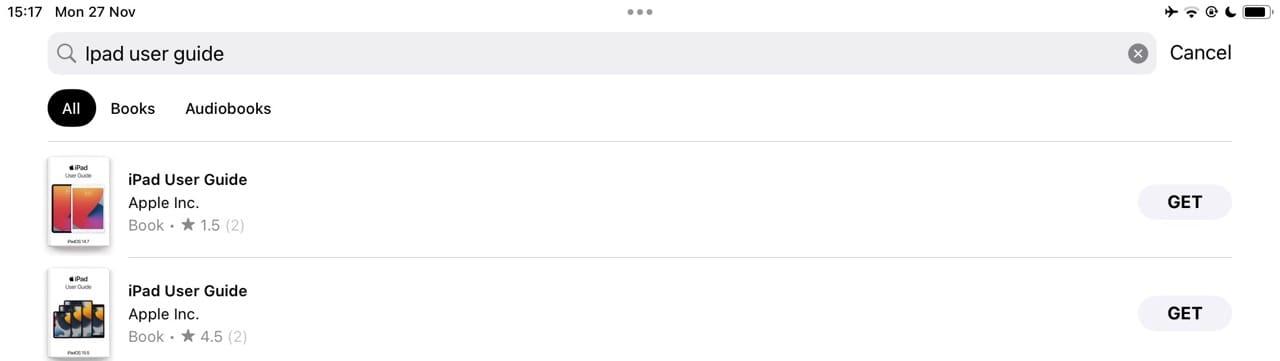
Go to the search bar and type “iPad User Guide”.
You should see a selection of iPad user guides for different versions of iOS or iPadOS. Select whichever one is the newest (usually with the highest number).
Tap the Get button. You need to sign in using your Apple ID account or create an Apple ID if you don’t have one, and you may also need to verify via Face ID or Touch ID if you are logged in.
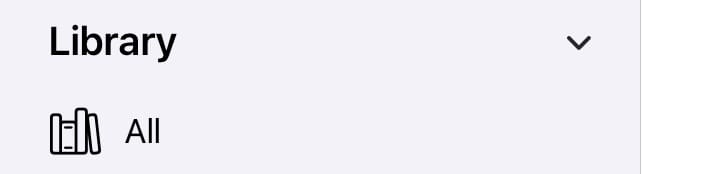
After the iPad user guide finishes downloading, you can find it in your Library from the side of the Books screen. Tap All, select the guide, and the book will appear.
How to Find the Manual for Older iPads
Apple’s iPad user guide is based on the software you’re using, not the iPad you have. This software is called iOS or iPadOS and Apple releases a major update for it each year. Normally people use the latest software version, but older iPads are sometimes limited by their hardware.
You can check what software is on your iPad in the Settings app.
Find out what version of iOS or iPadOS is on your iPad:
From the Home screen, tap the gray Settings app to open it.
The Settings app looks like a gray cog.
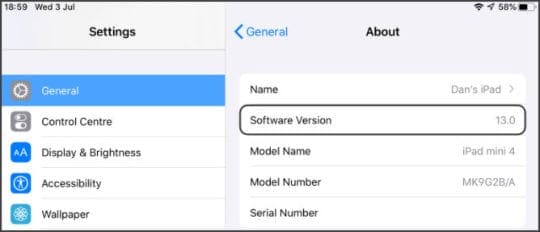
Tap General, then select About.
Your software is listed next to Software Version.
Find the iPad User Guide to match your software version.
From the Apple Books search results, you can see several user guides for different versions of iPad software. If you don’t see your version, tap See All or do a more specific search.
Watch iPad Video Guides on YouTube
If you prefer to watch videos, Apple’s got you covered! There is a dedicated Apple Support YouTube channel with loads of video guides about using all your Apple devices, including your iPad.
Each video is short, clear, and fun. You can subscribe to the channel to learn loads of new stuff about your devices. Or search through their existing videos.
While Apple posts user guides for its devices and its major operating system releases (iOS, iPadOS, macOS, watchOS, tvOS), it generally does not publish user guides for the minor releases.
For example, there is a user guide for the major release of macOS Catalina (10.15) but not a user guide for macOS Catalina minor releases, such as macOS 10.15.3.
To find information about minor releases, check out the Apple Developer Documentation site and scroll down to the section Release Notes. Then choose the operating system’s release notes you wish to review.
Use These Tips to Find Your iPad User Guide
Although you don’t get an extensive iPad user manual with your new device, don’t worry — there is plenty of helpful information on the Apple website. You can use the online user guide to learn about numerous aspects, such as updating your device and where important buttons are. Note that when using the Books app, the latest Apple manual posted there is iPadOS 16.
Of course, you can also check through our catalog of iPad-related content if you need to troubleshoot different issues. If there’s anything in particular you’re struggling with on your device, you can always let us know in the comments section.
Danny has been a professional writer since graduating from university in 2016, but he’s been writing online for over a decade. He has been intrigued by Apple products ever since getting an iPod Shuffle in 2008 and particularly enjoys writing about iPhones and iPads. Danny prides himself on making complex topics easy to understand. In his spare time, he’s a keen photographer.
OK to read on the I-pad But I want a copy that I can Print-out and read, rather than flop back and forth on the tablet.
Much easier for referring to especially for a ‘New ‘user!
When I attempt to download the iPad guide to my iPad Pro, it insists I enter payment card details. I will not do this. Why do they insist for a free product?
One problem- you sign into your account, find the book, the FREE book, tap “get” and it says “done”, but the book never shows up in your library!
I also searched the internet and found where you could download the PDF version, except there is no way on the page to start a download.
I would like to know whether there is a book that helps and a person of the older generation who is finding it hard to understand how to use my ipad. Please advise what would be the best information for me.
I have an iPad 6th generation – software version 14.6.
Ive gone back to using Pages for a project but I find that recent updates seem to have changed how to open new files/folders and manage them. Where can I find the latest instructions please (I would appreciate being able to print them)
Thank you.
For older users 55+ we are use to printed material. Please make the iPhone and iPad user manuals availabie in pdf format so we can download the manuals and print them out easily.
I recently received an iPad mini as a gift. There is no indication of the “iPad mini generation” of it.
The Model number is A2123. Please let me know what generation it is.
I just purchased the newest iPad 8th generation software version14.2 and have spent over 1 hour trying to find the User Manual. I am a senior citizen and not very computer savvy so I rely on User Manuals to teach me what I need to know in order to set up and use this product correctly. Please send me a link or whatever will help me find the Manual. Thank you.
It is amazing to me how computer people think that using any type of computer is always intuitive.. It is not intuitive and ther are those of us who learn better with an actual guide at the side of our computer. Apple should at the very least give us the option of printing it at home. I think this is a very poor decision on their part.
I cannot get the Ipad to stay unlocked for more than 20 seconds. Everytime I put it on and go to see a message or play a game its not open. I dropped it last week and wonder if something happened.
Regarding User Manual.
When attempting to download user manual, noticed statement that ipad is intuitive and does need a manual.
Found manual and it is 454 pages.
Intuitive ?
My wife has the latest Ipad and I have been trying to help her get it going. She gets a message that her apple ID has been locked. We have tried to log in but keep getting the message that the ID cannot be verified.
The Gmail account has also stopped working.
I have tried getting a pdf version of the Users Manual but it appears that Apple is too lazy or stingy to provide one to download.
When I click on the Download emanual now it takes me to some site that has car manuals. I think iPads are a load of nonsense!!
Apple does not publish PDF versions of their manuals. Instead, Apple allows users to read the iPad User Guide in Safari or any other internet browsing app OR download it to the Apple Books app to read it when offline.
Regarding the Apple ID verification issue, try to access Gmail on another device or computer using the web version of Gmail, not the app. You can use any device or computer–it doesn’t have to be your own. See if there is an email from Apple in the Inbox but also check Junk or Trash mailboxes if you don’t find it in the Inbox.
You can also have Apple resend the verification email, get the verification code displayed on another trusted device, get a text or phone call, or generate a code from a trusted device.
To resend the verification email:
Sign in to your Apple ID account page
Choose Resend next to the email address that you want to verify
Apple should send an email to that address
To get this via a phone:
Tap Didn’t get a verification code on the sign-in screen
Choose to have the code sent to your trusted phone number
Look for a text message or phone call from Apple with your verification code
Enter the code on your other device to complete signing in
If you have another trusted device signed in with your wife’s Apple ID:
Go to Settings > Apple ID
Tap Password & Security > Get Verification Code
Or look for a message that says “Account Details Unavailable.” Tap Get Verification Code.
Apple places all its public user guides on its manuals site.
Apple tends to release user guides for its major releases (i.e. iOS 13 or iPadOS) and not the minor versions (i.e. iOS 13.3) unless there are significant changes.
Here’s the guide for your iPad 2–this is mainly technical product information and warranty/care information.
For guides on how to use the software, you want to look at the Apple guides for the iOS or iPadOS version your device runs–for the iPad 2 the last compatible iOS version was iOS 9.3.5. Here’s the link to iOS 9 user’s guide for iPad.
Excellent goods from you, man. I’ve take into accout your stuff previous to and you’re just
too wonderful. I actually like what you’ve obtained right here, certainly like what you’re stating and the way during which you say it.
You’re making it entertaining and you still care for to stay it
wise. I cant wait to learn much more from you. That is really a great site.












OK to read on the I-pad But I want a copy that I can Print-out and read, rather than flop back and forth on the tablet.
Much easier for referring to especially for a ‘New ‘user!
Hi,
Can ipad 5th generation connect to accessories like usb ?
When I attempt to download the iPad guide to my iPad Pro, it insists I enter payment card details. I will not do this. Why do they insist for a free product?
One problem- you sign into your account, find the book, the FREE book, tap “get” and it says “done”, but the book never shows up in your library!
I also searched the internet and found where you could download the PDF version, except there is no way on the page to start a download.
where on the ipad 9th generation, can you find the IMEI numbers to add to your verizon account.
I would like to know whether there is a book that helps and a person of the older generation who is finding it hard to understand how to use my ipad. Please advise what would be the best information for me.
Could you please tell me where the user guide is for an iPad 9th generation w fi is as it did not come in the box or send me a hard copy please
Try your local library.
Where can I get a copy of the User Manual for my Ipad 6, 10.2″?
I have an iPad 6th generation – software version 14.6.
Ive gone back to using Pages for a project but I find that recent updates seem to have changed how to open new files/folders and manage them. Where can I find the latest instructions please (I would appreciate being able to print them)
Thank you.
For older users 55+ we are use to printed material. Please make the iPhone and iPad user manuals availabie in pdf format so we can download the manuals and print them out easily.
How do you charge or connect the keyboard to the iPad (model MD785LL/A Version 12.0
My daughter just gave me her iPad 5 that she no longer uses.
Having never used one before, I need a manual . Where can I download a free Operators manual for iPad 5?
I recently received an iPad mini as a gift. There is no indication of the “iPad mini generation” of it.
The Model number is A2123. Please let me know what generation it is.
We. Just received a new I pad there is a small plastic piece in the charging port. What do we do?
I just purchased the newest iPad 8th generation software version14.2 and have spent over 1 hour trying to find the User Manual. I am a senior citizen and not very computer savvy so I rely on User Manuals to teach me what I need to know in order to set up and use this product correctly. Please send me a link or whatever will help me find the Manual. Thank you.
I see everything here I need except how to download a user guide or user manual.
It is amazing to me how computer people think that using any type of computer is always intuitive.. It is not intuitive and ther are those of us who learn better with an actual guide at the side of our computer. Apple should at the very least give us the option of printing it at home. I think this is a very poor decision on their part.
Cannot find user manual for latest 140s3
I have an Apple IPAD with the following registrations:M A1954
Can you tell me where to find the user’s manual to print out
James Golightly
Hi James,
Apple releases user manuals for iPad based on their operating system instead of the model number.
To see what iPadOS or iOS version your iPad uses, go to Settings > General > About and Software Version
For iPadOS/iOS 13: See this manual
For iOS 12: See this manual
I cannot get the Ipad to stay unlocked for more than 20 seconds. Everytime I put it on and go to see a message or play a game its not open. I dropped it last week and wonder if something happened.
Excuse error typing meant ti type “not need manual”.
Thanks
Regarding User Manual.
When attempting to download user manual, noticed statement that ipad is intuitive and does need a manual.
Found manual and it is 454 pages.
Intuitive ?
My wife has the latest Ipad and I have been trying to help her get it going. She gets a message that her apple ID has been locked. We have tried to log in but keep getting the message that the ID cannot be verified.
The Gmail account has also stopped working.
I have tried getting a pdf version of the Users Manual but it appears that Apple is too lazy or stingy to provide one to download.
When I click on the Download emanual now it takes me to some site that has car manuals. I think iPads are a load of nonsense!!
Hi Jim.
Apple does not publish PDF versions of their manuals. Instead, Apple allows users to read the iPad User Guide in Safari or any other internet browsing app OR download it to the Apple Books app to read it when offline.
Regarding the Apple ID verification issue, try to access Gmail on another device or computer using the web version of Gmail, not the app. You can use any device or computer–it doesn’t have to be your own. See if there is an email from Apple in the Inbox but also check Junk or Trash mailboxes if you don’t find it in the Inbox.
You can also have Apple resend the verification email, get the verification code displayed on another trusted device, get a text or phone call, or generate a code from a trusted device.
To resend the verification email:
Sign in to your Apple ID account page
Choose Resend next to the email address that you want to verify
Apple should send an email to that address
To get this via a phone:
Tap Didn’t get a verification code on the sign-in screen
Choose to have the code sent to your trusted phone number
Look for a text message or phone call from Apple with your verification code
Enter the code on your other device to complete signing in
If you have another trusted device signed in with your wife’s Apple ID:
Go to Settings > Apple ID
Tap Password & Security > Get Verification Code
Or look for a message that says “Account Details Unavailable.” Tap Get Verification Code.
Hope something works for you!
Where can i find the user guide for iPad OS 13.3.1?
Thanks.
Hi Jacint,
Apple places all its public user guides on its manuals site.
Apple tends to release user guides for its major releases (i.e. iOS 13 or iPadOS) and not the minor versions (i.e. iOS 13.3) unless there are significant changes.
To find information about minor releases, check Apple Developer’s iOS and iPadOS release notes for the version you are interested in.
where the %^&* is the series of images to SHOW the user how to set up an iPad Pro 11?
all you people make life more stressful than 2019 years ago.
Hi Geoff,
Sorry that you are frustrated in setting up your iPad Pro. See if this helps explain thigs more clearly: Getting Started With iPad Pro: The Complete Guide
Or take a look at this Apple article that details the step-up process for new devices.
I am trying to find where I download users guide manual for iPad 2
Hi Stephen,
Here’s the guide for your iPad 2–this is mainly technical product information and warranty/care information.
For guides on how to use the software, you want to look at the Apple guides for the iOS or iPadOS version your device runs–for the iPad 2 the last compatible iOS version was iOS 9.3.5. Here’s the link to iOS 9 user’s guide for iPad.
Excellent goods from you, man. I’ve take into accout your stuff previous to and you’re just
too wonderful. I actually like what you’ve obtained right here, certainly like what you’re stating and the way during which you say it.
You’re making it entertaining and you still care for to stay it
wise. I cant wait to learn much more from you. That is really a great site.