One of the biggest reasons album artwork does not download to your iPhone or iPad is that you don’t have sufficient storage space available on your device.
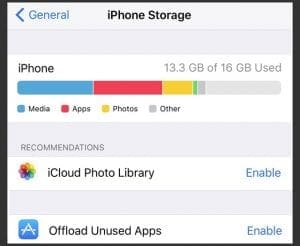
To Check Storage
Open Settings > General
Scroll down to iPhone (or iPad/iPod) Storage
Wait for the information to populate
Look at the graph information for specific details on how much internal storage you’re currently using
If your device has less than 10% free and available, it’s probably time to get some things off your device to free up space!
Once you open up some space, see if your album artwork now shows up!
Check out this article for tips on maximizing your internal storage and getting some space open.
Using Mobile (Cellular) Data?
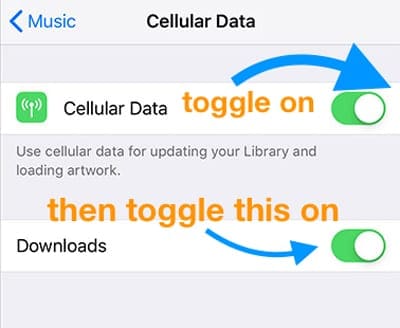
For folks not connecting to WiFi to download music, check some of your Cellular Settings to ensure you allow Apple Music to download when connected to mobile data.
Go to Settings > Music > and toggle on Cellular Data and then toggle on Downloads.
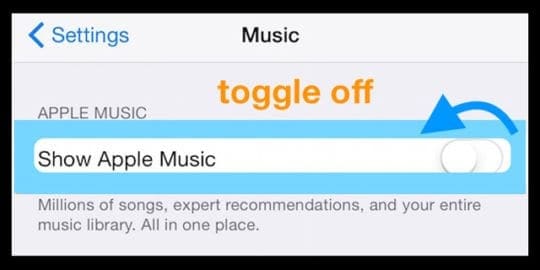
Toggle Apple Music Off and On
Sounds simple. And it is!
Try toggling Show Apple Music Off, wait a few minutes, and toggle it back on.
Look in Settings > Music > Show Apple Music
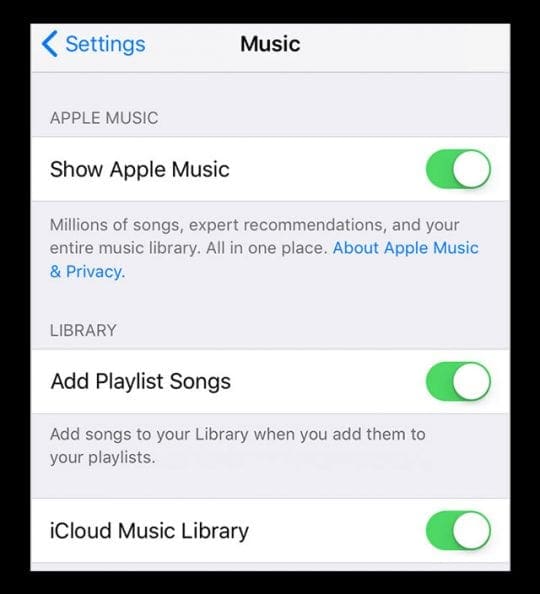
Or try disabling and re-enabling iCloud Music Library
If that doesn’t help, some readers tried this with iCloud Music Library and toggling this off then back on did the trick for them!
Find this in Settings > Music > iCloud Music Library
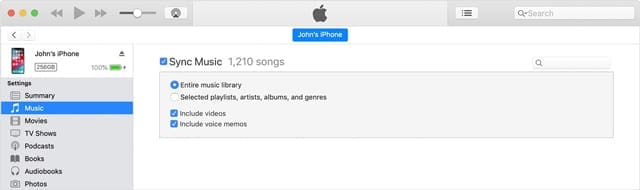
Sync with iTunes
Please note that this process may take some time especially if you have a lot of music files
Obsessed with tech since the early arrival of A/UX on Apple, Sudz (SK) is responsible for the original editorial direction of AppleToolBox. He is based out of Los Angeles, CA.
Sudz specializes in covering all things macOS, having reviewed dozens of OS X and macOS developments over the years.
In a former life, Sudz worked helping Fortune 100 companies with their technology and business transformation aspirations.
Good to see that this issue still exists after 10 years! And plenty of room on the devices, updates all current, library deleted and reloaded, devices disconnected, switched off and re-booted–to no effect.
What can one expect – Apple had 4+ security updates to it’s OS system late 2019. All over 1Gb in size – lucky for us we’re no longer on dial-up with restricted data plans. Where would we be?
Over this overpriced and overrated product. Just waiting to hear what these self-called “Geniuses” have to offer.
Just noticed lots of missing artwork in Apple Music on my MacBook Pro. Yes, this issue has been a constant bug for at least TEN YEARS! Apple has been absolutely worthless in never addressing this in its garbage app. How many more years will I have to find and replace album artwork in my collection that they lose with every update?
I’ve had this happen twice now. The first time it took a factory restore to get things back and it looks likely that will be necessary again. No update to software was obtained, just synching.
Just a short note for some reason after a year, i am missing all my album artwork on my ipod, the artwork is fine on the itunes front page, i automatically sync the iopd once a fortnight to add new songs and still “blank” on my ipod thanks
I tried the above steps and the album covers still did not transfer over. The only solution I could find that worked was to delete the “offending” albums from my iPad (Select the Music icon, hold down in the album cover and then press the “x” to delete) and then re-sync my iPad.











Good to see that this issue still exists after 10 years! And plenty of room on the devices, updates all current, library deleted and reloaded, devices disconnected, switched off and re-booted–to no effect.
What can one expect – Apple had 4+ security updates to it’s OS system late 2019. All over 1Gb in size – lucky for us we’re no longer on dial-up with restricted data plans. Where would we be?
Over this overpriced and overrated product. Just waiting to hear what these self-called “Geniuses” have to offer.
Just noticed lots of missing artwork in Apple Music on my MacBook Pro. Yes, this issue has been a constant bug for at least TEN YEARS! Apple has been absolutely worthless in never addressing this in its garbage app. How many more years will I have to find and replace album artwork in my collection that they lose with every update?
If Apple’s goal was to become AppleSoft then I believe they have attained their goal.
Between this and the built-in virus call iCloud they could not have done better.
I’ve had this happen twice now. The first time it took a factory restore to get things back and it looks likely that will be necessary again. No update to software was obtained, just synching.
My iPod touch is not geting off of headphones even know I don’t have them in. I have tried everything on this website but nothing is working
Just a short note for some reason after a year, i am missing all my album artwork on my ipod, the artwork is fine on the itunes front page, i automatically sync the iopd once a fortnight to add new songs and still “blank” on my ipod thanks
It doesnt work
I had the same album artwork issues. Kevin Knight has the right solution and it works – thanks Kevin
Thank you. This fixed my problem and I now have all my missing artwork back on my ipod and ipad.
I tried the above steps and the album covers still did not transfer over. The only solution I could find that worked was to delete the “offending” albums from my iPad (Select the Music icon, hold down in the album cover and then press the “x” to delete) and then re-sync my iPad.
How do I get pull downs to show I annotate when I push on the doccument. The I annotate is installed on my I pad.