Are you unable to change the rotation of your iPad’s screen? Trying to view your iPad horizontally but it’s stuck on the verticle view (or vice-versa)? Locked into portrait or landscape mode on your iPad?
When Orientation Lock is turned on, your screen won’t rotate. Learn our top tips on how to get your iPad out of an orientation lock in a few simple steps.
Check Your iPad’s Side Switch For Orientation Lock
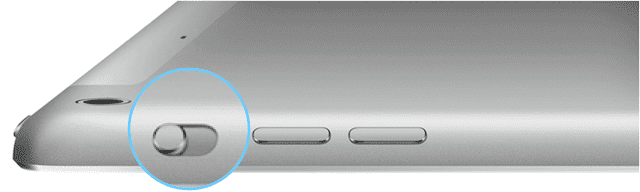
You can use the side switch on iPad to either lock the screen rotation or mute some iPad sounds.
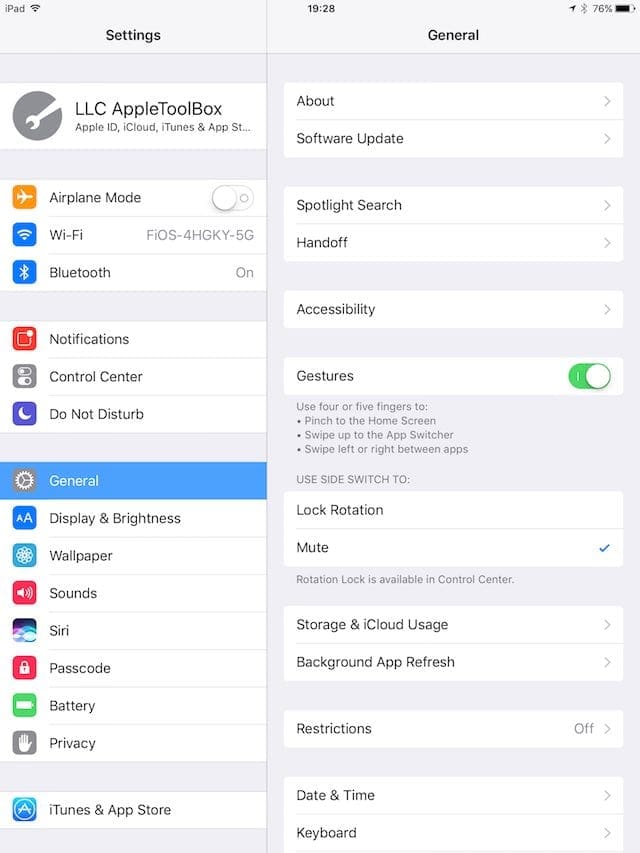
Tap Settings > General
Locate Use Side Switch To
Change to Mute
Please note that not all iPads have this feature
If Mute is selected, the switch on the side of the iPad mutes system sounds
If you choose Lock Rotation, then the switch locks the screen
Use Your Control Center To Change iPad Rotation
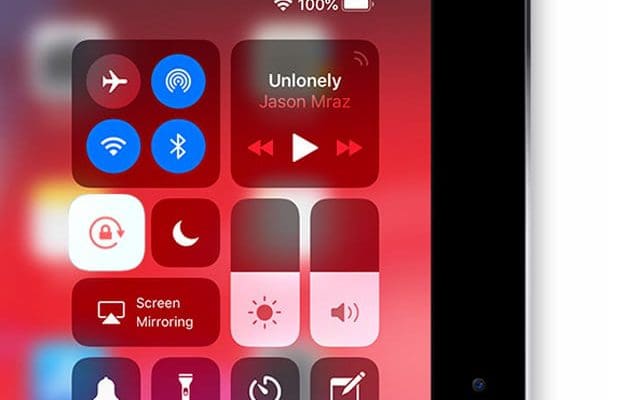
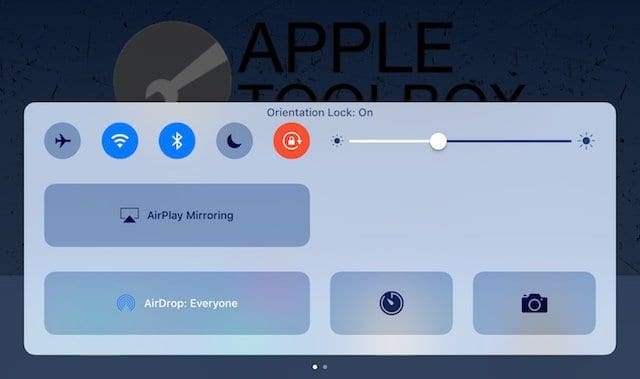
Look at your device’s Control Center and see if orientation lock is on. If it’s highlighted, it’s on.
Tap it once to disable it and your screen should change position depending on how it’s held.
For older model iPads with a side switch, you may not see this option in Control Center. Change your side switch setting to Mute to get the screen orientation option in Control Center.
Close Open Apps and Restart
Sometimes your iPad gets stuck in an app and that’s why your iPad won’t rotate. So let’s close your apps and then restart.
How To Close iPad Apps
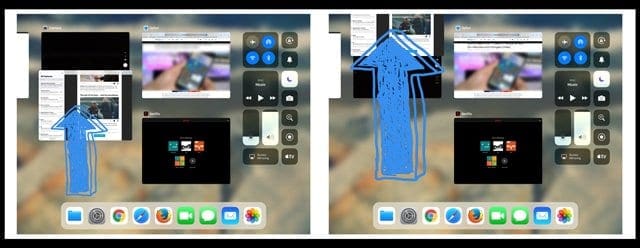
Double Press the Home Button or Swipe Up the Home Gesture Bar to open the app switcher
Swipe up on an app preview towards the top of your screen to close it
Repeat until all apps close
After you close all apps, restart your iPad by powering off, waiting 20-30 seconds, and powering back on
How To Restart an iPad
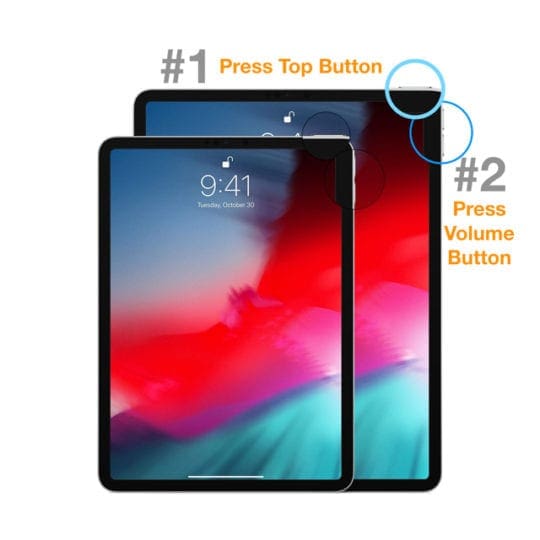
On an iPad with no Home Button and iPhones X or later: press and hold the Side/Top/Power button and either volume button until the slider appears
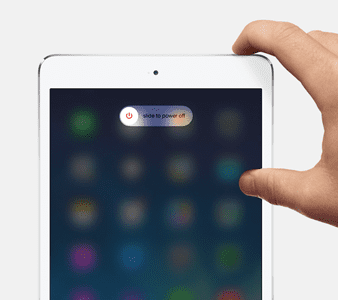
On an iPad or iPhone with a Home Button and iPod Touch: press and hold the Side/Top/Power button until the slider appears
Drag the slider to turn the device off and after the device turns off, press and hold that Side/Top/Power button again until you see the Apple Logo
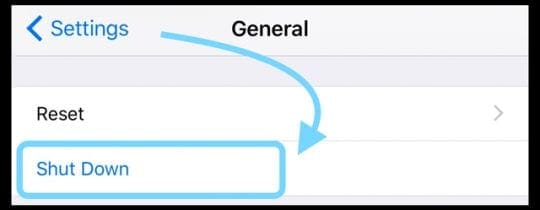
With iOS 11 and above, restart using Settings > General > Shut Down
Force a Restart
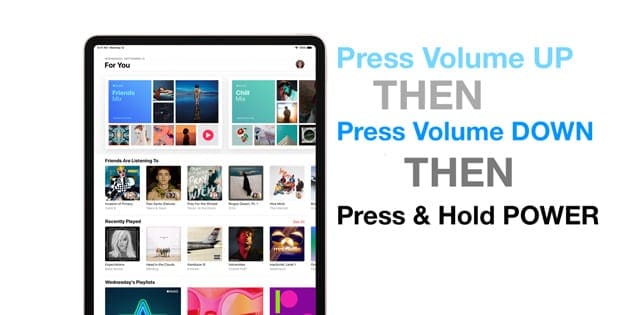
On an iPad with no Home Button and iPhone 8 and later: Press and quickly release the Volume Up button. Press and immediately release the Volume Down button. Then press and hold the Power button until the device restarts
On an iPhone 7 or iPhone 7 Plus: Press and hold both the Side and Volume Down buttons for at least 10 seconds, until you see the Apple logo
On an iPhone 6s and earlier, iPad with a Home Button, or iPod touch: Press and hold both the Home and the Top (or Side) buttons for at least 10 seconds, until you see the Apple logo
Try Another App
Sometimes, our screen is locked into a particular screen rotation due to the requirements of an app–particularly game apps! Some apps only support portrait or landscape mode.
So open another app and see if your screen now rotates as you want.
Obsessed with tech since the early arrival of A/UX on Apple, Sudz (SK) is responsible for the original editorial direction of AppleToolBox. He is based out of Los Angeles, CA.
Sudz specializes in covering all things macOS, having reviewed dozens of OS X and macOS developments over the years.
In a former life, Sudz worked helping Fortune 100 companies with their technology and business transformation aspirations.
Your iPad Pro can access printers that support AirPrint. Check with your printer’s technical site to see if your model includes that feature. If so, it usually involves connecting your ipad and the printer to the same WiFi network.
Check in Control Center for the screen orientation button–looks like a padlock with a circle arrow surrounding it. If it’s highlighted with orange and white, tap it to turn it off.
If your iPad is still stuck, close all open apps by double pressing the Home Button and swiping all app previews off the top of your screen. Once all apps close, power off your iPad and wait for a few minutes. Then power back on and see if you can change screen orientation.
If your iPad has a Side Switch, set the Side Switch to work as a mute switch instead of screen orientation lock. Go to Settings > General > Use Side Switch To and choose mute.
My orientation suddenly locked…I didn’t do anything in settings. As suggested, I went to settings>general> and tried to click the lock screen off…nothing…the check mark will not go away. My iPad is current with the updates…what happened…not happy being unable to rotate my screen. Help!
I tried resetting my settings, and then doing everything else suggested on a lot of the websites. The only fix that worked for me is as follows : hold down the power button and “Home” button simultaneously until your screen goes blank. The apple icon will appear just like when your IPad is powered on. Wait for a fe seconds like usual to use the slide to turn it on. For those of you who don’t know what the “Home” button is its the round indented space at the bottom of your IPad with a white square in it. Hope this helps! 🙂
Still isn’t working. I get get the setting page to uncheck the screen locked check mark. This happened without my even checking the box. Just all of a sudden my screen locked after updating apple software.
I dont understand. When the sound work the rotation dont work and when the rotation work, the sounds dont work !!!!! But when i buy this ipad the sound and the rotation works at the same time …
Wow, I was trying to do others said. Just type to time in the botton scrow to left and so. But i never saw the unlock botton. After read your comment. I got right there.
Tank you do much.










How do I access my printer from iPad pro
HI Laurie,
Your iPad Pro can access printers that support AirPrint. Check with your printer’s technical site to see if your model includes that feature. If so, it usually involves connecting your ipad and the printer to the same WiFi network.
My iPad is locked in the vertical position. How do I get it unlocked so I can switch it to horizontal?
Hi Victoria,
Check in Control Center for the screen orientation button–looks like a padlock with a circle arrow surrounding it. If it’s highlighted with orange and white, tap it to turn it off.
If your iPad is still stuck, close all open apps by double pressing the Home Button and swiping all app previews off the top of your screen. Once all apps close, power off your iPad and wait for a few minutes. Then power back on and see if you can change screen orientation.
If your iPad has a Side Switch, set the Side Switch to work as a mute switch instead of screen orientation lock. Go to Settings > General > Use Side Switch To and choose mute.
Cant access anything in my Ipad 2 – screen is locked and I cannot unlock the screen. Needed help.
My orientation suddenly locked…I didn’t do anything in settings. As suggested, I went to settings>general> and tried to click the lock screen off…nothing…the check mark will not go away. My iPad is current with the updates…what happened…not happy being unable to rotate my screen. Help!
It is tricky, very difficult to understand use different ways what ever it said it works do it in different ways
I tried resetting my settings, and then doing everything else suggested on a lot of the websites. The only fix that worked for me is as follows : hold down the power button and “Home” button simultaneously until your screen goes blank. The apple icon will appear just like when your IPad is powered on. Wait for a fe seconds like usual to use the slide to turn it on. For those of you who don’t know what the “Home” button is its the round indented space at the bottom of your IPad with a white square in it. Hope this helps! 🙂
Thanks Semoy
That worked
Still isn’t working. I get get the setting page to uncheck the screen locked check mark. This happened without my even checking the box. Just all of a sudden my screen locked after updating apple software.
Thanku that worked
Pls help me !!!!
I dont understand. When the sound work the rotation dont work and when the rotation work, the sounds dont work !!!!! But when i buy this ipad the sound and the rotation works at the same time …
Wow, I was trying to do others said. Just type to time in the botton scrow to left and so. But i never saw the unlock botton. After read your comment. I got right there.
Tank you do much.
Still doesn’t work for me. I have unlocked the orientation button, but my screen is still locked vertically.