It’s more important than ever to keep connected to people far away from you. One of the best ways to maintain those relationships is with Group FaceTime chats. These let you enjoy calls with up to 32 people at once, but what can you do when your Group FaceTime isn’t working?
If Group FaceTime isn’t working on your iPhone, iPad, or Mac, you can fix it using the troubleshooting steps below. We’ve also answered common questions, like how to start a call without activating your camera.
Lots of people ask the same questions when Group FaceTime isn’t working. We’ve pulled together some frequent questions below to give you quick answers to your problems.
If you can’t find your question, take a look at the troubleshooting steps beneath this FAQ.
Why Is There a Triangle With an Exclamation Mark in Group FaceTime Calls?
This icon appears when your Internet connection is too slow to maintain the Group FaceTime call. It’s a good idea to connect to broadband over Wi-Fi or to make sure you have a strong cell signal.
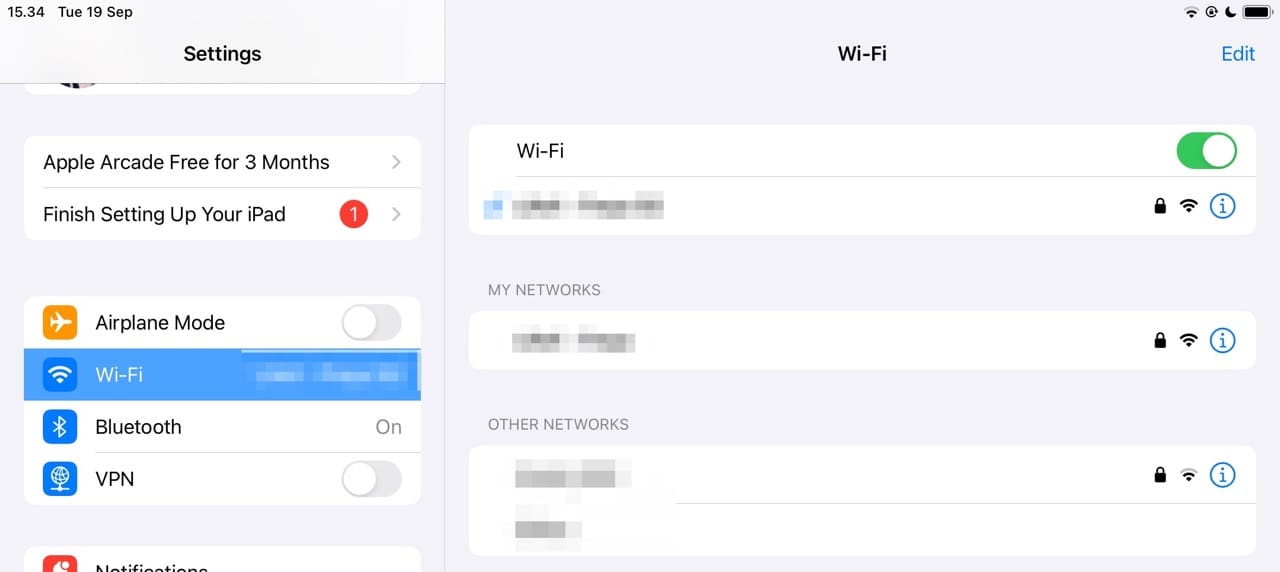
Open the Settings app on your iPhone or iPad.
Tap Wi-Fi.
Under the Networks section, select the Wi-Fi network you wish to join.
Enter the Wi-Fi password.
Tap the Join button in the top right corner.
If you’re already using Wi-Fi, stop other people from downloading or streaming music and videos on the same network. You might also need to restart your router or contact your internet service provider. Another thing you can try is leaving and rejoining the call.
There’s a chance the poor network connection is down to a problem with Apple’s systems. Check Apple’s system status online to find out.
Why Isn’t the Camera Working for People in My Group FaceTime Call?
FaceTime allows video and audio calls. If one of your contacts doesn’t want to use their camera, they might have been using audio-only with their camera turned off.
When this happens, you usually see their initials or their profile picture rather than a live video stream. It doesn’t mean Group FaceTime isn’t working, only that they turned their video off.
To fix it, that person needs to tap the camera icon in FaceTime on their device to turn the video stream on.
How Can I Join a Group Facetime Call Using Audio-Only Without Video?
When starting a brand new Group FaceTime call, you can choose to use video or audio-only. However, you don’t get the same choice when joining a FaceTime call that’s already in progress.
Instead, you need to tap the camera icon in FaceTime on your device after joining the call. When you tap this button, it disables your camera — making you an audio-only participant. You can still see other people, but they won’t be able to see you.
Can You Quickly Start a Group FaceTime Call With Many People?
If you already have a group chat in Messages, you can use that to start a Group FaceTime call with everyone.
Open the Messages app on your iPhone.
Locate the Group Chat that you want to use to create a Group FaceTime Call.
In the top right corner, tap the FaceTime button.
From the dropdown menu, select one of the following:
FaceTime Audio
FaceTime Video.
From here, the FaceTime call will commence. Unlike previous versions, you won’t need to still manually group members to your call. However, in the event that you want to add more users, you are able to with the steps below:
With the call active, tap the participants at the top of the screen.
From the menu that appears, tap the Add People button.
Enter the contact’s name, phone number, or email.
Tap the Add People button.
It’s important to remember that the people that you add to the call won’t be able to be removed. Instead, the only way for the participants to be removed from an ongoing call is for them to end the call themselves on their own devices.
Why Can’t I Start a Group Facetime Call With All of My Contacts?
Despite FaceTime being around for years and even having the ability to add up to 32 people at a single time, it took Apple until iOS 15 to allow for non-Apple participants. However, the fact remains that even if they are part of a group chat, you won’t be able to easily create a Group FaceTime Call.
This may not be much of an issue for some, but the reality is that it’s not like the entire world relies on Apple devices or the iPhone for their personal computing needs. Thankfully, Apple has finally made it possible for you to use FaceTime with an Android user. It just requires a bit more of a setup.
Open the FaceTime app on your iPhone, iPad, or Mac.
Tap the Create Link button. Where it features will vary depending on your device.
From the pop-up menu, tap Add Name to name the FaceTime. Alternatively, choose the contact you want to send it to or send via AirDrop. You can also use the Messages app to share links. For non-iOS users, try tools like WhatsApp.
On the other end of the line, the person receiving the link should be able to do so from whatever platform the message was sent. Then, you’ll be taken into Chrome or whatever other browsers you are using on Android. Simply enter your name, confirm permissions to use your camera, and then tap Join.
Troubleshooting When Group FaceTime Is Not Working
A lot of problems with Group FaceTime calls not working are easy to fix with some basic troubleshooting steps. We’ve listed each of the steps you need to follow below, which include checking FaceTime’s availability and testing your iPhone microphone.
Are You Using a Device Compatible With Group FaceTime?
Your device might not work with Group FaceTime, even if it’s running the latest software. Not all hardware is compatible because a large group call demands more power from the processor.
Here’s the list of devices that Apple states are compatible with Group FaceTime:
iPhone 6s or later
iPad Pro or later
iPad Air 2 or later
iPad mini 4 or later
iPad (5th generation) or later
iPod Touch (7th generation)
The minimum software requirement provided by Apple states that you need one of the devices above running at least iOS 12.1.4 or iPadOS. Unfortunately, if you aren’t using one of the compatible devices, the only way you’ll be able to use Group FaceTime calls is to do so as an audio participant. You can also use a video calling alternative, such as Zoom or Skype.
Find out Who Is Causing the Group FaceTime Problems
Consider the possibility that Group FaceTime is not working because of a problem with someone else’s device. Add people to your call one by one and try to find out if the same person causes problems each time.
Whoever is the common link — whether that’s you or someone else — needs to follow the troubleshooting steps below to fix FaceTime.
Do You Have the Latest Available Update Installed?
Although one-to-one FaceTime calls work on much older software, Group FaceTime requires iOS 12.1.4 or later. That means you should update your iPhone, iPad, or iPod touch to the latest software to work with Group FaceTime.
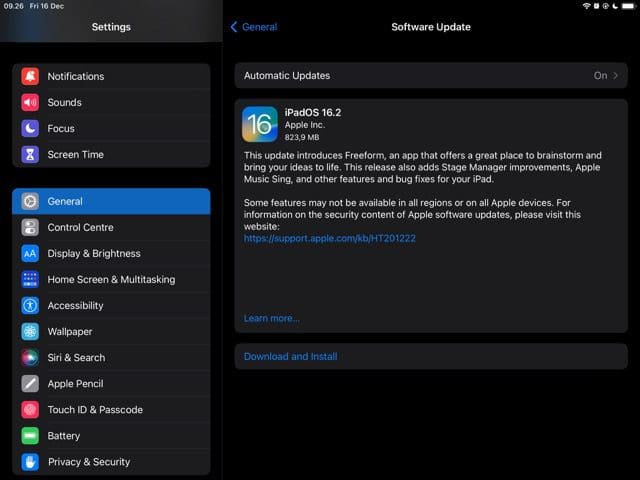
From your iPhone or iPad, open the Settings app.
Tap General.
At the top of the page, tap Software Update.
Wait a moment for the page to finish refreshing.
Once the update is available, tap the Download and Install button.
After the update is finished downloading, follow the on-screen steps to install the update.
Here’s how you can update your Mac to the latest software version:
Open the System Settings app.
In the sidebar on the left, click General.
On the right side of the window, click Software Update.
Wait a moment for the page to finish refreshing.
If an update is available, click the Download and Install button.
Make Sure That FaceTime Works in Your Country
Unfortunately, Group FaceTime is not a global service and doesn’t work in every country or region. Most places are supported, but you should check on Apple’s website to see which Apple services work in your country.
You may need to use a VPN to trick FaceTime into thinking you’re in a different country. Several options exist, including NordVPN, ExpressVPN, and Surfshark.
Restart FaceTime and Your Device
It’s always a good idea to restart your device when something stops working, but you should also restart FaceTime itself. First, end the call if you’re currently on one.
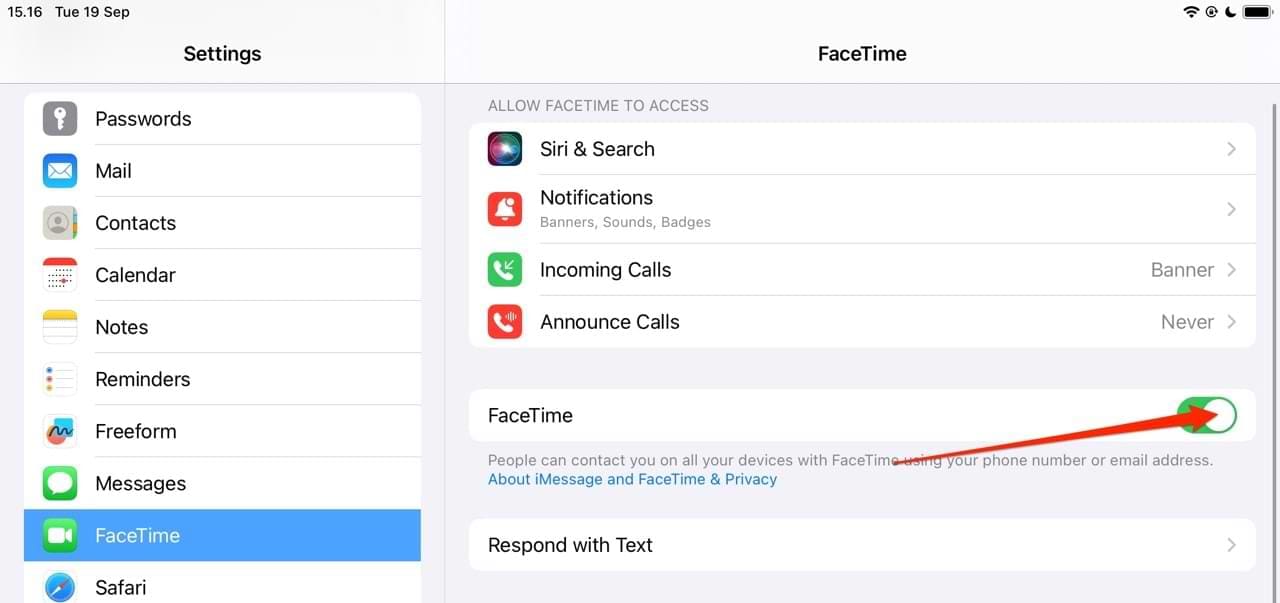
On an iPhone, iPad, or iPod touch, go to Settings > FaceTime and turn FaceTime off. The feature is below the Allow FaceTime to Access section. Then, restart your device and return to this Settings page to enable FaceTime again.
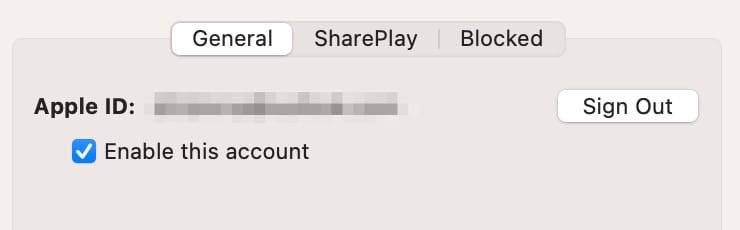
On a Mac, open the FaceTime app and go to FaceTime > Settings in the menu bar.
Uncheck the box to Enable this account, and then restart your Mac before checking the box to enable FaceTime again.
Stop Using FaceTime Effects
Part of the fun of a Group FaceTime call is adding Animoji, Memoji, stickers, and other effects to your face. But these effects could be the reason Group FaceTime isn’t working properly, and they can often hinder the performance of the app.
Try making a call without activating any of these effects to see if it helps. It’ll make your calls less entertaining, but you should stop having issues with the app not working as it should.
Sign Into FaceTime Again
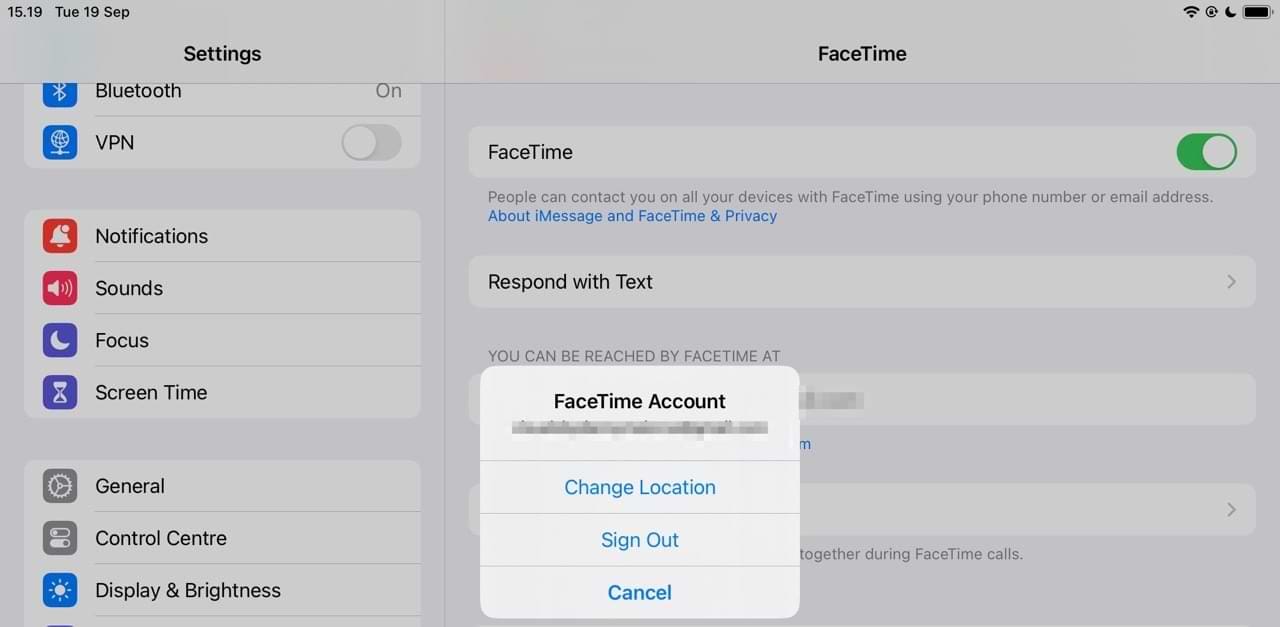
Sign out of FaceTime, then sign back in again to make sure there are no problems with your Apple ID account. If two people are trying to use the same Apple ID account from different devices, only one of them can join the call. They need to create a second account from the Apple ID website instead.
On an iPhone, iPad, or iPod touch, go to Settings > FaceTime. Tap your Apple ID username, then choose to Sign Out. Sign in again from the same page.
On a Mac, open FaceTime and go to FaceTime > Preferences from the menu bar. Click Sign Out, then sign in again from the same page.
Test Your Speaker, Microphone, and Camera
Open the Camera app on your iPhone, iPad, or iPod touch and record a short video. Watch the video back and make sure the camera and microphone are working on your device. You should repeat this using both the front- and rear-facing cameras to test each of them.
On a Mac, open the Photo Booth app to record a short video of yourself.
If there are any problems with the camera or microphone on your device, speak to Apple Support about getting a repair.
Why Can’t I Add a Person Into My Group FaceTime Call?
Some readers have complained about seeing the option to add people grayed out on their iPhones. And while there isn’t a one-size-fits-all explanation, there are a couple of things you can try.
The first would be to update your software, as these kinds of glitches are normally fixed when Apple releases newer versions of iOS. You can also try force restarting your device.
It’s also worth checking to ensure that you haven’t reached the maximum number of guests in your call.
Use These Tips to Fix Your FaceTime Group Call Issues
The Group FaceTime Call feature is an excellent choice for keeping in touch with loved ones who live far away. You can also use the tool for work-related calls if you feel that doing so is a better option than the alternatives. However, it’s possible that you sometimes will encounter issues — and when that happens, knowing how to fix them is essential.
Hopefully, the tips you’ve discovered in this article proved to be helpful. You can always leave your recommendations if something that we didn’t mention worked for you.
Danny has been a professional writer since graduating from university in 2016, but he’s been writing online for over a decade. He has been intrigued by Apple products ever since getting an iPod Shuffle in 2008 and particularly enjoys writing about iPhones and iPads. Danny prides himself on making complex topics easy to understand. In his spare time, he’s a keen photographer.
There is no add person button on the facetime app for group calls. I have tried all of your fixes and nothing is working. Also when we are trying to be added to a facetime call my name is greyed out and when I try to start a group call after adding the first person it’s greyed out ! The phone is the iphone 11 And I have the most recent Ios 14 software update !
I have tried all the troubleshooting and suggested fixes and none is working
Is this a problem with iPhone 11 because I can see other people complained and you have refused to respond to their queries
I tried having a FaceTime with two people and it does not work – using iPhone 12. Once I choose the people, I get the message Diane waiting and Valerie waiting, but neither of the two phones ring for a FaceTime.
There is no add person button on the facetime app. I have tried all of your fixes and nothing is working. Also when we are trying to be added to a facetime call our names are grey our friends told us. The phone is the iphone 11
We often see this problem when another app is using the camera you want.
Try closing all your open apps, then test FaceTime again.
Close an app
1. On an iPhone or an iPad with no home button from the Home screen, swipe up from the bottom of the screen and pause slightly in the middle of the screen
2. On an iDevice with a home button, double-click the Home button and swipe right or left to find the app that you want to close
3. Swipe right or left to locate the app you want to close
4. Swipe up on the app’s preview to close it

















There is no add person button on the facetime app for group calls. I have tried all of your fixes and nothing is working. Also when we are trying to be added to a facetime call my name is greyed out and when I try to start a group call after adding the first person it’s greyed out ! The phone is the iphone 11 And I have the most recent Ios 14 software update !
I have tried all the troubleshooting and suggested fixes and none is working
Is this a problem with iPhone 11 because I can see other people complained and you have refused to respond to their queries
I tried having a FaceTime with two people and it does not work – using iPhone 12. Once I choose the people, I get the message Diane waiting and Valerie waiting, but neither of the two phones ring for a FaceTime.
There is no add person button on the facetime app. I have tried all of your fixes and nothing is working. Also when we are trying to be added to a facetime call our names are grey our friends told us. The phone is the iphone 11
there is no add person button on my facetime for my iPhone 11 i’ve tried all of your fixes and nothing is working.
Can anyone tell me how to turn the camera on for face time , it just won’t switch on when pressing it on my I phone 6
HI Bev,
We often see this problem when another app is using the camera you want.
Try closing all your open apps, then test FaceTime again.
Close an app
1. On an iPhone or an iPad with no home button from the Home screen, swipe up from the bottom of the screen and pause slightly in the middle of the screen
2. On an iDevice with a home button, double-click the Home button and swipe right or left to find the app that you want to close
3. Swipe right or left to locate the app you want to close
4. Swipe up on the app’s preview to close it