You try unlocking your iPhone or iPad, and without warning or notice, the screen goes and STAYS black or blank. A text or call comes in, and you hear its notification sound, but you don’t see anything on your screen! So you know your iPad or iPhone screen is blank, but your device is on!
Maybe you rest your phone for a while and try to ignore it. After about an hour or so, with crossed fingers, you try again. But no luck, the black screen continues. The iPhone looks like it’s on and you see a faintly illuminated grid; you’re just not seeing any icons, lock screens, zilch, nada!
If this sounds familar, you are not alone. Getting a black or blank screen on your iPhone, iPad, or iPod is often a symptom of a larger hardware problem, but not always! This article focuses on software issues that cause black or blank screen and show you steps to fix it!
Several readers report that their iPhone or iPad screen turns into an “illuminated” black color or that they see a blank screen even while the device is on and working.
When the screen goes black or blank, your device’s audio may keep playing, and even let you use Siri or interact with the screen through guesswork!
Some users also report that this problem started after their most recent iOS update.
Why is my iPad or iPhone screen black or blank?
If you don’t see anything on your iPad’s, iPod’s, or iPhone’s screen but you continue to hear that the device works (like vibrates, rings and makes other sounds,) it usually points to a hardware problem.
Often it’s problems with the screen itself or the cable that connects to the screen.
However, it’s always possible that there is a software or iOS issue in play, so let’s first take a look at these settings to see if we can fix it ourselves, for free!
My iPhone screen is black! What to do when your iPad’s or iPhone’s screen turns black
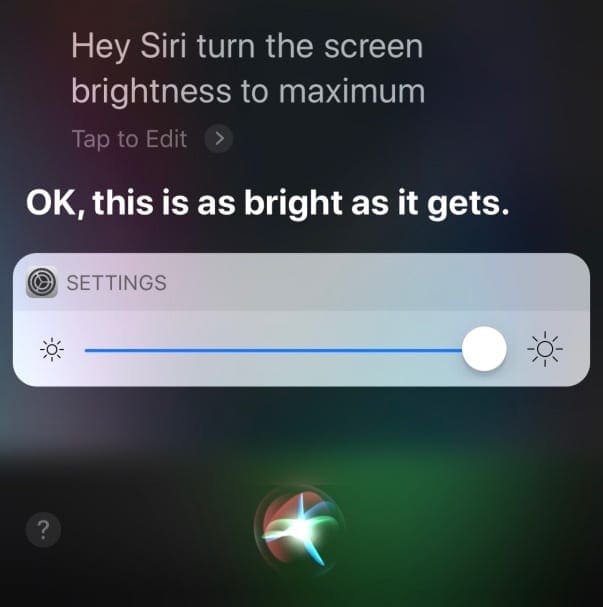
Ask Siri to turn up the brightness
The problem might simply be your screen brightness.
So if you can interact with Siri, try asking her to turn up the screen brightness to the maximum.
ask Siri to turn up your screen’s brightness for you!
See if that makes a difference. If not, keep reading!
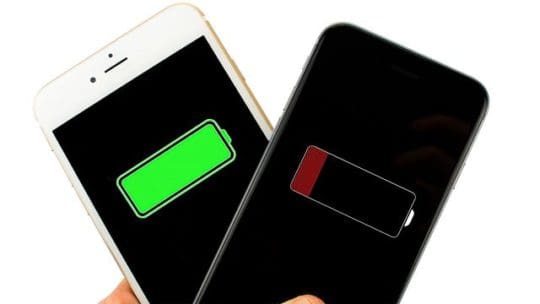
Battery issues
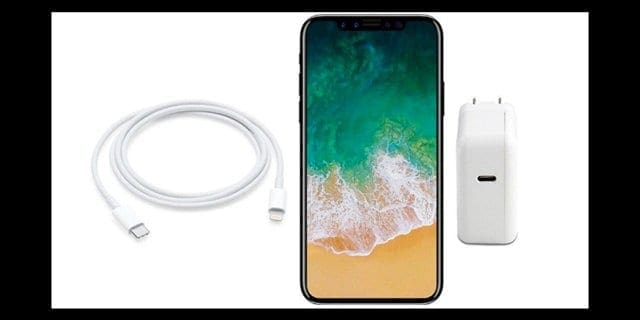
It may be a battery related issue. So connect your device to a power outlet and wait several minutes
Charge your iPhone or iPod for at least 10 minutes and 20 minutes for an iPad before using it–the longer charge the better
Make sure you check your cable and charger for any problems like frayed ends, dirty or greasy connectors or ports. If needed, clean them or use a different cable/charger
Reader Paul suggests plugging in your iDevice to a wall outlet for a very long time (he plugged his in for 2 days.) See if this resets your iDevice’s battery and power management
Restart your iPhone, iPad, or iPod
On an iPad with no Home Button and iPhones X or later: press and hold the Side/Top/Power button and either volume button until the slider appears
On an iPad or iPhone with a Home Button and iPod Touch: press and hold the Side/Top/Power button until the slider appears
Drag the slider to the right to turn the device off
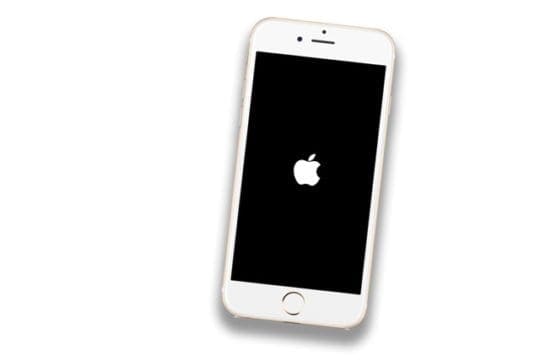
After the device turns off, press and hold that Side/Top/Power button again until you see the Apple Logo
With iOS 11 and above, restart using Settings > General > Shut Down until you see the “slide to power off”
If you see the Apple logo on your device’s screen, it’s likely the problem was software-related!
Use your device and see if it performs normally.
Perform a hard restart
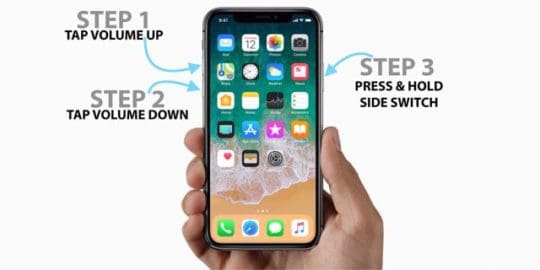
On an iPad with no Home Button and iPhones 8 or later: Press and quickly release the Volume Up button. Press and quickly release the Volume Down button. Then press and hold the Side/Top/Power button until the device restarts
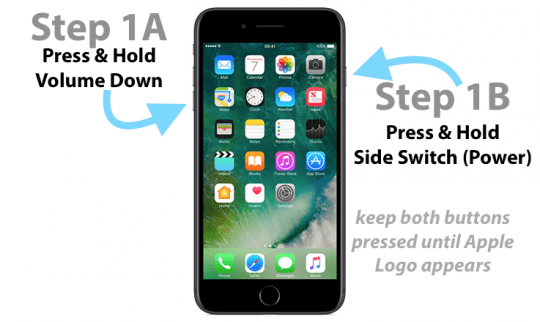
On an iPhone 7 or iPhone 7 Plus: Press and hold both the Side and Volume Down buttons for at least 10 seconds, until you see the Apple logo
On an iPhone 6s and earlier, iPad with a Home Button, or iPod touch: Press and hold both the Home and the Top (or Side) buttons for at least 10 seconds, until you see the Apple logo
If you see the Apple logo, it’s unlikely the problem is hardware-related but rather was a software issue.
Use your device as you normally would and see if the problem resolved.
Check your temperature for blank or black screen problems
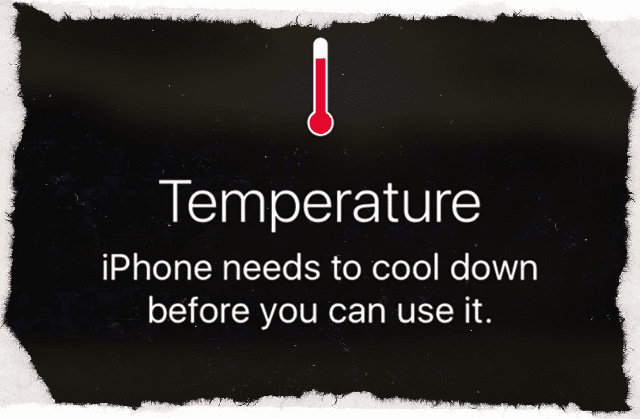
Black or blank screen problems often occur if you operate your device under extreme temperature conditions (like being too hot or too cold)
If too hot, just place your device in a cool area for several hours to let your device to cool down
And if too cold, put your iDevice in a warm area (but not hot) for several hours to allow it to warm up
Using an iOS device in frigid conditions outside of its operating range might temporarily shorten battery life and could cause the device to turn off
Battery life will return to normal when you bring the device back to higher ambient temperatures
Try and always use your iOS devices where the ambient temperature is between 0º and 35º C (32º to 95º F)
Burp that baby!
If the solutions listed above don’t work, it could be that your iDevice’s display cable has come loose or partially separated from its connector.
You’re in DFU Mode if your screen is completely black
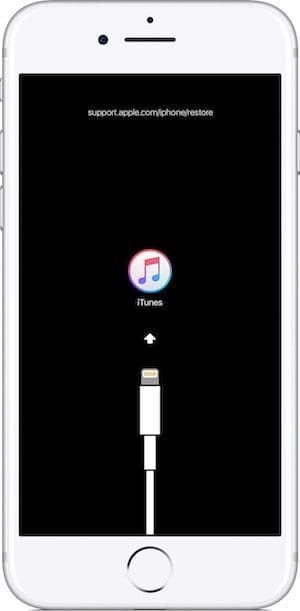
DFU Mode (Device Firmware Update) allows iTunes to communicate with your iDevice, without it loading iOS and booting up.
A DFU restore completely erases your iDevice and then installs a fresh copy of the latest iOS and firmware onto your device. It’s like starting from scratch!
So if you are considering a DFU restore, make sure you have a backup available or move ahead with the knowledge that your device is completely erased.
No time? Check out our video!
Need to fix your iPhone or iPad screen? Contact Apple Support
If none of the steps above worked for your device, it’s likely that your iPhone’s or other iDevice’s hardware has a problem, typically with the screen’s display connector or cable. You likely need Apple to perform an iPad or iPhone screen repair.
For most, hardware problems mean a trip to your local or online Apple Support Team or a regional Apple Certified Repair Center.
You continue to see a black or blank screen after charging, force restarting, and following the steps mentioned
Your iPad, iPhone, or iPod Touch is recognized by iTunes but nothing displays on-screen or you see a faint glow
You see a black screen, but you hear alerts, sounds, and vibrations
Your screen is on but non-responsive to inputs like tap, slide, and other gestures
The iDevice’s Home button or Sleep/Wake button is broken or stuck
Your iDevice is stuck on the Apple logo
The iPhone or iPad displays a solid color or iTunes doesn’t recognize it
Why use Apple Support or Apple certified repair shops?
If your iPhone, iPad, or iPod is under warranty, it only makes sense to have Apple or its authorized shops repair it! Apple requires that all repairs covered under Apple’s warranty must be performed by Apple-certified technicians.
And usually, repairs made under an active Apple Care+ plan are cheaper than those done elsewhere.
Plus, when Apple repairs your device, the remaining warranty still applies.
If Apple suspects or has evidence that your device was repaired at a non-approved shop, your warranty is automatically voided.
To find out if your device is still covered by Apple’s warranty, use this tool and enter your device’s serial number.
Wrap up
Usually, you fix blank or black screens on iPhones, iPads, and other iDevices by following the recommended steps above.
We’ve found that you solve most of these problems by performing a hard restart by holding the sleep/wake button and home button or volume up/down buttons (depending on iPhone model) together for at least ten seconds AND ignore the red slider.
But just in case this happens again, remember to back up your iPhone or another iDevice, so you never EVER lose precious data.
Preferably you backup following our 2X2 rule (2 cloud and 2 local backups.) It might feel like overkill but better safe than sorry!
Reader Tips
Some readers have luck with pressing down or tapping with their palms on the backs of their iPads or iPhones to bring up the Apple Logo or Home Screen. If this reader tip works for you, your iPhone probably has a loose connection, likely a bad connection to the LCD Screen or the logic board. This problem typically resurfaces. If so, take your iPhone or iDevice to an Apple Store or Certified Apple Repair Center to replace and repair the bad connections. This repair is not a DIY project as it requires soldering
Paul recommends charging your iDevice via a wall outlet for several days, especially if you’ve had a recent hardware replacement or update
If you see a glow to your screen but can’t make out anything, Paul recommends checking the iPad by connecting it iTunes. If iTunes recognizes the device and is able to communicate with it, it’s likely that the screen is disabled or has a loose screen connector cable. The only cure for this is to take the screen off and reconnect the cable firmly–either DYI or via an Apple Service Repair Center. For those into DIY, Paul warns that performing this fix yourself almost always results in a cracked screen, so purchase a new screen for your iDevice (check make and model) before you start the repair!
Obsessed with tech since the early arrival of A/UX on Apple, Sudz (SK) is responsible for the original editorial direction of AppleToolBox. He is based out of Los Angeles, CA.
Sudz specializes in covering all things macOS, having reviewed dozens of OS X and macOS developments over the years.
In a former life, Sudz worked helping Fortune 100 companies with their technology and business transformation aspirations.
I did a forced restart by holding the power button and the home button until the apple logo appeared. But the sign in never comes up. The apple logo won’t go away and I can’t sign in.
I am having problems with my Scrabble Go app. Every time I insert a letter into a game, the game resizes so that the entire game is not on the screen. I have tried to do a reset to my iPad; however, my iPad turns off before the reset is complete. Scrabble is the only problem that I am encountering, except for the soft reset. Can I delete the Scrabble Go app and reinstall it?
Upset with Apple I have been a loyal customer for years and did the update on my iPad Air to 13.3.1 and my screen went black have tried everything to reboot with no success I will have to think about getting another one everything was fine until I downloaded the update very upset over this
I am very thankful to found Siri directing me to this fix it advice written for me to find out what is wrong with my iPad gen 5 and now updated to the current IOS 13.3.
What happened was I didn’t expect my iPad to not react to the “update” installed.
The one element that caused me grief on viewing all photos/viewings in only black & white. Not a good thing.
Over the Christmas period, I purchased the iPad-pro 11” but I want my second iPad to go to my son when it’s working. Before I release it to my son.
I hope by following the ideas presented I will be able to view the pad as I have over these years.
First, power off the iPad, let it sit on the charger for a few hours, and then power it back on. See if your photos now show up in color.
If not, let’s reset your settings. Go to Settings > General > Reset > Reset All Settings.
* This resets to default everything in Settings, including notifications, alerts, brightness, and clock settings like wake up alarms
* Resetting all settings also reverts all your personalized and customized features like wallpapers and accessibility settings back to factory defaults
* Performing this action does not impact any of your personal device data, including photos, texts, documents, and other files
* You need to reconfigure these settings once your iPhone or iDevice restarts
My iPad mini has a black screen with the plug in pic and battery. I have tried burping it and holding down the Home button and power button at the same time. No apple appears.also bought a new cord.
It sounds like you’ve tried all the troubleshooting steps. At this point, we recommend you schedule an appointment with an Apple Genius to have your iPad inspected and run through a series of diagnostic tests.
Genius appointments are always free, even when Apple Care+ has expired. The repair is not free, unless your iPad Mini is still under Apple Care.
* On an iPhone 6S or below plus all iPads with home buttons & iPod Touches, press Home and Power at the same time until you see the Apple logo
* On an iPad with no home button and iPhone 8 and above models: Press and quickly release the Volume Up button. Then press and quickly release the Volume Down button. Finally, press and hold the Side/Top button until you see the Apple logo
I have still problem, I have black sreen. I can hear notfication and sounds even Siri but nothing is helping to turn on my Ipad.
No Idea what to do!!! I am crying.. I have done everything !!
* On an iPad with no Home Button and iPhones 8 or later: Press and quickly release the Volume Up button. Press and quickly release the Volume Down button. Then press and hold the Side/Top/Power button until the device restarts.
* On an iPhone 7 or iPhone 7 Plus: Press and hold both the Side and Volume Down buttons for at least 10 seconds, until you see the Apple logo.
* On an iPhone 6s and earlier, iPad with a Home Button, or iPod touch: Press and hold both the Home and the Top (or Side) buttons for at least 10 seconds, until you see the Apple logo.
If you cannot see your screen, use hey siri and ask siri to turn the screen brightness all the way up.
If you have access to iTunes, you can also try a DFU Mode Restore.
If nothing works, contact Apple Support or visit a nearby Apple Service Center–your iPad may have a hardware issue or a loose screen cable.
My daughter dropped her phone flat on its back. It was only responsive on the button since it is iphone7. It vibrates when she turns it off and on but the screen is black. You can’t hear calls or messages. Is this a possible LCD or logic board dislodge?
Mely, Sorry to hear about this. Its hard to say if its a logic board dislodge. Did you try out the part about connecting it to iTunes as explained in the article? If you have Applecare on this newer iPhone 7, we would strongly suggest taking to the Apple store or calling Apple Support and have them check it out. Good Luck and we truly hope that this gets fixed by one of the tips in the article.
i tried the hard reset but it just turns off itself and turn it back on again with a black illuminating screen…i have a lot of important pictures there and would really like to keep them.
It sounds like you may be experiencing the resetting bug that plagued earlier versions of iOS 11. Please check out the tips in this article.
Do you have access to a Mac or Windows PC with iTunes installed? The computer doesn’t have to be yours–it can be anyone’s! Or you can visit an Apple Store or Apple Retailer and ask them to use iTunes on one of their Macs–they are supposed to allow iDevice owners access to the display Macs for routine upkeep. See if iTunes recognizes your device–if so, make a backup of your device (if using someone else’s computer, make sure you bring a thumb drive to save your backup to.)
Once you complete your iPhone backup in iTunes, go to MacintoshHD>Users>library>application support >mobileSync>Backup. In the backup folder, find the backup file (folder) you just created. Copy that file and paste it into your thumb drive. Whenever you want to restore the backup, copy it from the thumb drive and paste to the same location on the Mac’s HD where you copied earlier.
So… my phone (iPhone 6) died!!
Has anyone experienced anything like this: I was texting when the bottom of the screen started to turn a translucent red and it moved up the screen until the whole screen was red. It took about 4-5 sec. Then it either became opaque or the text screen disappeared, and the screen then turned bluish-grey and then went dark grey but still seemed illuminated. I tried a soft and then a hard reset. Nothing. Not even the “dark illumination”. Called Apple and tried a few things, stopped shy of doing a (?) factory reset. I haven’t backed it up recently and will lose data. So I’m hesitant to do that. It will vibrate but not ring when we call it. Hoped it was just a dead screen or something somehow disconnected. Took it to an Apple Store a few days ago, the current checker showed it was still functioning. They replaced the screen but no functionality . They actually replaced it again just to be sure the first screen they replaced it with wasn’t a lemon. Still nothing. Any thoughts?!?! After I read this post, I thought maybe more unfortunate folks would be having this issue if it was related to the most recent update, which I had done. And if so, if Apple is doing anything about it…
I had my phone for 3 years, no damage to it at all. I just don’t get how it can just die like that!!
There are at least two faults being confused here probably more so check your symptoms carefully. First thing, make sure iPad is fully charged, and plug it in to a computer with iTunes if you can to see if you get any response (the ipad is designed to run diagnostics and updates via the computer link and often this will bring it out of a deep sleep state).
These answers based on experience of two issues and both fixed.
If the screen is completely black (no glow of any kind) and none of the start up buttons / procedures work, this may be a hard crash which I had once after replacing the screen and it took 2 days plugged into the power socket before the ipad finally boot up by pressing the start button – it just took a long time to re-charge and sort itself out, bizarre but I’ve read several accounts of the same thing – likely a power surge protection circuit that flips out and then self resets after a set time. Note, during that period a Mac computer connected to the iPad via USB cable will NOT get ANY response because the ipad is completely off power.
If you get a blank screen but you can see a glow when you touch the home button this confirms you have a charged battery and the iPad is booted up. It is likely in this case to be the screen connector cable that has come lose – it’s very delicate and may not have been locked down, especially if you have had a new screen. If you have dropped your ipad or jolted it suddenly (like heavy breaking in the car throwing it against the seat) this is enough to disconnect a cable that is not securely fixed with the built in clip. If you tap the iPad gently on the back towards the top edge (home button on your left looking at the screen) and the screen comes back on or flickers on / off then its definitely a loose cable – this is where it resides under the screen. Fairly common, especially if you have had the screen replaced. You can check that the iPad is alive’ by connecting it to a Mac with the USB cable – iPhoto / iTunes will launch and they will communicate with the ipad because its booted and operating, just the screen is disabled. The only cure for this is to take the screen off and reconnect the cable firmly – if the clip is broken you will need a thin slip of gaffer tape (very sticky tape used in mechanical engineering) to ensure it stays in place. Note: you will almost certainly crack the thin iPad screen removing it, so order a replacement first from Amazon / eBay ensuring you state the correct iPad model and colour.
My I pad had a black screen, for 30 secs would go white, then black again. Nothing worked!
Then, thanx to you, plugging my I pad 2 into my mac book, opening itune, and pressing the home button and and the off/on button totally worked! Then they synced with each other which took about 2 hrs. But now my ipad works great! Thanx so much for those directions! You are wonderful to give help like that.; I was so frustrated, and thought I was going to have to drive to phoenix (2hrs way) to fix it. You made my day!!!!!
OMG…it works. My iPad had black illuminated blank screen for days. I was about to buy a new one. And then I saw this post today.
With iPad cover on, i turned the face down on the hardwood floor, pressed it harder 2 times (not too hard but enough to create a pressure on the screen), and know what?
I got the screen display back…THANKS A TON guys…
This happened when I dropped my iPad. Black screen. But it was on?!? I was really worried. I tried hitting the back but no luck. Then I spent 5 minutes hitting it with my Samsung phone which has a soft case (it was hurting my hand to hit it). Sure enough after some tapping the screen came back on!!!! Thanks for this fix!!!
Wow…the ‘I-Pad Slam’ worked for me, too! My iPad 2 screen was black when it was on, couldn’t see the Apple logo when turning it on and nothing would register on it. Pressing the volume control buttons, home button, and sleep button would get the screen to flicker all blue for a split second and then it would go all black. Tried the hard reset, recovery mode restore, etc., and clearly the screen just wasn’t displaying.
I had it in a soft case and I squarely and evenly slammed it face down on the hardwood floor. The first slam made the screen flicker on much longer, and then I slammed it even harder (I had nothing to lose!) and the screen stayed on! The color green doesn’t render right, but the rest of the colors display perfect. I’m sure one of the pins of the LCD plug is still not firmly seated, but it’s usable and other than looking like it’s running less of a color palette than it supposed to be, it works! I tried slamming it again and there was no further improvement, so I figured I’d stop while I was ahead. At least i know that it’s the LCD connection if i want to crack it open sometime. Glad i found this post!
AMAZING! That’s what worked for me! My wife has and uses the iPad and i is NOT computer savvy. My youngest son usually comes here often enough but today he wasn’t here and the screen went “blank”! No home screen no restart no nothing. I finally banged the back on my knee and I saw the apple. I thought it was a totally dead battery but it still had 84%. Totally weird.
My iPad regularly reloads any page I am looking at.
The screen freezes then a window at the top, underneathe the IP address line, opens and states….. ” a problem has occurred with this website so it was reloaded”….this happens numerous times while I am on line. How can I correct it? Is it a network problem? There are 4 other computers of in the household but the iPad is the only one that experiences this problem.
I haven’t updated the software for my ipad yet considering I just repaired it from a charging problem but I want to update the software….how do I do it……plzzzz this is really important.
I know this article was written some time ago, but you just saved me a trip to repair shop, and or possible money to resolve – at the mercy of whatever they might tell me needs to be done (like replace my phone). But the Two-Button Hold was the miracle I needed. So THANK YOU! I had previously only read about holding down the on/off button for 10 seconds for a reboot. And that did not work. The problem was a completely black screen, due to (in my opinion) a “frozen screen” on an app I was opening. It eventually went black after trying different methods of on/off, shutdown, etc… to shake it out of its frozen state.
Ok so my iPad has been dead for about two months or so and the screen is black when I turn it on it shows the appel icon but that’s it what can I do to fix it please help. I need my iPad for work
My iPod touch 6th generation will go to a black screen, but you can still recieve notifications, texts,and you can hear siri. It turn on once in a blue moon but when it turns on it will work for 5 minutes but when i apply pressure on it it will turn off. ive tried everything and its not even a year old. I dont wanna get it fixed or i dont want to get a new one. PLEASE HELP ME
my iPhone 4 just went black when i woke up one morning….. it vibrates when you call it and all but the screen just goes black and slowly turns bright white until it goes off again!!!! this happens when you press the power button,, unfortunately none of the listed methods worked
I too had the black screen of death panic set in so looked at this forum was very sceptical about banging and dropping my iPad as have looked after it but hey presto 20mins of banging and hitting my iPad it has worked so thank you every one for this valuable piece of information
I’ve literally been depressed not having my iPad with me for the past 6 days! and icloud was not showing any of my 2,000 photos (totally depressing) It just blanked out after charging. After a great consultations the genius bar at the Apple Store and a hefty bill, i decided to take matters into my own hands and dig in online on other solutions.
I found this blog and after reading the comments decided to give it a go.
After a whole day banging my poor ipad around, it didnt turn on. I then charged it for 2 days still no luck. I continued to bang it about and thank GOD my ipad is now back and alive!!!
Thanks for the great posts!!!!
whooooohoooooo!!!
I work for a school district…had the black screen of death and found the knee bump…Worked like a charm…I have seen many strange fixes in my time, but the knee bump has to be pretty close to the top of Technology Fixes…
I truly thought this was an insane “fix” to my issue, but I got so fed up that I DID try the “drop” technique. I just dropped it flat down on my carpeted floor-first time, nothing; I was probably too afraid & so too gentle. I think I was so frustrated that the second time I kind of slammed it flat down-and voila! I, too, could not believe it, but YES, this worked. My black, blank screen came on and all is good! Thanks everyone who kept posting to try this!
i tried everything. the charging the home screen and wake/sleep botton combo even the banging!bothing worked for my iPad mini.maybe i didn’t hit it hard enough?
My iPad screen goes black as well. With this many people posting similar problems, you’d think Apple would address. It’s just over two years old. Tried the suggestions above, to no avail! Bummer
Hi
Thanks for the advice thought mi I pad 2 was dead. Had taken it to the Apple shop and they said the screen had gone and I would have to buy a new one. But after hitting it hard on the back it has come back to life to say I’m happy is an understatement!!! Ps I laid it face down on a thick magazine and hit it on the back with a closed fist in a dice 5 shape… It took three goes and it worked… Yeeehaaaa!
My daugter and I were in a panic because the screen went black. We finally tried the knew bagging and it came on. the resolution changed somewhat but w can live with that. Just glad it cam back on.
Holy Crap! Dropping the ipad after I had held down power and home button several times actually worked! I dropped my ipad last night and it has been a bright black screen ever since, so after reading these posts decided to try it and wow….it actually worked! thank you thank you thank you!!!
I can’t believe it worked! My ipad was blank with backlit screen for about a week now. I tried the soft reset (holding down the home and power buttons) to no avail. When I dropped it from a foot off the floor a couple of times, its working again! Thanks for the great posts.
OMG i had black and white screen on my ipad 2. the screen went funny. i then read the comments on here about hitting the back of ipad which i did and it bloody worked.
Thank you so much
My husband just came in with his iPad flashing black screen. I’m so glad I found this page, I hit the iPad against my leg ONE TIME and the screen came back up!!! I couldn’t believe it!!! Thanks so much!!
Faced same problem and I tried many times to restart my ipad but it doesn’t work. After read this comments… myself tried same approach and it worked for me… Great….Thank you so much… 🙂
my iphone 5c will not turn on. However i am still geeting texts, calls and alerts i tryed the kneebang and it worked but now it stpoed again is here any onthe way???? Plz help i cant do anything without my phone my parents said i have to get the money on my own but i cant get a job cuz of school. and i cant do anything unless i can tell my parents where i am so till i get $450 or find a way to turn it on im stuck
GUYS HERES THE SOLUTION FOLLOW THEESE STEPS
1. HOLD DOWN THE POWER AND HOME BUTTON AT THE SAME TIME FOR A WHILE.
2. NOW THE SCREEN SHOULD BE VISIBLE BUT ODDLY COLORED SO BANG THE BACK OF YOU I PAD MULTIPLE TIMES TO GET BACK THE ORIGINAL COLOR.
My iPad was blank too, the MacBook was asking permission to connect and i couldn’t see the screen
one of the following worked
– charging a bit longer
– smacking it with my hand
the screen came on, and I was able to press “trust”, now it is working ok
is this problem caused by the recent iPad software updates – if so, I’m really pissed off.
Ipad 2 died 2 weeks ago with black screen flickering when the on button is pushed. I took it to the Apple Store and they said it was shot – $ 250.00 to replace it with the trade in of the old one. It was 1 month out of warranty. Tried the knee drop and it did not work. Then I dropped onto the corner from about 2 feet (heavily padded carpet). I rotated to a different corner each time I dropped it and after 5 or 6 drops it can back on and is working like a champ. Thanks for the tip !!!
I can’t believe dropping it worked. I did it a few times and nothing happened. I had given up hope when I dropped it on its back and saw a glimmer of the screen! So I just kept dropping it on its back and boom! It came back to life. Thank you!!!!
I thought I would have to get a new iPad because everything in the comments wasn’t working so I held both buttons and than slapped it sort of hard ony knee and th Apple sign came up!
My iPad went all white the last te and I dropped it a few tes on the floor and it worked, but now it is happening again a little after I dropped it a cracked the screen. I tried everything I did last time and more. It’s not working though. Not this time.
Seriously, I just decided I’d drop my ipad forcefully on the couch (backside down) and the third time, I saw a flash of the apple! Did that a few more times…and then I clapped it on it’s earphone side in my hand forcefully. It completely came back after black screen for a day!!! Thank you …you knee bangers!!!
Seriously – I just tried this and it WORKED!!!! Our screen went blank a few days ago and I tried holding the power and awake button together and no luck! This was a lifesaver! I am so glad I came across this. THANK YOU!!!!!!!
THANK YOU!! i was having a mini heart attack whem my ipads screen just went black! Thank god for this i wouldnt have got it back on. Goodbye now, soo happy now
This thread is excellent. I was hesitate to hit my ipad, because I had always been so careful with it. But I thought if I start out gentle maybe it will work. you do have to do it with a bit of force but it really worked the knee bang theory saved my ipad. Thank so much for everyones help.
I work for a school district that has over 10k iPads and at least once a week in my own school I get a work order involving this issue, All I do is slap it on the back until it comes on and colors get adjusted properly.
Banging the iPad really works! My toddler dropped my iPad yesterday and I was left with a blank screen even tho fully charged. Saw this advice and started dropping it but didn’t work. Finally in desperation I gave it quite a few hard bangs on the back of the iPad (with the case on) and eventually got a flicker and then the screen came back on! Preserve with it!!
Ipad had a black screen with backlight. Tried resetting, rebooting no change. Dropped it on its back 3 times from 1 foot onto thin carpeted floor. The screen came back. I was skeptical but now I believe.
Thanks
Same thing happened here! Screen went black…etc., tried everything nothing worked. Was really upset because no way I could ever afford another one. That’s when I figured I had nothing to lose and tried turning the iPad over and banging the apple with the palm of my hand. Had to do it about 4 to5 times and IT WORKED!!!!!!
for me, with the dead/blank screen (and semi-lighted blank screen), it worked to drop it on a corner from about a foot onto carpet over concrete (the 3rd corner i tried), but not kneeing it, banging it, knocking it or resetting it using home and sleep buttons. thanks for the advice.
thank you so much mine was the semi-lighted screen and i use my ipad for everything i knocked it and then bangned it it turned on but it was red and fuzzy so i used a old method for when it got fuzzy which was also banging it ang i got it clear ang working
mine did this every now and then, but the screen was fuzzy green. I was able to bang it and then get it back to normal typically, but this time it turned black and now i can hear sounds but that is it. Now i can get it to a semi-lighted screen to, like it’s trying to turn on but it can’t. I don’t know what to do because it has been like this for 2 weeks.
OMG!!! All of a sudden the screen on my iphone 5 goes black…the phone is still working and I can hear the alerts but completely black. I went to the apple support site for help…big waste of time there…as I was about to just chuck this phone out the window I came across this page…as I started to read the posts I started to think another big waste of time…but as a last resort I thought what could it hurt to bang it on my knees 4 or 5 times…and on the last try the apple logo showed up on my screen…thank you thank you thank you
Ok, i was using my ipod earlier for about 2hours straight. Then the screen just cut off! Iknew it wasnt dead because it was on the charger at the moment. Plus everytime i click the sleep button it blinks on snd goes off, i tried reseting it with the power and home button but it does the same thing everytime! WHAT TO DO!!
I am usimg iphone 5s.. there one time my phone dry empty of batery.. after i fully charged my phone it won’t go to home screen.. it just freeze at apple icon and the screen turning to blue and red.. and again it shutdown it self.. any idea what to do on this.. please reponse quick! Really help your help here…
This worked for me too! My screen was “illuminated black” after dropping it so I tried this technique. First time I dropped it the screen was restored but in a “red negative” look, second time same thing but in green, third time it returned to normal! Too funny!!
As someone who this screen thing just happened to and cannot afford a new Ipad, I feel compelled to say that the kneebang worked for me. I was reluctant, I thought my whole thing was ruined, (who knows it still might be) the reset stuff was not working. It was also scaring me because each time I did it, many colors came on the screen and disappeared convincing me to believe the ipad was dying even more and i was helping it.
I did the knee bang which was not at nearly bad or scary as it sounds. If you hurt yourself doing it, you probably went over board.
Someone asked me to try and find out what why their ipad wasnt coming on and i tried everything and thenread these comments and after the 8th post telling me how osmeone else didnt believe smacking it on their lap worked I decided to try it too and yeah it definitely worked!!!! Really and still!!!
I’ve tried this smack trick, nad it hasnt worked for me. I can hear it make the communication sound when I plug it in, but screen stays black. I even went and got a new LCD for it and same thing still persists.. any other ideas? I’m deseperate……
Had the same problem happen to me. My iPad was working fine the night before, but the next morning it was not turning on and had a black screen. Tried plugging it in, did not turn on, could only hear notification sounds. Smacked it on the back about 3 times, then pressed the home and on/off button for a minute straight. Miraculously, the apple logo appeared! Thanks to everyone who posted on this forum! Saved me the trouble and anxiety.
Whoever suggested that we should tap the back of the ipad when it turned black is actually a genius. Thank you for sharing this technique coz it worked!
it totally worked on my phone, I thought Im gonna b taking my phone being blackout to school. But now I dnt have to worry about it. Thanks to whoever posted this , the last option helped me with my phone. ☺️
I honestly thought my daughters Ipad was gone…the screen turned black. I looked at this post and smacked the Ipad off of my leg and it worked!!! So glad!!
I can’t believe it. I tried the knocking on the back trick of my fiancee’s ipad 2 that hasn’t been working since march, and the screen started working again. I really thought this idea was a joke until i seen dozens of,people recommending it. They couldnt all be trolls, right? And sure enough, it’s working. Thanks, everyone.
oh wow. so i had the same trouble after my ipad slid off my bed onto carpet in a very well protected case. I tried evetything including smacking it and saw some white flickers which i panicked and stopped. i then re tried the two button on off and after just the lit up black screen. i tried dropping it onto carpet from a foot high with its front side up… nothing then worked the distance to two feet. its alive, and is just like it was. !! soo good
Awesome my dear friendzzzz. Thank u so so much. Just put my ipad on lap and tapped twice in front and then back…. It worked as a charm. Amazing!!! My sisters 3 year old son will kiss me 100 times for this : )
OMFG!!!! I seriously thought all these comments about “kneeing it” it the back, smacking it and whacking it on your knees were people’s idea of a joke, but when my son’s ipad stopped working and all we had was an illuminated black screen and it wouldn’t turn on or off and restarting with the home/on/off buttons did nothing, I thought…..what have I got to lose????
So I sat down and whacked it on my knees.
Several times.
It flickered a little and then nothing.
Then I turned it over and slapped the back of it.
Hard.
Then I turned it back over and pressed the on/off button.
The apple symbol appeared!!!!!! Then hey presto it turned back on!!! I cannot believe that this technique actually works!!!! Seriously gobsmacked!!!!!
Wow! I was totally not believing that colution either and then I literally just tried it right now after my son dropped it on the tip onto the tile floor…screen popped right back up! Gotta loove Google! :o)
Crazy but banging the back of the ipad2 on my lap solved the problem, the screen was with the wrong colors, I shuttled it down normally and after rebooting the iPad was perfect, back to normal. As other people has said I didn’t drop the iPad, but it was really hot when the problem appeared.
Thank you for the “banging on lap” solution.
SO literally I have been depressed for a week now over my iPad 2. The screen was black called apple and was 74 days out of my warranty…they told me there was nothing they could do for me. I have never dropped my ipad or anything so I couldnt understand why the display was black. Tried the hard reset and it didnt work! I read these comments, went over to my poor iPad tapped it on my knee and BAM it turned right on!!!! Now I just hope it stays this way.
My toddler dropped my ipad on the carpet and got a blank/black screen. I tried everything. I even did a restore. Googled to find some suggestions and came across this thread. Saw you all tried hitting the back of the ipad. I though no way would the work. Hit it on my legs first, nothing. Then hit it a little harder with my palm and saw a miracle “flicker” appear. Couple more hits, viola! Thanks for the “miracle” tip!
My screen keeps going blank although I can still hear the sounds from the app. I’ve tried the ‘on-off/home’ button technique and this brings up the apple but as soon as the iPad finishes rebooting my home screen appears for only a fraction of a second before the screen goes blank again. Occasionally touching the screen opens an app and the screen will come to life but pressing the home button makes the screen go blank about 80% of the time. I’ve tried resetting it via iTunes and banging it on the back all to no avail. Any ideas?
My iPad screen is black and it won’t respond. It says ‘voice over on.’ I have tried all the suggestions: the reboot, slap the thigh, etc. I am not able to try asking Siri to turn off the voice over because it keeps telling me Siri is unavailable. Any other suggestions? thanks.
iPad randomly turned off, I tried taking it off sleep but it flashed for a millisecond and had blue lines vertically on the top that looked as if it’s bleeding. Really upset, please help. Tried all techniques. :/
My Ipad screen went black for no apparent reason a couple of weeks ago..the sound still works but it is just displaying a black screen. I tried restarting it but nothing…also tried to sync it with itunes and restore it but as my ipad is password protected it would not allow me to do so.. I would go to an Apple store for advice but the closest one is 70-odd miles away, so if anyone has experienced this issue before and knows how to help, please please please share with me.
Does anyone know how to get past my password on itunes, or if there is a way i can disable it from the computer? I’m currently charging it just now and if all else fails I’ll try the smacking technique…
Same thing happened to me. My ipad fell from the couch to the floor and I was left with “the black screen of death” Sooo, I smacked “hard” on the back. Ipad CPR. My Ipad is alive and kicking…..
hi, my screen on my ipad 3 is blank. tried replacing the digitizer screen. siri will talk to me however when i hard reset nothing happens. i cannot restore my ipad in itunes as it contains a passcode and comes up with a 0xE8000084 error code. any suggestions to what i can do?
I saw this.on another forum….at first.i thought it was dumb…then I tried it out……..I simply banged my ipad on my lap while sitting…..it started to flicker and….voila…..it cam back on…….no jokes….talk about a hard reset…..
so i had a blue ..blackish screen and the reset didnt work..so i read your comment and was like yeah right like that would work; and it actually did… banged my ipad on my lap and now its on ! thanks a bunch 🙂
I look at this comment thought about it. Thought the person who suggested maybe a little crazy tried all other options first. Figured might as well try this one to and like previous person BAM Ipad back in action after a little spank 😉 lol
Thanks
Omg!! My ipad had the same issue. I thought you may have been having some fun by saying to just bang it on your lap, but I was desperate enough to try it and it worked. CRAZY!!! Thans so much.
I just wanted to thank you SO much for the advice you gave in this article. It happened to me last night. Black screen. No reason. Fully charged. Didn’t drop it. I was crushed, as it is my only computer and I wouldn’t be able to replace it. I decided to look it up before I took it to the Apple store, and I am so glad I did! The trick was to hold the home button down at the same time as the on/off button. There the apple came up and shortly after, my home pic. WHEW!!
Again, thank you for posting this. Bless you!!
My ipad will not respond. Its just a black/blank illuminated screen or a hazey screen sometimes purple. Or a flashing broken picture screen if that makes sense…..?
Exactly! I can’t see anything, and my iTunes won’t restore because I have to go into settings on my iPad and turn off “Find my iPad” before it will restore. wtf?
WHAT AM I SUPPOSE TO DO NOW????!!!!! I don’t wanna pay!!!! I tried everything but doesn’t work!!! All I see on my iPhone is just an illuminated black screen!!! I seriously don’t wanna pay big money!! please someone, someone!! Find a way to fix this mess…. To tell you the truth, to me iPhone are kind of annoying because you have everyday problems with it, and have to pay for it to repair it…
So what you need to do is hold your ipad/ipod upside down on your knee and give it a couple taps on the back of it. If this doesn’t work tap it very light and increase speed and strength if necessary. Hope this helps!
Al0777says
Yes the same thing has happened to me I was on my iPad and then it went black and its wont respond to pressing the home and standby button helppp!!
Thank you so much, I was panicking and pressing the home and power button worked a treat!! Phew
Marge hudaksays
Thanks so much
Sherwynsays
I tried doing the the power and home button together but it was the knee bang that worked for me 🙂 Thanks for your suggestions guys. I was in total freak out mode prior…
The on/off button and home button simultaneous press and hold woke up the ipad after a complete black screen for three days. Was about to do the kneebang technique but came across this maneuver and it worked.
I thought it was a goodbye for this ipad air i was so nervous because this is not mine its my boyfriend’s tab. I become so desperate back then but not too brave to do the kneebaging technique then i try this i hold the home button then simultaneously on the lock button then ola it works!! So if you have second thought of dropping your ipad try to do this first. BTW thank you savior 🙂
I appreciate this. My ipad decided to go blank on me and right after I saw this it miraculously came right back on. Thanks again! I suggest doing this for anyone who is having the same problem I am.
Mine has the same issue. But i read a forum from apple support from Riley Steward and he said to:
Riley stewart
Aug 19, 2013 9:19 PM
in response to barbara424
Try kneeing you ipad on the back with a considerable amount of force, that worked for me. I know it sounds crazy but something moved inside of your ipad and kneeing it will move it back. I promise I am not lying.
CRAZY!!! BUT THIS WORKED!!! IT PROVED ME WRONG, I THOUGHT THE NEXT STEP WAS TO TAKE IT IN TO APPLE STORE. I SMACKED THE IPAD A FEW TIMES ON THE BACK SIDE AND LET IT FALL FROM A FOOT HIGH ONTO MY LAP ABOUT 3-4 TIMES AND WAS ABLE TO SEE MY SCREENSAVER COME ON!! WOOWHOO!!
Also just as crazy advice – but worked for me, is to drop the iPad onto one of its corners from about 1-2 feet off the ground. First time you do this you will think its crazy and its going to break it – so just drop it onto a soft carpet. It may not fix the screen fully on the first try but you will see something. Next time – hey presto! Dropping the ipad actually fixes it!
My ipad 2 has showed a blank white screen for the last week. After reading these comments, I decided to try a technique similar to the Kneebang Technique by dropping my ipad 2 from a height of between 1-2 ft. onto my lap between 5-10 times and then throwing it semi-forcefully 2-3 times onto my lap. The screen went from white and blank to just black without being responsive (*talk about making me worried). I threw it a couple times more onto my lap and then held down the power button, at which point in time the beautiful apple symbol popped up and my ipad began to function just like new. I was about to buy a new screen and digitizer, but tried this technique first, which paid off. My daughter had dropped the ipad several times recently, so it seemed logical that something may have just been jiggled loose inside. I highly suggest trying this technique or the kneebang technique before replacing your screen/digitizer.
i can’t fix my iPad 2. It can take pics from the home button and lock button but my screen it bright white and frozen. Please respond what should i do
Emma Tsays
Can’t believe it but after reading these posts I took the advice and dropped my daughters ipad on my lap a couple of times then onto carpet a couple times at a height of about 20cm, and the blank screen came back alive!!! Its totally working beautifully again! So glad I found this thread! Thanks everybody!
This works!!!!!!!! Thank you for the information and saving me 300 bucks
Satyasays
wow…..am glad I read this thread. My iPad 2 was able to connect with itunes and was able to restore the software multiple times. However, the screen would would never work. Finally, I dropped it on my floor from about a foot and the home screen came on.
anthonysays
ok i waass skepttical at first like anyone but it worked thankyou god it worked lol i am dead serious i swear to godit worked for me droopped it on lapthen i dropped on corners from about one and a half foot thankyou!!!!!!
This is the craziest thing ever. I just tried this for my son’s iPad and it worked. I thought it was a prank but since it seemed there was nothing else to be done I tried anyway. My son got this iPad through the school and uses it as a communication device so I was desperate to try and fix it myself. It’s actually dropping it on one of the sides that worked. Amazing. Thank you for sharing this tip.
OH MY GOD THIS ACTUALLY WORKED. My iPad has been havin problems since the screen cracked, I thought of have to contact the people that changes my screen to see if they knew. Anyway, my friend found this… Before I tried it, I thought, “Man, this guys crazy. It’ll just mess it up more.” But then I tried slapping it on my knee a few times… And voila!! It worked! Then me and my friend started freaking out and bouncing and crap (overreaction much? Lol), but it worked… Thank you so much!! Now I won’t have to go the whole night sharing my friends iPod. Yay!! C:
My daughters I pad did not work I read your advise knock it about a bit and bingo the bloody thing worked thanks for the massive tip and spread the word . Most people would take their faulty pads to a apple dealer and get a large bill but not today thanks to you
I was at a loss and desperate, so I gave my ipad a few stiff jabs to the back of the device…and BINGO! Problem solved!!!! All it need was some tough love.
Wow. Thought I was bonkers following this advice but yes it really did work and we have saved ourselves a considerable bill for repair. Brilliant and thanks 🙂
OMG! My son used my iPad as a kneeboard on the carpet and it quit working. All I could get was an illuminated black screen. After trying EVERYTHING else I tried the Kneebang Technique. Dropped it on my lap several times, dropped it on its corner and back on the carpet. Then tried the power button again and it came on! Works fine now!
Just dropped the stupid thing face down on my lap a few times and it worked!!
Amazing!!
I searched tech support for an hour before I found this and it was really worth the time spent!!!!
OMG!!! It’s true! I’ve done everything, including a restore but still illuminated black screen. One whack made it flash but second one did the trick. (Of course, now I have to set it up again since I decided to set it up as new. Thought it might be some setting glitch.
Oh my goodness I cannot believe this worked, at first i think I was being too gentle and nothing happened, then decided to bang each corner and the top and bottom on a table covered with a soft cloth. I pressed the home button and it sprang into life. Thank you thank you thank you. x
I, too, decided the “big hammer” fix was worth a try. I placed my iPad face down on the cushion of my couch and with my open palm, slapped the back several times. I now have a working iPad again. Thank you so much.
I did the knee bang but I must not have done it hard enough so I turned it over and basically slammed it on a carpeted floor. Same concept but worked like a charm.. I never would have been brave enough to do that without seeing this thread. Thank you so much
Totally works! Banged the back of the ipad on my lap fairly hard about 5 times and saw the screen flicker on and off. Banged it another 5 times and it stayed on. Thanks!
I read some of the comments and actually what ended up fixing my iPad was literally smacking it a few hard times in the back with my hand and it started working!! NO JOKE!
Try resetting into recovery mode by pressing the sleep/wake button and home button at the same time then start up device when shuts off just happened to me yesterday so it works










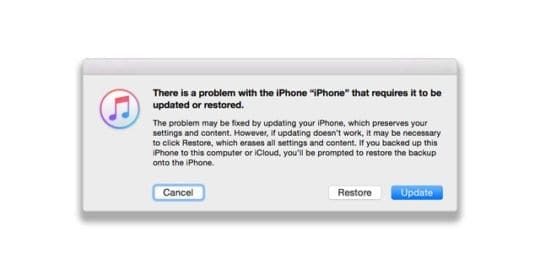














I did a forced restart by holding the power button and the home button until the apple logo appeared. But the sign in never comes up. The apple logo won’t go away and I can’t sign in.
Hi, Joni
DId you try to restore your device through iTunes? Or I guess you may try a third-party tool like TunesKit iOS system recovery.
Hope this helps
I am having problems with my Scrabble Go app. Every time I insert a letter into a game, the game resizes so that the entire game is not on the screen. I have tried to do a reset to my iPad; however, my iPad turns off before the reset is complete. Scrabble is the only problem that I am encountering, except for the soft reset. Can I delete the Scrabble Go app and reinstall it?
Took 2-year-old iPad to Apple store for a fix.
After testing was told screen could not be fixed, needed to purchase new iPad.
The blank screen started the next day after updates.
There is no damage to the device and the technician noted it after complete inspection.
I feel this malfunction is due to updates performed on the iPad, would like Apple to reimburse me or receive a new iPad. Thanks, Kim Backenkeller
Upset with Apple I have been a loyal customer for years and did the update on my iPad Air to 13.3.1 and my screen went black have tried everything to reboot with no success I will have to think about getting another one everything was fine until I downloaded the update very upset over this
I am very thankful to found Siri directing me to this fix it advice written for me to find out what is wrong with my iPad gen 5 and now updated to the current IOS 13.3.
What happened was I didn’t expect my iPad to not react to the “update” installed.
The one element that caused me grief on viewing all photos/viewings in only black & white. Not a good thing.
Over the Christmas period, I purchased the iPad-pro 11” but I want my second iPad to go to my son when it’s working. Before I release it to my son.
I hope by following the ideas presented I will be able to view the pad as I have over these years.
Thank you for the ideas shown here.
Hi Paul,
First, power off the iPad, let it sit on the charger for a few hours, and then power it back on. See if your photos now show up in color.
If not, let’s reset your settings. Go to Settings > General > Reset > Reset All Settings.
* This resets to default everything in Settings, including notifications, alerts, brightness, and clock settings like wake up alarms
* Resetting all settings also reverts all your personalized and customized features like wallpapers and accessibility settings back to factory defaults
* Performing this action does not impact any of your personal device data, including photos, texts, documents, and other files
* You need to reconfigure these settings once your iPhone or iDevice restarts
Let us know if this does or does not work.
Liz
My iPad mini has a black screen with the plug in pic and battery. I have tried burping it and holding down the Home button and power button at the same time. No apple appears.also bought a new cord.
Hi Shari,
It sounds like you’ve tried all the troubleshooting steps. At this point, we recommend you schedule an appointment with an Apple Genius to have your iPad inspected and run through a series of diagnostic tests.
Genius appointments are always free, even when Apple Care+ has expired. The repair is not free, unless your iPad Mini is still under Apple Care.
My husbands iPad has just gone blank can’t turn on or off, very pale grey screen
Hi Katrina.
Try a forced restart.
* On an iPhone 6S or below plus all iPads with home buttons & iPod Touches, press Home and Power at the same time until you see the Apple logo
* On an iPad with no home button and iPhone 8 and above models: Press and quickly release the Volume Up button. Then press and quickly release the Volume Down button. Finally, press and hold the Side/Top button until you see the Apple logo
Hej,
I have still problem, I have black sreen. I can hear notfication and sounds even Siri but nothing is helping to turn on my Ipad.
No Idea what to do!!! I am crying.. I have done everything !!
Hi Nar,
Try a forced restart and see if that helps:
* On an iPad with no Home Button and iPhones 8 or later: Press and quickly release the Volume Up button. Press and quickly release the Volume Down button. Then press and hold the Side/Top/Power button until the device restarts.
* On an iPhone 7 or iPhone 7 Plus: Press and hold both the Side and Volume Down buttons for at least 10 seconds, until you see the Apple logo.
* On an iPhone 6s and earlier, iPad with a Home Button, or iPod touch: Press and hold both the Home and the Top (or Side) buttons for at least 10 seconds, until you see the Apple logo.
If you cannot see your screen, use hey siri and ask siri to turn the screen brightness all the way up.
If you have access to iTunes, you can also try a DFU Mode Restore.
If nothing works, contact Apple Support or visit a nearby Apple Service Center–your iPad may have a hardware issue or a loose screen cable.
Ipad on charge….opened it up…black screen and will not turn on…not 18 months old….seems Apple is rotten!
I am gobsmacked. My Ipad has had a black screen for over a month now and today I decided to research fixing it.
I happened upon theappletoolbox.com and went through the steps and YEAH, it worked !!!!.
Thank you soooo much for the info. I am very grateful.
I will recommend this for anyone I know that has this Apple device problem.
Please what are the steps?
Read the article
Will the burping work on white screen with black border that slowly changes on white screen with black checkered pattern on a loop?
Hi Janet,
It’s worth a try! Just make sure you protect your iPad’s screen with a towel or soft cloth and then try the burping technique.
SK
My daughter dropped her phone flat on its back. It was only responsive on the button since it is iphone7. It vibrates when she turns it off and on but the screen is black. You can’t hear calls or messages. Is this a possible LCD or logic board dislodge?
Mely, Sorry to hear about this. Its hard to say if its a logic board dislodge. Did you try out the part about connecting it to iTunes as explained in the article? If you have Applecare on this newer iPhone 7, we would strongly suggest taking to the Apple store or calling Apple Support and have them check it out. Good Luck and we truly hope that this gets fixed by one of the tips in the article.
i tried the hard reset but it just turns off itself and turn it back on again with a black illuminating screen…i have a lot of important pictures there and would really like to keep them.
Hi Nat,
It sounds like you may be experiencing the resetting bug that plagued earlier versions of iOS 11. Please check out the tips in this article.
Do you have access to a Mac or Windows PC with iTunes installed? The computer doesn’t have to be yours–it can be anyone’s! Or you can visit an Apple Store or Apple Retailer and ask them to use iTunes on one of their Macs–they are supposed to allow iDevice owners access to the display Macs for routine upkeep. See if iTunes recognizes your device–if so, make a backup of your device (if using someone else’s computer, make sure you bring a thumb drive to save your backup to.)
Once you complete your iPhone backup in iTunes, go to MacintoshHD>Users>library>application support >mobileSync>Backup. In the backup folder, find the backup file (folder) you just created. Copy that file and paste it into your thumb drive. Whenever you want to restore the backup, copy it from the thumb drive and paste to the same location on the Mac’s HD where you copied earlier.
SK
So… my phone (iPhone 6) died!!
Has anyone experienced anything like this: I was texting when the bottom of the screen started to turn a translucent red and it moved up the screen until the whole screen was red. It took about 4-5 sec. Then it either became opaque or the text screen disappeared, and the screen then turned bluish-grey and then went dark grey but still seemed illuminated. I tried a soft and then a hard reset. Nothing. Not even the “dark illumination”. Called Apple and tried a few things, stopped shy of doing a (?) factory reset. I haven’t backed it up recently and will lose data. So I’m hesitant to do that. It will vibrate but not ring when we call it. Hoped it was just a dead screen or something somehow disconnected. Took it to an Apple Store a few days ago, the current checker showed it was still functioning. They replaced the screen but no functionality . They actually replaced it again just to be sure the first screen they replaced it with wasn’t a lemon. Still nothing. Any thoughts?!?! After I read this post, I thought maybe more unfortunate folks would be having this issue if it was related to the most recent update, which I had done. And if so, if Apple is doing anything about it…
I had my phone for 3 years, no damage to it at all. I just don’t get how it can just die like that!!
There are at least two faults being confused here probably more so check your symptoms carefully. First thing, make sure iPad is fully charged, and plug it in to a computer with iTunes if you can to see if you get any response (the ipad is designed to run diagnostics and updates via the computer link and often this will bring it out of a deep sleep state).
These answers based on experience of two issues and both fixed.
If the screen is completely black (no glow of any kind) and none of the start up buttons / procedures work, this may be a hard crash which I had once after replacing the screen and it took 2 days plugged into the power socket before the ipad finally boot up by pressing the start button – it just took a long time to re-charge and sort itself out, bizarre but I’ve read several accounts of the same thing – likely a power surge protection circuit that flips out and then self resets after a set time. Note, during that period a Mac computer connected to the iPad via USB cable will NOT get ANY response because the ipad is completely off power.
If you get a blank screen but you can see a glow when you touch the home button this confirms you have a charged battery and the iPad is booted up. It is likely in this case to be the screen connector cable that has come lose – it’s very delicate and may not have been locked down, especially if you have had a new screen. If you have dropped your ipad or jolted it suddenly (like heavy breaking in the car throwing it against the seat) this is enough to disconnect a cable that is not securely fixed with the built in clip. If you tap the iPad gently on the back towards the top edge (home button on your left looking at the screen) and the screen comes back on or flickers on / off then its definitely a loose cable – this is where it resides under the screen. Fairly common, especially if you have had the screen replaced. You can check that the iPad is alive’ by connecting it to a Mac with the USB cable – iPhoto / iTunes will launch and they will communicate with the ipad because its booted and operating, just the screen is disabled. The only cure for this is to take the screen off and reconnect the cable firmly – if the clip is broken you will need a thin slip of gaffer tape (very sticky tape used in mechanical engineering) to ensure it stays in place. Note: you will almost certainly crack the thin iPad screen removing it, so order a replacement first from Amazon / eBay ensuring you state the correct iPad model and colour.
Hi Paul,
Thank ou for sharing your tips and insight to this issue. Your experience is very helpful and we’ll add them into the article as a great reader tip!
Thanks again for sharing.
SK
Just do a quick triple tap on your home button.
My I pad had a black screen, for 30 secs would go white, then black again. Nothing worked!
Then, thanx to you, plugging my I pad 2 into my mac book, opening itune, and pressing the home button and and the off/on button totally worked! Then they synced with each other which took about 2 hrs. But now my ipad works great! Thanx so much for those directions! You are wonderful to give help like that.; I was so frustrated, and thought I was going to have to drive to phoenix (2hrs way) to fix it. You made my day!!!!!
Hi Nancy,
That’s totally awesome. Thank you for sharing your story and what worked for you. Yippee!
SK
OMG…it works. My iPad had black illuminated blank screen for days. I was about to buy a new one. And then I saw this post today.
With iPad cover on, i turned the face down on the hardwood floor, pressed it harder 2 times (not too hard but enough to create a pressure on the screen), and know what?
I got the screen display back…THANKS A TON guys…
This happened when I dropped my iPad. Black screen. But it was on?!? I was really worried. I tried hitting the back but no luck. Then I spent 5 minutes hitting it with my Samsung phone which has a soft case (it was hurting my hand to hit it). Sure enough after some tapping the screen came back on!!!! Thanks for this fix!!!
I tied everything and then just smacked the iPad three four time it work for me thanks a lot
my ipad air is not able to on it freeze on black screen, I been tried all your suggestions.
please tell me what to do
Wow…the ‘I-Pad Slam’ worked for me, too! My iPad 2 screen was black when it was on, couldn’t see the Apple logo when turning it on and nothing would register on it. Pressing the volume control buttons, home button, and sleep button would get the screen to flicker all blue for a split second and then it would go all black. Tried the hard reset, recovery mode restore, etc., and clearly the screen just wasn’t displaying.
I had it in a soft case and I squarely and evenly slammed it face down on the hardwood floor. The first slam made the screen flicker on much longer, and then I slammed it even harder (I had nothing to lose!) and the screen stayed on! The color green doesn’t render right, but the rest of the colors display perfect. I’m sure one of the pins of the LCD plug is still not firmly seated, but it’s usable and other than looking like it’s running less of a color palette than it supposed to be, it works! I tried slamming it again and there was no further improvement, so I figured I’d stop while I was ahead. At least i know that it’s the LCD connection if i want to crack it open sometime. Glad i found this post!
AMAZING! That’s what worked for me! My wife has and uses the iPad and i is NOT computer savvy. My youngest son usually comes here often enough but today he wasn’t here and the screen went “blank”! No home screen no restart no nothing. I finally banged the back on my knee and I saw the apple. I thought it was a totally dead battery but it still had 84%. Totally weird.
My iPad will not Bring up the screen no matter what I do ! Very perplexed ! It is still screwed up ,!
My iPad will not Bring up the screen no matter what I do ! Very perplexed !
My iPad regularly reloads any page I am looking at.
The screen freezes then a window at the top, underneathe the IP address line, opens and states….. ” a problem has occurred with this website so it was reloaded”….this happens numerous times while I am on line. How can I correct it? Is it a network problem? There are 4 other computers of in the household but the iPad is the only one that experiences this problem.
I haven’t updated the software for my ipad yet considering I just repaired it from a charging problem but I want to update the software….how do I do it……plzzzz this is really important.
I have tried all options as suggested and still cannot seem to get my ipad working. Any more suggestions?
that would be great advice but my home button doesn’t work and I don’t know what else to do
I know this article was written some time ago, but you just saved me a trip to repair shop, and or possible money to resolve – at the mercy of whatever they might tell me needs to be done (like replace my phone). But the Two-Button Hold was the miracle I needed. So THANK YOU! I had previously only read about holding down the on/off button for 10 seconds for a reboot. And that did not work. The problem was a completely black screen, due to (in my opinion) a “frozen screen” on an app I was opening. It eventually went black after trying different methods of on/off, shutdown, etc… to shake it out of its frozen state.
DJ,
Thank you for your thoughtful comment. We are so glad this helped you! And we have updated our article to reflect your suggestions.
Cheers,
Liz
wow!!! i can’t believe my ipad is back by holding the power switch and holding the bottom simultaneouly.. Thanks
Ok so my iPad has been dead for about two months or so and the screen is black when I turn it on it shows the appel icon but that’s it what can I do to fix it please help. I need my iPad for work
My iPod touch 6th generation will go to a black screen, but you can still recieve notifications, texts,and you can hear siri. It turn on once in a blue moon but when it turns on it will work for 5 minutes but when i apply pressure on it it will turn off. ive tried everything and its not even a year old. I dont wanna get it fixed or i dont want to get a new one. PLEASE HELP ME
my iPhone 4 just went black when i woke up one morning….. it vibrates when you call it and all but the screen just goes black and slowly turns bright white until it goes off again!!!! this happens when you press the power button,, unfortunately none of the listed methods worked
My ipad doesn’t show anything on the screen it can only speak the screen dark
I’ve tried everything, nothing worked…… I am so sad……
Thanks buddies…I dropped my friend’s iPad face down on a carpet, it worked
My iPad screen turned blank 3 times!
I too had the black screen of death panic set in so looked at this forum was very sceptical about banging and dropping my iPad as have looked after it but hey presto 20mins of banging and hitting my iPad it has worked so thank you every one for this valuable piece of information
I’ve literally been depressed not having my iPad with me for the past 6 days! and icloud was not showing any of my 2,000 photos (totally depressing) It just blanked out after charging. After a great consultations the genius bar at the Apple Store and a hefty bill, i decided to take matters into my own hands and dig in online on other solutions.
I found this blog and after reading the comments decided to give it a go.
After a whole day banging my poor ipad around, it didnt turn on. I then charged it for 2 days still no luck. I continued to bang it about and thank GOD my ipad is now back and alive!!!
Thanks for the great posts!!!!
whooooohoooooo!!!
I work for a school district…had the black screen of death and found the knee bump…Worked like a charm…I have seen many strange fixes in my time, but the knee bump has to be pretty close to the top of Technology Fixes…
I truly thought this was an insane “fix” to my issue, but I got so fed up that I DID try the “drop” technique. I just dropped it flat down on my carpeted floor-first time, nothing; I was probably too afraid & so too gentle. I think I was so frustrated that the second time I kind of slammed it flat down-and voila! I, too, could not believe it, but YES, this worked. My black, blank screen came on and all is good! Thanks everyone who kept posting to try this!
i tried everything. the charging the home screen and wake/sleep botton combo even the banging!bothing worked for my iPad mini.maybe i didn’t hit it hard enough?
My iPad screen goes black as well. With this many people posting similar problems, you’d think Apple would address. It’s just over two years old. Tried the suggestions above, to no avail! Bummer
Thanks for this topic, restarting it by holding the sleep button on top and home button helped.
Hi
Thanks for the advice thought mi I pad 2 was dead. Had taken it to the Apple shop and they said the screen had gone and I would have to buy a new one. But after hitting it hard on the back it has come back to life to say I’m happy is an understatement!!! Ps I laid it face down on a thick magazine and hit it on the back with a closed fist in a dice 5 shape… It took three goes and it worked… Yeeehaaaa!
My brothers screen was black, grayish,white it won’t even turn on! Help!
My daugter and I were in a panic because the screen went black. We finally tried the knew bagging and it came on. the resolution changed somewhat but w can live with that. Just glad it cam back on.
Holy Crap! Dropping the ipad after I had held down power and home button several times actually worked! I dropped my ipad last night and it has been a bright black screen ever since, so after reading these posts decided to try it and wow….it actually worked! thank you thank you thank you!!!
I can’t believe it worked! My ipad was blank with backlit screen for about a week now. I tried the soft reset (holding down the home and power buttons) to no avail. When I dropped it from a foot off the floor a couple of times, its working again! Thanks for the great posts.
OMG i had black and white screen on my ipad 2. the screen went funny. i then read the comments on here about hitting the back of ipad which i did and it bloody worked.
Thank you so much
My husband just came in with his iPad flashing black screen. I’m so glad I found this page, I hit the iPad against my leg ONE TIME and the screen came back up!!! I couldn’t believe it!!! Thanks so much!!
Faced same problem and I tried many times to restart my ipad but it doesn’t work. After read this comments… myself tried same approach and it worked for me… Great….Thank you so much… 🙂
Well I never… it worked – dropping it on to my knee 🙂
my iphone 5c will not turn on. However i am still geeting texts, calls and alerts i tryed the kneebang and it worked but now it stpoed again is here any onthe way???? Plz help i cant do anything without my phone my parents said i have to get the money on my own but i cant get a job cuz of school. and i cant do anything unless i can tell my parents where i am so till i get $450 or find a way to turn it on im stuck
oops i met getting
GUYS HERES THE SOLUTION FOLLOW THEESE STEPS
1. HOLD DOWN THE POWER AND HOME BUTTON AT THE SAME TIME FOR A WHILE.
2. NOW THE SCREEN SHOULD BE VISIBLE BUT ODDLY COLORED SO BANG THE BACK OF YOU I PAD MULTIPLE TIMES TO GET BACK THE ORIGINAL COLOR.
FOLLOW THEESE STEPS
My iPad was blank too, the MacBook was asking permission to connect and i couldn’t see the screen
one of the following worked
– charging a bit longer
– smacking it with my hand
the screen came on, and I was able to press “trust”, now it is working ok
is this problem caused by the recent iPad software updates – if so, I’m really pissed off.
It actually worked i just prestes the home and sleep/wake buttons and it worked!!!!
Ipad 2 died 2 weeks ago with black screen flickering when the on button is pushed. I took it to the Apple Store and they said it was shot – $ 250.00 to replace it with the trade in of the old one. It was 1 month out of warranty. Tried the knee drop and it did not work. Then I dropped onto the corner from about 2 feet (heavily padded carpet). I rotated to a different corner each time I dropped it and after 5 or 6 drops it can back on and is working like a champ. Thanks for the tip !!!
I can’t believe dropping it worked. I did it a few times and nothing happened. I had given up hope when I dropped it on its back and saw a glimmer of the screen! So I just kept dropping it on its back and boom! It came back to life. Thank you!!!!
I thought I would have to get a new iPad because everything in the comments wasn’t working so I held both buttons and than slapped it sort of hard ony knee and th Apple sign came up!
My iPad went all white the last te and I dropped it a few tes on the floor and it worked, but now it is happening again a little after I dropped it a cracked the screen. I tried everything I did last time and more. It’s not working though. Not this time.
Sorry some spelling errors.
Thank you all for your suggestions and ideas
I tried it all and added putting it in the freezer for 15 min
But still my problem did not get solved
The black screen with the apple symbol flashing
any new thoughts
thanks a lot for sounds way to solve a problem
Seriously, I just decided I’d drop my ipad forcefully on the couch (backside down) and the third time, I saw a flash of the apple! Did that a few more times…and then I clapped it on it’s earphone side in my hand forcefully. It completely came back after black screen for a day!!! Thank you …you knee bangers!!!
Seriously – I just tried this and it WORKED!!!! Our screen went blank a few days ago and I tried holding the power and awake button together and no luck! This was a lifesaver! I am so glad I came across this. THANK YOU!!!!!!!
Yep, it works. But what does that say about the iPad, if you have to give it a hard wack on the back to get it to work.
Apple take note – THAT’S NOT GOOD ENOUGH!
THANK YOU!! i was having a mini heart attack whem my ipads screen just went black! Thank god for this i wouldnt have got it back on. Goodbye now, soo happy now
This thread is excellent. I was hesitate to hit my ipad, because I had always been so careful with it. But I thought if I start out gentle maybe it will work. you do have to do it with a bit of force but it really worked the knee bang theory saved my ipad. Thank so much for everyones help.
I work for a school district that has over 10k iPads and at least once a week in my own school I get a work order involving this issue, All I do is slap it on the back until it comes on and colors get adjusted properly.
guys please help my iPod shows that its dead and shows the apple logo but when I know it on the screen is black please help thx
Thank you! Can’t believed it worked!
Banging the iPad really works! My toddler dropped my iPad yesterday and I was left with a blank screen even tho fully charged. Saw this advice and started dropping it but didn’t work. Finally in desperation I gave it quite a few hard bangs on the back of the iPad (with the case on) and eventually got a flicker and then the screen came back on! Preserve with it!!
Ipad had a black screen with backlight. Tried resetting, rebooting no change. Dropped it on its back 3 times from 1 foot onto thin carpeted floor. The screen came back. I was skeptical but now I believe.
Thanks
Same thing happened here! Screen went black…etc., tried everything nothing worked. Was really upset because no way I could ever afford another one. That’s when I figured I had nothing to lose and tried turning the iPad over and banging the apple with the palm of my hand. Had to do it about 4 to5 times and IT WORKED!!!!!!
for me, with the dead/blank screen (and semi-lighted blank screen), it worked to drop it on a corner from about a foot onto carpet over concrete (the 3rd corner i tried), but not kneeing it, banging it, knocking it or resetting it using home and sleep buttons. thanks for the advice.
thank you so much mine was the semi-lighted screen and i use my ipad for everything i knocked it and then bangned it it turned on but it was red and fuzzy so i used a old method for when it got fuzzy which was also banging it ang i got it clear ang working
mine did this every now and then, but the screen was fuzzy green. I was able to bang it and then get it back to normal typically, but this time it turned black and now i can hear sounds but that is it. Now i can get it to a semi-lighted screen to, like it’s trying to turn on but it can’t. I don’t know what to do because it has been like this for 2 weeks.
My I pad is blank I tried the knee thing it worked but only for a few minutes I can hear the buttons clicking but I cant see anything please help!
OMG!!! All of a sudden the screen on my iphone 5 goes black…the phone is still working and I can hear the alerts but completely black. I went to the apple support site for help…big waste of time there…as I was about to just chuck this phone out the window I came across this page…as I started to read the posts I started to think another big waste of time…but as a last resort I thought what could it hurt to bang it on my knees 4 or 5 times…and on the last try the apple logo showed up on my screen…thank you thank you thank you
Ok, i was using my ipod earlier for about 2hours straight. Then the screen just cut off! Iknew it wasnt dead because it was on the charger at the moment. Plus everytime i click the sleep button it blinks on snd goes off, i tried reseting it with the power and home button but it does the same thing everytime! WHAT TO DO!!
I am usimg iphone 5s.. there one time my phone dry empty of batery.. after i fully charged my phone it won’t go to home screen.. it just freeze at apple icon and the screen turning to blue and red.. and again it shutdown it self.. any idea what to do on this.. please reponse quick! Really help your help here…
This worked for me too! My screen was “illuminated black” after dropping it so I tried this technique. First time I dropped it the screen was restored but in a “red negative” look, second time same thing but in green, third time it returned to normal! Too funny!!
As someone who this screen thing just happened to and cannot afford a new Ipad, I feel compelled to say that the kneebang worked for me. I was reluctant, I thought my whole thing was ruined, (who knows it still might be) the reset stuff was not working. It was also scaring me because each time I did it, many colors came on the screen and disappeared convincing me to believe the ipad was dying even more and i was helping it.
I did the knee bang which was not at nearly bad or scary as it sounds. If you hurt yourself doing it, you probably went over board.
Yip, second time this has worked for me 🙂
It only worked for me once!!!!!!!
I SWEAR,THIS WAY WORK FOR ME,THANKS ALL
Someone asked me to try and find out what why their ipad wasnt coming on and i tried everything and thenread these comments and after the 8th post telling me how osmeone else didnt believe smacking it on their lap worked I decided to try it too and yeah it definitely worked!!!! Really and still!!!
heyyy
my pad mini went black and i pressed home button and on/off button together and now my ipad mini wont charge
my ipad mini say connect to power when it is :/ ???
I’ve tried this smack trick, nad it hasnt worked for me. I can hear it make the communication sound when I plug it in, but screen stays black. I even went and got a new LCD for it and same thing still persists.. any other ideas? I’m deseperate……
Had the same problem happen to me. My iPad was working fine the night before, but the next morning it was not turning on and had a black screen. Tried plugging it in, did not turn on, could only hear notification sounds. Smacked it on the back about 3 times, then pressed the home and on/off button for a minute straight. Miraculously, the apple logo appeared! Thanks to everyone who posted on this forum! Saved me the trouble and anxiety.
Black screen nothing worked slaped it and “hello “I love this feed thank you so much my iPad Is works
Whoever suggested that we should tap the back of the ipad when it turned black is actually a genius. Thank you for sharing this technique coz it worked!
it totally worked on my phone, I thought Im gonna b taking my phone being blackout to school. But now I dnt have to worry about it. Thanks to whoever posted this , the last option helped me with my phone. ☺️
I honestly thought my daughters Ipad was gone…the screen turned black. I looked at this post and smacked the Ipad off of my leg and it worked!!! So glad!!
I can’t believe it. I tried the knocking on the back trick of my fiancee’s ipad 2 that hasn’t been working since march, and the screen started working again. I really thought this idea was a joke until i seen dozens of,people recommending it. They couldnt all be trolls, right? And sure enough, it’s working. Thanks, everyone.
Whao it worked, i palm the back of my ipad a few times and it solve the screen problem. Thanks =)
oh wow. so i had the same trouble after my ipad slid off my bed onto carpet in a very well protected case. I tried evetything including smacking it and saw some white flickers which i panicked and stopped. i then re tried the two button on off and after just the lit up black screen. i tried dropping it onto carpet from a foot high with its front side up… nothing then worked the distance to two feet. its alive, and is just like it was. !! soo good
Awesome my dear friendzzzz. Thank u so so much. Just put my ipad on lap and tapped twice in front and then back…. It worked as a charm. Amazing!!! My sisters 3 year old son will kiss me 100 times for this : )
OMFG!!!! I seriously thought all these comments about “kneeing it” it the back, smacking it and whacking it on your knees were people’s idea of a joke, but when my son’s ipad stopped working and all we had was an illuminated black screen and it wouldn’t turn on or off and restarting with the home/on/off buttons did nothing, I thought…..what have I got to lose????
So I sat down and whacked it on my knees.
Several times.
It flickered a little and then nothing.
Then I turned it over and slapped the back of it.
Hard.
Then I turned it back over and pressed the on/off button.
The apple symbol appeared!!!!!! Then hey presto it turned back on!!! I cannot believe that this technique actually works!!!! Seriously gobsmacked!!!!!
Thanks people!~:)
Wow! I was totally not believing that colution either and then I literally just tried it right now after my son dropped it on the tip onto the tile floor…screen popped right back up! Gotta loove Google! :o)
Crazy but banging the back of the ipad2 on my lap solved the problem, the screen was with the wrong colors, I shuttled it down normally and after rebooting the iPad was perfect, back to normal. As other people has said I didn’t drop the iPad, but it was really hot when the problem appeared.
Thank you for the “banging on lap” solution.
SO literally I have been depressed for a week now over my iPad 2. The screen was black called apple and was 74 days out of my warranty…they told me there was nothing they could do for me. I have never dropped my ipad or anything so I couldnt understand why the display was black. Tried the hard reset and it didnt work! I read these comments, went over to my poor iPad tapped it on my knee and BAM it turned right on!!!! Now I just hope it stays this way.
Yup! My screen went black after reading the comments about banging it on your lap I did it and now my Ipad2 is working like nothing happened….
I plugged my iPad in and immediately I heard a ‘ding’ ! As it got plugged it. That method worked for me(:
Un-effn belivable
i was about to give up and i did the drop from a foot off the floor and it came alive.
thanks everyone
My toddler dropped my ipad on the carpet and got a blank/black screen. I tried everything. I even did a restore. Googled to find some suggestions and came across this thread. Saw you all tried hitting the back of the ipad. I though no way would the work. Hit it on my legs first, nothing. Then hit it a little harder with my palm and saw a miracle “flicker” appear. Couple more hits, viola! Thanks for the “miracle” tip!
My screen keeps going blank although I can still hear the sounds from the app. I’ve tried the ‘on-off/home’ button technique and this brings up the apple but as soon as the iPad finishes rebooting my home screen appears for only a fraction of a second before the screen goes blank again. Occasionally touching the screen opens an app and the screen will come to life but pressing the home button makes the screen go blank about 80% of the time. I’ve tried resetting it via iTunes and banging it on the back all to no avail. Any ideas?
My iPad screen is black and it won’t respond. It says ‘voice over on.’ I have tried all the suggestions: the reboot, slap the thigh, etc. I am not able to try asking Siri to turn off the voice over because it keeps telling me Siri is unavailable. Any other suggestions? thanks.
Thanks so much fixed my little sisters iPad she gave me a big hug.
iPad randomly turned off, I tried taking it off sleep but it flashed for a millisecond and had blue lines vertically on the top that looked as if it’s bleeding. Really upset, please help. Tried all techniques. :/
My Ipad screen went black for no apparent reason a couple of weeks ago..the sound still works but it is just displaying a black screen. I tried restarting it but nothing…also tried to sync it with itunes and restore it but as my ipad is password protected it would not allow me to do so.. I would go to an Apple store for advice but the closest one is 70-odd miles away, so if anyone has experienced this issue before and knows how to help, please please please share with me.
Does anyone know how to get past my password on itunes, or if there is a way i can disable it from the computer? I’m currently charging it just now and if all else fails I’ll try the smacking technique…
Holding down the home button and off button at the same time works. Thank god!!!
Had this problem for a couple of days until just now. I tried the home and on/off button simultaneously as mentioned by gautam and it worked . 🙂
My iphone just all of a sudden went blank!!! Black screen… I’ve restored it but it still goes back to the blank screen!!! Plz help me
The CPR approach worked for me too!
Same thing happened to me. My ipad fell from the couch to the floor and I was left with “the black screen of death” Sooo, I smacked “hard” on the back. Ipad CPR. My Ipad is alive and kicking…..
Same thing happened to me! Dropped the iPad onto carpet from the bed.
Black screen, what worked ??
Smacking it hard on the back!
Yippee !!!
it doesnt work i will cry now 🙁
hi, my screen on my ipad 3 is blank. tried replacing the digitizer screen. siri will talk to me however when i hard reset nothing happens. i cannot restore my ipad in itunes as it contains a passcode and comes up with a 0xE8000084 error code. any suggestions to what i can do?
It worked
Restarting, as suggested earlier, worked for me. Thanks!!
Blank screen. Tried everything. All day. still unresponsive. Very sad.
my ipad goes blank/black how can i fix it ??? need help please tnx …
my home button dose not work and nothing is working please help me
I saw this.on another forum….at first.i thought it was dumb…then I tried it out……..I simply banged my ipad on my lap while sitting…..it started to flicker and….voila…..it cam back on…….no jokes….talk about a hard reset…..
so i had a blue ..blackish screen and the reset didnt work..so i read your comment and was like yeah right like that would work; and it actually did… banged my ipad on my lap and now its on ! thanks a bunch 🙂
I look at this comment thought about it. Thought the person who suggested maybe a little crazy tried all other options first. Figured might as well try this one to and like previous person BAM Ipad back in action after a little spank 😉 lol
Thanks
Omg!! My ipad had the same issue. I thought you may have been having some fun by saying to just bang it on your lap, but I was desperate enough to try it and it worked. CRAZY!!! Thans so much.
this is the only thing that worked for me, weird, but thank you!
Ok my iPad has had the black screen for 6months. Just read this post and banged in on my leg literally 5seconds ago and the thing popped on!!!!!!!
I just wanted to thank you SO much for the advice you gave in this article. It happened to me last night. Black screen. No reason. Fully charged. Didn’t drop it. I was crushed, as it is my only computer and I wouldn’t be able to replace it. I decided to look it up before I took it to the Apple store, and I am so glad I did! The trick was to hold the home button down at the same time as the on/off button. There the apple came up and shortly after, my home pic. WHEW!!
Again, thank you for posting this. Bless you!!
My ipad will not respond. Its just a black/blank illuminated screen or a hazey screen sometimes purple. Or a flashing broken picture screen if that makes sense…..?
My ipad screen’s problem today screen automatic black
it very useful…thx for help to solve my ipad mini…just now i am very nervous about my ipad mini… =)
Why does my screen go black when I go into certain sites
My ipad has gone blank and I can’t get it to respond.
Now if my screen is blank or black, how am I going to be able to shutdown apps I cannot see, or guess where to swipe to turn it off??
Exactly! I can’t see anything, and my iTunes won’t restore because I have to go into settings on my iPad and turn off “Find my iPad” before it will restore. wtf?
I’ve found that pushing both the home and power buttons and holding them can force-shutdown your device, with the Ipad Mini 2.
Thanks so much was crazy like a week with no ipad and it worked a charm. your a champ dude.
This is exactly my problem too! Did you manage to fix it?
WHAT AM I SUPPOSE TO DO NOW????!!!!! I don’t wanna pay!!!! I tried everything but doesn’t work!!! All I see on my iPhone is just an illuminated black screen!!! I seriously don’t wanna pay big money!! please someone, someone!! Find a way to fix this mess…. To tell you the truth, to me iPhone are kind of annoying because you have everyday problems with it, and have to pay for it to repair it…
So what you need to do is hold your ipad/ipod upside down on your knee and give it a couple taps on the back of it. If this doesn’t work tap it very light and increase speed and strength if necessary. Hope this helps!
Yes the same thing has happened to me I was on my iPad and then it went black and its wont respond to pressing the home and standby button helppp!!
Slap the back of it near the home key, it worked for me
But I can’t o.. It was not work for me
Slapping the back near the home key worked!!
my ipad air has a black screen It won’t turn on The lady will say I don’t understand your question.
what u need to do is hold power and homebutton when u see apple logo let go and it will turn on by its self
yes this works…brilliant
Thank you so much, I was panicking and pressing the home and power button worked a treat!! Phew
Thanks so much
I tried doing the the power and home button together but it was the knee bang that worked for me 🙂 Thanks for your suggestions guys. I was in total freak out mode prior…
The on/off button and home button simultaneous press and hold woke up the ipad after a complete black screen for three days. Was about to do the kneebang technique but came across this maneuver and it worked.
I thought it was a goodbye for this ipad air i was so nervous because this is not mine its my boyfriend’s tab. I become so desperate back then but not too brave to do the kneebaging technique then i try this i hold the home button then simultaneously on the lock button then ola it works!! So if you have second thought of dropping your ipad try to do this first. BTW thank you savior 🙂
I appreciate this. My ipad decided to go blank on me and right after I saw this it miraculously came right back on. Thanks again! I suggest doing this for anyone who is having the same problem I am.
thanks to all. my ipad is working now.
unbealivable!!! it does really work
This worked after trying other things for over an hour. THANK YOU!
THANK YOU!!! my Ipad mini is working now because of you!
Mine has the same issue. But i read a forum from apple support from Riley Steward and he said to:
Riley stewart
Aug 19, 2013 9:19 PM
in response to barbara424
Try kneeing you ipad on the back with a considerable amount of force, that worked for me. I know it sounds crazy but something moved inside of your ipad and kneeing it will move it back. I promise I am not lying.
https://discussions.apple.com/message/21959408
Trust me this is not a joke. It worked for me i thought i lost my ipad forever.
CRAZY!!! BUT THIS WORKED!!! IT PROVED ME WRONG, I THOUGHT THE NEXT STEP WAS TO TAKE IT IN TO APPLE STORE. I SMACKED THE IPAD A FEW TIMES ON THE BACK SIDE AND LET IT FALL FROM A FOOT HIGH ONTO MY LAP ABOUT 3-4 TIMES AND WAS ABLE TO SEE MY SCREENSAVER COME ON!! WOOWHOO!!
I know it actually works thanks!!
Also just as crazy advice – but worked for me, is to drop the iPad onto one of its corners from about 1-2 feet off the ground. First time you do this you will think its crazy and its going to break it – so just drop it onto a soft carpet. It may not fix the screen fully on the first try but you will see something. Next time – hey presto! Dropping the ipad actually fixes it!
My ipad 2 has showed a blank white screen for the last week. After reading these comments, I decided to try a technique similar to the Kneebang Technique by dropping my ipad 2 from a height of between 1-2 ft. onto my lap between 5-10 times and then throwing it semi-forcefully 2-3 times onto my lap. The screen went from white and blank to just black without being responsive (*talk about making me worried). I threw it a couple times more onto my lap and then held down the power button, at which point in time the beautiful apple symbol popped up and my ipad began to function just like new. I was about to buy a new screen and digitizer, but tried this technique first, which paid off. My daughter had dropped the ipad several times recently, so it seemed logical that something may have just been jiggled loose inside. I highly suggest trying this technique or the kneebang technique before replacing your screen/digitizer.
i can’t fix my iPad 2. It can take pics from the home button and lock button but my screen it bright white and frozen. Please respond what should i do
Can’t believe it but after reading these posts I took the advice and dropped my daughters ipad on my lap a couple of times then onto carpet a couple times at a height of about 20cm, and the blank screen came back alive!!! Its totally working beautifully again! So glad I found this thread! Thanks everybody!
This works!!!!!!!! Thank you for the information and saving me 300 bucks
wow…..am glad I read this thread. My iPad 2 was able to connect with itunes and was able to restore the software multiple times. However, the screen would would never work. Finally, I dropped it on my floor from about a foot and the home screen came on.
ok i waass skepttical at first like anyone but it worked thankyou god it worked lol i am dead serious i swear to godit worked for me droopped it on lapthen i dropped on corners from about one and a half foot thankyou!!!!!!
This is the craziest thing ever. I just tried this for my son’s iPad and it worked. I thought it was a prank but since it seemed there was nothing else to be done I tried anyway. My son got this iPad through the school and uses it as a communication device so I was desperate to try and fix it myself. It’s actually dropping it on one of the sides that worked. Amazing. Thank you for sharing this tip.
OH MY GOD THIS ACTUALLY WORKED. My iPad has been havin problems since the screen cracked, I thought of have to contact the people that changes my screen to see if they knew. Anyway, my friend found this… Before I tried it, I thought, “Man, this guys crazy. It’ll just mess it up more.” But then I tried slapping it on my knee a few times… And voila!! It worked! Then me and my friend started freaking out and bouncing and crap (overreaction much? Lol), but it worked… Thank you so much!! Now I won’t have to go the whole night sharing my friends iPod. Yay!! C:
My daughters I pad did not work I read your advise knock it about a bit and bingo the bloody thing worked thanks for the massive tip and spread the word . Most people would take their faulty pads to a apple dealer and get a large bill but not today thanks to you
I was at a loss and desperate, so I gave my ipad a few stiff jabs to the back of the device…and BINGO! Problem solved!!!! All it need was some tough love.
The kneebang technique works for me. Yehey!!!
Wow. Thought I was bonkers following this advice but yes it really did work and we have saved ourselves a considerable bill for repair. Brilliant and thanks 🙂
OMG! My son used my iPad as a kneeboard on the carpet and it quit working. All I could get was an illuminated black screen. After trying EVERYTHING else I tried the Kneebang Technique. Dropped it on my lap several times, dropped it on its corner and back on the carpet. Then tried the power button again and it came on! Works fine now!
it does sound the craziest solution but it turned out to be a life saver…
Yes the knee smack thing really worked! Thank You I thought my iPad was gone forever
Absolutely amazing this works, thanks for the advice.
THANK YOU!
THANK YOU!
THANK YOU!
Just dropped the stupid thing face down on my lap a few times and it worked!!
Amazing!!
I searched tech support for an hour before I found this and it was really worth the time spent!!!!
THANK YOU!!!
OMG!!! It’s true! I’ve done everything, including a restore but still illuminated black screen. One whack made it flash but second one did the trick. (Of course, now I have to set it up again since I decided to set it up as new. Thought it might be some setting glitch.
unbealivable!!! it does really work. hindi ko alam na pwede pala yun
ya this thing really works!!!!i cant believe it bt it worked for me…
Oh my goodness I cannot believe this worked, at first i think I was being too gentle and nothing happened, then decided to bang each corner and the top and bottom on a table covered with a soft cloth. I pressed the home button and it sprang into life. Thank you thank you thank you. x
It
Worked
For me!!
I don’t believe it but it worked for me also.
Hitting it on my leg DID work!!! Thank you so much!!! 🙂
I, too, decided the “big hammer” fix was worth a try. I placed my iPad face down on the cushion of my couch and with my open palm, slapped the back several times. I now have a working iPad again. Thank you so much.
Thank you, thank you, thank you! This worked for me.
I did the knee bang but I must not have done it hard enough so I turned it over and basically slammed it on a carpeted floor. Same concept but worked like a charm.. I never would have been brave enough to do that without seeing this thread. Thank you so much
Totally works! Banged the back of the ipad on my lap fairly hard about 5 times and saw the screen flicker on and off. Banged it another 5 times and it stayed on. Thanks!
I read some of the comments and actually what ended up fixing my iPad was literally smacking it a few hard times in the back with my hand and it started working!! NO JOKE!
Try resetting into recovery mode by pressing the sleep/wake button and home button at the same time then start up device when shuts off just happened to me yesterday so it works
Hold in power and home button for like 3 to 5 mins then it will turn on mine worked