Well, what happened to my bookmarks Safari? Several readers tell us that their Safari bookmarks disappear, often after an update. Users also report that Safari bookmarks do not appear to be syncing properly with iCloud connected devices, including computers. If this sounds like you, today we’re outlining how to retrieve bookmarks on iPhone, iPad, and Macs. So let’s recover Safari bookmarks!
Double-press the Home button or swipe up the Home Gesture Bar to see your most recently used apps.
Swipe right or left to find your Safari app’s preview.
Swipe up on Safari’s preview to close.
Next tap the Home button.
Optional: restart your device.
Tap on the Safari icon and let it restart.
Check Date & Time
Ensure that the settings on your device are correct. Preferably, set your iDevice to Automatically. Go to Settings > General > Date&Time > Set Automatically. If it’s already toggled on, toggle it off, wait 20 seconds, and toggle it back on.
Check your iCloud Settings
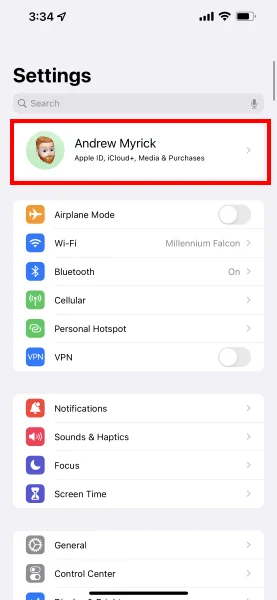
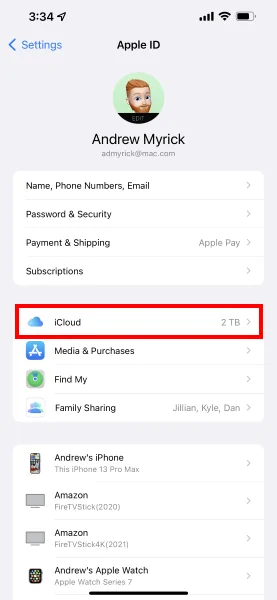
Check your iCloud Settings by going to Settings > Apple ID Profile > iCloud and ensure that Safari is turned ON.
If your Safari is already toggled ON, try toggling it OFF.
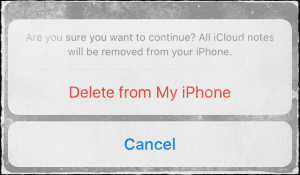
A message appears asking what to do with your synced iCloud Safari data, select “Delete from My iPhone.” Then wait 20-30 seconds and toggle Safari back ON. Tap “Merge” at the message “your Safari data merges with iCloud.”
Restart Your Device
Try restarting your device by powering off, waiting 10-20 seconds, and powering back up. If that doesn’t do the trick, try a forced restart.
Perform a Forced Restart
On an iPhone X and newer: Press and quickly release the Volume Up button. Press and quickly release the Volume Down button. Then, press and hold the Side button until you see the Apple logo
On an iPhone 7 or iPhone 7 Plus: Press and hold both the Side and Volume Down buttons for at least 10 seconds, until you see the Apple logo
On an iPhone 6s and earlier, iPad, or iPod touch: Press and hold both the Home and the Top (or Side) buttons for at least 10 seconds, until you see the Apple logo
Got a Mac?
First, on your Mac go to System Preferences > iCloud and untick iCloud Safari syncing. Next, open each and every iDevice that you’re signed in using the same Apple ID as your Mac and delete the bookmarks from those devices. Restore your Safari bookmarks to your Mac via Time Machine or via iCloud’s website, then go back to each device and toggle back on Safari in iCloud. This may take time so be patient as your device syncs to those iCloud servers.
Use Time Machine
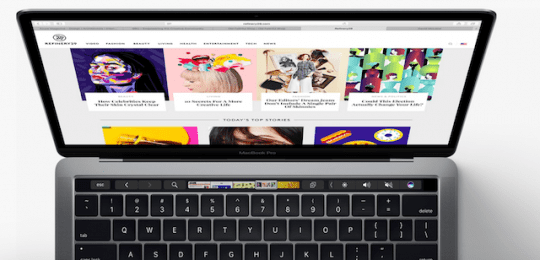
If you have a Mac and sync with the same Apple ID and iCloud, your bookmarks may be recoverable from a Time Machine backup. If using Time Machine as your backup method, first quit Safari and then open Time Machine.
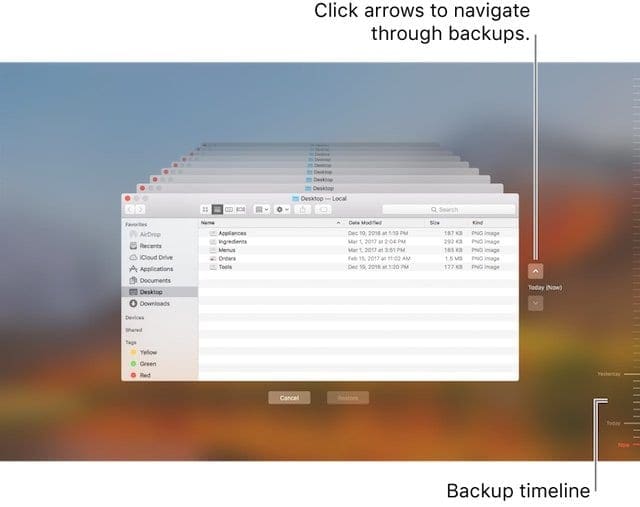
Open Time Machine by clicking the Time Machine icon in the menu bar and selecting Enter Time Machine. If you don’t have Time Machine on your top menu bar, go to Apple Menu > System Preferences and tap Time Machine. Select Show Time Machine in menu bar and follow the previous steps.
Use Time Machine to locate your Safari Bookmarks backup file. You can also search for any deleted files, previous versions of files, and files like your Safari Bookmark file that aren’t working or have become corrupt and restore versions that did work!
Look towards the right side of your screen for your Backup Timeline. Then, choose a specific date and time to go back in time to find your file
For ease, once in Time Machine, locate that recent backup that you believe contains your Safari Bookmarks and press Command+Shift+G to bring up the Go To Folder dialog box. Then type in: ~/Library/Safari/Bookmarks.plist and choose to Restore that particular file.
Selecting the “Restore” button restores that file to the same folder on your Mac. If overwrites the existing file, so a pop-up asks what you want to do.
Additional Troubleshooting Tips for Safari Bookmarks
Create an iCloud Backup
Settings > Apple ID Profile > iCloud > Backup > Back Up Now
Sign out of iCloud
Scroll Down to screen bottom and tap Sign Out
Select “Delete from My iPhone” for next two messages. This temporarily removes iCloud data–it restores when you sign back into iCloud
Enter your Apple ID password to turn off Find My iPhone
iCloud now Signs you OUT
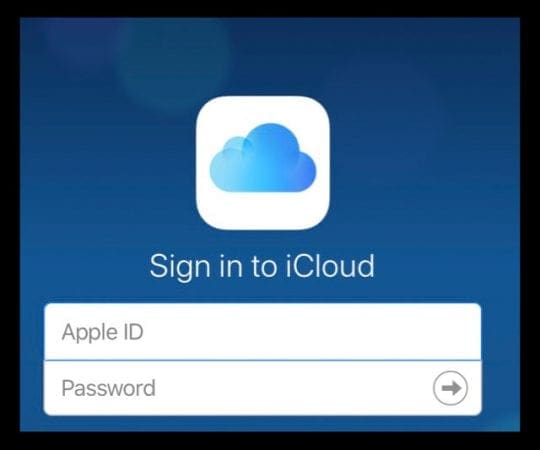
Sign back IN to iCloud
Return to Settings > Apple ID Profile > iCloud
Tap Sign In
Enter Apple ID and password
Customize what you want iCloud to sync
After signing out and back in, iCloud returns to its defaults
Make sure Backup and Find My iPhone are ON
Sometimes, this simple restart of the app fixes your missing bookmarks. However, if you accidentally delete your bookmarks from one of your iDevices, recovery is still possible from your iCloud account. Please read on to find out how to do so.
How-To Recover Deleted Safari Bookmarks
This happens to many of us, especially when we have multiple iDevices. We see many instances when your kid(s) playing on your iPad or iPhone accidentally deletes all your saved Safari bookmarks. Or you might accidentally delete the bookmarks on your iPhone or iPad. This is where the recovery from iCloud comes in handy.
Assuming that both your iPhone and iPad are connected to your iCloud account, you can easily re-sync the bookmarks and recover them back onto your iDevice.
Let’s say that your bookmarks were lost on your iPad. In that case, simply go to Settings > Apple ID Profile > iCloud. Turn the Safari setting to OFF on your iPad AND THEN your iPhone. Please make sure that you are using the same Apple ID on both the devices.
Next, turn Safari back on your iPhone and then on your iPad. iCloud automatically syncs your Safari bookmarks onto your iPad. This process does take some time depending on your number of bookmarks and your WiFi signal. Give it about 30 minutes or so and you should see all your bookmarks return to your iPad.
Visit iCloud’s Website to Recover Missing Bookmarks
If you need to access a bookmark that you can’t find or that you deleted within the last 30 days, visit iCloud.com on your computer or with Desktop Mode on an iDevice to try and recover those bookmarks.
Restore Safari Bookmarks with iCloud’s Website
Once on the iCloud website, tap Settings
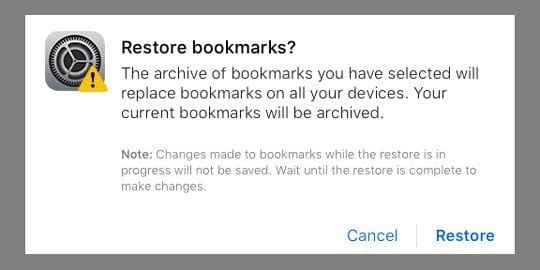
Scroll down the page and look for Advanced, click Restore Bookmarks
Select the archive you want to restore and click Restore
If there are more versions than can fit on a page, scroll to see all your options
Your current bookmarks are saved as a new archive file
The bookmarks update on all your iDevices and Macs that you signed in with the same Apple ID AND that you enabled iCloud’s Safari option
Wait until iCloud finishes restoring your Safari bookmarks
While your Safari bookmarks restore, any changes you make aren’t saved
Bookmarks Not Displaying in the correct order?
If your bookmarks aren’t displaying in the same order across all of your devices, check the number of bookmarks in the folder. If your folder contains more than 500 bookmarks, the order of bookmarks might not be the same on all devices.
How To Export Bookmarks for Safekeeping
If you are able to recover your bookmarks, it’s a good idea to export your Safari bookmarks just in case something happens in the future. That way, recovery is easy! This process does require a Mac that you sync with the same Apple ID.
How-To Export a copy of your Safari bookmarks on your Mac
Choose File > Export Bookmarks
Select a location where you want to export the file, then click Save
The file’s default name is Safari Bookmarks.html but you can change it if desired
Need to export from another browser besides Safari?
To export a copy of your Mozilla Firefox, Google Chrome, or Microsoft Internet Explorer bookmarks, visit Mozilla, Google, or Microsoft for steps to export bookmarks.
Obsessed with tech since the early arrival of A/UX on Apple, Sudz (SK) is responsible for the original editorial direction of AppleToolBox. He is based out of Los Angeles, CA.
Sudz specializes in covering all things macOS, having reviewed dozens of OS X and macOS developments over the years.
In a former life, Sudz worked helping Fortune 100 companies with their technology and business transformation aspirations.
Because I’ve been frustrated over being unable to find my Safari program for a few days, a friend suggested your post and a utility. Because I was too lethargic to read, I used the Acethinker iOs System Recovery application to fix the problem. I’m going to try the strategies you suggested. I appreciate you sharing this information.








Because I’ve been frustrated over being unable to find my Safari program for a few days, a friend suggested your post and a utility. Because I was too lethargic to read, I used the Acethinker iOs System Recovery application to fix the problem. I’m going to try the strategies you suggested. I appreciate you sharing this information.