Lately, when I try to browse the App Store on my iPhone, it shows me a message that there are “too many HTTP (or HTTPS) Redirects.” And then, the other day it happened in Safari too! So what’s the deal?
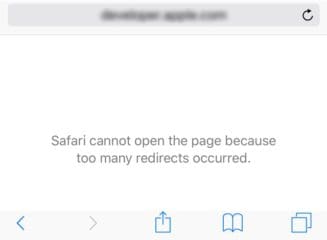
Several readers tell us that Safari and/or their App Store app is not working. Specifically, when they try to log into a site or open an app, they get the error “Safari cannot open the page because too many redirects occurred!”
This error may show either too many HTTP redirects or HTTPS redirects.
If you are completely unable to access the App Store on your iOS device; follow the instructions below.
After performing each step, please test to see if the issue is resolved.
Force the App Store app to close
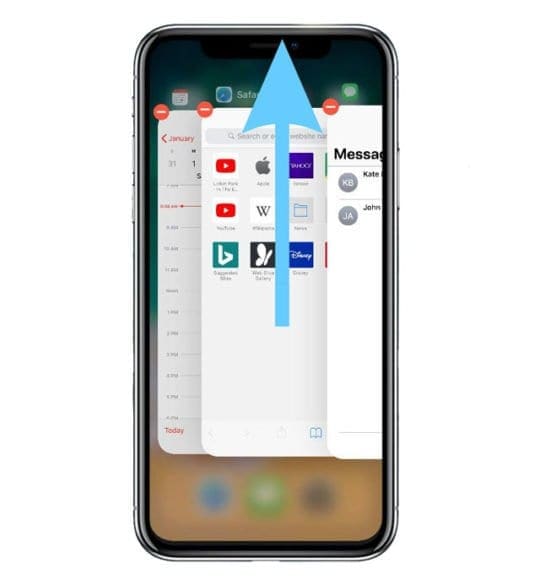
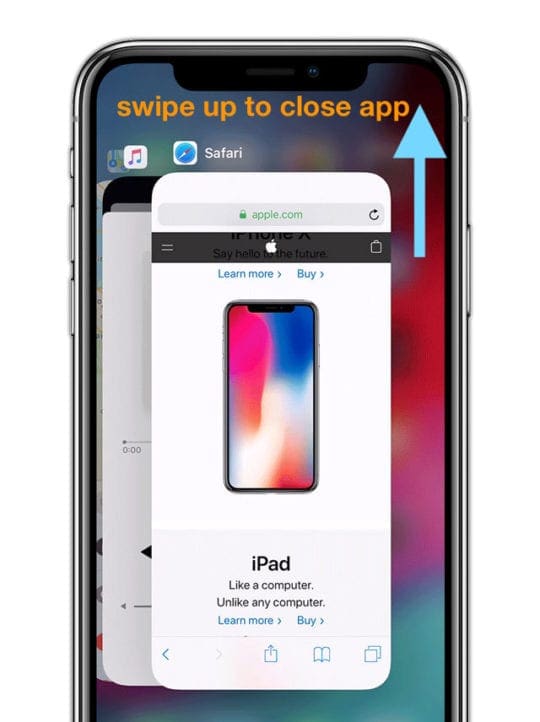
Double press your Home Button or swipe up the Home Gesture Bar
Locate the app preview for the App Store
Swipe up the App Store app preview off the top of your screen
Restart your device
Try launching the App Store app again
If closing the App Store app doesn’t work
Close all open apps by double pressing the Home Button or swiping up the Home Gesture Bar
Swipe up off the top of your screen all the app previews
Do this until all you see is your Home Screen
Sign Out and Back Into the iTunes & App Store
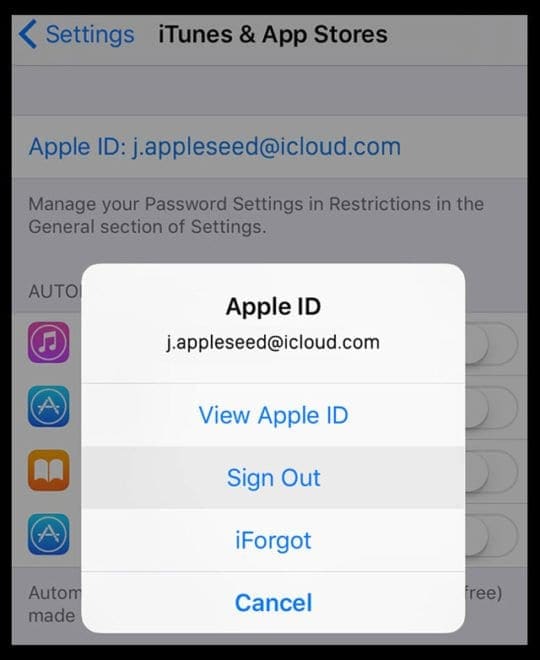
Open Settings > iTunes & App Stores
Tap your Apple ID
Choose Sign Out
Tap Sign In
If signing out and back in doesn’t help
Go back to Setting> iTunes & App Store
Sign out of your Apple ID again
Open the App Store
Try to download anything free
When asked to enter your Apple ID, ignore this message and instead open Settings > iTunes & App Store again and sign in with your Apple ID
Force Restart Your iDevice
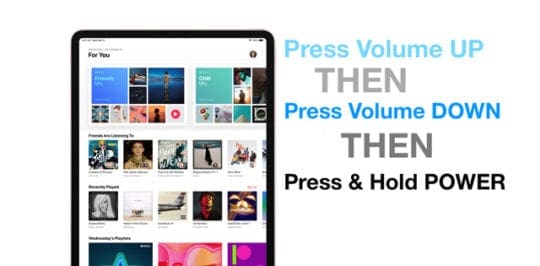
On an iPad with no Home Button and iPhones 8 or later: Press and quickly release the Volume Up button. Press and quickly release the Volume Down button. Then press and hold the Side/Top/Power button until the device restarts
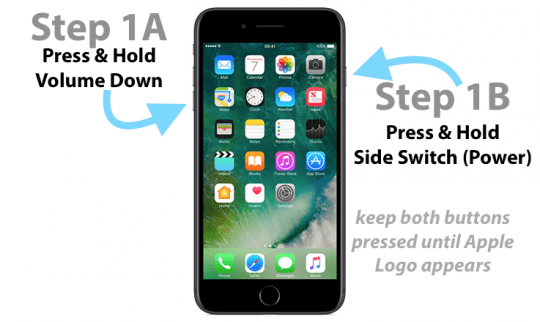
On an iPhone 7 or iPhone 7 Plus: Press and hold both the Side and Volume Down buttons for at least 10 seconds, until you see the Apple logo
On an iPhone 6s and earlier, iPad with a Home Button, or iPod touch: Press and hold both the Home and the Top (or Side) buttons for at least 10 seconds, until you see the Apple logo
Too Many HTTP Redirects on Safari for iOS?
Force the Safari app to close
Double press your Home Button or swipe up the Home Gesture Bar
Locate the app preview for Safari
Swipe up the Safari app preview off the top of your screen
Restart your device
Try launching the Safari app again
If closing the Safari app doesn’t work
Close all open apps by double pressing the Home Button or swiping up the Home Gesture Bar
Swipe up off the top of your screen all the app previews
Do this until all you see is your Home Screen
Clear Safari’s Cache
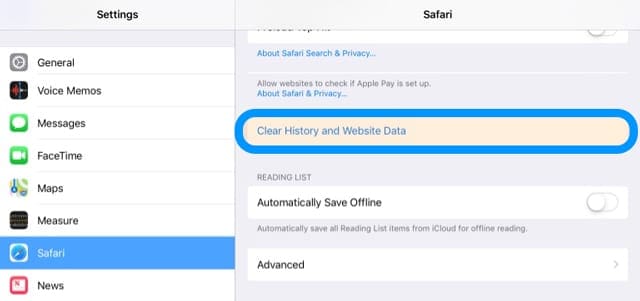
Open Settings > Safari
Choose Clear History and Website Data
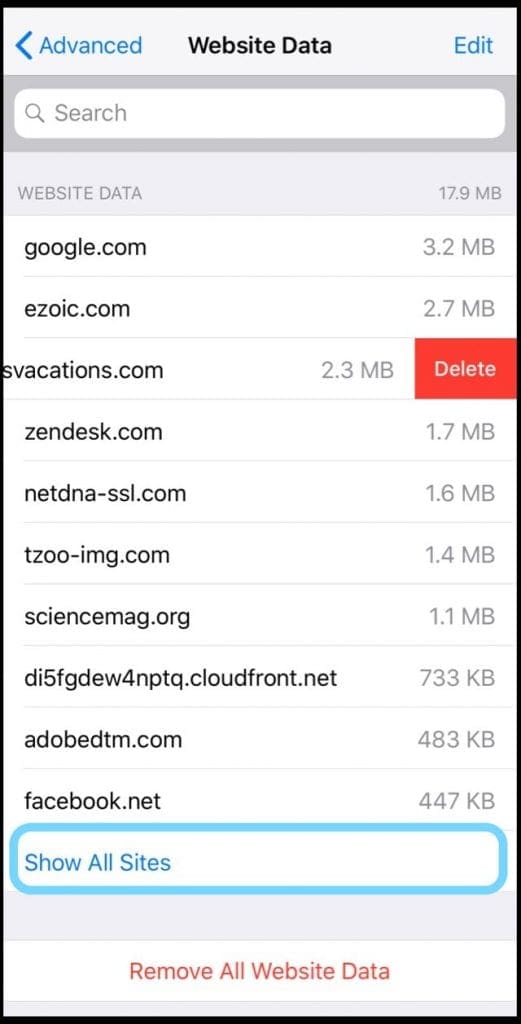
In that same Safari Settings menu, scroll down to Advanced
Choose Website Data
Swipe each site to Delete individually or tap Remove All Website Data to remove all data at once
If clearing Safari cache didn’t help
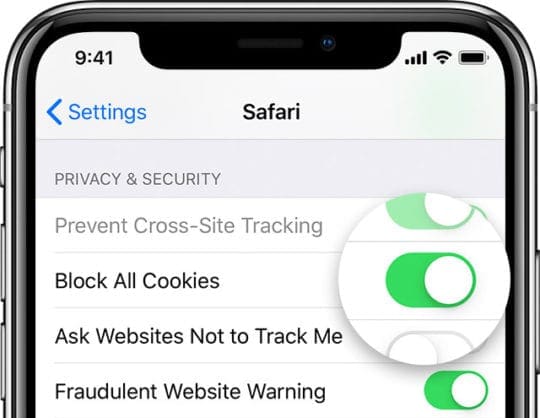
Go to Settings > Safari
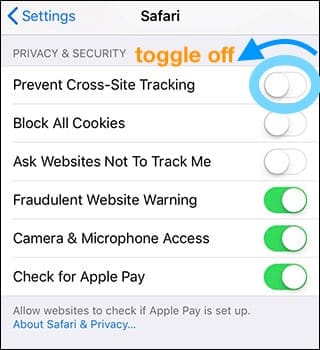
Scroll to the section Privacy & Security
Allow Cookies by toggling off Block All Cookies
Temporarily toggle off the setting to Prevent Cross-Site Tracking
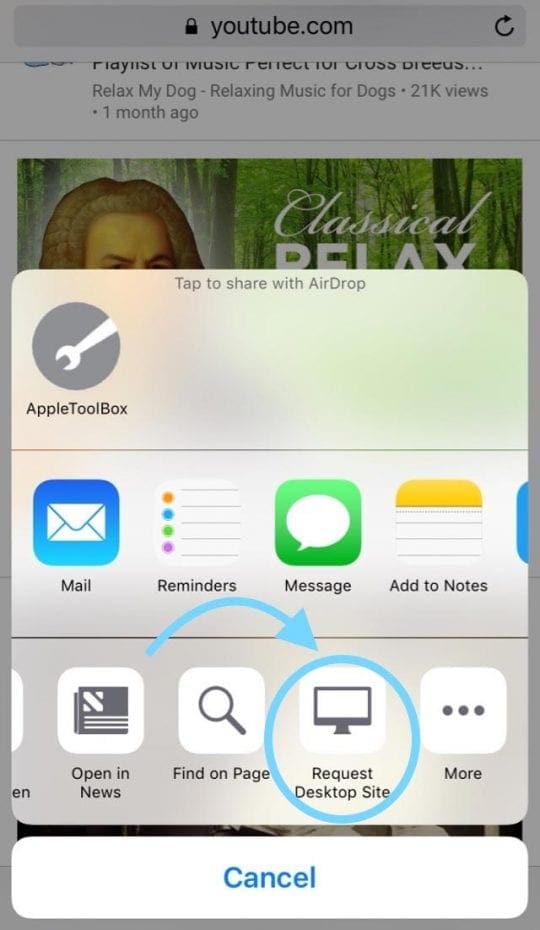
Request Safari’s Desktop Site
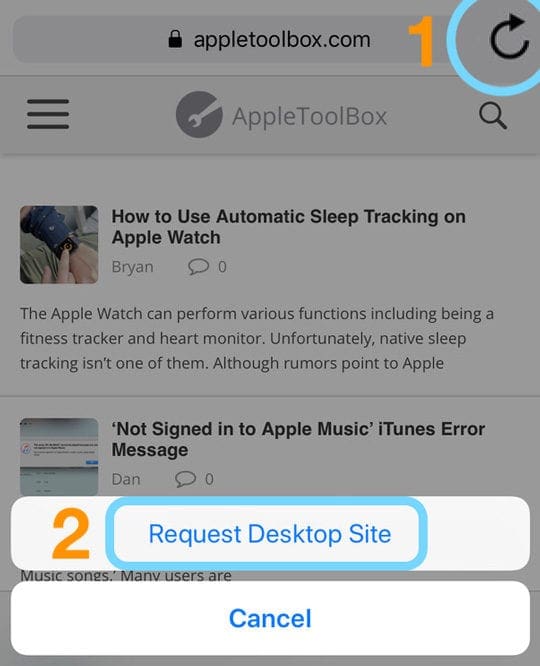
On the exact page where you get the redirect error, tap and hold the refresh icon
Select Request Desktop Site
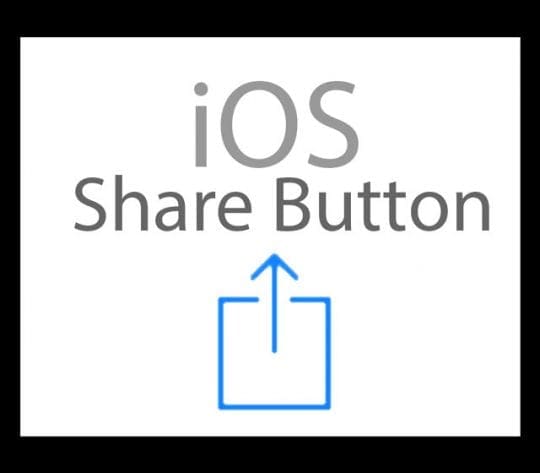
Another option is to tap the Share button
And choose Request Desktop Site from the Share Sheet
Why Does Netflix Say ‘could not open the page, too many redirects?’
Some users have reported that they are getting the same error with the Netflix app
For iOS Devices
On the home screen, tap Settings
Scroll down and tap Safari
Under Privacy & Security, toggle off Block All Cookies
Return to your email and try the password reset link again
For Macs
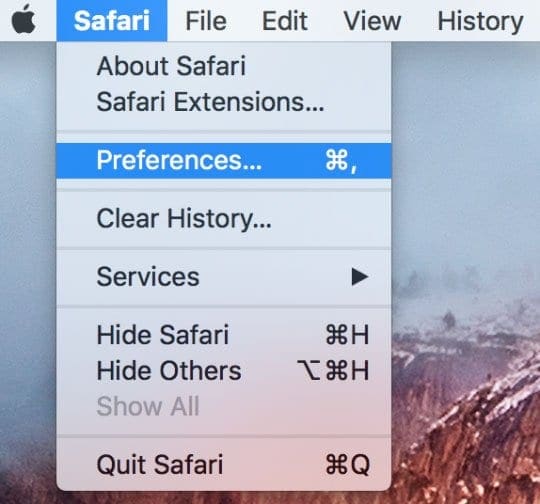
Go to the Safari > Preferences
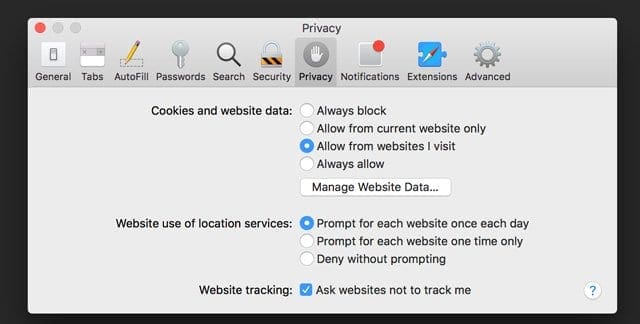
SelectPrivacy
Under Cookies and website data, choose Manage Website Data
Search for Netflix
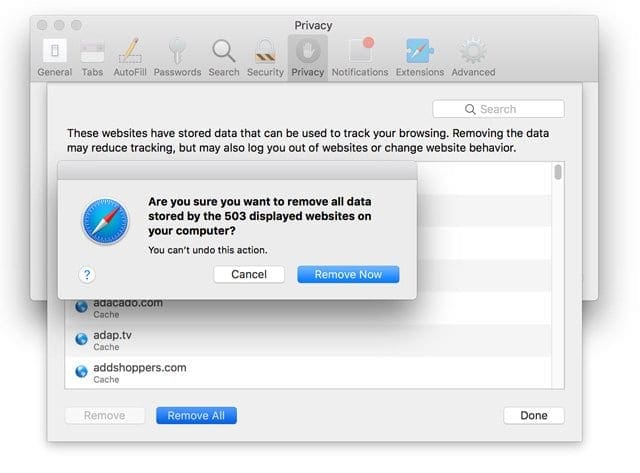
Select Remove
Tap Remove Now
After you delete the Netflix website data, close Safari and try Netflix again
Too Many HTTP Redirects on Safari for Mac?
Open Safari
Choose Safari > Preferences
Click the Privacy icon
Click Manage Website Data
Tap either Remove All or use the Search field to find the name of the redirecting website, then select the website and click Remove Now
Obsessed with tech since the early arrival of A/UX on Apple, Sudz (SK) is responsible for the original editorial direction of AppleToolBox. He is based out of Los Angeles, CA.
Sudz specializes in covering all things macOS, having reviewed dozens of OS X and macOS developments over the years.
In a former life, Sudz worked helping Fortune 100 companies with their technology and business transformation aspirations.
I am trying to get on Uber.com to sign in but I can only get so far and then Safari has been redirected too many times. I followed your plan but It doesn’t work for me. When I do go back to Manage Website Data I can see that 8 wide sites it redirected through. I have had this trouble for awhile now. Do you have any advice on how I can fix this or should I contact Apple?
First, close the Safari app by double pressing Home or swiping up from the bottom to access your app switcher. Locate Safari and then swipe it up, off the top of your screen.
Then, go to Settings > Safari > Advanced and remove all that website data.
Once done, restart.
Open Safari and close all open tabs by pressing and holding the tabs icon (look like two overlapping squares.) Choose Close all tabs.
Finally, try accessing uber again by typing its URL in the address bar.
This message means that the URL you have is directing to another page, which then directs to another page–and there may be multiple redirects happening–or even a redirect loop where it just cycles through again and again.
This error could be the page you want to visit itself–the website itself created the redirect or it could be that there is an issue with your Safari’s cache or cookies.
The first thing to do is close all the open tab in Safari.
If the problem is on an iPhone/iPad/iPod:
Open Safari
At the bottom or top (depending on what device you use) long press on the Tabs icon (looks like two overlapping squares)
Select Close All Tabs
for Macs:
Right-click on any tab and choose Close other tabs
Next clear your Safari’s Cache:
for Macs:
In the Safari app on your Mac, choose Safari > Preferences
Click Privacy
Choose Manage website data
Wait for information to populate
Click Remove All
On an iPhone/iPad/iPod:
Go to Settings > Safari > Advanced > Website Data
Tap Remove All Website Data
Finally, close Safari
Close an app
1. On an iPhone or an iPad with no home button from the Home screen, swipe up from the bottom of the screen and pause slightly in the middle of the screen
2. On an iDevice with a home button, double-click the Home button and swipe right or left to find the app that you want to close
3. Swipe right or left to locate the app you want to close
4. Swipe up on the app’s preview to close it
I just bought this new movie off the app store and I only have this movie for 48 hours. app store redirected me to the TV app after I purchased the movie. but once I click to watch the movie, 5 seconds later an error pops up saying “too many HTTP redirects” any fixes?
Close all open apps by double pressing the Home Button or swiping up the Home Gesture Bar and then swiping up off the top of your screen all the app previews. Do this until all you see is your Home Screen.
Then, open Settings > Safari and choose Clear History and Website Data. Then toggle off the setting to prevent cross-site tracking.
In that same Safari Settings menu, scroll down to Advanced and again choose Website Data. Tap Remove All Website Data.
Then restart your iDevice and try watching the movie again.
If that didn’t work, sign out of the iTunes & App Store and sign in again, using this technique:
1- Go to Setting> iTunes & App stores> sign out of your Apple ID account
2- Open the App Store and try to download anything that’s free
3- Enter your account details to sign in o go to settings and sign in there
Hi everyone listen to alebadi feb 17 th
Instructions I had this problem today and choose to follow what alebadi said worked great thank you
Follow this below
alebadi
February 17, 2013
iPhone 4s 32GB
Hi…
I have the same problem but I solved it easily…
It happened when I tried to make another account and just closed the App Store, then I got the mentioned message…
My solution was:
1- Go to Setting> iTunes & App stores> sign out of your account
2- Open App Store and try to download anything free and when asked to enter your account just close the App Store
3- Go to setting again and sign in
4- For here it worked for me, I don’t know about you… lol
I tried everything that everyone said. Nothing is fixing it. The “too many http redirects” only occurs when I tap on Categories and Top 25. Any help would be nice.
Nope. Nothing. Null. Nada.
What’s really frustrating (and says a lot, actually), is that neither Apple nor the networks seem to give a damn, as this has been a problem for several months.
Having exact same issues as Bree. Have spent almost an hour on the phone with “apple support”… No help at all. Have had phone only 1 month :/ very frustrated
Total fail. I expect this type of thing from Microsoft but not apple. None of this works. I think it’s a Apple central issue they need I resolve. Just like the recent issue with changing people’s security questions on us randomly so had to call in to get that fixed also. Apple is going down hill fast.
I also have iPhone 5 along with 6.1.4 most recent update and 2 days ago I noticed my categories and top 25 buttons within the App Store app have changed there location. Also while tapping on either tab, it comes up with HTTP too many redirects. Now I’ve done everything that the above people have suggested and nothing works and there’s no available update according to apple. Like I said my phone was perfectly fine up until 2 days ago, which tells me it’s an apple plague. Too many people having the same problem. Makes u wonder?????
I’m having the exact same problem. I have an iPhone 5 and I’m using iOS 6.1.4. Ive tried all the little solutions people have listed and nothing has worked for me.
This def didnt work for me … :/ I am using iOS 6.1.3
I even noticed that the bottom bar of my App Store is switched up as well. It’s not how it use to be. When I try to go “categories” or “top 25” it won’t let me. I get that error msg.
I’ve follow the steps that it told me p, but I’m still getting the same error!!!
Help me!!!!!!!!!!!!!!!!!!!!!!!!!!!!!!!!!!!!!!!!!!!!!!!!!!!!!!!!!!!!!!!!!!!!!!!!!!!!!!!!!!!!!!!!!!!!!!!!!!!!!!
I signed out of my iTunes account via settings and then forced the App Store to close down. Then restarted the iPhone, logged back in to my account and bang; back in business.
I just updated to 6.1.2 and the problem resolved itself. I didn’t notice any mentioned of this issue being addressed with this, the most recent, iOS patch.
I couldn’t get the instructions above to work either, but glad for the ideas and really glad the update cleared the problem (on my iPad 2/wifi only – I never had the issue on my iphone 5 for whatever it is worth)
iPhone 4s 32GB
Hi…
I have the same problem but I solved it easily…
It happened when I tried to make another account and just closed the App Store, then I got the mentioned message…
My solution was:
1- Go to Setting> iTunes & App stores> sign out of your account
2- Open App Store and try to download anything free and when asked to enter your account just close the App Store
3- Go to setting again and sign in
4- For here it worked for me, I don’t know about you… lol
Pls help, I’ve tried this so far, but nth happens! I dun kno wat to do now! It still appears ” Too many http redirects” when I try to access App Store.












I am trying to get on Uber.com to sign in but I can only get so far and then Safari has been redirected too many times. I followed your plan but It doesn’t work for me. When I do go back to Manage Website Data I can see that 8 wide sites it redirected through. I have had this trouble for awhile now. Do you have any advice on how I can fix this or should I contact Apple?
Hi Ann,
First, close the Safari app by double pressing Home or swiping up from the bottom to access your app switcher. Locate Safari and then swipe it up, off the top of your screen.
Then, go to Settings > Safari > Advanced and remove all that website data.
Once done, restart.
Open Safari and close all open tabs by pressing and holding the tabs icon (look like two overlapping squares.) Choose Close all tabs.
Finally, try accessing uber again by typing its URL in the address bar.
Hope this works!
This error appears on ios and windows platforms on safari, chrome, ie and firefox.
Why am I getting the message “ safari can’t open page because too many redirects?”
Hi Kameka,
This message means that the URL you have is directing to another page, which then directs to another page–and there may be multiple redirects happening–or even a redirect loop where it just cycles through again and again.
This error could be the page you want to visit itself–the website itself created the redirect or it could be that there is an issue with your Safari’s cache or cookies.
The first thing to do is close all the open tab in Safari.
If the problem is on an iPhone/iPad/iPod:
Open Safari
At the bottom or top (depending on what device you use) long press on the Tabs icon (looks like two overlapping squares)
Select Close All Tabs
for Macs:
Right-click on any tab and choose Close other tabs
Next clear your Safari’s Cache:
for Macs:
In the Safari app on your Mac, choose Safari > Preferences
Click Privacy
Choose Manage website data
Wait for information to populate
Click Remove All
On an iPhone/iPad/iPod:
Go to Settings > Safari > Advanced > Website Data
Tap Remove All Website Data
Finally, close Safari
Close an app
1. On an iPhone or an iPad with no home button from the Home screen, swipe up from the bottom of the screen and pause slightly in the middle of the screen
2. On an iDevice with a home button, double-click the Home button and swipe right or left to find the app that you want to close
3. Swipe right or left to locate the app you want to close
4. Swipe up on the app’s preview to close it
That should do the trick!
I just bought this new movie off the app store and I only have this movie for 48 hours. app store redirected me to the TV app after I purchased the movie. but once I click to watch the movie, 5 seconds later an error pops up saying “too many HTTP redirects” any fixes?
Hi Dakota,
Close all open apps by double pressing the Home Button or swiping up the Home Gesture Bar and then swiping up off the top of your screen all the app previews. Do this until all you see is your Home Screen.
Then, open Settings > Safari and choose Clear History and Website Data. Then toggle off the setting to prevent cross-site tracking.
In that same Safari Settings menu, scroll down to Advanced and again choose Website Data. Tap Remove All Website Data.
Then restart your iDevice and try watching the movie again.
If that didn’t work, sign out of the iTunes & App Store and sign in again, using this technique:
1- Go to Setting> iTunes & App stores> sign out of your Apple ID account
2- Open the App Store and try to download anything that’s free
3- Enter your account details to sign in o go to settings and sign in there
the error never showed after I switched off my VPN buttom
Hi everyone listen to alebadi feb 17 th
Instructions I had this problem today and choose to follow what alebadi said worked great thank you
Follow this below
alebadi
February 17, 2013
iPhone 4s 32GB
Hi…
I have the same problem but I solved it easily…
It happened when I tried to make another account and just closed the App Store, then I got the mentioned message…
My solution was:
1- Go to Setting> iTunes & App stores> sign out of your account
2- Open App Store and try to download anything free and when asked to enter your account just close the App Store
3- Go to setting again and sign in
4- For here it worked for me, I don’t know about you… lol
Hi everyone listen to alebadi feb 17 th
Instructions I had this problem today and choose to follow what alebadi said worked great thank you
I tried everything that everyone said. Nothing is fixing it. The “too many http redirects” only occurs when I tap on Categories and Top 25. Any help would be nice.
Thank u very much it worked for me:))
Nothing working. Go to hell Apple.
Nope. Nothing. Null. Nada.
What’s really frustrating (and says a lot, actually), is that neither Apple nor the networks seem to give a damn, as this has been a problem for several months.
Having exact same issues as Bree. Have spent almost an hour on the phone with “apple support”… No help at all. Have had phone only 1 month :/ very frustrated
Total fail. I expect this type of thing from Microsoft but not apple. None of this works. I think it’s a Apple central issue they need I resolve. Just like the recent issue with changing people’s security questions on us randomly so had to call in to get that fixed also. Apple is going down hill fast.
I am getting the the same EXACT problems as Negron, please fix apple.
I also have iPhone 5 along with 6.1.4 most recent update and 2 days ago I noticed my categories and top 25 buttons within the App Store app have changed there location. Also while tapping on either tab, it comes up with HTTP too many redirects. Now I’ve done everything that the above people have suggested and nothing works and there’s no available update according to apple. Like I said my phone was perfectly fine up until 2 days ago, which tells me it’s an apple plague. Too many people having the same problem. Makes u wonder?????
I’m having the exact same problem. I have an iPhone 5 and I’m using iOS 6.1.4. Ive tried all the little solutions people have listed and nothing has worked for me.
This def didnt work for me … :/ I am using iOS 6.1.3
I even noticed that the bottom bar of my App Store is switched up as well. It’s not how it use to be. When I try to go “categories” or “top 25” it won’t let me. I get that error msg.
PLEASE HELP ME
Nothing works
Didn’t work. Dead on the water. Unable to update apps.
Tried and failed. Still getting the same error
This is not working for me :(!! I would appreciate it if someone could fix it So It Will Work ;)!! That would make me extremely happy ;)!!!
I’ve follow the steps that it told me p, but I’m still getting the same error!!!
Help me!!!!!!!!!!!!!!!!!!!!!!!!!!!!!!!!!!!!!!!!!!!!!!!!!!!!!!!!!!!!!!!!!!!!!!!!!!!!!!!!!!!!!!!!!!!!!!!!!!!!!!
Working perfectly.
Worked fine for me thanks!
I signed out of my iTunes account via settings and then forced the App Store to close down. Then restarted the iPhone, logged back in to my account and bang; back in business.
I just pdated to 6.1.2 then the problem automatic resolved
Thanks! Works on jailbroken 4S with 6.1
New update fixes issue. Tested and approved.
I just updated to 6.1.2 and the problem resolved itself. I didn’t notice any mentioned of this issue being addressed with this, the most recent, iOS patch.
I couldn’t get the instructions above to work either, but glad for the ideas and really glad the update cleared the problem (on my iPad 2/wifi only – I never had the issue on my iphone 5 for whatever it is worth)
This worked perfectly for me. Thank you.
Me either 🙁
iPhone 4s 32GB
Hi…
I have the same problem but I solved it easily…
It happened when I tried to make another account and just closed the App Store, then I got the mentioned message…
My solution was:
1- Go to Setting> iTunes & App stores> sign out of your account
2- Open App Store and try to download anything free and when asked to enter your account just close the App Store
3- Go to setting again and sign in
4- For here it worked for me, I don’t know about you… lol
*******************
Alebadi is a genius. Worked on my White iPhone 5 64GB
*******************
Worked for me too. 🙂
This worked for me!!!! thank you thank you thank you!!!
Me neither. I get it when I try to open the ITunes Store. No solutions I have read on various websites resolves the problem
Pls help, I’ve tried this so far, but nth happens! I dun kno wat to do now! It still appears ” Too many http redirects” when I try to access App Store.
Like David I did it all, Twice, not fixed. It seemed happen after using Safari.
None of this worked for me…
This is not working for me either. I’ve tried quite a few fixes from the internet and none are working.
This dont work for me too!
This did not work for me either. Submitted a trouble ticket/Email to Apple Support.
I deleted my you tube apps and then reloaded them. No idea why it worked, but I’m back in business.
Did not fix the problem
I have tried 1,3,4 but it didn’t help. Come here and tried the 2nd (Apple ID) solution and it works!
Apple is dumb anyway.
Not working.
This didn’t works for me 🙁
me too.
Me either!! I hate updates!!
Did not work for me.