• Skip to primary navigation
  • Skip to main content
  • Skip to primary sidebar
  • Skip to footer

AppleToolBox

Tools and Fixes for Mac, iPad, iPhone & iWatch

Search posts

  • About
  • Contact

CONNECT WITH US

CATEGORIES

  • iPhone
  • iPad
  • iPod
  • Apple Watch
  • Mac/MacBook
  • AirPods
  • Apple TV
  • News
  • Apple Services
  • HomePod
  • Reviews

SITE

  • Home
  • About Us
  • Contact
  • Advertise

Search posts

You are here: Home / iPhone / iPhone Does Not Always Ring

iPhone Does Not Always Ring

By Michelle Honeyager 0 comments Last updated March 27, 2022

While our phones can do a lot, the fact is their primary function is still that it should work as a phone. It’s right in the name: iPhone. But sometimes people report issues with the phone not always ringing. This can be disastrous, as it makes it look like you’re dodging calls to your friends and family, or you could even miss something very important like a job interview call. Below we’ll go into why your iPhone might not always ring and how to troubleshoot the issue.

iPhone Going Straight to Voicemail

One case reported in the Apple forums is that someone will call from the same number and all the settings on the phone will be the same, and then sometimes it rings and other times the phone goes to voicemail.

It can even happen when someone is in the contacts list.

Troubleshoots for iPhone Not Ringing

The standby is to try restarting the phone. Power it all the way down so it turns off. That can resolve temporary hick-ups with the phone.

You might also want to try updating the phone to the latest software available.

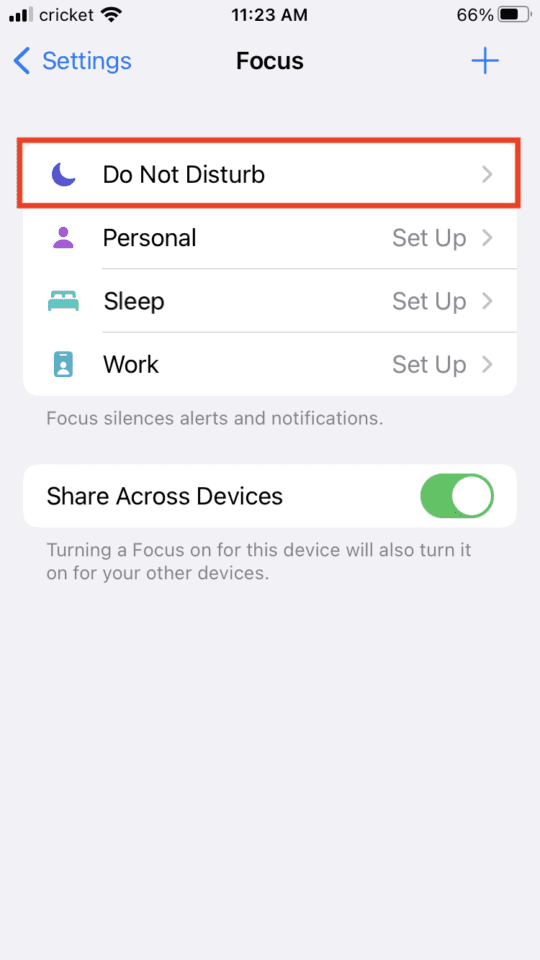
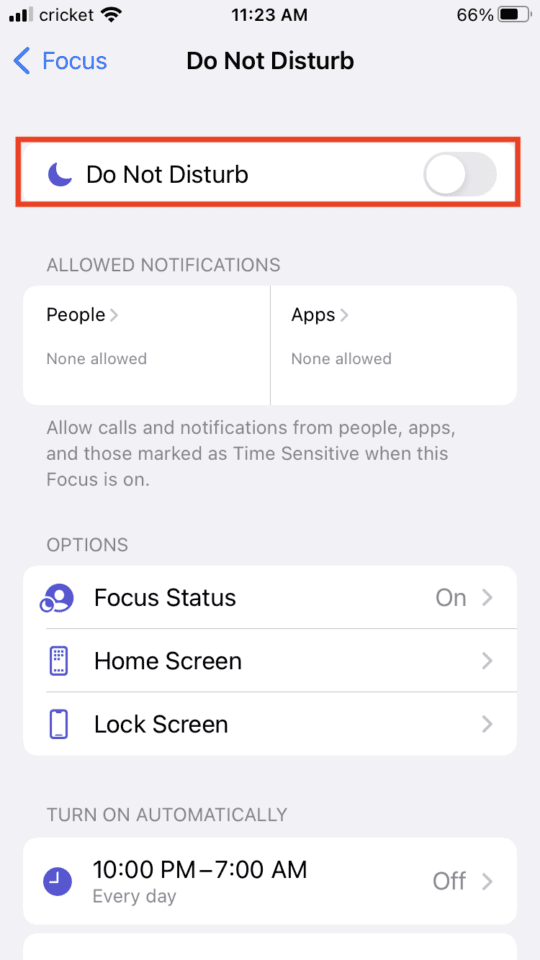
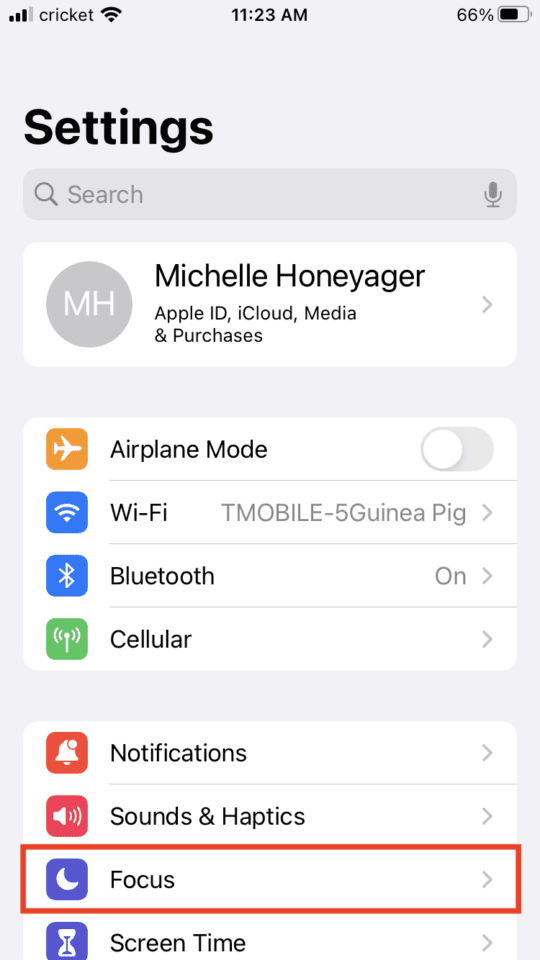
Some people also report that the Do Not Disturb setting might be enabled on the phone. To turn off Do Not Disturb:

  1. Go into your Settings app with the cogwheel icon
  2. Select Focus

  1. Tap Do Not Disturb

  1. Make sure the toggle at the top next to Do Not Disturb is gray, tap it if it is green to turn it to gray

Also, be sure to make sure calls are in your recents list in your phone app. If they are not, the call is not making it through and it is a problem with the signal and carrier. You are likely not receiving calls at all in this case.

Related Posts:

  • The home screen on an iPhone
    iOS iPhone Visual Voicemail Not Working After iOS 17…
  • iPhone Voicemail Header
    iPhone Calls Going Straight to Voicemail Without…
  • solen-feyissa-15v6smjHVHQ-unsplash
    How To Close Your Apple Watch Rings Everyday
  • Person holding iPhone in their hand with Face ID
    iPhone: How to Change the Number of Rings Before Voicemail
  • Live Voicemail in action on iOS 17
    iOS 17: What is Live Voicemail and How Can You Use It?
  • Photo of an iPhone being taken out of its box
    How To Use Dual SIM and eSIM on Your iPhone
  • Screen Shot 2021-08-12 at 7.36.51 PM
    The Best AirPods Max Cases For 2021
  • woman texting on iphone
    Call Sound Issues With iPhone: How to Fix
  • iphone and airpods on a table
    iPhone Dropping Calls After Updating to iOS 17? Here…

Reader Interactions

Write a Comment Cancel reply

Primary Sidebar

Recent Posts

  • How to Manage Your iPhone Call Log
  • Are Apple’s Safety Precautions Enough for AirTags?
  • How to Hide Username and Photo on the Mac Lock Screen
  • Microsoft Resume vs. Apple Handoff – Which Wins for Cross-Device Work?
  • How to Export iTunes Library to New Computer
  • What the Gemini Desktop App Will Bring to Mac

Connect with us

Footer

ABOUT

  • About Us
  • Contact us
  • Advertise
  • Privacy
  • Terms of Use

GUIDES

  • iOS & iPadOS
  • Apple ID
  • iCloud
  • App Store
  • iTunes
  • FaceTime
  • iMessage
  • Siri
  • Books and iBooks
  • Game Center
  • AirPlay

CONNECT

  • Facebook
  • Twitter
  • FeedBurner
  • YouTube

© Copyright 2010-2024 Guiding Tech Media · All Rights Reserved

This site and its content are in no way affiliated or endorsed by Apple, Inc. · Reproduction without explicit permission is prohibited