Apple’s newly launched Vision Pro headset represents its first foray into augmented reality glasses. Initial reviews praise the stunning visuals and spatial audio immersion Vision Pro enables. It promises to revolutionize workouts, gaming, social interactions, and more as early adopters dive in.
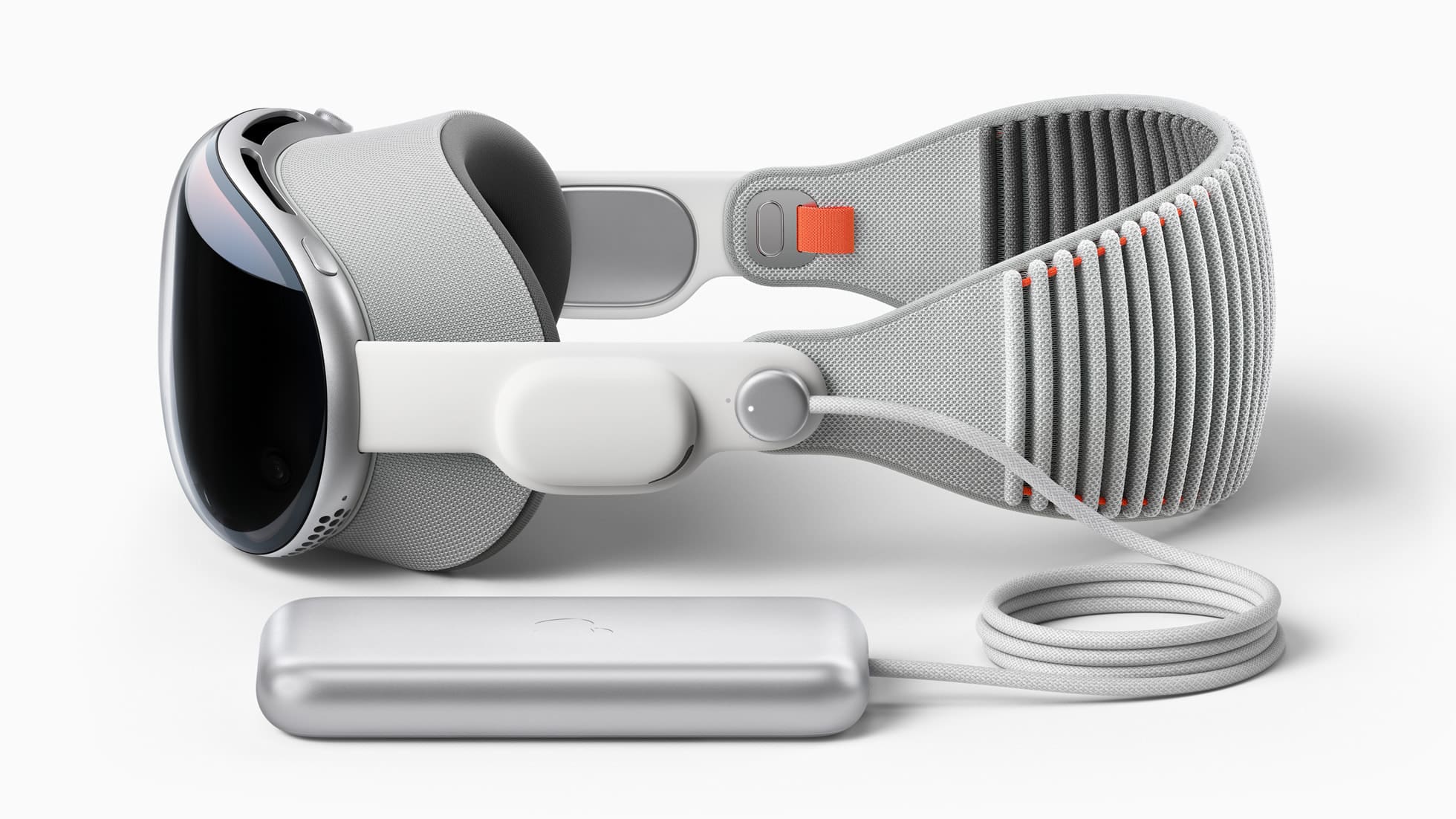
However, lengthy usage sessions drain the built-in battery rapidly. Apple bundles the $199 Magnetic Charging Cable with portable battery pack for extended sessions. But paying a fifth of the headset’s cost solely for Apple’s proprietary battery pack seems overpriced.
Thankfully, Vision Pro also supports charging via standard USB-C cables and third-party power banks. But which specifications and features are ideal for the best experience? This comprehensive guide covers everything about safely using affordable portable chargers to power your Vision Pro headset.
Why Consider Third-Party Portable Chargers for Vision Pro?
Opting for universal USB-C power banks instead of Apple’s official battery pack has several benefits:
Cost Efficiency: Quality third-party power banks are available for under $50, a significant saving compared to Apple’s $199 option.
Extended Battery Life: These power banks typically offer higher capacities, allowing for longer VR sessions.
Versatility: They can also charge other USB-C devices, such as iPhones, iPads, and MacBooks.
It’s essential, however, to ensure that these third-party batteries meet specific charging specifications for optimal performance.
Can You Use Third-Party Portable Chargers With Vision Pro?
Yes, you can use third-party portable batteries with the Apple Vision Pro. The device’s external battery supports USB-C Power Delivery (PD), allowing it to be compatible with a wide range of third-party power banks. For instance, a 20,000mAh 30W USB-C PD power bank is capable of extending the Vision Pro’s runtime by approximately an additional 2 hours.
This compatibility opens up options for users to select third-party batteries based on their preferences for weight, capacity, and price. There are numerous 20,000mAh 30W PD power banks available on the market, many of which are priced under $50, offering a cost-effective way to extend the usage time of the Vision Pro.
Moreover, third-party accessory manufacturers are also developing innovative solutions, such as a neck-worn power bank designed specifically for spatial computing devices like the Vision Pro. This design aims to offer a more comfortable and practical alternative to Apple’s own battery pack, which some users find cumbersome. This indicates a growing ecosystem of third-party accessories designed to enhance the Vision Pro experience, including options for extended battery life.
Checking Vision Pro Portable Charger Compatibility
Thankfully, Vision Pro supports universal USB-C Power Delivery portable chargers just like modern laptops, tablets and phones. But you have to watch for:
Power Delivery Standard – Needs USB-C PD support for proper fast charging, not plain USB-C.
30W Power Output – Vision Pro draws up to 30 watts from USB-C PD sources. Lower outputs charge slower.
USB-C to USB-C Cable – Only USB-C to USB-C cables support full 30W power delivery for peak charging speed.
Minimum 10,000 mAh Capacity: This should provide at least one full charge for the Vision Pro.
Recommended 20,000+ mAh Capacity: Larger capacities mean more recharges for the headset.
As long as your prospective power bank meets those key criteria, Vision Pro will charge smoothly without issues.
Safe Charging Practices
When using portable power banks, it’s important to follow safe charging practices:
Charge the Power Bank Fully: Before connecting it to any device, make sure it’s fully charged.
Monitor the Indicator Lights: These help you keep track of the remaining charge.
Use While Charging: The Vision Pro can be used while it’s charging.
Secure Attachment: When stationary, attach the power bank to the Vision Pro straps using velcro or clips to prevent cable tangling.
Adhering to these practices ensures that third-party batteries are as reliable as Apple’s own product.
Using Vision Pro with External Battery Packs
While the Vision Pro doesn’t have an integrated battery like iPhone-style battery cases, connecting external battery packs is straightforward:
Passive Charging: The power bank will charge the Vision Pro automatically, even when the headset is not in use.
Active Charging: You can use the headset while it’s being charged.
Battery Indicator Monitoring: Keep an eye on the battery percentage to gauge the charging status.
Proper Cable Management: Secure the cables with anchors or clips to avoid interference during active VR use.
With the right accessories, charging the Vision Pro, whether stationary or active, is both safe and efficient.
Best Portable Charger for Apple Vision Pro
Based on their stellar reputation, high capacity, and 30W+ USB-C PD compliance, here are some recommended portable power banks for reliable Vision Pro charging:
Anker 533 PowerCore 30W: With a 10,000mAh capacity, the Anker 533 will provide at least one full charge for the Vision Pro. It’s equipped with dual USB-C ports and a single USB-A port, all while being compact and lightweight.
Baseus 30,000mAh Power Bank (65W): 65W USB-C port provides enough power to charge a laptop at full spped. It also features a total of seven different ports, and there’s even an LED display to let you know how fast your devices are charging.
INIU 140W Power Bank: With 3 charging ports, including a blazing-fast PD 3.1 140W USB-C in/out port, a PD 45W USB-C fast charging port, and a trusty USB-A port, this power bank is your all-in-one charging solution. It works seamlessly with various cable types, ensuring rapid charging for all your devices.
UGREEN 145W 25000mAh Portable Charger: The UGREEN 145W portable charger is a high-capacity power solution, boasting a substantial 25000mAh battery, ideal for extended use. It features three versatile charging ports and a convenient digital display, ensuring efficient power management and device compatibility.
Shargeek STORM2 Slim 100W Power Bank: The Shargeek STORM2 Slim portable charger stands out with its unique see-through design, allowing users to view its internal components. It boasts a 20,000mAh capacity and rapid 100W charging speeds, complemented by an IPS screen for real-time charging status and information display.
Anker Prime 27K Power Bank: The Anker Prime 27K Power Bank is a robust portable charger, offering an impressive 250W charging speed and a substantial 27650mAh capacity, ideal for powering multiple devices quickly. Its advanced features include the ability to monitor, control, and locate the charger using a smartphone, enhancing convenience and security for on-the-go charging.
Any of those battery packs will seamlessly extend your Vision Pro usage for prices ranging below $100 to being more comparable to Apple’s own Battery Pack.
Conclusion
In conclusion, the newly released Apple Vision Pro headset does support charging from and compatibility with affordable third-party USB-C PD portable chargers despite lacking official certification. As long as key criteria like 30W power delivery output and 10,000 mAh capacities are met, quality power banks from Anker, Zendure, and other brands can safely extend your VR usage sessions.
The standards-based USB-C connectivity ensures reliable performance, often at 75% cheaper prices compared to Apple’s own $199 battery pack. While first-party accessories may offer greater seamlessness, third-party options provide significant cost savings without much compromise on core functionality. Just be sure to adhere to proper charging practices and choose packs meeting outlined power specifications.
With the convenience and versatility of portable power banks, you can now comfortably use Vision Pro headsets for longer stretches without tethering to wall outlets and without emptying your bank account on proprietary accessories. Affordable batteries truly unlock the full mobile potential of augmented reality glasses.
Andrew Myrick is a freelance writer based on the East Coast of the US. He enjoys everything to do with technology, including tablets, smartphones, and everything in between. Perhaps his favorite past-time is having a never-ending supply of different keyboards and gaming handhelds that end up collecting more dust than the consoles that are being emulated.







Write a Comment