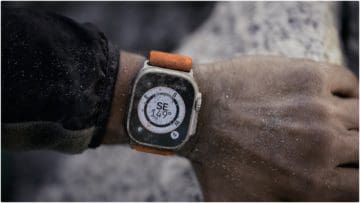
For too long, Apple has had a reputation for being notoriously difficult when it comes to repairs. There have been countless articles and news pieces written about how Apple is experiencing legal trouble regarding the Right to Repair movement and complaints from disgruntled customers. Finally, it seems that with Apple’s “Far Out” event and the subsequent products that followed, we see a seismic shift in the company’s attitude. Regardless of whether Apple was forced to implement these changes or it believed it was finally time to provide users with repairability, it’s great to see that we’ll be able to fix our beloved products. If you recently purchased an Apple Watch Ultra or are wondering if the Apple Watch Ultra is repairable, read on to find out more.
When Apple was announcing its new line of products, a few people raved about how the iPhone 14 was more repairable than previous versions. But what not many people caught onto was that the Apple Watch Ultra had an external screw on the back. When you see an external screw, that means you know it’ll be fixable. It’s certainly not perfect, as there are bits of adhesive that stick around everywhere once you get the product open, but it’s a start. Compared to having to physically crack open the AirPods or laser cut through the back of a phone, this is great news.
Of course, Apple claim that these changes make it so that its products are more easily replaceable at Apple stores with Apple Care. However, one of the annoying things about opening the Apple Watch Ultra is that as soon as you open the case, you tear apart the thin and clear gasket that helps with waterproofing. So if you perform any of these repairs yourself or go to a third-party service shop, it’ll be almost impossible to order any new parts if necessary. If you break or lose something during the repair process, you might as well buy a new Apple Watch Ultra. However, the existence of external screws means that you can actually access the battery and all internal components if you so wish. We would still recommend using Apple Care if you need the product fixed, though. You can never be too safe.
New Apple Watch Ultra Features
If you’re thinking about getting the new Apple Watch Ultra because it’s repairable, check out some of the other features it brings:
LTE Included
For the first time, an Apple Watch has LTE connectivity. While it’s obvious that you won’t be able to watch any HD movies or surf the web on this device, it does mean you can open up your watch to a bunch of other features. That means you can call, text, play music from your Apple Music playlists, use Apple Pay, download apps on the App Store or use Maps with an internet connection. Some may have complained that the previous Apple Watch iterations were slightly one-dimensional, but now with this LTE connection, you can unlock a whole new world on your wrist.
Action Button
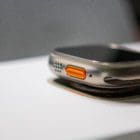
The action button is a new feature unique to the Apple Watch Ultra. It’s ambiguous in nature but very self-explanatory. The action button acts as a versatile tool that allows you to use your Apple Watch Ultra with ease. If you’re beginning a sprint, just open the workout app and press the action button to start. Likewise, if you’re about to go on a dive, you can do the same. Sometimes you don’t have the time to tap and swipe at your watch, so the action button allows you to enjoy the functionality of an Apple Watch Ultra without having to fiddle with it.
Health Features
The Apple Watch series has always been big on health and exercise, but the Apple Watch Ultra allows you to enjoy a lot more features that help you track your overall well-being. You can track your sleep to see how much time you spend in REM, core, and deep sleep. The watch provides you with information on your heart health by notifying you of any irregular rhythms. You can gain insight into your blood oxygen levels (we have no idea how, either). And what’s great about the new Apple Watch Ultra is that women can track their body temperature and menstural cycles to improve their quality of life.








Write a Comment