The App Store has always been one of Apple’s most popular platforms, as it’s been on iOS devices since the inception of the smartphone. There have been countless timeless classics to emerge from the App Store, with games like Fruit Ninja and Flappy Bird, dating apps that changed digital social life, major social media networks with billions of users, and productivity apps that helped society change the way people work. Ads on the App Store have never been particularly intrusive, and they seemed to fit into the platform relatively organically. A few years ago, Apple decided to change up the App Store interface to allow for more written content, curated selections, and more community engagement. So what’s driving this decision to include more ads on the platform? Read on to find out more.
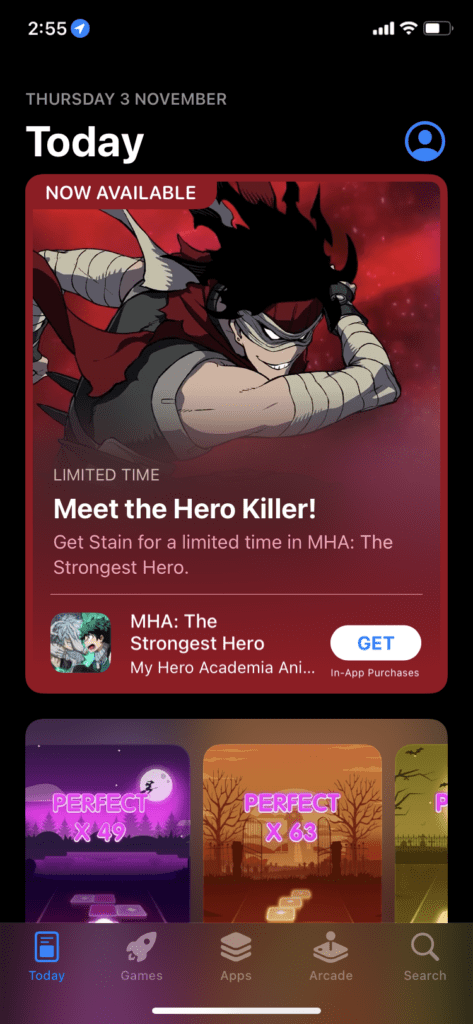
From October 25, 2022, users will experience a larger influx of advertisements on the App Store. If you open the Today tab (the first screen that shows up when you open the app), you’ll see limited offers, large ad spots, and then the curated content. Having the first two spaces serve as huge ad spots does add a more aesthetic vibe to the App Store, especially if done right, and the additions don’t seem harmful to user experience at all.
When you go to the Games tab, you see a sliding reel of ads and then the classic “What We’re Playing” section that has been around for ages. Scrolling down, you see a plethora of games in different categories for you to choose from. The Apps tab also adopts the same sliding ad reel but includes all different types of apps, from social media to productivity. The Arcade tab is a huge advertisement in itself, as Apple is trying to entice people to subscribe to this service. And lastly, the search tab also includes some ads and suggestions.
What Inspired This Decision?
Apple’s business operations team identified that its $4 billion in annual revenue had a lot more opportunity to grow, so it decided to expand ads across all its platforms. It’s been known for ages that those with large budgets can pay for more exposure, but Apple has finally decided to push that business model to the App Store. Of course, you can boil any decision down to “we can make more money”, but we trust (and hope) that Apple can get this advertising right and not make it intrusive. As soon as we start receiving notifications for new apps and discounts, it’ll have gone too far.
What Does This Mean For Apps?
For small developers, this news isn’t so good. Apple’s ad spots are absolutely massive, and with the amount of traffic the App Store gets on a daily basis, you know that a single ad spot on the Today tab would be extremely pricey. Small developers simply can’t afford to spend money on premium ad spots. Although, to be fair, most small apps resort to advertising on different platforms, such as Facebook or Instagram. There are also still smaller ad spots up for grabs on the subsequent tabs on the App Store, although also limited.
For bigger developers, it’s a case of who can outbid each other. Those with deeper pockets can afford to keep their product in the limelight for longer and attract more customers. For consumers, not much has changed at all. If you get particularly annoyed at seeing big ads, you might feel a bit frustrated, but this shouldn’t affect our day-to-day lives at all. If you frequent the App Store often to look for new apps and games, you might even enjoy these changes.












Write a Comment