Apple TV may sometimes fail to connect to your iPhone’s hotspot. After updating iOS to the latest version, Apple TV may not recognize your password right away. When this issue occurs, the following message pops up on the screen: “There was a problem connecting to the network. The Wi-Fi password you entered is not correct. Try again. (-100)”
Unfortunately, there’s no option to enter the password again or forget the network. Let’s see what else you can do to solve this problem.
What to Do if Apple TV Won’t Connect to Your iPhone Hotspot
Update iOS and Apple TV
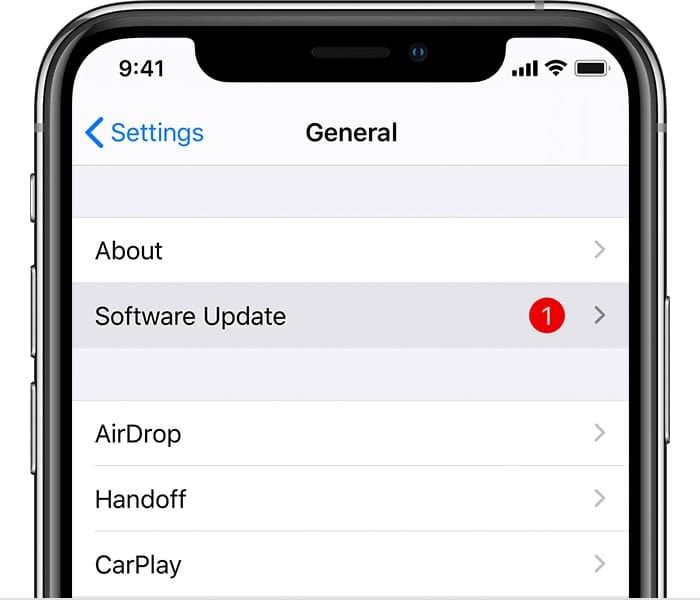
If this issue started occurring shortly after updating your iOS version, it could be caused by an unexpected software bug. Apple’s engineers may have already patched it in the latest iOS release. Go to Settings, select General, and tap Software Update. Install the latest updates, restart your devices, and check if the issue persists.
Make sure your device is running the latest software.
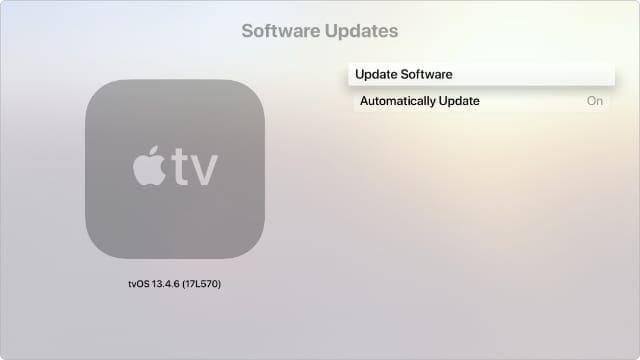
Connect Apple TV to a different network and check for updates. Go to Settings, select System, and then Software Updates.
Make sure your Apple TV is running the latest version of tvOS.
Hotspot on iOS 15 and Newer Is Protected by WPA3
Many Apple TV users experienced similar hotspot issues after installing iOS 15. As a quick reminder, iOS 15 and newer now rely on the WPA3 security protocol for wireless connections. This means that hotspot connections no longer work with older devices.
Apple devices that support WPA3 include:
iPhone 7 and later
iPad 5th generation and later
Apple TV 4K and newer
Apple Watch Series 3 and newer
MacBooks with 802.11ac or later
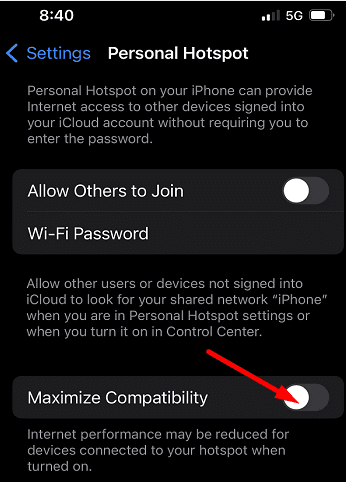
If your Apple TV is obsolete, the recent security protocol changes could explain why you can’t connect to your iPhone’s hotspot. On your iOS device, go to hotspot settings, and turn on Maximize compatibility. Check if you notice any improvements.
Run the Connection Through Your Laptop
As a workaround, you can run the iPhone hotspot connection through your laptop. First, connect your laptop to your iPhone hotspot. Then, share the connection via a mobile hotspot on your laptop. Alternatively, you can also use an Ethernet cable to connect Apple TV to your laptop.
Reset Apple TV
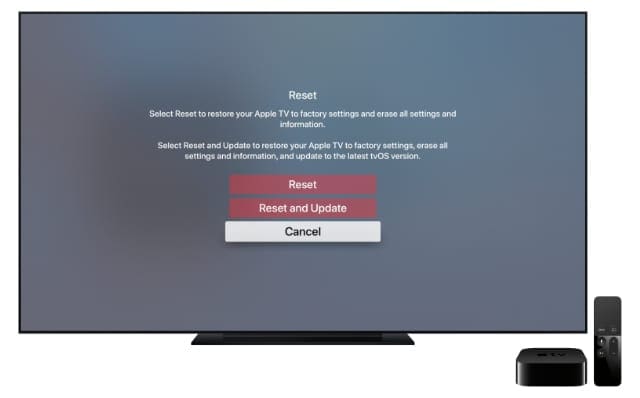
Try resetting your Apple TV to factory settings, and check if this method solves your hotspot issues. Navigate to Settings, go to System, and then select Reset. If you want to quickly go back to factory settings, select Reset. If you want to restore default settings and install the latest software updates, select Reset and Update.
Erase your Apple TV using the Reset option in System Settings.
Well, if Apple TV still won’t connect to your iPhone hotspot, contact Apple Support for further help.
Conclusion
To fix the issue where Apple TV won’t connect to your iPhone hotspot, update your iPhone and Apple TV to the latest version. Alternatively, try running the iPhone hotspot connection through your laptop. Additionally, try resetting your Apple TV to factory settings. If the problem persists, contact Apple Support.
Hit the comments below and let us know if you’re still experiencing the same problem. If the issue is gone, do tell us which solution worked for you.
Madalina has been a Windows fan ever since she got her hands on her first Windows XP computer. She is interested in all things technology, especially emerging technologies — AI and DNA computing in particular.
Resetting Apple TV works a treat for the Apple TV not connecting to the iPhone hotspot. Now every time I want to watch Apple TV, all I have to do now is reset it, spend 2 hours signing into everything, changing incorrect passwords to passwords that can’t be the last password used, and then hooray, I can watch Apple TV again until the next time it is turned off of my phone is taken out of range of Apple TV, it’s a great solution you have listed here.









I don’t have a Laptop. Only an i7.
Maximum compatibility seems to be unavailable on iPhone XR, it it possible to download som app to fix this?
Which apps?
Resetting Apple TV works a treat for the Apple TV not connecting to the iPhone hotspot. Now every time I want to watch Apple TV, all I have to do now is reset it, spend 2 hours signing into everything, changing incorrect passwords to passwords that can’t be the last password used, and then hooray, I can watch Apple TV again until the next time it is turned off of my phone is taken out of range of Apple TV, it’s a great solution you have listed here.
Same problem. Has always connected before. Now won’t even give me the choice to connect to hotspot.