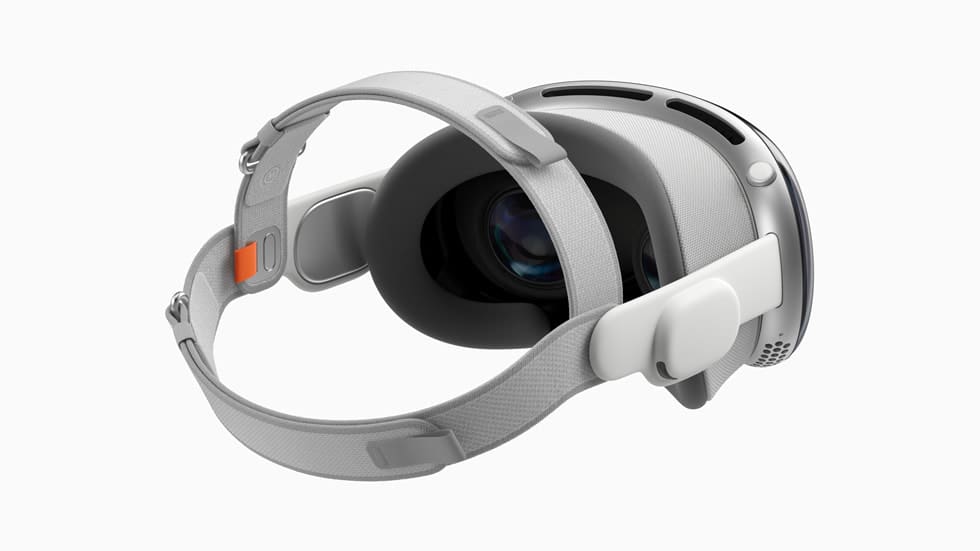
As the first major new hardware product category from Apple since the Apple Watch, the Vision Pro augmented reality headset commands appropriately premium pricing starting at $3,499. Keeping the headset looking pristine and operating flawlessly requires regular careful cleaning of its variety of materials and sensors.
In this comprehensive cleaning guide, we’ll cover best practices and recommended products for safely cleaning every surface of Vision Pro without causing any damage. From the intricate mesh fabric to delicate lenses and electronics, properly caring for each Vision Pro component ensures optimal comfort, visual clarity, and functionality.
Cleaning the Apple Vision Pro should be done with care to avoid damaging the device. Here’s a step-by-step guide based on the information available:
Unplug all external power sources, devices, and cables: Before you start cleaning, ensure that the device is disconnected from any power sources or other devices.
Use a soft, lint-free cloth: Avoid abrasive cloths, towels, paper towels, or similar items. Excessive wiping might cause damage.
Cleaning the lenses: Avoid using abrasive cloths or harsh chemicals that may strip away delicate coatings. One of the best ways of doing quick occasional maintenance is using a lens cleaning pen.
Cleaning the faceplate: The Vision Pro’s faceplate is made of a curved glass panel. Avoid using aerosol sprays, solvents, abrasives, or cleaners containing hydrogen peroxide that might damage the finish.
Cleaning the Fabric and Cushions: Clean by applying a small amount of dish soap diluted in water to a soft bursh. Then, gently brush the stained, dirty, or sweaty areas.
Cleaning hard-to-remove smudges: For infrequent cleaning of hard-to-remove smudges, you can moisten the cloth with a 70-percent isopropyl alcohol (IPA) solution.
Cleaning the ZEISS Optical Inserts: If you’re using ZEISS Optical Inserts with your Vision Pro, remember to always remove them from the device to clean them. Check the Instructions for Use for cleaning instructions and approved cleaning products.
Remember, these are general guidelines based on available information. Always refer to the manufacturer’s instructions for the most accurate and up-to-date information.
Why Proper Cleaning Matters for Vision Pro
Maintaining the high-end, high-performance Vision Pro headset is crucial, especially considering its use in immersive virtual environments and its proximity to the user’s face. Regular cleaning is essential for hygiene purposes, as it prevents the buildup of skin oils, makeup, sweat, and other substances that could cause irritation or negatively impact the viewing experience. Ensuring the clarity of the device is also vital; smudges, dust, and residue on the lenses can severely degrade visual fidelity, affecting both augmented reality (AR) mode and regular use.
The functionality of the Vision Pro heavily relies on its outward-facing cameras and sensors, which are responsible for environment scanning. These components require an unobstructed field of view, free from debris, to maintain accurate tracking. Comfort is another key aspect; allowing moisture, oils, and grime to accumulate on the head and eye cushions can significantly reduce comfort, particularly during prolonged usage sessions.
Additionally, the longevity of the product is tied to proper care. Following Apple’s cleaning guidance ensures that it remains in top condition, looking brand new and functioning flawlessly.
Best Accessories to Clean Apple Vision Pro
When it comes to maintaining the pristine condition and functionality of your Apple Vision Pro headset, choosing the right cleaning accessories is crucial. In this section, we will explore the best accessories specifically designed to keep your Vision Pro clean and hygienic. From specialized wipes to gentle cleaning solutions, these products ensure that your headset remains in top-notch condition, enhancing both your user experience and the device’s longevity.
Lens Cleaning Pen: Keep your Vision Pro crystal clear with a dedicated cleaning pen. This one specifically offers a dual-ended design with a cleaning brush and a suede tip to get rid of smudges and fingerprints that a microfiber cloth might leave behind.
Whoosh! Screen Shine Kit: This screen cleaner is one of the only screen cleaners on the market that can clean any screen and device safely. It uses a formula that is free from alcohol and ammonia for a completely odorless screen cleaner.
70% Isopropyl Alcohol Wipes: 70% isopropyl alcohol wipes are ideal for cleaning the Apple Vision Pro as they effectively sanitize the device, removing germs and bacteria without damaging sensitive electronic components. Their gentle formulation ensures they won’t harm the headset’s surfaces, including lenses and sensors, while providing a thorough clean.
Keeping your Apple Vision Pro headset clean is essential for both optimal performance and longevity. The accessories highlighted in this section provide effective, safe, and user-friendly options for maintaining your headset. Regular use of these recommended products will not only preserve the clarity and hygiene of your Vision Pro but also contribute to a more immersive and enjoyable virtual reality experience.
Conclusion
Maintaining the cleanliness of your Apple Vision Pro is key to ensuring a consistently high-quality virtual reality experience. By following the steps and guidelines outlined in this article, you can effectively remove dirt, oils, and smudges without damaging the sensitive components of the headset.
Regular cleaning not only preserves the headset’s functionality and visual clarity but also extends its lifespan, making it a worthwhile routine for any Vision Pro user. Remember, a clean headset is not just about hygiene; it’s about enjoying the immersive world of virtual reality in its most vivid and unobstructed form.
Andrew Myrick is a freelance writer based on the East Coast of the US. He enjoys everything to do with technology, including tablets, smartphones, and everything in between. Perhaps his favorite past-time is having a never-ending supply of different keyboards and gaming handhelds that end up collecting more dust than the consoles that are being emulated.









Write a Comment