• Skip to primary navigation
  • Skip to main content
  • Skip to primary sidebar
  • Skip to footer

AppleToolBox

Tools and Fixes for Mac, iPad, iPhone & iWatch

Search posts

  • About
  • Contact

CONNECT WITH US

CATEGORIES

  • iPhone
  • iPad
  • iPod
  • Apple Watch
  • Mac/MacBook
  • AirPods
  • Apple TV
  • News
  • Apple Services
  • HomePod
  • Reviews

SITE

  • Home
  • About Us
  • Contact
  • Advertise

Search posts

You are here: Home / Mac / What is Website Tinting?

What is Website Tinting?

By Michelle Honeyager 0 comments Last updated February 11, 2024

Website tinting simply expands the color scheme of the website to the top of the screen or window. This can create a more aesthetically seamless browsing experience.

The feature works for the Safari browser and has been available since iOS 15 and macOS Monterey.

Here you can see the top of Safari without website tinting enabled:

And here’s the top of Safari with website tinting enabled:

How to Turn on Website Tinting

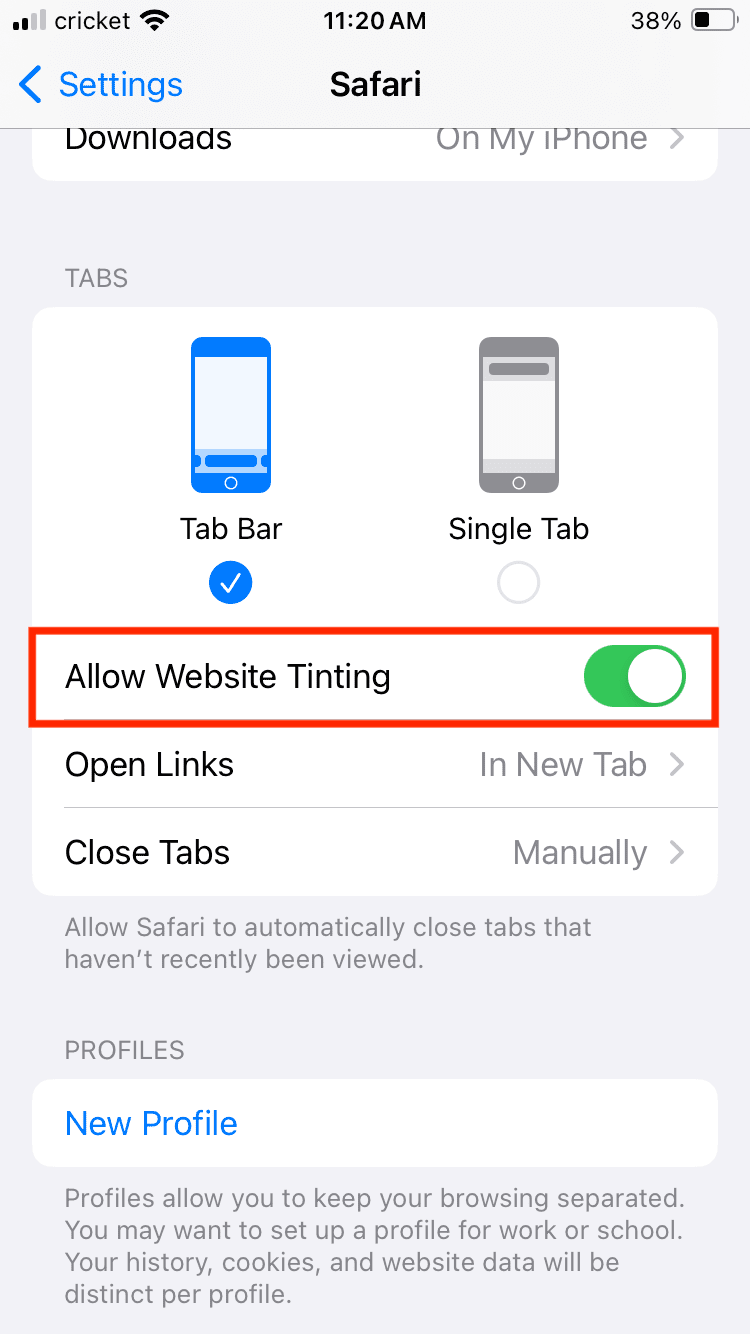
On the iPhone: Hit the Settings app > tap Safari > scroll to Tabs > toggle on Allow Website Tinting so that it is green.

On the iPad: Go to the Settings app > tap Safari > go to the Accessibility header > Toggle on Show Color in Compact Tab Bar. You will also have to select the Compact Tab Bar setting at the top of the screen because the feature works in the Compact Tab mode.

On the Mac: With Safari open, hit the Safari menu at the top left of the screen > hit Settings > hit the Advanced tab > check the box that reads Show color in compact tab bar. Select Tabs and then click on Compact next to Tab layout.


Related Posts:

  • MacBook Pro 2021 iPad Mini iPhone 13 Pro AirPods 3 Beats Fit Pro iPad Pro Best Apple Products - 5
    How to Downgrade From macOS Ventura to macOS Monterey
  • photo of an iphone with ios 16 downloaded on it
    iOS 16 Tips and Tricks: The Definitive List
  • Apple Studio Display Setup - 5
    macOS Monterey Won't Install? Here's How To Fix It
  • macOS Monterey Hero
    What’s New With macOS Monterey 12.3
  • 2023 Mac Studio lifestyle - 1
    macOS Could Not Be Installed, How-To Fix
  • macOS Monterey Hero
    How To Upgrade To macOS Monterey
  • A problem occurred with this webpage so it was reloaded, fix
    Safari: "A problem occurred with this webpage so it…
  • WWDC 2021 Hero
    WWDC21 Recap: Everything You Missed In Apple's 2-Hour Event
  • sidecar on iPadOS and macOS
    Sidecar not working in iPadOS and macOS? How to fix…

Reader Interactions

Write a Comment Cancel reply

Primary Sidebar

Recent Posts

  • How to Hide Username and Photo on the Mac Lock Screen
  • Microsoft Resume vs. Apple Handoff – Which Wins for Cross-Device Work?
  • How to Export iTunes Library to New Computer
  • What the Gemini Desktop App Will Bring to Mac
  • What to Do When Windows 11 Won’t Detect Your iPad
  • Outlook Outage 2026: iPhone Fixes for Sign-In Chaos

Connect with us

Footer

ABOUT

  • About Us
  • Contact us
  • Advertise
  • Privacy
  • Terms of Use

GUIDES

  • iOS & iPadOS
  • Apple ID
  • iCloud
  • App Store
  • iTunes
  • FaceTime
  • iMessage
  • Siri
  • Books and iBooks
  • Game Center
  • AirPlay

CONNECT

  • Facebook
  • Twitter
  • FeedBurner
  • YouTube

© Copyright 2010-2024 Guiding Tech Media · All Rights Reserved

This site and its content are in no way affiliated or endorsed by Apple, Inc. · Reproduction without explicit permission is prohibited