The iPad Pro is a fantastic device, but without power it becomes little more than an expensive placemat. Many users have experienced problems with their iPad Pro not charging, even while it’s plugged in. We put together this post to show you how to fix it.
It’s no good if your iPad Pro doesn’t charge to 100%, doesn’t charge while plugged in, or charges slowly. Take a look at our suggestions below to find out what you can do to fix it.
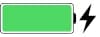
When your iPad Pro is completely dead it can be difficult to tell if it’s charging at all. Normally, a lightning bolt icon appears in the menu bar or on the lock screen to show your device is charging, but this only happens if your iPad Pro turns on.
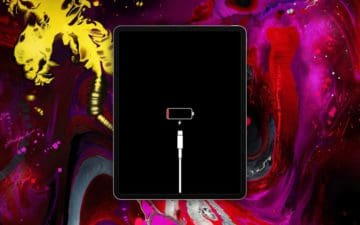
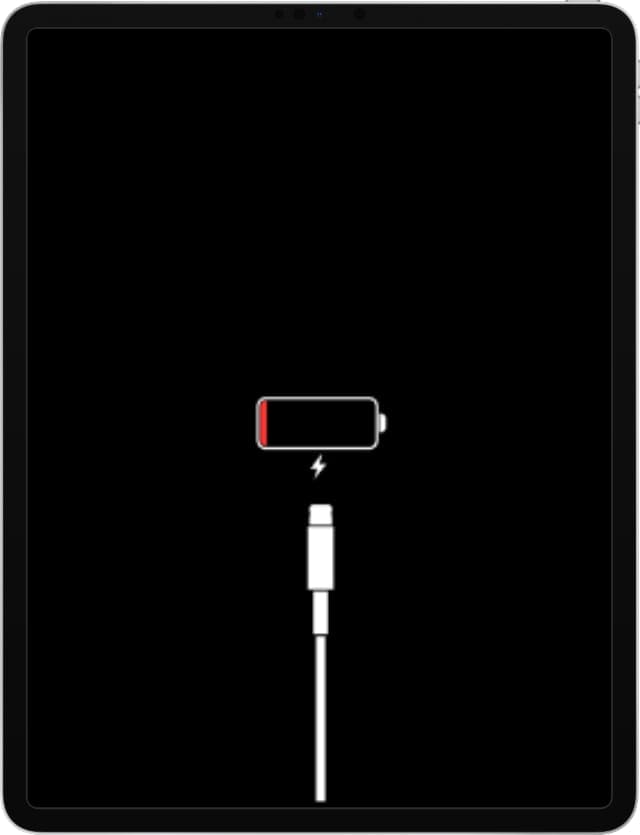
Attempt to charge your iPad Pro for at least half an hour, then try briefly powering it on by holding the Top button. You might see a Low Power screen, which shows a red battery icon.
Your iPad Pro shows a white cable on the low power screen when it isn’t charging.
If your iPad Pro isn’t charging, you also see a white cable on the Low Power screen. If your iPad Pro is charging, you only see the red battery.
If nothing shows on the screen at all, try connecting your iPad Pro to a computer. There’s a chance it’s powered on but the screen isn’t working. If your computer recognizes the device, follow our instructions to restore it using DFU mode.
Why is my iPad Pro charging so slowly?
Several users have commented on how slowly their iPad Pro appears to charge. Typically, an iPad should charge from 0% to 100% in under six hours. But there are several factors that might make it take longer:
the wattage of your power adapter
whether the iPad Pro is in use while it charges
the quality of your charging cables or power adapters
whether you charge from a USB port instead of a power outlet
the ambient temperature around your iPad Pro or the ventilation of its case.
How can I make my iPad Pro charge faster?
Follow the tips below to help your iPad Pro charge faster:
Leave your iPad Pro asleep while it’s charging.
Use a power adapter that delivers 12W of power or more.
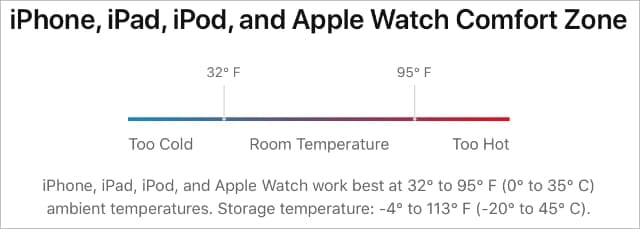
Your iPad Pro is most comfortable between 32° and 95° F. Image from Apple.
Other times, software errors cause problems with the battery reading on your iPad Pro. The software may think your battery is only 95% charged when it’s actually at 100%. This was a common problem with iOS 11, but Apple resolved it in later releases.
Use the troubleshooting steps laid out below to fix problems with your iPad Pro not charging or not charging to 100%. Not all the steps are necessary, and they increase in severity, so make sure you test your iPad Pro again after each step.
If you find the solution that works for your iPad Pro, let us know what it was in the comments at the bottom of the page. That way we can keep working to improve this guide.
Without further ado, let’s get started!
Step 1. Close every app and restart your device
Battery problems are frequently the result of a software error. If your iPad Pro doesn’t charge when it’s plugged in or charges very slowly, this might be because an app or process is causing issues in the background.
If your iPad Pro powers on, follow the instructions below to close every app and restart it. If your iPad Pro doesn’t power on, try charging it for at least half an hour then click here to get instructions on how to Force Restart it.
How to close every app and restart your iPad Pro:
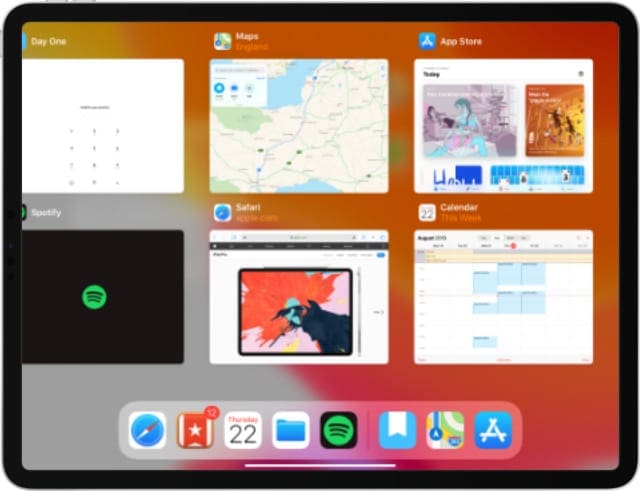
On devices with Face ID: Swipe up from the bottom of the screen to open the App Switcher.
On devices without Face ID: Double-click the Home button to open the App Switcher.
Slide every app off the top of the screen to close it.
Press and hold the Top button, then slide to power off your iPad Pro.
Wait at least 30 seconds before pressing the Top button to restart your device.
Close every app and go back to the Home screen before restarting your iPad Pro.
How to Force Restart your iPad Pro:
On devices with Face ID: Quickly press and release the Volume Up button then the Volume Down button, then hold the Top button until your iPad Pro restarts.
On devices without Face ID: Press and hold the Top button and the Home button until your iPad Pro restarts.
Step 2. Update iOS or iPadOS on your device
As we already mentioned, many charging problems for iPad Pro users are actually the result of software bugs. This was particularly true for iOS 11 users, who experienced a wide range of battery-related problems.
Apple releases small updates all the time to fix bugs like this. Update your iPad Pro to the latest version of your operating software to ensure you aren’t suffering from old bugs.
How to update the operating software on an iPad Pro:
Use Wi-Fi to connect your iPad Pro to the Internet.
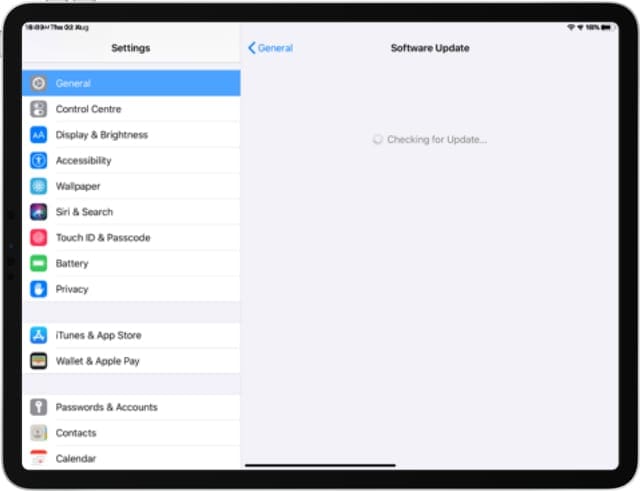
On your device, go to Settings > General > Software Update.
Wait for your iPad Pro to check for new updates, then download and install them.
Download and install the latest software updates to avoid problems charging your iPad Pro.
Step 3. Use an appropriate power adapter and outlet
Apple makes a range of power adapters for its devices. The primary difference between each adapter is the wattage delivered: 5W, 12W, 30W, for example. Using the wrong adapter might be why your iPad Pro doesn’t charge or charges slowly.
Only use accessories that have the certified “Made for iPad” logo on them.
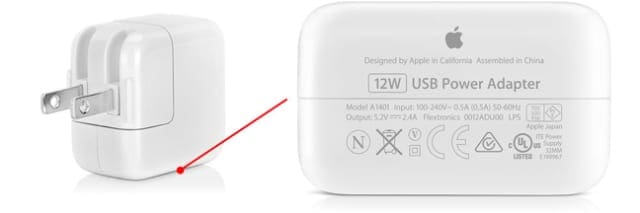
If possible, use the power adapter that came with your iPad Pro. Otherwise, ensure the adapter you use is Apple certified and delivers at least as much wattage as your original adapter. You can see the wattage of your adapter on the bottom of it.
Connect your power adapter to a wall socket, instead of charging your iPad Pro from a computer’s USB port. If your iPad Pro still doesn’t charge, test a different accessory from the same socket.
Step 4. Inspect the cable and port for damage
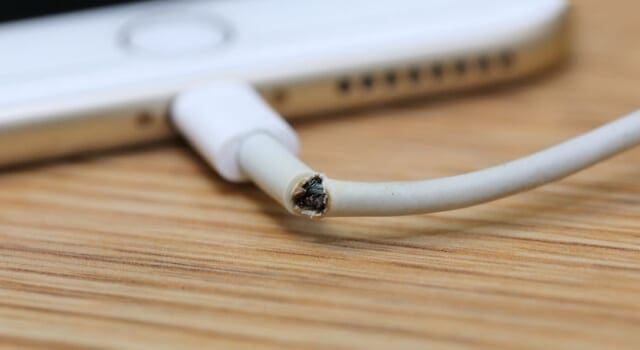
Apple’s lightning cables are notorious for breaking, and the new USB-C cables might not be much better. Any damage might explain why your iPad Pro is not charging. Inspect your cable for things like:
split or frayed sections
kinks and wrinkles
scorch marks
naked wiring
bent or cracked connectors.
Make sure the charging cable you use is Apple certified. If possible, try charging a different device from the same cable. Or try charging your iPad Pro from a different cable.
Damaged cables might be the reason your iPad Pro isn’t charging.
Finally, use a flashlight to inspect the lightning or USB-C port on your iPad Pro. Use an antistatic brush or compressed air to remove any debris such as dust, lint, or dirt. Be very careful not to damage the metal pins when you do this.
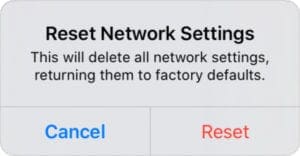
We suggest you try resetting the network settings first. This is the least destructive option and has proven effective for some users.
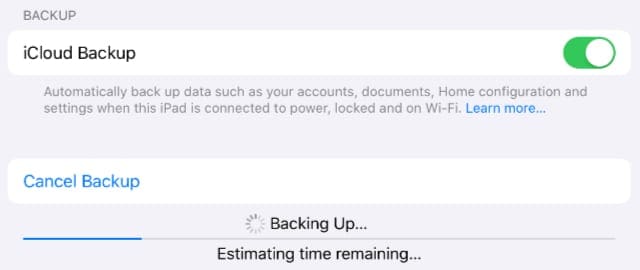
Back up your iPad Pro so you can’t lose important content or settings.
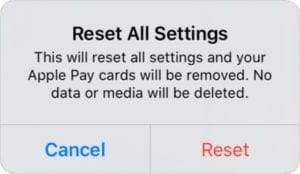
If that fails, reset all your settings. This affects things like your Notifications, Alarms, Apple Pay, Home Screen Layout, and more. But it doesn’t delete your actual content, such as photos, videos, apps, or notes.
If your iPad Pro still charges slowly or doesn’t charge at all, you should restore it using DFU (Device Firmware Update) mode. This is the deepest level of restore possible; it reinstalls every piece of software and firmware on your device.
How to reset the network settings on your iPad Pro:
On your device, go to Settings > General > Reset.
Select ‘Reset Network Settings.’
Confirm you want to ‘Reset’ your network settings.
Don’t reset your network settings unless you know your Wi-Fi password.
How to reset all the settings on your iPad Pro:
On your device, go to Settings > General > Reset.
Select ‘Reset All Settings.’
If prompted, enter your device passcode or Screen Time Passcode.
Confirm you want to ‘Reset’ all settings.
Resetting all your settings doesn’t delete any content, but changes many other settings.
How to restore your iPad using DFU mode:
When you restore your device using DFU mode, it erases all the content and settings on your device. Anything you don’t have another copy of is lost forever. Make a backup before you begin.
The troubleshooting suggestions we detailed above are a great start, but some problems can’t be fixed at home. If your iPad Pro is still not charging properly, it must be due to a hardware fault. You need to speak to Apple to repair this.
Back up your iPad before your battery replacement!
Apple doesn’t actually replace the battery in iPads. Instead, they replace the entire device. This is because it’s not possible to open the iPad enclosure without permanently compromising it.
iCloud provides the most convenient way to create a backup of your iPad Pro.
Unfortunately, it’s not possible to make a new backup of your iPad Pro if it doesn’t turn on.
How much does a battery replacement cost from Apple?
If your iPad Pro is less than one year old, Apple should replace its battery for free under the limited warranty. This may not be the case if your iPad Pro is damaged.
Dan writes tutorials and troubleshooting guides to help people make the most of their technology. Before becoming a writer, he earned a BSc in Sound Technology, supervised repairs at an Apple Store, and even taught English in China.
I know this is an old thread but maybe someone else will find it like I did…
I saw a warning pop up only one or two times, it said the iPad was too hot and it would resume charging when the iPad cools down.
I started paying attention and I noticed it doesn’t like to charge when the brightness has been on high too long, but it doesn’t always give you the correct error message.
The high brightness can make the iPad overheat and then won’t charge.
Intermittent charging of my 4th generation found to be due to charger/cable. It would start charging but charging symbol would go from green to white so charging stopped. Purchased new iPad and tried the charger from that box and found it was perfect. Started charging straight away (green symbol) and continued to full charge. The pressing of buttons was just a red herring!
I followed your instructions, but, when I held the power button in, Siri came up and the iPad Pro didn’t show the Power Down screen. Then I followed your “How to Force Restart your iPad Pro” steps and that worked. After waiting over 30 seconds, I powered it on again and noted it was now charging from my 29 watt power supply. By the way, I had already previously noted that the iPad Pro charged MUCH faster when using the 29 watt USB-C power supply. That makes me suspect that the larger power supply that came with the iPad Pro may perhaps have some smarts in it to slow down charging, though I can’t be sure about that.
Forget about anything you read. If you get this far, i assume you have the same problem as i had. And all i did was to eventually get a replacement. Apple knows about their shortcomings on the charging side, you just need to hope you are within warranty or you have purchased an extended one (something i can only carefully advise to do). And then apple will not even discuss, they just give you the replacement.
All the many solutions are just a waste of (your) time, and the typical rumor apple spreads through its community, but at the end it is just very bad quality on the charges side. I also have a Samsung tablet (usb-c) and no problems at all.
My ipad pro is not charging when it is connected with apple charger and it is charging for sometime with other type c charger, and after that it won’t charge
So i think u will tell the solution for this
The power to my Ipad Pro is dead – i.e. wont charge at all so all of your suggestions wont help! i.e. it wont power up as the battery wont charge. What is the best course of action from here?
thanks, best regards
Greg
I have ipad pro purchased in UAE now I am in csnada my device id only charging from the laptop not ftom source power I took it ti apple center they were not able to fix it because is it purchased outside Canada I need your help this ipaf is for my he is heavily use it for learning and online school
I have had a 12.9″ iPad pro for about 6 months. At the 3 month mark, it quit charging. I called support and they sent me a new charging cable & Plug. 3 months later, It happened again. I sent the iPad back to and they “repaired” and returned to me 3 days ago. It was fully charged when I received it. I didn’t use it much over the weekend and when the battery was low yesterday, I plugged it in. It took over 8 hours to get to 46 % . Obviously, it needed charging this morning, It’s been plugged in for 7 hours and it’s at 5%- actually lost 5% while charging! I’m ready to send it back and downgrade.
In f/u to what John mentioned, Apple Support does indicate for Mac notebooks that “you can use a compatible higher wattage power adapter without issue, but it won’t make your computer charge faster…”
If the same charging approach works for lithium-ion batteries in the iPad models, then it makes sense to use the OEM wattage level or above and the iPad model should only draw the amount of charge it needs in order to properly charge. Apparently it is an issue of flow of power sufficient to overcome a low battery threshold when a lithium-ion battery discharges to a very low state—only using at least the OEM level wattage power adapter for charging purposes will then enable the very low level battery to start successfully receiving enough power to start actively charging again.
That Apple support article I found was published on May 1, 2020: “Find the right power adapter and cable for your Mac notebook” “(Learn which power adapter, cable, and plug works with your Mac notebook computer.)” https://support.apple.com/en-us/HT201700
(Although I’ve looked, I haven’t had any luck finding a similar theme article for iPad models).
This is what the Apple Support article for Mac notebook models mentions relative to using various size power adapters with said models:
“Power adapters for Mac notebooks are available in 29W, 30W, 45W, 60W, 61W, 85W, 87W, and 96W varieties. You should use the appropriate wattage power adapter for your Mac notebook. You can use a compatible higher wattage power adapter without issue, but it won’t make your computer charge faster or operate differently. If you use a power adapter that is lower in wattage than the adapter that came with your Mac, it won’t provide enough power to your computer.”
Try charging it using a 60W adaptor, like the one for an I-Mac Pro. This, in the case of an iPad Pro using the new C type adaptor. I suffered the same problem after left my iPad running with a youtube video and it auto-shutdown due to low battery. I couldn’t get it to charge, Apple wanted $499 to fix the problem, but then I plugged it into an iMac-Pro charger and issue resolved itself in about 3 min. It seems that the more powerful charger jumped started the battery.
With the fluctuating availability via secondary sources of iPad Pro 3rd generation units, my spouse & dtr found a 512GB refurb supposedly in excellent condition & ordered it for me when my desktop iMac’s internal hard drive died this past July. The reseller they chose via the Walmart marketplace of such devices offers many through eBay sales as well. What my family didn’t know (nor did I) at the time was that the reseller was NOT including an OEM 18W power charger for USB-C nor OEM charge cable for USB-C both ends, which is what MUST be used w/ that model iPad Pro. So on day 31 after receipt the device suddenly won’t charge after having discharged. Long story short, be aware that should you purchase a refurb, you may need to go out and get the proper 18W USB-C power adapter & either a 1 or 2 meter long USB-C on both ends charge cable yourself. Should the lithium-ion battery in that model discharge sufficiently, it won’t be able to get past the red line charging icon for having low battery status & the device WON’T open and that includes trying to force open it by pressing the volume & power buttons, etc. It has to be charged on the CORRECT Apple charging power adapter using a proper USB-C only cable. That reseller was ‘cutting corners’ putting a cheaper off-brand nondescript power adapter with a standard USB port and using a cheaper cable (USB-C on one end and normal USB on the other end) rather than including OEM or equivalent charging block and cable w/ the purchase of the refurb iPad. We went through a lot of stressful hours trying to sort out what was going on, but the folks at iPadRehab kindly alerted us that they have been getting into their shop a number of the 12.9″ (year 2018) as well as 11″ size models of 3rd generation iPad models b/c folks can’t seem to get the models to charge & after iPadRehab uses the proper 18W power adapter & USB-C on both ends cable everything checks out on the models.
So please check whatever power adapter & cable you are using for a device that suddenly won’t charge as perhaps it is not the correct one (OEM or equivalent) for that model, yet had worked when there was still enough residual charge in the device to be able to recharge it up to 100% previously, but if the battery does do a normal discharge it may not have enough ability to recharge w/o using the OEM or equivalent power adapter & cable for that model device. I had found iPadRehab via YouTube when trying to get any information on what options to try when the iPadPro wouldn’t charge or open & they replied to an online inquiry promptly w/ good advice, so if we had to address another issue w/ said iPad Pro, we’ve kept their info as we would get back in touch w/ them & they have specific info on their website about how they do business & their charges.
My Ipad Pro is not charging. I used it about 4 hours Tuesday and i went to plug it in to charge last night and it showed the battery as almost empty. just a little bit of red showing up in the battery emblem. I has never been that low before. I charged it all last night in it is still the same. I tap the button in the top right corner and it flashes the battery emblem and then goes away. What do i need to do?














I know this is an old thread but maybe someone else will find it like I did…
I saw a warning pop up only one or two times, it said the iPad was too hot and it would resume charging when the iPad cools down.
I started paying attention and I noticed it doesn’t like to charge when the brightness has been on high too long, but it doesn’t always give you the correct error message.
The high brightness can make the iPad overheat and then won’t charge.
Intermittent charging of my 4th generation found to be due to charger/cable. It would start charging but charging symbol would go from green to white so charging stopped. Purchased new iPad and tried the charger from that box and found it was perfect. Started charging straight away (green symbol) and continued to full charge. The pressing of buttons was just a red herring!
My iPad Pro will not charge and it will not open as the battery is dead.
Can I get my battery replaced?
If so what would be the cost?
Thank you
I followed your instructions, but, when I held the power button in, Siri came up and the iPad Pro didn’t show the Power Down screen. Then I followed your “How to Force Restart your iPad Pro” steps and that worked. After waiting over 30 seconds, I powered it on again and noted it was now charging from my 29 watt power supply. By the way, I had already previously noted that the iPad Pro charged MUCH faster when using the 29 watt USB-C power supply. That makes me suspect that the larger power supply that came with the iPad Pro may perhaps have some smarts in it to slow down charging, though I can’t be sure about that.
Thanks so much for this! I thought I was going to have to replace my charging port ($$$$) but your troubleshooting steps solved the problem.
My charger port broke
Forget about anything you read. If you get this far, i assume you have the same problem as i had. And all i did was to eventually get a replacement. Apple knows about their shortcomings on the charging side, you just need to hope you are within warranty or you have purchased an extended one (something i can only carefully advise to do). And then apple will not even discuss, they just give you the replacement.
All the many solutions are just a waste of (your) time, and the typical rumor apple spreads through its community, but at the end it is just very bad quality on the charges side. I also have a Samsung tablet (usb-c) and no problems at all.
My ipad pro is not charging when it is connected with apple charger and it is charging for sometime with other type c charger, and after that it won’t charge
So i think u will tell the solution for this
The power to my Ipad Pro is dead – i.e. wont charge at all so all of your suggestions wont help! i.e. it wont power up as the battery wont charge. What is the best course of action from here?
thanks, best regards
Greg
I have ipad pro purchased in UAE now I am in csnada my device id only charging from the laptop not ftom source power I took it ti apple center they were not able to fix it because is it purchased outside Canada I need your help this ipaf is for my he is heavily use it for learning and online school
Hi.. My iPad is not charging. It only charges up to 1%.
Please help. I’ll be so happy .
I have had a 12.9″ iPad pro for about 6 months. At the 3 month mark, it quit charging. I called support and they sent me a new charging cable & Plug. 3 months later, It happened again. I sent the iPad back to and they “repaired” and returned to me 3 days ago. It was fully charged when I received it. I didn’t use it much over the weekend and when the battery was low yesterday, I plugged it in. It took over 8 hours to get to 46 % . Obviously, it needed charging this morning, It’s been plugged in for 7 hours and it’s at 5%- actually lost 5% while charging! I’m ready to send it back and downgrade.
In f/u to what John mentioned, Apple Support does indicate for Mac notebooks that “you can use a compatible higher wattage power adapter without issue, but it won’t make your computer charge faster…”
If the same charging approach works for lithium-ion batteries in the iPad models, then it makes sense to use the OEM wattage level or above and the iPad model should only draw the amount of charge it needs in order to properly charge. Apparently it is an issue of flow of power sufficient to overcome a low battery threshold when a lithium-ion battery discharges to a very low state—only using at least the OEM level wattage power adapter for charging purposes will then enable the very low level battery to start successfully receiving enough power to start actively charging again.
That Apple support article I found was published on May 1, 2020: “Find the right power adapter and cable for your Mac notebook” “(Learn which power adapter, cable, and plug works with your Mac notebook computer.)” https://support.apple.com/en-us/HT201700
(Although I’ve looked, I haven’t had any luck finding a similar theme article for iPad models).
This is what the Apple Support article for Mac notebook models mentions relative to using various size power adapters with said models:
“Power adapters for Mac notebooks are available in 29W, 30W, 45W, 60W, 61W, 85W, 87W, and 96W varieties. You should use the appropriate wattage power adapter for your Mac notebook. You can use a compatible higher wattage power adapter without issue, but it won’t make your computer charge faster or operate differently. If you use a power adapter that is lower in wattage than the adapter that came with your Mac, it won’t provide enough power to your computer.”
Try charging it using a 60W adaptor, like the one for an I-Mac Pro. This, in the case of an iPad Pro using the new C type adaptor. I suffered the same problem after left my iPad running with a youtube video and it auto-shutdown due to low battery. I couldn’t get it to charge, Apple wanted $499 to fix the problem, but then I plugged it into an iMac-Pro charger and issue resolved itself in about 3 min. It seems that the more powerful charger jumped started the battery.
Dude, you are my hero! I used my nintendo switch charger and started charging again! Thanks a lot for the idea!
With the fluctuating availability via secondary sources of iPad Pro 3rd generation units, my spouse & dtr found a 512GB refurb supposedly in excellent condition & ordered it for me when my desktop iMac’s internal hard drive died this past July. The reseller they chose via the Walmart marketplace of such devices offers many through eBay sales as well. What my family didn’t know (nor did I) at the time was that the reseller was NOT including an OEM 18W power charger for USB-C nor OEM charge cable for USB-C both ends, which is what MUST be used w/ that model iPad Pro. So on day 31 after receipt the device suddenly won’t charge after having discharged. Long story short, be aware that should you purchase a refurb, you may need to go out and get the proper 18W USB-C power adapter & either a 1 or 2 meter long USB-C on both ends charge cable yourself. Should the lithium-ion battery in that model discharge sufficiently, it won’t be able to get past the red line charging icon for having low battery status & the device WON’T open and that includes trying to force open it by pressing the volume & power buttons, etc. It has to be charged on the CORRECT Apple charging power adapter using a proper USB-C only cable. That reseller was ‘cutting corners’ putting a cheaper off-brand nondescript power adapter with a standard USB port and using a cheaper cable (USB-C on one end and normal USB on the other end) rather than including OEM or equivalent charging block and cable w/ the purchase of the refurb iPad. We went through a lot of stressful hours trying to sort out what was going on, but the folks at iPadRehab kindly alerted us that they have been getting into their shop a number of the 12.9″ (year 2018) as well as 11″ size models of 3rd generation iPad models b/c folks can’t seem to get the models to charge & after iPadRehab uses the proper 18W power adapter & USB-C on both ends cable everything checks out on the models.
So please check whatever power adapter & cable you are using for a device that suddenly won’t charge as perhaps it is not the correct one (OEM or equivalent) for that model, yet had worked when there was still enough residual charge in the device to be able to recharge it up to 100% previously, but if the battery does do a normal discharge it may not have enough ability to recharge w/o using the OEM or equivalent power adapter & cable for that model device. I had found iPadRehab via YouTube when trying to get any information on what options to try when the iPadPro wouldn’t charge or open & they replied to an online inquiry promptly w/ good advice, so if we had to address another issue w/ said iPad Pro, we’ve kept their info as we would get back in touch w/ them & they have specific info on their website about how they do business & their charges.
Thanks for the Tips. Looks like it’s a call to apple but i appreciate the steps to make sure i did what i could.
My Ipad Pro is not charging. I used it about 4 hours Tuesday and i went to plug it in to charge last night and it showed the battery as almost empty. just a little bit of red showing up in the battery emblem. I has never been that low before. I charged it all last night in it is still the same. I tap the button in the top right corner and it flashes the battery emblem and then goes away. What do i need to do?