It’s not often that Apple releases a new device, feature, or product with some next-generation technology and it doesn’t work. However, that’s exactly what we have been seeing when it comes to 5G connectivity on the iPhone 12.
For one reason or another, not everyone is able to take advantage of the 5G networks that are continuing grow. Carrier’s are continuing the mad-dash to provide 5G in all of the same areas that LTE is currently available. And the iPhone 12 lineup is just one of the bleeding edge devices that can take advantage of this.
With 5G connectivity, it’s important to note that this technology is still in its infancy. There are still a lot of bugs to work out, which is why our iPhone’s can still make use of LTE networks. But if you want to try and figure out why 5G isn’t working on your iPhone, there are a few steps to attempt.
Check with your carrier
The first thing that you’ll want to do if you notice that 5G is not working on iPhone 12 is to check with your carrier. With the new push for 5G networks, actually making use of these requires a plan change with your carrier. Some carriers may charge an extra few dollars a month, while other include 5G connectivity in your current plan. Double-checking with your carrier is always the safest bet.
Check the 5G coverage area where you live
Unlike 4G or LTE networks, where carriers are practically overlapping in every corner of the grid, 5G’s a bit different. There are differing versions of 5G rolling out, dependent upon what carrier you are using. So if you notice that your iPhone 12 neve
r switches over to 5G, it may be because of limited coverage in your area. Luckily, you can check the coverage map for the major carriers to determine whether it’s available.
Whenever you received your iPhone, the 5G connectivity was enabled out of the box. However, for one reason or another, this could have been turned off accidentally or intentionally. Here’s how you can double check to make sure 5G is turned on:
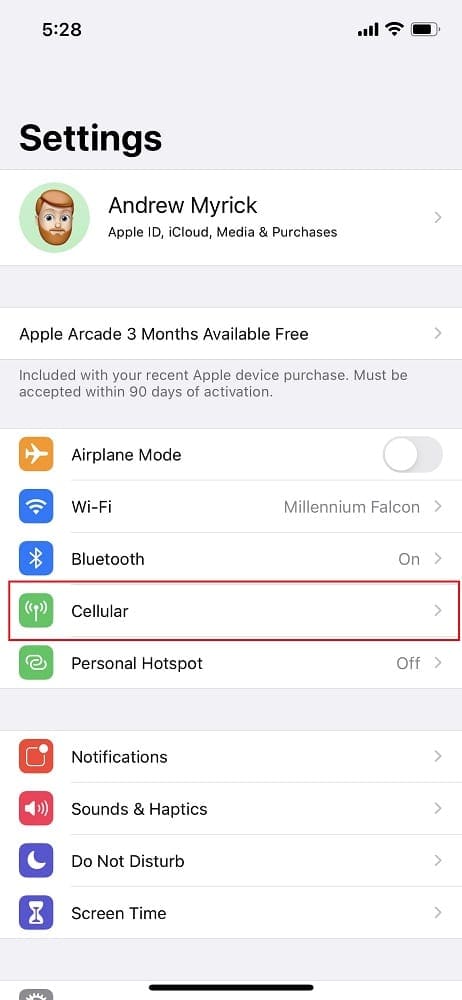
Open the Settings app.
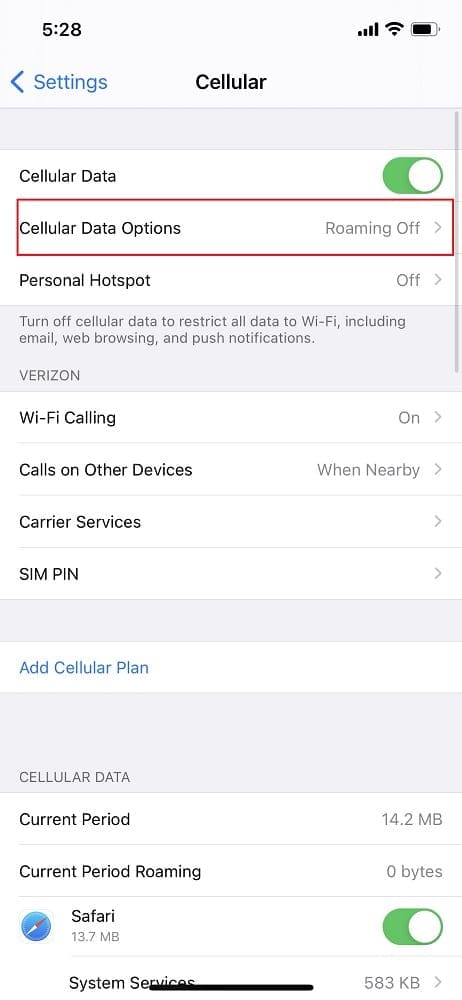
Tap Cellular.
Select Cellular Data Options.
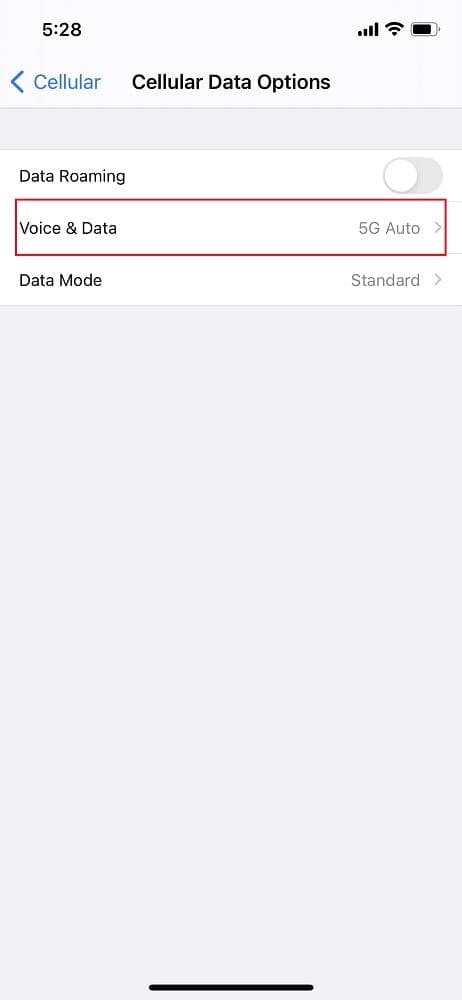
Tap Voice & Data.
Make sure that either 5G Auto or 5G On are selected.
5G Auto is a unique feature which uses Apple’s Smart Data mode. This makes it so that your iPhone 12 can quickly switch between 5G or LTE, based on what provides faster network speeds. For example, if you are an area with no 5G, then your iPhone will switch to LTE, which will help save battery life.
Are you using Dual SIM Mode?
Until Apple releases the final version of iOS 14.5, you won’t be able to use 5G simultaneously with Dual SIM mode enabled. Dual SIM is for those who are making use of the built-in eSIM with one phone number, and a dedicated SIM card for another. However, up until iOS 14.5, you could not use 5G on both lines, even if it’s offered by your carrier.
Reset your Network Settings
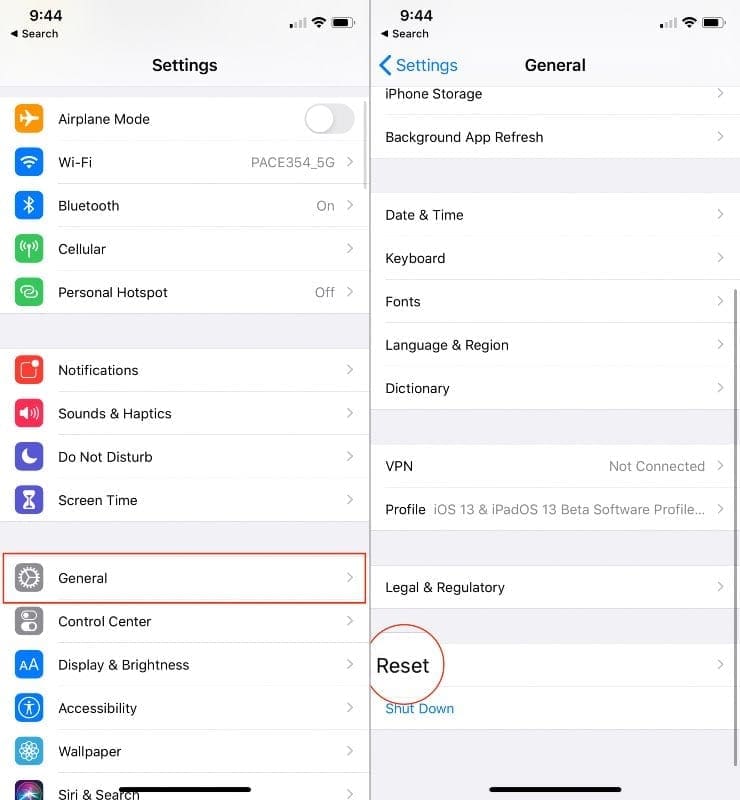
From time to time, you need to perform a reset on your iPhone. This can help work out any potential bugs or kinks in the software. Thankfully, you don’t necessarily need to completely reset the iPhone if your 5G isn’t working. Instead, you can reset the Network Settings alone while you continue trying to troubleshoot why 5G isn’t working.
Open the Settings app.
Tap General.
Scroll down and select Reset.
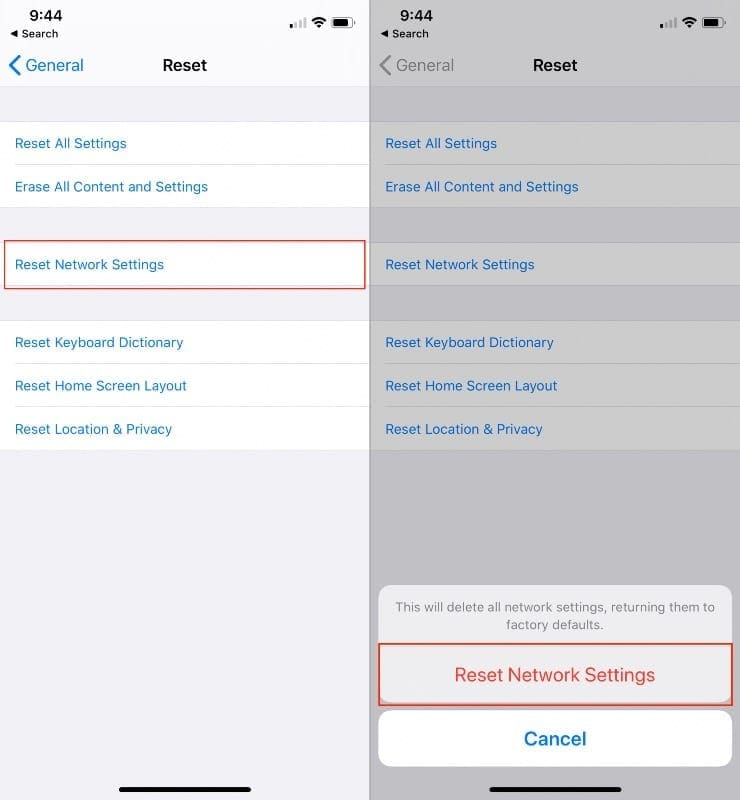
Tap Reset Network Settings.
Enter your passcode, if prompted.
Tap Confirm.
Once completed, your iPhone will forget any network settings that you had previously configured. This includes any Wi-Fi networks, or any other data settings that you had created in the Settings app. After performing this task, restart your iPhone, and go back and change the settings that were reset.
Toggle Airplane Mode
Airplane Mode is designed to remove all potential interference from phone calls, Bluetooth, or anything else on your iPhone. This includes your cellular network, and is one of the easiest ways to gain back network connectivity. The reason for this is due to the fact that when you turn on Airplane Mode and then turn it back off, your iPhone is forced to connect to the nearest cell tower.
Swipe down from the top right corner of your screen.
From within control center, tap the Airplane Mode icon to turn it on.
Wait a few moments.
Tap the Airplane Mode toggle again to turn it off.
Check your status bar after the signal bars return.
As a note, it could take a few moments for your iPhone to connect to the nearest cell tower. After turning off Airplane Mode, keep an eye on the network bars in the status bar. When the iPhone connects to a cell tower, the bars will fill up, and you’ll be able to see whether LTE or 5G is being used.
Restart your iPhone
One of the simplest ways to try and get your iPhone back in working condition is to simply restart it. It’s no different from the old tech-support war stories of technicians telling customer to turn it off and turn it back on.
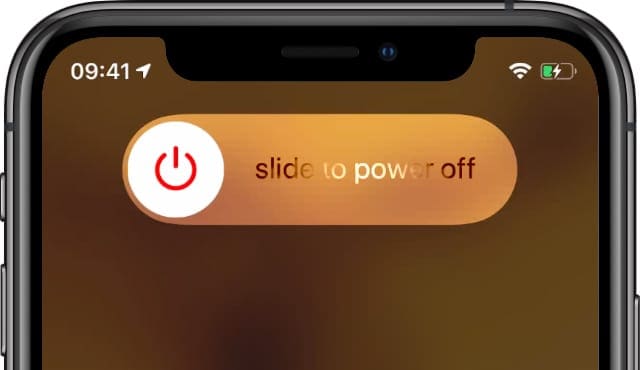
Slide to power off and restart your iPhone.
Restart iPhone if using iPhone 12:
Press and hold one of the Volume Buttons and the Side Button until the Power Off Slider appears.
Drag the slider to turn off your iPhone.
Wait 30 seconds.
Press and hold the Side Button until you see the Apple logo.
Check for a software update
Make sure your device is running the latest software.
Apple has been on a rapid pace with new software updates on a seemingly bi-weekly basis. There are bug fixes and additional software features that are added with these updates. And those bug fixes could be just the key for getting 5G to work again.
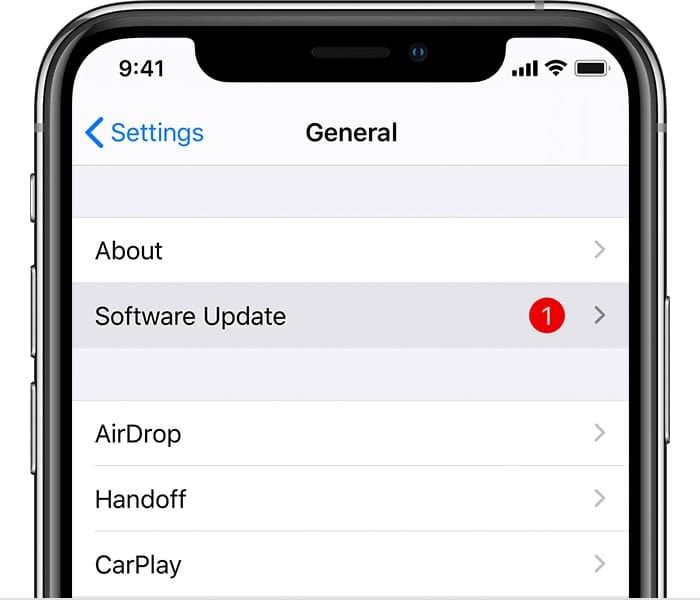
Open the Settings app.
Tap General.
Select Software Update.
If an update is available, tap Download and Install.
Enter your passcode if necessary.
Perform a factory reset
When all else fails, you may need to perform a factory reset on your iPhone 12. This is the second-to-last solution if you can’t seem to get 5G working. Before you just reset everything, you’ll want to make sure your information is backed up.
Open the Settings app on your iPhone.
Tap your name at the top of the page.
Select iCloud.
Scroll down under Apps using iCloud, and select iCloud Backup.
Tap Back Up Now.
The backup process could take some time if you are connected to your cellular network. It’s still important to back everything up before you perform a Factory Reset, so patience is key here.
Once the backup has finished, it’s time to wipe the slate clean with a Factory Reset of your iPhone.
Open the Settings app on your iPhone.
Tap General.
Scroll down and select Reset.
Tap Erase All Content and Settings.
Enter your passcode or Apple ID password, when prompted.
Wait.
After your iPhone has wiped itself clean, you will need to go through the setup process again. If you want, you will have the option to restore the recently-created iCloud backup.
What if 5G still does not appear?
Sometimes, you can exhaust all of the potential workarounds or fixes and your iPhone just continues to have issues. This likely has something to do with the hardware itself, and can’t be solved just by restarting or resetting your iPhone.
If this is the case for you, the last step is to reach out to Apple’s Support Team. Chances are they will confirm whether you have performed a series of steps to try and get your iPhone back in working order. Be sure to share all of the steps that you took if asked, as it will help the Support Team to determine what route to take.
Conclusion
5G connectivity can be really awesome, if you find a good connection. If you happen to live in, or come across, an area with poor 5G reception, the results can be frustrating. We’ve seen “5G” speeds that are actually much slower than LTE. This is a tell-tale sign that 5G may be the future, but it’s not available just yet.
If you have been experiencing issues with 5G on your iPhone 12, but found another way to get it working, let us know in the comments. That way we can share any other methods with other folks looking for answers on solving this problem.
Andrew Myrick is a freelance writer based on the East Coast of the US. He enjoys everything to do with technology, including tablets, smartphones, and everything in between. Perhaps his favorite past-time is having a never-ending supply of different keyboards and gaming handhelds that end up collecting more dust than the consoles that are being emulated.
even better situation is this… my iphone 12 pro all the sudden one day stopped connecting to 5g network but still shows full bars and 5g in status bar. I get lte and it works, i get 5g ultrawide and it work but just 5 g?… nope nothing. No internet whatsoever.
I have tried all these things, called att tech line, nuthin works. I am now getting a new sim card sent to me and thats the last resort. I am pissed, i purchased this phone for the 5g option and cannot choose the option, its not even on the list











Why is my iPhone 12 Pro Max not connecting to 5g even after getting a new 5g SIM card and resetting my network
even better situation is this… my iphone 12 pro all the sudden one day stopped connecting to 5g network but still shows full bars and 5g in status bar. I get lte and it works, i get 5g ultrawide and it work but just 5 g?… nope nothing. No internet whatsoever.
I have tried all these things, called att tech line, nuthin works. I am now getting a new sim card sent to me and thats the last resort. I am pissed, i purchased this phone for the 5g option and cannot choose the option, its not even on the list