After updating to Apple’ latest update to iOS, some users discover that they cannot turn cellular data (mobile data) on or off for any apps after upgrading.
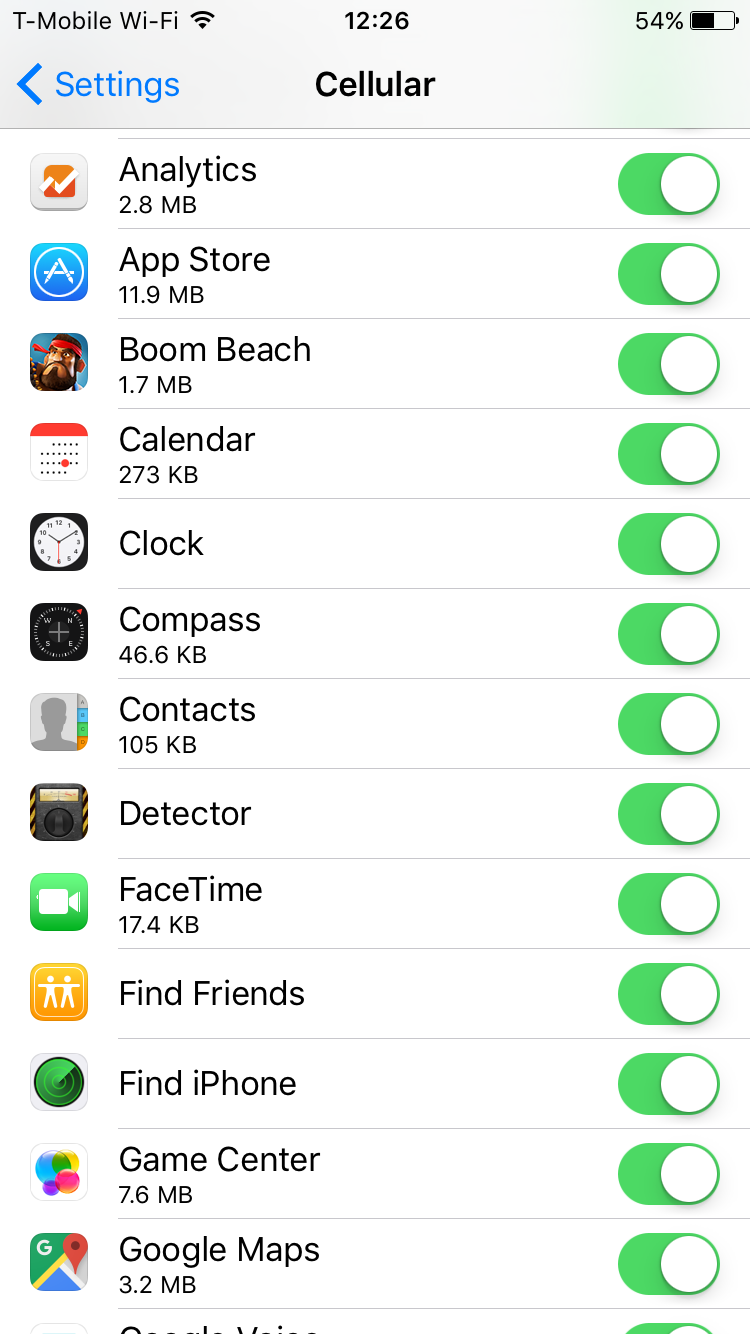
Further when a user toggles an app’s switch to its “on” or “off” position under the “Use Cellular Data For” setting, the change is not respected by the system. Once you leave the Cellular Data menu, it reverts to the previous settings.
It seems that a number of users are experiencing this problem.
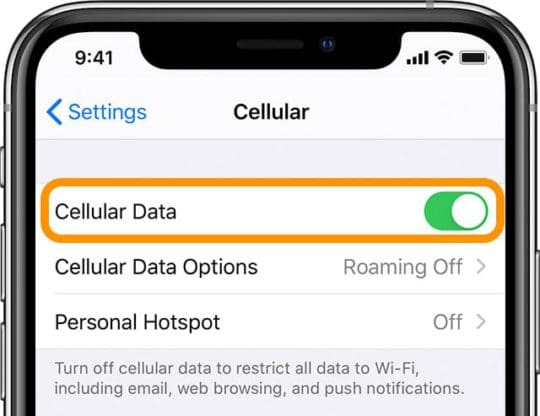
Confirm cellular data is enabled by going to Settings > Cellular > Cellular Data
Try turning Airplane mode on and off again by going to Settings > Airplane Mode
Go to Settings > General > Screen Time or Restrictions > Cellular Data Use, make sure “Don’t Allow Changes” is toggled off, then tap Settings > Cellular, then turn Cellular Data to OFF, wait a few seconds, then turn Cellular Data back to ON
Reset Network Settings by going to Settings > General > Reset > Reset Network Settings
Reboot your device by powering off, waiting a few moments, and powering back on
Uninstall and install any app that doesn’t update the cellular data settings properly
Update your iOS device to the latest version of iOS software
Try to reset all settings via Settings > General > Reset > Reset All Settings
If nothing above helps you, you could try this:
Back up your device (Settings > Apple ID > iCloud > Backup > Back Up Now). You can see your recent back ups by going to Settings > Apple ID > iCloud > Manage Storage
Restore your device. Important this will erase everything. This is why you should back up first. Connect your device to your computer. In iTunes or Finder, select your device, and click Restore.
When your device restarts, follow the setup assistant and set it up as NEW, don’t set up from a backup because it is highly likely that this problem is due to corrupt information, this means that problem repeats if you restore from a backup. Instead, restore your device from iCloud later.
Now verify that the problem is resolved
After verifying, now restore your iCloud backup. To do this, go to Settings > General > Reset > then tap “Erase all content and settings.” When your device restarts, tap Restore from a Backup.
If still not resolved, consider downgrading the device, if available
Disable Face ID or Touch ID & Passcode (Settings > Face ID/Touch ID & Passcode) and Find My iPhone (Settings > Apple ID > iCloud > Find My iPhone)
Connect your device to your computer using the original lightning cable
Launch iTunes or Finder
In iTunes or Finder, select your iOS device
Hold down the Option / Alt key on your Mac keyboard (Windows: left Shift key) and click on the Restore iPhone button
In the popup, select the IPSW file your downloaded
When it is done, your device restarts
Is your iPhone missing Cellular Data settings altogether?
If after updating, you don’t see any options for Cellular or Cellular Data, it’s likely there was an issue with the update.
It’s best to use iTunes or Finder to reinstall your iOS to fix these types of problems.
Make sure you backup your data before you proceed via iCloud or iTunes/Finder.
Once the backup is complete, open iTunes/Finder and connect your device to the computer via a cable. Once connected, follow these directions:
On an iPhone 8 and above: Press and quickly release the Volume Up button. Then press and quickly release the Volume Down button. Finally, press and hold the Side button until you see the recovery-mode screen
On an iPhone 7 or iPhone 7 Plus: Press and hold the Side and Volume Down buttons at the same time. Keep holding them until you see the recovery-mode screen
On an iPhone 6s and earlier, iPad, or iPod touch: Press and hold both the Home and the Top (or Side) buttons at the same time. Keep holding them until you see the recovery-mode screen
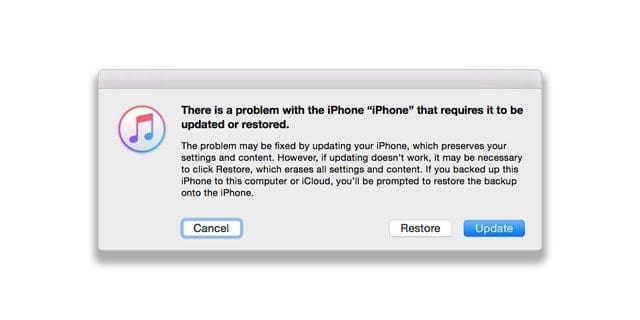
When you see the option to Restore or Update, choose Update—this tries to reinstall iOS without erasing your data.
Wait while the software downloads to the device.
When complete, visit the Settings app and confirm that the menu options for Cellular and Cellular data are restored.
If the download takes more than 15 minutes and your device exits recovery mode, let the download complete, then repeat these steps.
Obsessed with tech since the early arrival of A/UX on Apple, Sudz (SK) is responsible for the original editorial direction of AppleToolBox. He is based out of Los Angeles, CA.
Sudz specializes in covering all things macOS, having reviewed dozens of OS X and macOS developments over the years.
In a former life, Sudz worked helping Fortune 100 companies with their technology and business transformation aspirations.
I’ve introduced all the updates, killed WiFi help, dumped the information sucking applications, upheld up, rebooted, and as yet getting information utilization route above anything I’ve at any point experienced previously.
I at long last killed cell information, reset insights and my telephone is as yet indicating cell information use!
Just to note, I did likewise with my iPad and have had no cell information use since resetting the insights.
The issue lies with the iPhone 6.
My significant other was going to move up to the 6 Plus yet this information use bug has made him reevaluate an iPhone. Same with two companions who have 5’s.
I’ve installed all the updates, turned off WiFi assist, dumped the data sucking apps, backed up, rebooted, and still getting data usage way above anything I’ve ever experienced before. I finally turned off cellular data, reset statistics and my phone is still showing cellular data usage! Just to note, I did the same thing with my iPad and have had no cellular data usage since resetting the statistics. The problem lies with the iPhone 6. My husband was going to upgrade to the 6 Plus but this data usage bug has caused him to rethink an iPhone. Same with two friends who have 5’s. Definitely cannot recommend iPhones in the current situation.
I upgraded my Iphone 5 to iOS version 9.2 and I regret it. First I got a white screen of death (that freaked me out) and after I reset my phone, now my Safari doesn’t work AT ALL! I touch the icon, the screen opens and immediately closes and ditches me. I can’t even access Safari in “Settings” I touch it and it kicks me out! ARGH! And since Apple Iphones don’t have the option of changing the default browser I’m screwed! I can’t access links that come embedded in emails, or ANY of my many bookmarks. I tried some suggestions an Apple guy gave me, but nothing’s working. WHAT NOW?
It keeps turning cellular on. Every morning I get another notice from AT&T telling me I’m out of data and they are adding more. I’ve used more data in the 3 weeks I’ve had the new i6 than I used in the last 4 months. What’s up apple? How can I keep the cellular data OFF, and who is going to reimburse me for this glitch? I have been monitoring my usage and have watched it increase while I’m connected to my home Wi-Fi! How much time do I have to return this phone?
Have iphone 4s, did the 9.0.2 upgrade. Could not make or receive calls everything else working okay. Tried everything on all these sites. Did a backup, then complete restore to 9.0.2, still could not make calls. Last resort I removed my sims card and phone started working. I always thought sprint did not use one but was wrong. I hope this information helps. Just a note: was unsuccessful in downgrading back to 8.4.1 ios.
hey guys ..i have been experiencing this problem since i u[dgraded to 8.4.2. i was better off on 7.0 Feel cheated with 1000$ spent on phone .. was better off on blackberry. at least it worked for mails
Updated IOS 9.0.2 for iPad and now unable to reply to posts from others on Facebook. Whenever I click on comment, a blank white page and the keypad shows. However, you can’t actually type anything.
Really pissed off wirh this ios 9.0.1 i changed the package of my ipad but still doesnt work. I have a lots of work to do with my ipad now im starting for being disappointed with aple fix that pleaae or else im sure theres a lot of people will change theyre device to android.
Nothing here worked but I haven’t totally erased my phone yet because I’m out of town and now I can’t turn cell data on for anything and I’m pretty much stuck not being able to use anything. It’s so frustrating!
I shut my cellular data off occasionally so I can save money, but now that actually want to use it, it won’t turn back on. This new iOS update is ridiculous. Apple probably is loosing a lot of money because of the BS
I agree with all the above comments. Whilst Apple fixed some bugs in a 9.x.minor patch I would have thought this issue of any app that was turned off for cellular in 8.x cannot be turned on in 9.x. (I find that those that were on in 8.x can be toggled ok) needs to be the number 1 fix to come out of Apple ASAP.
Nothing Apple have screwed up on in the past has hobbled the iPhone so much.
Worse as it was discovered in Beta but ignored. The least they Apple could have done was to alert its customers that they have an issue they cannot be **sed to fix before pushing the code out but if you turn everything on for cellular and then upgrade you should be ok.
I experienced the no cellular data after downloading the IOS 9.0.1 so I called T-Mobile and they told me to get help from Apple.
The lady from Apple told me to factory reset my iPhone 5 by first back up everything to iTunes (what a mistake!), it took more than 5 hours and nowhere near finish. I decided to stop the iTunes and back up everything to my computer (which took less than 30 min.) and reset .
The problem still persisted so I decided to give T-Mobile another try.
A T-Mobile tech man in Colorado Spring tried step by step different process and came with the solution!
TURN OFF THE LTE ENABLE
it works, but you only get 4G speed.
I updated to IOS9.0.2 today and it did not resolve the problem, well..better than nothing!
GLTA
9.02 did not solve it
Now application turn on and off on cellular data but phone cannot connect to cellular network.
Really?
Come on Apple beyond ridiculous.
$800 phone that doesn’t work.
What would Steve say ?
Ready for samsung ? Yes almost ready
Took update 9.0.2 this morning. Problem is resolved at last! Shame the initial release testing wasn’t up to scratch though, this should have been spotted before letting it go public.
I’m really annoyed at this point. Restrictions on cellular data usage are no longer working. And my kid is blowing up my monthly bill. Sure, she should be doing as she’s told. And sure, I could ground her or take away her phone. And I’ll get right on that. But the phone should work as designed. Period. For what we pay for the device and monthly services, I think I’m right in expecting it to work. FIX IT APPLE!!!!!!!!
Omg!!!! Same thing here! Luckily my kid hasn’t figured it out yet but I’m sure she will! I’m so frustrated right now! Only reason I bought iPhone was for restrictions and now they don’t even work!!!
I also tried the first fix described, it did not work. Using 9.0.1, am on Verizon. I cannot downgrade due to systems restrictions from my employer, as I receive work email messages on my personal device. Bug means that I cannot buy MBTA Commuter Rail tickets using their app because I cannot turn on cellular data. As a result, forced to pay surcharge when paying cash to buy a ticket. Urge Apple to fix and send out updates. This bug is costing me money!
I agree with the above comments. I am paying for something I can’t use. I can’t add any new books through iBooks. Same go for iTunes Store, Music, FaceTime, Numbers and Pages. I would think that this would be a priority for Apple since they are not making any money off of me since I can’t access the iTunes Store, Music or iBooks.
This is really frustrating – I travel for work and rely on my apps for business, hotel reservations and leisure. I cannot turn any of them on so I have to go back to the old way of pre-planning everything and carrying a folio with my itinerary – still works but c’mon Apple – test your updates before release. Hope 9.0.2 fixes all this.
Cellular data keeps flipping back to “on”. In addition, I can’t send text messages from iPad (“not delivered” message appears…..however it will send some….affects messages whether being sent to other Apple products or non apple products….. After closing an app, reverts to “how can I help you”, rather than home page!!!!!
I was so excited to upgrade from 5 to 6s. Now, I can’t connect to blue tooth, the loading of data is slow if at all, can’t turn off and on the cellular data. I’m so frustrated with this phone. I hope the fix comes out soon. I’m not going to upgrade this 6s for many years to come. This is totally expensive BS I’m experience. Apple you have got to do better!!!
The apps I use most I can no longer use on my phone. I am literally paying for a smart phone that I can use as a flip phone. I have done everything short of wiping phone out and starting over. This is ridiculous.
Very disappointed in Apple’s reaction to this I pay $80 a month for data that I cannot use – the phone company doesn’t care as its not their problem – your customer service both on the phone and in store has been nothing short of disgraceful offering no support – you need to fix this – will not buy another iPhone again
This is more of a fudge than a fix. From other posts it appears this does not work, or at best just until the next time the device is rebooted. When can we expect a proper fix, i.e. 9.0.2?







I’ve introduced all the updates, killed WiFi help, dumped the information sucking applications, upheld up, rebooted, and as yet getting information utilization route above anything I’ve at any point experienced previously.
I at long last killed cell information, reset insights and my telephone is as yet indicating cell information use!
Just to note, I did likewise with my iPad and have had no cell information use since resetting the insights.
The issue lies with the iPhone 6.
My significant other was going to move up to the 6 Plus yet this information use bug has made him reevaluate an iPhone. Same with two companions who have 5’s.
Thanks for the data charges apple, solid update
Why dosen’t apple use the “Kiss” method for it ridiculous combusion IPhone,
Keep it simple stupid
I’ve installed all the updates, turned off WiFi assist, dumped the data sucking apps, backed up, rebooted, and still getting data usage way above anything I’ve ever experienced before. I finally turned off cellular data, reset statistics and my phone is still showing cellular data usage! Just to note, I did the same thing with my iPad and have had no cellular data usage since resetting the statistics. The problem lies with the iPhone 6. My husband was going to upgrade to the 6 Plus but this data usage bug has caused him to rethink an iPhone. Same with two friends who have 5’s. Definitely cannot recommend iPhones in the current situation.
I upgraded my Iphone 5 to iOS version 9.2 and I regret it. First I got a white screen of death (that freaked me out) and after I reset my phone, now my Safari doesn’t work AT ALL! I touch the icon, the screen opens and immediately closes and ditches me. I can’t even access Safari in “Settings” I touch it and it kicks me out! ARGH! And since Apple Iphones don’t have the option of changing the default browser I’m screwed! I can’t access links that come embedded in emails, or ANY of my many bookmarks. I tried some suggestions an Apple guy gave me, but nothing’s working. WHAT NOW?
It keeps turning cellular on. Every morning I get another notice from AT&T telling me I’m out of data and they are adding more. I’ve used more data in the 3 weeks I’ve had the new i6 than I used in the last 4 months. What’s up apple? How can I keep the cellular data OFF, and who is going to reimburse me for this glitch? I have been monitoring my usage and have watched it increase while I’m connected to my home Wi-Fi! How much time do I have to return this phone?
Have iphone 4s, did the 9.0.2 upgrade. Could not make or receive calls everything else working okay. Tried everything on all these sites. Did a backup, then complete restore to 9.0.2, still could not make calls. Last resort I removed my sims card and phone started working. I always thought sprint did not use one but was wrong. I hope this information helps. Just a note: was unsuccessful in downgrading back to 8.4.1 ios.
hey guys ..i have been experiencing this problem since i u[dgraded to 8.4.2. i was better off on 7.0 Feel cheated with 1000$ spent on phone .. was better off on blackberry. at least it worked for mails
Updated IOS 9.0.2 for iPad and now unable to reply to posts from others on Facebook. Whenever I click on comment, a blank white page and the keypad shows. However, you can’t actually type anything.
Add me to the list I have 9.02. I was fine on 9.01
This is very poor, uploaded a update and now i have ‘no service’ whatsoever
we need a fix and quick because i am paying for a phone i can’t use !!!
I guess apple must be aware of this problem till now and will take steps to fix this issue
But we are apple users we cant keep calm so plz steve jobs do it fast
Really pissed off wirh this ios 9.0.1 i changed the package of my ipad but still doesnt work. I have a lots of work to do with my ipad now im starting for being disappointed with aple fix that pleaae or else im sure theres a lot of people will change theyre device to android.
Nothing here worked but I haven’t totally erased my phone yet because I’m out of town and now I can’t turn cell data on for anything and I’m pretty much stuck not being able to use anything. It’s so frustrating!
I shut my cellular data off occasionally so I can save money, but now that actually want to use it, it won’t turn back on. This new iOS update is ridiculous. Apple probably is loosing a lot of money because of the BS
And I tried everything mentioned
I agree with all the above comments. Whilst Apple fixed some bugs in a 9.x.minor patch I would have thought this issue of any app that was turned off for cellular in 8.x cannot be turned on in 9.x. (I find that those that were on in 8.x can be toggled ok) needs to be the number 1 fix to come out of Apple ASAP.
Nothing Apple have screwed up on in the past has hobbled the iPhone so much.
Worse as it was discovered in Beta but ignored. The least they Apple could have done was to alert its customers that they have an issue they cannot be **sed to fix before pushing the code out but if you turn everything on for cellular and then upgrade you should be ok.
Still no update and still no luck. Pity, thought apple was the best
I installed 9.0.2, the new OS fixed the cellular data on/off problem in my iPhone. Glad Apple came through!
I experienced the no cellular data after downloading the IOS 9.0.1 so I called T-Mobile and they told me to get help from Apple.
The lady from Apple told me to factory reset my iPhone 5 by first back up everything to iTunes (what a mistake!), it took more than 5 hours and nowhere near finish. I decided to stop the iTunes and back up everything to my computer (which took less than 30 min.) and reset .
The problem still persisted so I decided to give T-Mobile another try.
A T-Mobile tech man in Colorado Spring tried step by step different process and came with the solution!
TURN OFF THE LTE ENABLE
it works, but you only get 4G speed.
I updated to IOS9.0.2 today and it did not resolve the problem, well..better than nothing!
GLTA
9.02 did not solve it
Now application turn on and off on cellular data but phone cannot connect to cellular network.
Really?
Come on Apple beyond ridiculous.
$800 phone that doesn’t work.
What would Steve say ?
Ready for samsung ? Yes almost ready
now that I have updated to iOS 9.0.2 I don’t have any service like what am I supposed to do now
Took update 9.0.2 this morning. Problem is resolved at last! Shame the initial release testing wasn’t up to scratch though, this should have been spotted before letting it go public.
Used to hate iPhone. Got one 6s gifted. And all was good till this fckd up update. Tried everything as mentioned. Apps still not working
I’m really annoyed at this point. Restrictions on cellular data usage are no longer working. And my kid is blowing up my monthly bill. Sure, she should be doing as she’s told. And sure, I could ground her or take away her phone. And I’ll get right on that. But the phone should work as designed. Period. For what we pay for the device and monthly services, I think I’m right in expecting it to work. FIX IT APPLE!!!!!!!!
Omg!!!! Same thing here! Luckily my kid hasn’t figured it out yet but I’m sure she will! I’m so frustrated right now! Only reason I bought iPhone was for restrictions and now they don’t even work!!!
I wish Apple will send us updated version as early as possible otherwise people will shifted to androids
I also tried the first fix described, it did not work. Using 9.0.1, am on Verizon. I cannot downgrade due to systems restrictions from my employer, as I receive work email messages on my personal device. Bug means that I cannot buy MBTA Commuter Rail tickets using their app because I cannot turn on cellular data. As a result, forced to pay surcharge when paying cash to buy a ticket. Urge Apple to fix and send out updates. This bug is costing me money!
I concur with Russ. We need a permanent resolution.
I have same problem with app celluar data on….. In future I will never buy Iphone again
I agree with the above comments. I am paying for something I can’t use. I can’t add any new books through iBooks. Same go for iTunes Store, Music, FaceTime, Numbers and Pages. I would think that this would be a priority for Apple since they are not making any money off of me since I can’t access the iTunes Store, Music or iBooks.
Should have bought the Android!
Very frustrated pay all this money for data and phones and can’t use the data or fix this issue.
I can not get my data to stay on two of my games.
This is really frustrating – I travel for work and rely on my apps for business, hotel reservations and leisure. I cannot turn any of them on so I have to go back to the old way of pre-planning everything and carrying a folio with my itinerary – still works but c’mon Apple – test your updates before release. Hope 9.0.2 fixes all this.
Cellular data keeps flipping back to “on”. In addition, I can’t send text messages from iPad (“not delivered” message appears…..however it will send some….affects messages whether being sent to other Apple products or non apple products….. After closing an app, reverts to “how can I help you”, rather than home page!!!!!
I was so excited to upgrade from 5 to 6s. Now, I can’t connect to blue tooth, the loading of data is slow if at all, can’t turn off and on the cellular data. I’m so frustrated with this phone. I hope the fix comes out soon. I’m not going to upgrade this 6s for many years to come. This is totally expensive BS I’m experience. Apple you have got to do better!!!
The apps I use most I can no longer use on my phone. I am literally paying for a smart phone that I can use as a flip phone. I have done everything short of wiping phone out and starting over. This is ridiculous.
Very disappointed in Apple’s reaction to this I pay $80 a month for data that I cannot use – the phone company doesn’t care as its not their problem – your customer service both on the phone and in store has been nothing short of disgraceful offering no support – you need to fix this – will not buy another iPhone again
Yours solutions didn’t solde this problem on my iPad 4 iOS 9.01
I hope APPLE Will release an Update soon to solve this
Regards
Tried the top fixed, nothing. I don’t have the desire to reinstall or downgrade. Please fix and send out updates.
This is more of a fudge than a fix. From other posts it appears this does not work, or at best just until the next time the device is rebooted. When can we expect a proper fix, i.e. 9.0.2?
I agree. Mine is shot and requires 11gb now!!!
I updated to 9.0.2 and it’s worse. iBooks crashes all the time and battery life sucks. Thinking of switching to android and I hate android devices
Just downgrade to the earlier ios8 version. Anything is way better than subjecting your privacy to the catastrophe that is Android.