Photos. Videos. Documents. Notes. Contacts. Those are just some things you might want to share with your family, friends, or co-workers daily. And AirDrop and Quick Share – previously known as Nearby Share – allow you to do just that. Here’s how these two file-sharing tools compare.
AirDrop is exclusively for Apple devices – iPhones, iPads, and Macs. Given that this feature has existed since 2011, most Apple devices have it.
Quick Share only launched in 2020. At first, it only connected Android devices and Chromebooks. But as of 2023, Windows PCs joined the fray. However, this late arrival means that Quick Share is only available on selected Windows devices. Plus, you need an app – the feature isn’t built directly into Windows like AirDrop is on Macs.
AirDrop vs. Quick Share: Cross-Platform Sharing
AirDrop is a seamless way to share files across Apple devices. But that’s all you can use – Apple products. In contrast, Quick Share is available on different operating systems. There’s Android, Windows, and ChromeOS. This makes it a more versatile option within its ecosystem.
AirDrop vs. Quick Share: Tech
AirDrop and Quick Share function pretty similarly. Both use Wi-Fi, Bluetooth, or NFC to transfer files. The exact method depends on the devices involved and their connection availability. NFC has only recently been added as a transfer option for AirDrop, so only Apple’s latest operating systems can use it.
AirDrop vs. Quick Share: Range
According to Google, sharing between Android and Windows devices can only happen if they’re within 16 feet of each other. AirDrop, however, can work with a much larger distance – 30 feet. That’s almost twice the range of Quick Share.
AirDrop vs. Quick Share: Capacity
AirDrop and Quick Share impose no limits on the number and size of the files sent. At least that’s what they claim. In practice, users sometimes fail to transfer larger files using both methods. However, AirDrop seems to handle large transfers more consistently.
AirDrop vs. Quick Share: Speed
In most cases, AirDrop and Quick Share have similar speeds. Both are reasonably quick – well above 25 megabytes per second. However, Quick Share can slow down significantly when files are sent from an Android to a Windows device. In this scenario, you’re looking at a measly 150 kilobytes per second.
AirDrop vs. Quick Share: Privacy
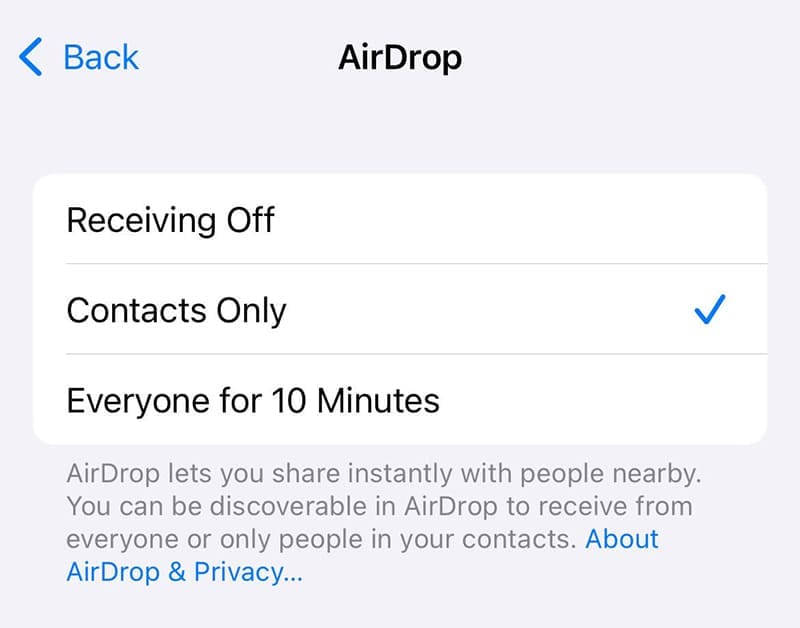
Both AirDrop and Quick Share offer options to control visibility and sharing. AirDrop allows you to set your visibility to three options.
Receiving Off
Contacts Only
Everyone
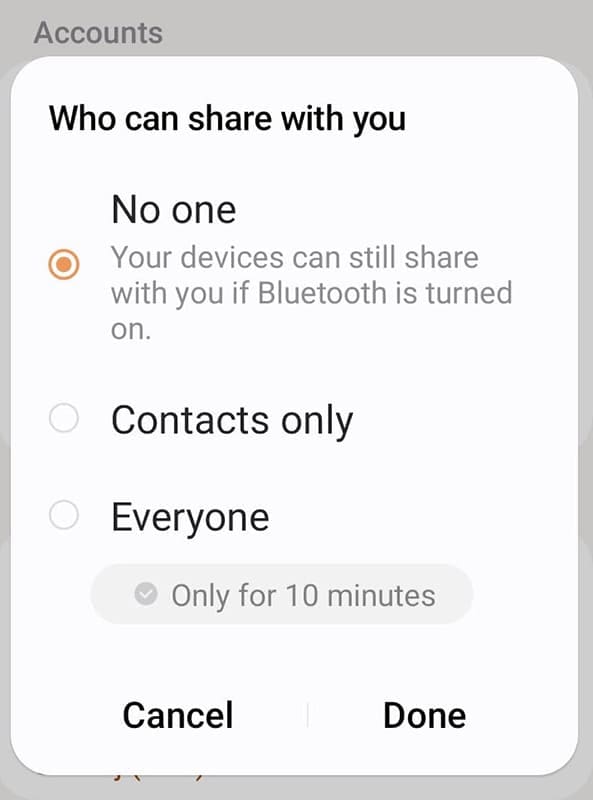
Quick Share offers similar controls.
No one
Contacts Only
Everyone
Both methods also use encrypted connections for the file transfer itself, adding a layer of security.
AirDrop vs. Quick Share: Ease of Use
Both AirDrop and Quick Share prioritize simplicity. To share a file, you only need to tap an icon and find the recipient. However, AirDrop might be quicker to discover available devices and connect to them. This results from its tight integration within the Apple ecosystem. Also, Quick Share might fail to connect more often. When this happens, Google recommends a few actions.
Bringing the devices within 1 foot of each other
Turning Airplane mode on and off
Turning your device on and off
Making sure you’re the only one sharing files with the device
As for AirDrop, the only difficulties can occur if you don’t turn on Bluetooth and Wi-Fi and if the recipient has its visibility turned off. In other words, the technology itself isn’t the issue.
As an avid gamer, I’ve run into my fair share of error codes and weird faults that have forced me to find fixes to problems I never anticipated. That gave me a passion for sharing those fixes with others so we can all game without feeling like our hardware is rebelling against us.













Write a Comment