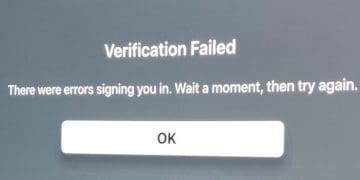
When you try to log in to Apple TV with your Apple ID, you may sometimes get an error message that says the verification process failed. Wait for a few minutes, and try again later. Hopefully, the login errors will disappear on their own. If waiting doesn’t work, follow the troubleshooting steps below.
First things first, check the System Status page for service interruptions. If the Apple TV service is affected by any known issues, wait until Apple has fixed them, and try again later. If everything’s up and running on Apple’s end, follow the steps below.
Verify Your Date and Time Settings
Go to your smart TV’s settings, and check your current region, time, and time zone settings. Make sure they’re accurate. If you’re using the wrong time and time zone settings, Apple’s servers may fail to verify and validate your account for security reasons. Keep in mind that secure data transmissions require an accurate timestamp.
Check Your Connection and Unplug Your Devices
Make sure there are no issues with your network. If your device has a stable Internet connection, the Apple TV app should update automatically.
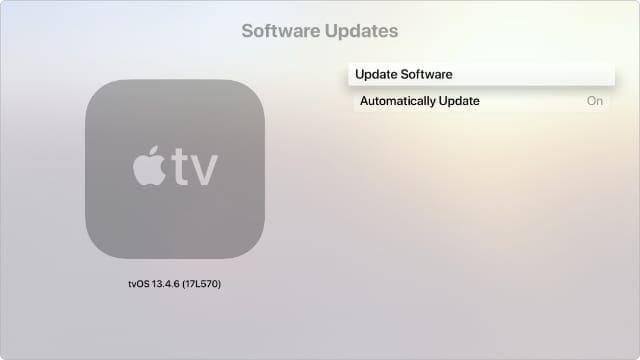
Make sure your Apple TV is running the latest version of tvOS.
If your connection is unstable, unplug your router, leave it unplugged for two minutes, plug it back in, and try again. Turn off your TV, unplug the power cord, wait for 30 seconds, and then restart the device.
As a quick reminder, if multiple devices are using your connection, you may experience bandwidth issues. Disconnect them, and try again. Use a different connection and check if you notice any improvements. By the way, don’t forget to update the software on your smart TV to the latest version.
Select the problematic Apple TV device in the list.
Select Remove from account.
Enable 2FA and Reset Your Apple ID Password
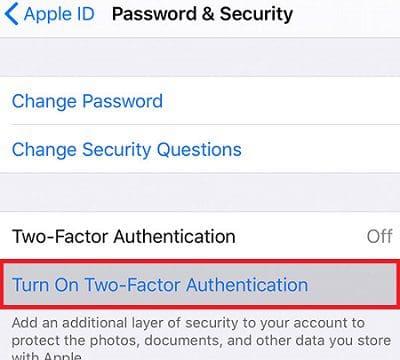
If you haven’t enabled two-factor authentication yet, enable this extra layer of security and check the results. You can enable 2FA on your iPhone, Mac, or on the web. For more information and step-by-step instructions, go to Apple’s support page.
If you’re using a new Apple ID, check your account and add all the necessary details to complete your profile.
If the problem persists, reset your Apple ID password. Then, log out of your account on all your devices, and restart them. Log back into your account on your smart TV, and check if you’re still getting the same error.
⇒ Note: Some users confirmed that completing another login on your iPhone could help you solve the problem. Check if you can sign in on the smart TV with the mobile option.
Remove Recent Channels and Reinstall Apple TV
If this problem started occurring after adding new channels, remove recently added channels. The same is valid for your settings. If you recently tweaked your settings, restore previous settings and check if you notice any changes. Additionally, uninstall Apple TV, restart your device, and reinstall the app.
Reset Your Device
If nothing works, reset your device. Go to Settings, select the Reset option and wait until your device goes back to factory settings.
Sometimes, you may need to follow all the steps above to solve the problem. For example, if you’re experiencing this problem on your Fire TV stick, make sure to install the latest firmware version. To do that, navigate to My Fire TV, select About, and select Check for updates. Then, uninstall the Apple TV app and restart the Fire TV stick. Install the Apple TV app again, and reset your Fire TV stick if the issue persists.
Conclusion
To fix the “Verification failed” error on Apple TV, make sure your date and time settings are correct. Then, unplug your router and smart TV to completely reset the connection to Apple’s servers. Additionally, enable two-factor authentication and reset your Apple ID password. Add any necessary account details to complete your profile. If the issue persists, remove recently added channels, reinstall the Apple TV app, and reset your device.
Did you manage to solve the problem? Hit the comments below and let us know which solution worked for you.
Madalina has been a Windows fan ever since she got her hands on her first Windows XP computer. She is interested in all things technology, especially emerging technologies — AI and DNA computing in particular.
Would like some additional help please. Apple is playing on another tv, iPad and iPhone all in the same house. Just one tv has stopped playing it and says verification failed!
I have tried to sign up for Apple TV many times this past year on my Sony Smart tv. It is so disappointing that after unplugging this and changing that, apple. TV is still showing up as not able to be verified. I followed all toolbox instructions until my fingers hurt. So disappointed since there is programming I would like to enjoy on this platform. I don’t want to be charged for my May 28 thru June 28 payment since I can only have Apple TV on my phone and I don’t watch tv on my phone.
Hello, I have a Samsung Q60 Series TV and none of these fixes worked for this tv, including trying my husbands Apple ID. From googling this is an issue for many with this TV with only the appleTV app. It would be wonderful to be able to use a QR code to login like with my other smart TVs. Please advise. Kindest, Victoria
This didn’t fix my problem either. Just got a brand new LG Smart TV ( ) and I can’t login to Apple TV+ ( get the Verification Failed error ), Airplay won’t work ( keeps re-prompting for the code even after I type it into my iPhone or iPad and hit enter ), and can’t add the TV to HomeKit ( the code keeps changing as soon as I scan or type it in ). Everything also works ( e.g. Disney+, Amazon Prime, NetFlix, all of the LG channels ) but everything to do with Apple just fails 🙁
This stinks! I just tried signing up, which took forever with the groupon mess, and now I can’t sign in! What a joke. I give up, thanks for nothing Apple.
I don’t even want AppleTv but I need to watch the A’s tonight. You’re making it impossible for me to login. I’ve tried making an account but every time I get the email verification code it always fails. Fix your shit and stop stealing my fucking baseball. Fuck you Apple.











Would like some additional help please. Apple is playing on another tv, iPad and iPhone all in the same house. Just one tv has stopped playing it and says verification failed!
I have tried to sign up for Apple TV many times this past year on my Sony Smart tv. It is so disappointing that after unplugging this and changing that, apple. TV is still showing up as not able to be verified. I followed all toolbox instructions until my fingers hurt. So disappointed since there is programming I would like to enjoy on this platform. I don’t want to be charged for my May 28 thru June 28 payment since I can only have Apple TV on my phone and I don’t watch tv on my phone.
Can’t watch any thing on Apple tv
Hello, I have a Samsung Q60 Series TV and none of these fixes worked for this tv, including trying my husbands Apple ID. From googling this is an issue for many with this TV with only the appleTV app. It would be wonderful to be able to use a QR code to login like with my other smart TVs. Please advise. Kindest, Victoria
Verification error when logging into Apple TV…????
I have tried all of these and my fire still won’t sign in to apple tv.
This is pathetic Apple can’t fix this problem. Time to unsubscribe to apple TV.
Jane
Verication Failed code on Apple tv plus
Have reset the tv after talking to your 800 number.
Still can’t get it to let me sign in.
What do I try next? It’s like the Applet t.v. plus app is dead.
Thanks
This didn’t fix my problem either. Just got a brand new LG Smart TV ( ) and I can’t login to Apple TV+ ( get the Verification Failed error ), Airplay won’t work ( keeps re-prompting for the code even after I type it into my iPhone or iPad and hit enter ), and can’t add the TV to HomeKit ( the code keeps changing as soon as I scan or type it in ). Everything also works ( e.g. Disney+, Amazon Prime, NetFlix, all of the LG channels ) but everything to do with Apple just fails 🙁
This has not fixed the problem. Same “verification error” continues.
This stinks! I just tried signing up, which took forever with the groupon mess, and now I can’t sign in! What a joke. I give up, thanks for nothing Apple.
i have a better idea, rather than do any of the above – because apple can’t get it’s verification code s*it together, i’ll just go with paramount+
Amen!
I don’t even want AppleTv but I need to watch the A’s tonight. You’re making it impossible for me to login. I’ve tried making an account but every time I get the email verification code it always fails. Fix your shit and stop stealing my fucking baseball. Fuck you Apple.