• Skip to primary navigation
  • Skip to main content
  • Skip to primary sidebar
  • Skip to footer

AppleToolBox

Tools and Fixes for Mac, iPad, iPhone & iWatch

Search posts

  • About
  • Contact

CONNECT WITH US

CATEGORIES

  • iPhone
  • iPad
  • iPod
  • Apple Watch
  • Mac/MacBook
  • AirPods
  • Apple TV
  • News
  • Apple Services
  • HomePod
  • Reviews

SITE

  • Home
  • About Us
  • Contact
  • Advertise

Search posts

You are here: Home / AirPods / How to Connect AirPods to an Android Phone

How to Connect AirPods to an Android Phone

By Louis Roundtree 0 comments Last updated July 11, 2025

Things to Know
  • AirPods work similarly to any other Bluetooth headphones when connecting to non-Apple products.
  • Some Android phones might have different settings in their menus, so the steps might not exactly match. However, Bluetooth device settings should always be similar.
  • You won’t be able to check the AirPods’ remaining battery on the Android, and you can’t change how the charging case behaves when clicked.
  • Siri and other advanced Apple control features won’t work with your AirPods when you’re using them on an Android device.

If you’ve recently switched from using an iPhone to an Android device, or have simply borrowed someone’s AirPods to use with your Android phone, you might be wondering if AirPods actually work apart from Apple devices. Well, the short answer is that they behave similarly to any other Bluetooth headphones, and it’s quite easy to pair AirPods with Android.

How to Connect AirPods to Android for AirPods (All Models)

The only thing you really need to do to connect AirPods to Android phones is turn on the AirPods for pairing, then open Bluetooth on your phone.

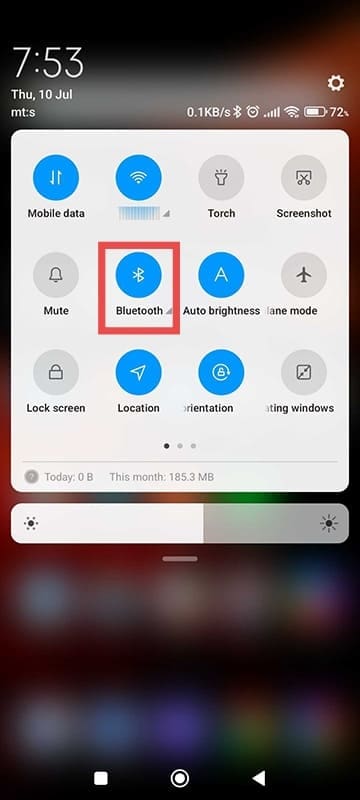
Step 1. Unlock the phone and drag from top down to open the Info menu.

Step 2. You may need to expand it by dragging the top section again until you find Bluetooth. It may be located on a different part of the menu, so you may need to scroll to the right, too. Alternatively, you can open your phone’s Settings app.

How to Connect AirPods to an Android Phone 1

Step 3. Click on Bluetooth (in the Info menu, long-press on the “Bluetooth” label rather than the icon).

Step 4. Toggle Bluetooth on, and you should get a list of devices nearby that you can pair with. If needed, select “Available devices” or “Pair new device,” whichever option for pairing is available on the screen (as it depends on the Android build).

How to Connect AirPods to an Android Phone 2

Step 5. You need to find your AirPods on the list. For this, you need to turn on Bluetooth pairing mode in the earbud case. This will depend on your exact model:

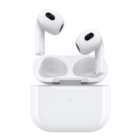
  • AirPods 1, 2, 3, and all versions of Pro: Put the earbuds in the charging case, then open the lid and press and hold the setup button on the back until the status light flashes white. This should take about five seconds.
  • AirPods 4: Put the earbuds back in the case, open the case, hold it near the phone, and double tap the front button on the case until the status light flashes white.
  • AirPods Max: Press and hold the Noise Control button on the right ear cup (with the earbuds in it) until you get a white status light.

Step 6. Once your AirPods are set to pair, recheck your phone’s Bluetooth screen. The AirPods should be named as such, with the listed model name.

Feature Limitations if You Pair AirPods With Android

When using AirPods with Android devices, several features become unavailable:

  • Siri Integration – Voice assistant commands default to Google Assistant instead.
  • Automatic Ear Detection – Music won’t pause when removing AirPods.
  • Seamless Device Switching – You need to manually reconnect AirPods each time you switch between devices.
  • Spatial Audio – Advanced audio processing features are disabled.
  • Find My Integration – You won’t be able to locate lost AirPods through the “Find My” network.
  • Battery Widgets – No native battery level will display in the status bar.
  • Automatic Updates – Firmware updates require a connection to an Apple device.

Related Posts:

  • Screen Shot 2021-07-12 at 4.52.12 AM
    AirPods Max Review: How They Look Six Months Later
  • AirPods Pro 2 - 1
    AirPods Max vs AirPods Pro 2: Making The Right Purchase
  • How to fix iPhone stuck in headphones mode
    How to Fix iPhone Stuck in Headphones Mode, Speaker…
  • pexels-ready-made-3921816
    $160 AirPods vs. $20 Amazon AirPods review
  • Powerbeats Pro Connection problems new hero
    Powerbeats Pro Connection Problems? Solve it now
  • airpods-wont-reset-no-light-flashing
    Google Pixel Buds vs AirPods vs Beats Fit Pro:…
  • pexels-karolina-grabowska-5624998
    The Best Apple Gifts for The 2022 Holidays
  • 2022 Mac Mini with Studio Display and Accessories
    Mac Tips For New Users In 2023
  • pexels-ready-made-3921814
    The Best AirPods Alternatives For Every Budget
Louis Roundtree
Louis Roundtree

As an avid gamer, I’ve run into my fair share of error codes and weird faults that have forced me to find fixes to problems I never anticipated. That gave me a passion for sharing those fixes with others so we can all game without feeling like our hardware is rebelling against us.

Reader Interactions

Write a Comment Cancel reply

Primary Sidebar

Recent Posts

  • How to Export iTunes Library to New Computer
  • What the Gemini Desktop App Will Bring to Mac
  • What to Do When Windows 11 Won’t Detect Your iPad
  • Outlook Outage 2026: iPhone Fixes for Sign-In Chaos
  • Guide to Changing iMessage Backgrounds on iPhone and Mac
  • Has Apple Killed Vision Pro? (Insane Sales Flop Explained)

Connect with us

Footer

ABOUT

  • About Us
  • Contact us
  • Advertise
  • Privacy
  • Terms of Use

GUIDES

  • iOS & iPadOS
  • Apple ID
  • iCloud
  • App Store
  • iTunes
  • FaceTime
  • iMessage
  • Siri
  • Books and iBooks
  • Game Center
  • AirPlay

CONNECT

  • Facebook
  • Twitter
  • FeedBurner
  • YouTube

© Copyright 2010-2024 Guiding Tech Media · All Rights Reserved

This site and its content are in no way affiliated or endorsed by Apple, Inc. · Reproduction without explicit permission is prohibited

Last Updated on July 15, 2025 by Louis Roundtree