Welcome back to another round of the best iOS apps and the best macOS apps! This time, we’re kicking off another new year with some of the best recommendations I have to bring you.
In this post, we’re going to look at apps that will help you learn how to code, fidget when you’re bored, search your Mac, and get access to a plethora of great apps through one app service.
For those new to this series, this is a monthly series where I cover some of the best apps currently available. I do my best to stick to lesser-known apps while occasionally blending in staples that I think everyone should have. That means that whether you’re a new Apple user or a veteran, there will be plenty of new stuff for you to explore in this curation.
1. Forte²: A better way to build habits using one of the best iOS apps
First on our list of the best iOS apps is Forte². It’s another habit tracker for the iPhone that aims to not be “just another habit tracker”. It does this by using a unique approach to building your habits.
Nearly every habit tracker on iOS is the same. It notifies you to do something (or not do something) each day. You check it off, and that’s it!
This is not how Forte² works. Forte² is not focused on streaks, but on how your brain actually adopts new habits. And that’s not by building linear, unbroken streaks, but steady, persistent progress.
That means that when you “break a streak” the app doesn’t start you back at zero. You have the opportunity to do something (or not do something) up to 100 times per day. You then set a weekly goal for what number you want to hit (or stay underneath) for the week. It’s a more sensible and sustainable way to change your habits.
Forte² is free with up to four habits, though you can pay a small fee to unlock more.
2. Kanagawa: A peaceful puzzle game with hand-drawn graphics
I’m always on the lookout for relaxing puzzle games to quit my mind with, and that’s exactly what this next item on our list of the best iOS apps is.
Kanagawa is a simple, beautiful, relaxing puzzle game for iPhone and iPad. The objective is to sort the puzzle pieces into rows without stalemating your movements. Similar to the tube-sorting games you see all over the App Store, but with a much, much-improved coat of paint and none of the obnoxious ads or power-ups.
I’ve been addicted to this game for a few weeks now. It’s my go-to when I’m listening to something in the background and want to be doing something with my hands.
My one complaint with this app is that I wish it had an unlimited mode! There are 100+ levels, which sounds like a lot, except that most of the puzzles can be solved in less than two minutes. This means you can beat the game in just a few days of fiddling with it. I’d love to see more levels added or even just the ability to have levels randomly generated for each difficulty level.
Even still, at just $1.99, it’s a great deal and a lot of fun to play.
3. Fidgets: A fidget cube for your wrist is one of the best iOS apps
It’s been a few years since the fidget cube craze of the late 2010s, something that all of us have probably heard of at least (or maybe you even had one!). These little gadgets fit in your pocket and have various sensory and tactile feedback objects on each side of the cube. A switch, button, marble, and so on.
Well, the next app on our list of the best iOS apps is Fidgets. Fidgets is a fidget cube for your Apple Watch. It comes with six interactive screens that you can swipe between. You can tap, balance, move, click, switch, flick, and more in the app.
All of these interactions are paired with haptic feedback, so you feel what you’re doing as much as you’re seeing it. This is a great tool for someone who needs something to do with their hands or even relies on stemming to stay grounded. Neurodivergent individuals in particular will likely find a lot of use with this app.
Fidgets is free to use, though there is a one-time upgrade for those who want to support the creator and change the color theme of the app. Check it out!
Recently, I’ve gotten back into programming after a four-year hiatus. Unsurprisingly, I have a lot of skills to brush up on. That’s what led me to stumble on tinkerstellar.
tinkerstellar is an app that mirrors Swift Playgrounds, the free iPad app from Apple that helps you learn how to program in Swift. Instead of teaching you Swift, however, this app focuses on teaching you Python.
For those that don’t know anything about coding, Python is the programming language designed for beginners. It’s super easy to learn and very well structured. Not to mention that it’s powerful, too! You can do a ton of stuff with it, making it great for diving into code. It’s the programming language to learn.
Part of what makes tinkerstellar such a great tool for learning Python is that it has fundamental and advanced concepts. You can learn the basics of Boolean logic and graduate to learning computer science topics like machine learning. It’s a really powerful app that anyone wanting to learn more about programming should pickup.
Best of all, tinkerstellar is free! There is just one caveat, and that’s that it’s technically not an iOS app – it’s an iPadOS app. You’ll need an iPad to learn in it. If you have an iPad, though, then seriously, check this app out!
Yep, it’s time for another round of Menu Bar apps! These are some of my favorite apps, as they’re persistent, in the background, and just add a bit of nifty functionality to your Mac. So let’s crowd that Menu Bar a bit more with one of the best macOS apps, iStat Menus!
iStat Menus is an app that brings key stats about your Mac to the Menu Bar. These stats include things like your memory usage, CPU pressure, network stability, battery and power usage, and more.
If you find yourself opening apps like Activity Monitor or System Preferences often to check the status of your Mac, iStat Menus will put all of this information right in your Menu Bar. This way, you can quickly reference it and see how your Mac is performing at a glance.
iStat Menus is a bit pricey, at $9.99. That one-time purchase, though, gives you access to everything your Mac has to offer. If this is an app you’re going to use every day, don’t let the price tag sway you!
2. Alfred: Upgrade your Spotlight with one of the best macOS apps
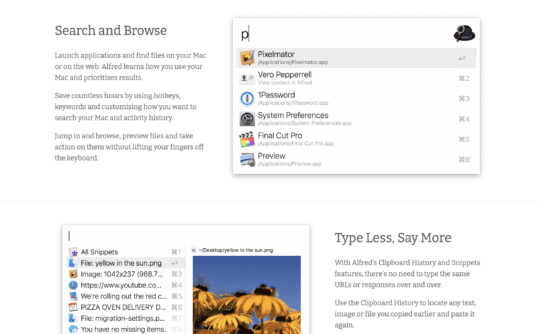
When deciding which apps to cover in this month’s list of the best macOS apps, I was shocked to discover that I’ve never talked about Alfred before. Maybe it’s because it’s so popular, or maybe I just assumed that I had to have talked about it. Regardless, I’m talking about it now.
Alfred is a major upgrade for Spotlight. It does everything that Spotlight search does and more. It can launch apps, quit apps, run automated routines, initiate a web search, show your clipboard history, launch a mini-player for Music, and a ton more.
At its core, though, Alfred is a search app. Its search features are highly-configurable, and they adapt to you. Tired of having Photo Booth appear when you’re searching for Photos? Alfred learns this by the way you use it and adapts automatically.
It’s a staple of third-party macOS apps and for good reason. The core features are free to use (I’ve been using it for months and never felt the need to upgrade it). For additional features like the mini-player and automated routines, you can pay roughly $40USD. That unlocks the “Power Pack”, which is packed with great features.
Next on our list of the best macOS apps is another item designed to upgrade the way you use your Mac. Snagit, properly named, will give your macOS screenshots a substantial feature bump.
Screenshots on macOS are already pretty great. You can easily screen record, capture specific windows or portions of the screen, choose to show or hide the mouse, and markup your screenshots. All of this works great and is readily built into the Mac system.
But it could be better. At least, that’s the ideology behind Snagit. Snagit is a much more robust app for taking and sharing screenshots. It offers advanced markup tools that make it feel like a lightweight Photoshop, and collaborating with others and sharing your screen is made much simpler.
If you’re someone who shares and takes screenshots often, then you may get a kick out of the extra features that Snagit has to offer. It’s another pricey app, though, at $63. For that reason, I more so recommend this to professionals who can write this off or have an employer cover it. For everyday screenshot taking it might be a bit overpowered and overpriced.
Last but certainly not least on our list of the best macOS apps is Setapp. It might be cheating to include Setapp, but it’s my list, so I can break the rules!
For those that don’t know, Setapp isn’t a single app, but a subscription service that gives you access to more than 200 apps. For just $10/month, you can use as many of these apps as much as you want, without ever worrying about ads or nagging to upgrade for certain features.
In all honesty, it’s kind of a crazy deal. It even includes a lot of the apps I’ve suggested before, including iStat Menus from this very list. You can find just about every kind of app there is on Setapp, making it a true one-stop solution for all of your app needs.
While I’ve never personally subscribed to Setapp, I highly recommend checking it out. I find that many of the apps I’m using or suggesting have been available through Setapp time and time again. It only makes sense to recommend it to you.
Start using the best iOS apps and the best macOS apps today
And that’s it! Those are my recommendations for the best iOS apps and the best macOS apps for this month. If I had to pick this month’s greatest hits, it would be Kanagawa, tinkerstellar, and Alfred. Give them a look!
Be sure to tune in next month for more of the best app recommendations! This is a monthly series, so keep coming back to AppleToolBox to keep your Apple toolbox filled with the very best apps available.













Write a Comment