It is incredibly frustrating when your iPhone drops a call, doesn’t even ring, or even tells you you have service when you really don’t. Like many people, you’ve probably experienced seeing full bars on your phone screen and somehow still not having any service.
Often what happens is that your phone will hook up to the service from one particular cell phone tower and then doesn’t naturally switch over to another one once it gets out of range. Sometimes this occurs when a mobile phone tries to maintain its connection to a tower, or if the nearest tower is currently overwhelmed by the number of connected devices. This can result in anything from inconsistent cell reception to practically no cell reception whatsoever.
Luckily, there is something you can do about it. With a few easy fixes, you can try to force your iOS device to switch cell phone towers.
OpenSignal is a mobile connectivity and network signal test app. It can help you run speed tests, find the best coverage in your area, and use maps to compare data speeds and signal strengths. It also shows you which cell tower you are currently connected to.
You can download and install the OpenSignal app from the Apple App Store.
Configure OpenSignal
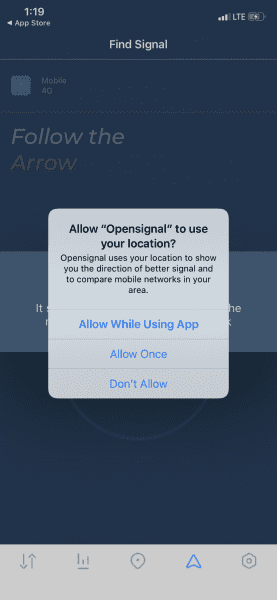
Once you’ve downloaded and installed OpenSignal on your iOS device, navigate to the arrow icon on the bottom menu bar of the app. There, the app will ask you to allow OpenSignal access to your location. You must select Allow, or the app won’t work.
You will then see a screen showing an arrow pointing to the cell tower your iPhone is currently connected to. If you tap on the arrow, it will bring up a map that labels all of the nearby towers associated with your carrier.
Using this, you’ll be able to check which tower your phone is connected to, and can come back to the app and see if your forced switch was successful.
Manually Switch Towers with iOS
Once you’ve checked cell towers with OpenSignal, you can force the switch.
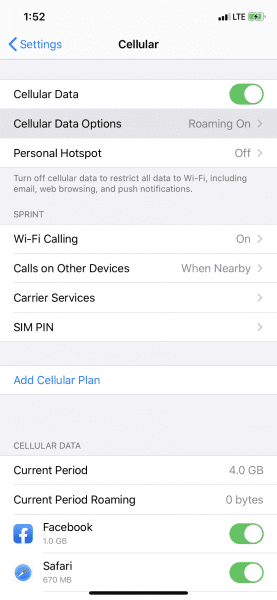
Open Settings on your iPhone.
Tap on Cellular > Cellular Data Options.
Select Enable LTE.
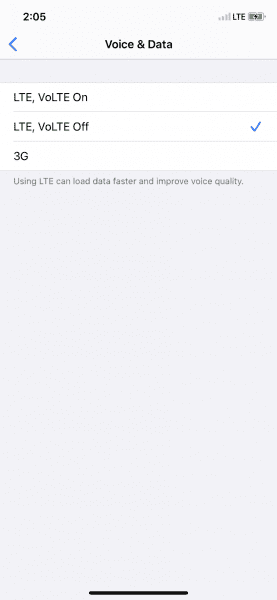
The setting will probably default to Voice & Data. Toggle it Off, wait about 30 seconds, and then switch it back to its previous setting. This will force your iPhone to search for the nearest cell tower with the strongest signal strength.
On newer iPhones, you might only see Voice & Data instead of Enable LTE. If this is the case, then LTE, VoLTE On will already be selected. Toggle LTE, VoLTE Off, wait 30 seconds, and then change its status back to On.
Verify the Change with OpenSignal
Next, head back to OpenSignal. Open the app and navigate to the same screen as before. If the switch was successful, you should see the arrow pointing in a different direction towards the new cell tower.
If it seems as though you’re still connected to the same tower as before, it could be that there isn’t a better one around. You might need to wait until you’re in a different area, or the nearby towers aren’t as overloaded.
Alternative Method: Reset Network Settings
If you tried OpenSignal and forcing a cell tower switch and you’re still not getting any service, there is another troubleshooting method you can try. However, this more of a hard reset than a soft reset. This will reset not only the mobile carrier signal but also all saved Wifi networks and passwords, cellular settings, and VPN hookups. We recommend that you use this only as a last resort.
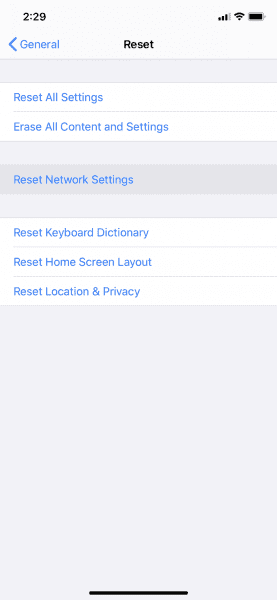
To reset the network settings, go to Settings > General.
Tap Reset (at the bottom) and then Reset Network Settings.
You will likely be asked to confirm the reset and enter the Passcode you have set for your iPhone.
This will force your iPhone to reset any network or cellular settings completely. Once rebooted, your phone should connect to the strongest nearby cell tower.
Wrapping Up
Not having any cell signal is a pain, especially if your iOS device is essentially lying to you! If you know you’re going to be in the area for a while and need to force a cell tower switch, then try out the OpenSignal technique. But only hard reset your network settings if you absolutely have to. Sure, no signal is a bummer, but having to re-enter all of your network data and settings afterward will prove more tedious than a few hours without cell service.
Could Apple Give me Instructions “ To : RE Position Device”?
My ISP is Verizon Lady Tech told me what to do. When done my iPhone MX Max had 3Bars and STATED “3 G” even the Verizon name showed on the top left of screen. She said restart phone. I turned it off and on again and her fix went back to 1-2 bars LTE.
Please give instructions for iPhones not just only for Tablets. They are both different .
I can not get opensignal to point towards any cell tower on my iphone 12 pro. Location is allowed. A coworker with the same phone and network has his working while standing next to me.
Thanks for this helpful article. I’m trying this technique but in Open Signal version (5.7.1) when I tap on the Arrow icon, I see a screen which resembles a compass with a giant arrow. The arrow points to a smaller icon and tapping on either does not show the cell tower map. How can I switch towers?











Could Apple Give me Instructions “ To : RE Position Device”?
My ISP is Verizon Lady Tech told me what to do. When done my iPhone MX Max had 3Bars and STATED “3 G” even the Verizon name showed on the top left of screen. She said restart phone. I turned it off and on again and her fix went back to 1-2 bars LTE.
Please give instructions for iPhones not just only for Tablets. They are both different .
I can not get opensignal to point towards any cell tower on my iphone 12 pro. Location is allowed. A coworker with the same phone and network has his working while standing next to me.
Thanks for this helpful article. I’m trying this technique but in Open Signal version (5.7.1) when I tap on the Arrow icon, I see a screen which resembles a compass with a giant arrow. The arrow points to a smaller icon and tapping on either does not show the cell tower map. How can I switch towers?