• Skip to primary navigation
  • Skip to main content
  • Skip to primary sidebar
  • Skip to footer

AppleToolBox

Tools and Fixes for Mac, iPad, iPhone & iWatch

Search posts

  • About
  • Contact

CONNECT WITH US

CATEGORIES

  • iPhone
  • iPad
  • iPod
  • Apple Watch
  • Mac/MacBook
  • AirPods
  • Apple TV
  • News
  • Apple Services
  • HomePod
  • Reviews

SITE

  • Home
  • About Us
  • Contact
  • Advertise

Search posts

You are here: Home / iPhone / Airpods Connected but No Sound

Airpods Connected but No Sound

By Michelle Honeyager 4 comments Last updated February 17, 2022

Airpods can help you listen to music without the pesky cord that used to come automatically on all earbuds. However, there are some hiccups to this new way of working.  One is that people who use Airpods notice that they don’t always automatically play music.

The Airpods are connected to the iPhone, but they simply aren’t playing sound and users report not even hearing the usual start-on tone. Their iPhone even shows the Airpod icon at the top of the screen, but there’s simply no sound. Changing the volume also doesn’t help. Below are a few ways to try to troubleshoot the issue.

Contents

  • Using the Charging Case
  • Performing a Reset
  • Other ways to Troubleshoot the Issue

Using the Charging Case

You can simply put the Airpods back in the charging case, which clears out the issue for some people:

  1. Put the Airpods back in the charging case.
  2. Close the cover.
  3. Wait at least 10 seconds.
  4. Open the case back up.
  5. Both the case and Airpods should show battery charge.
  6. Put the Airpods back in your ears and see if they work.

Performing a Reset

You might also try doing a full reset by:

  1. Place the Airpods back in their case and close.
  2. Open the Airpod case and press the small button at the back of the case for a few seconds.
  3. The light should blink amber three times.
  4. Close the Airpods case again.
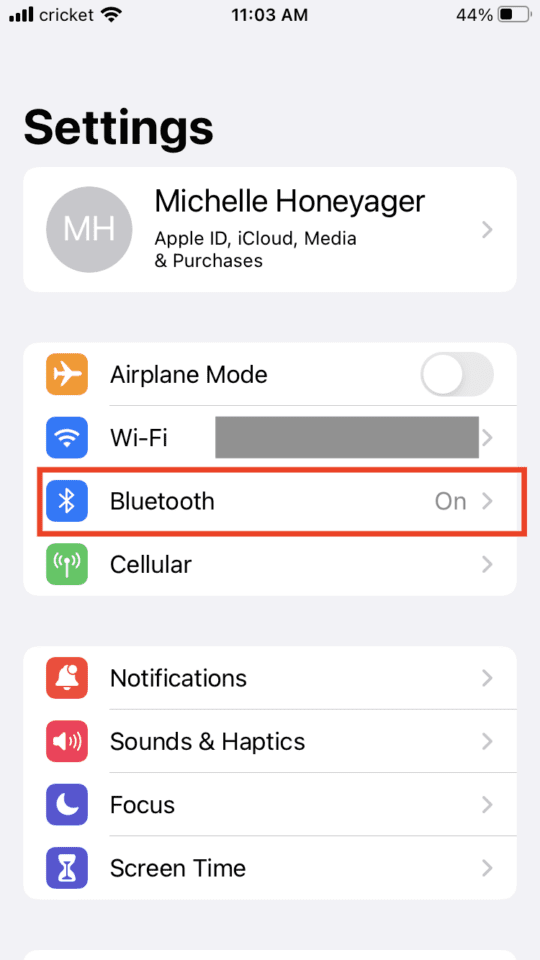
  5. Open the Bluetooth settings on your phone by going to Settings and selecting Bluetooth:

  1. Select Your Airpods and tap the Forget This Device option for your Airpods. That should allow them to pair up again.

Other ways to Troubleshoot the Issue

This is such a widespread problem that different people have stated results with different options. Some of them include:

  • Upgrading to an iPhone 7+ worked in at least one case
  • Try refreshing the music app you are working through
  • Turning Bluetooth on and off again

If troubleshoots like this don’t work, you might have to take your Airpods to an Apple Store. It could be the Airpods themselves are faulty.

Related Posts:

  • How to Find Lost AirPods Pro 2 with Precision Finding - Locate earbud
    I Lost My AirPods! How To Find Your Lost AirPods or…
  • AirPods Case and iPhone
    How Do You Use Live Listen With AirPods? Here’s What…
  • Photo of someone using Apple Music on their smartphone
    How to Fix Apple Music Not Working on iPhone / iPad
  • AirPods Pro not working Hero
    AirPods Pro Not Working? Here Are Some Tips and Tricks
  • Screen Shot 2021-07-12 at 4.52.12 AM
    AirPods Max Review: How They Look Six Months Later
  • AirPods Pro 2 - 1
    How Can I Make My Apple AirPods Louder?
  • AirPods Pro 2 - 1
    AirPods Max vs AirPods Pro 2: Making The Right Purchase
  • airpods-wont-reset-no-light-flashing
    Google Pixel Buds vs AirPods vs Beats Fit Pro:…
  • AirPods 3 and Case render
    AirPods 3 Tips and Tricks

Reader Interactions

Write a Comment Cancel reply

Show 4 Comments

  1. Marli says

    July 6, 2023 at 4:52 PM

    My AirPods say that they are connected but the sound still comes out of my phone/MacBook and does not come out of the AirPods.

    Reply
  2. Alan says

    December 29, 2022 at 4:56 PM

    Cecilia,
    Thank you. It worked!

    Reply
  3. Kayne Brent says

    September 8, 2022 at 2:27 PM

    My airpods won’t connect to my mac book computer and I’ve tried to resest the airpods and connect them to the computer and they connceted to the computer and connected noice but still didn’t play any noise.

    Reply
  4. Cecilia says

    July 31, 2022 at 9:15 PM

    It was the funniest and silliest moment. It happened to me and my AirPods pro this morning, no sounds coming out, even though I hear the connecting signal and the podcast is play. I tried to put them back into the case, reset the phone, forget the device and reset. Still could’t work. I gave up. And then after awhile, I tried again, accidentally I raised the volume. And here it is.

    And then I remembered, I’ve reduced the volume to zero while wearing the AirPods last night.

    I hope this will help.

    Reply

Primary Sidebar

Recent Posts

  • How to Export iTunes Library to New Computer
  • What the Gemini Desktop App Will Bring to Mac
  • What to Do When Windows 11 Won’t Detect Your iPad
  • Outlook Outage 2026: iPhone Fixes for Sign-In Chaos
  • Guide to Changing iMessage Backgrounds on iPhone and Mac
  • Has Apple Killed Vision Pro? (Insane Sales Flop Explained)

Connect with us

Footer

ABOUT

  • About Us
  • Contact us
  • Advertise
  • Privacy
  • Terms of Use

GUIDES

  • iOS & iPadOS
  • Apple ID
  • iCloud
  • App Store
  • iTunes
  • FaceTime
  • iMessage
  • Siri
  • Books and iBooks
  • Game Center
  • AirPlay

CONNECT

  • Facebook
  • Twitter
  • FeedBurner
  • YouTube

© Copyright 2010-2024 Guiding Tech Media · All Rights Reserved

This site and its content are in no way affiliated or endorsed by Apple, Inc. · Reproduction without explicit permission is prohibited

Last Updated on February 17, 2022 by Mitch Bartlett