• Skip to primary navigation
  • Skip to main content
  • Skip to primary sidebar
  • Skip to footer

AppleToolBox

Tools and Fixes for Mac, iPad, iPhone & iWatch

Search posts

  • About
  • Contact

CONNECT WITH US

CATEGORIES

  • iPhone
  • iPad
  • iPod
  • Apple Watch
  • Mac/MacBook
  • AirPods
  • Apple TV
  • News
  • Apple Services
  • HomePod
  • Reviews

SITE

  • Home
  • About Us
  • Contact
  • Advertise

Search posts

You are here: Home / Apple TV / Fix: Tennis Channel Not Working on Apple TV

Fix: Tennis Channel Not Working on Apple TV

By Madalina Dinita 1 comment Last updated February 25, 2022

If you can’t watch your favorite Tennis Channel events on Apple TV, don’t panic. There are a few things you can do to troubleshoot the problem. For example, check if the iPad app is working and watch your favorite tennis competition via AirPlay. If you don’t have an iPad or the issue persists, follow the troubleshooting steps below.

Contents

  • What to Do if the Tennis Channel Won’t Work on Apple TV
    • Update Your Apple TV App
    • Unplug Your Smart TV and Router
    • Reset or Reinstall Apple TV
    • Conclusion

What to Do if the Tennis Channel Won’t Work on Apple TV

Check the System Status page for any Apple TV service interruptions. Then, check the Tennis Channel’s official Twitter account for news about service interruptions. If there are any known issues, try again later.

⇒ Note: As of October 2019, the Tennis Channel App is no longer available on the 2nd and 3rd generation Apple TVs introduced in 2010 and 2012. You can access the Tennis Channel App on the 4th generation Apple TV and Apple TV 4K.

Update Your Apple TV App

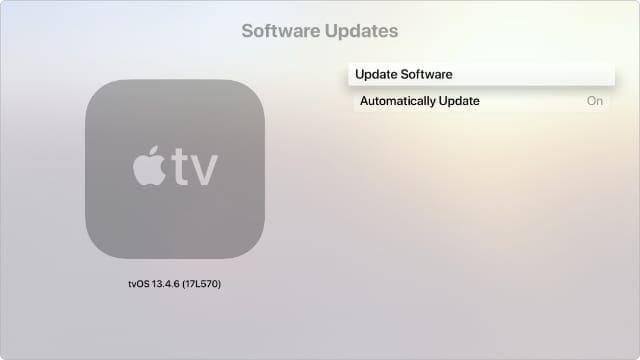
Install the latest version of tvOS on your device, and check if you notice any changes. Your Apple TV app should update automatically. If that doesn’t happen, you can manually install the latest updates.

Navigate to Settings, select System, and go to Software Updates. Then, select Update Software. If there are any updates available, select Download and Install. Apple TV will automatically restart during the update process.

Apple TV Update Software System settings
Make sure your Apple TV is running the latest version of tvOS.

Unplug Your Smart TV and Router

If you still can’t watch the Tennis Channel, turn off your smart TV and unplug the power cable. Leave your TV unplugged for two minutes to get rid of flea power. Meanwhile, unplug your router as well. Plug your devices back into the wall outlet, wait until they go back online, and check if the Tennis Channel is available.

Reset or Reinstall Apple TV

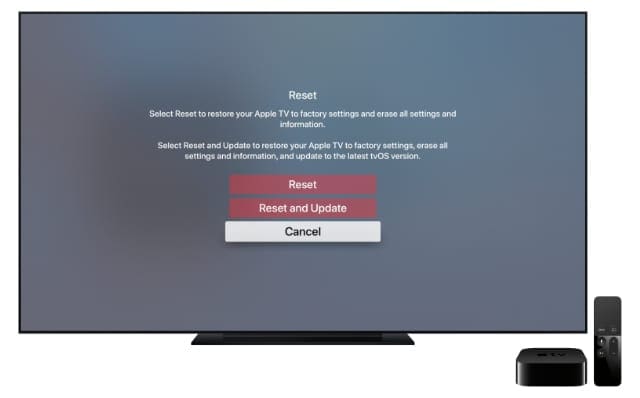
Try resetting the Apple TV app and check if this solution solves the problem. Keep in mind that when you reset the app, you’ll lose all data, including your accounts, personal information, settings, TV shows, movies, and so on.
To reset Apple TV, navigate to Settings, go to Reset, and then select the Reset option.

Apple TV Reset and Update options from Settings
Erase your Apple TV using the Reset option in System Settings.

If nothing works, try deleting the Apple TV app, and restart your device. Download the app again, and check the results. If the problem persists, contact Tennis Channel support.

Conclusion

If the Tennis Channel won’t work on Apple TV, restart the app. Then, update your Apple TV app to the latest version. Additionally, unplug your smart TV and router to reset the connection. If the issue persists, reset and reinstall Apple TV.

Hit the comments below and let us know if you managed to solve the problem. Don’t forget to mention which solution did the trick for you.

Related Posts:

  • How to Sign up for Twitter Blue hero
    How to Sign up for Twitter Blue
  • How to Upload 4K Pictures to Twitter Hero
    What Is Twitter Circle and How to Use It
  • Apple Watch Ultra Tips and Tricks
    Apple Watch Tips and Tricks for 2023
  • Missing Holidays on iPhone Calendar? How-to Fix Hero
    How To Duplicate and Copy Calendar Events in iOS and…
  • How to Upload 4K Pictures to Twitter Hero
    Best Twitter Apps for iPhone, iPad, and Mac
  • How to Sign up for Twitter Blue hero
    What Happened To Tweetbot, Twitteriffic, and Other…
  • Here are 5 tips and tricks for using the new Twitter app on macOS Catalina
    How to Delete Twitter on iPhone, iPad, and Mac
  • 2023 Mac Studio lifestyle - 1
    macOS Could Not Be Installed, How-To Fix
  • Photo of someone using Apple Music on their smartphone
    How to Fix Apple Music Not Working on iPhone / iPad
Madalina Dinita

Madalina has been a Windows fan ever since she got her hands on her first Windows XP computer. She is interested in all things technology, especially emerging technologies — AI and DNA computing in particular.

Reader Interactions

Write a Comment Cancel reply

Show 1 Comments

  1. Arnold Palmer says

    March 27, 2022 at 7:57 AM

    Tennis Channel International currently available in:

    Austria, Germany, Greece, Switzerland and UK.

    Reply

Primary Sidebar

Recent Posts

  • How to Stop Sharing Analytics in iOS 26
  • How to Manage Your iPhone Call Log
  • Are Apple’s Safety Precautions Enough for AirTags?
  • How to Hide Username and Photo on the Mac Lock Screen
  • Microsoft Resume vs. Apple Handoff – Which Wins for Cross-Device Work?
  • How to Export iTunes Library to New Computer

Connect with us

Footer

ABOUT

  • About Us
  • Contact us
  • Advertise
  • Privacy
  • Terms of Use

GUIDES

  • iOS & iPadOS
  • Apple ID
  • iCloud
  • App Store
  • iTunes
  • FaceTime
  • iMessage
  • Siri
  • Books and iBooks
  • Game Center
  • AirPlay

CONNECT

  • Facebook
  • Twitter
  • FeedBurner
  • YouTube

© Copyright 2010-2024 Guiding Tech Media · All Rights Reserved

This site and its content are in no way affiliated or endorsed by Apple, Inc. · Reproduction without explicit permission is prohibited