You can easily restrict iMessage on an iPod touch, iPad or iPhone; even though there is no direct way to do so using restrictions, also known as parental controls. Here is how:
Steps: How to use parental controls to restrict iMessage
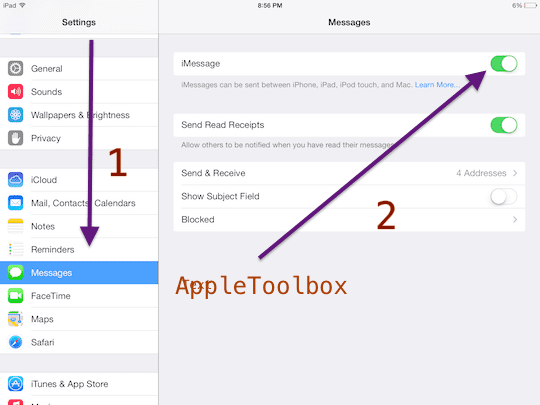
1. Disable iMessage by going to Settings > Messages and toggle the iMessage slider to OFF to disable it. Skip this step if iMessage is already disabled.
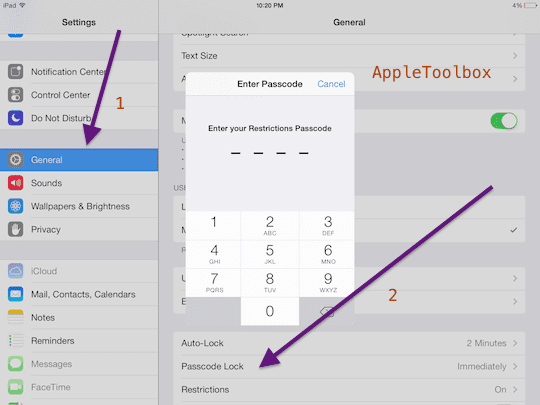
2. Now you need to lock ability to change account settings in restrictions (also known as parental controls) so that only you can enable iMessage. Tap Settings > General > Restrictions. If you’ve already enabled restrictions before, you’ll be prompted for your passcode, and enter your passcode. If not, tap Enable Restrictions and enter a passcode. Choose a passcode that you will remember. Don’t forget your passcode as the passcode will be required to disable Restrictions.
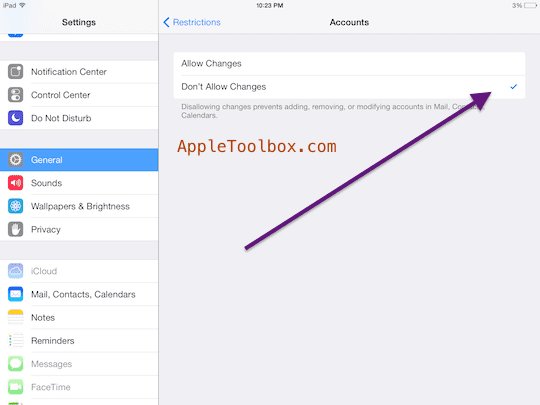
3. Tap Allow Changes: and select Accounts then tap Don’t Allow Changes. Now access to iMessages is restricted.
Notes:
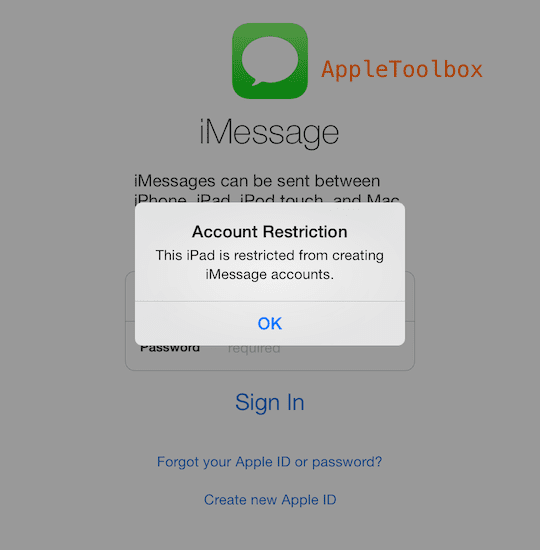
a. Note that the Messages app will still be present on the Home screen but when you try to open it, you will see a message saying ” This iPad is restricted from creating iMessage accounts”
b. Note that you can restrict iMessage on an iPhone, but the method described above will not restrict the Messages app. This means is that Messages using SMS and MMS will still work.
Obsessed with tech since the early arrival of A/UX on Apple, Sudz (SK) is responsible for the original editorial direction of AppleToolBox. He is based out of Los Angeles, CA.
Sudz specializes in covering all things macOS, having reviewed dozens of OS X and macOS developments over the years.
In a former life, Sudz worked helping Fortune 100 companies with their technology and business transformation aspirations.
I want to disable imessages without my 11 year old son knowing I did. Imessages do not show up on our AT&T phone bill, and so if he deletes them, I will never know they happened. (He knows about the double delete trick). #1 I would like to know if there is a way to make text messages still look blue?… Or #2 is there another setting that I can set (cellular data?… airplane mode??) that will change the texts to just regular texts but not show that imessages are turned off?
I have a question: we have set out teenage son’s iPhone for a downtime starting at 10:30pm. We’ve also set communication restrictions during downtime to just his dad & myself. Is Imessaging still going to work for his contacts whom he messages? I would
Have thought that he could only send / receive texts from his dad & me, but, he can still send / receive messages after downtime. (Those sent messages are blue in color, therefore, I’m assuming that’s imessage.)
Even with parental controls on and screen time locked down my son can just go into contacts and select “share contact” then he selects “messages” and is able to text and get around all restrictions! Even when the “message” icon is grayed out on the home screen! I submitted this to Apple, I even did a screen recording how to do it and they won’t fix the texting bypass. I think I will have to get an Android to lock him out of texting. I even tried turning texting off at the T-Mobile level and the texting still works for iPhones. Geez!
My mom won’t let me message or FaceTime. She took everything away from me. She blocked it on all our family’s devices. What should I do?? She won’t even let me get a phone, iPod touch, or anything. And my age is 11 and one half. What should I do? I can’t even talk to my friends over vacations and breaks. I can’t even text my mom and say that I feel sick. I can’t even tell her anything until she comes home. It’s not because of the price, it’s just that she doesn’t want me to get a new one.
My sister is facing a legal investigation and on probation from ONE person messaging her who was an adult. She’s only 16 years old. You do NOT need messaging right now. If you’re sick, you can call. I’m 21 now, and when I was in middle school, every classroom and the office had phones I could use to call home. It isn’t worth getting in serious danger and trouble over.
Hi, Thank you for your article. I am trying to limit imessaging for my child’s ipod. It is not highlighted but she has it and uses it. When I go to restrictions, the box underneath says “disable restrictions” and I don’t see anywhere where it would say “allow changes”. Could you please help me? Thank you again!











I want to disable imessages without my 11 year old son knowing I did. Imessages do not show up on our AT&T phone bill, and so if he deletes them, I will never know they happened. (He knows about the double delete trick). #1 I would like to know if there is a way to make text messages still look blue?… Or #2 is there another setting that I can set (cellular data?… airplane mode??) that will change the texts to just regular texts but not show that imessages are turned off?
I have a question: we have set out teenage son’s iPhone for a downtime starting at 10:30pm. We’ve also set communication restrictions during downtime to just his dad & myself. Is Imessaging still going to work for his contacts whom he messages? I would
Have thought that he could only send / receive texts from his dad & me, but, he can still send / receive messages after downtime. (Those sent messages are blue in color, therefore, I’m assuming that’s imessage.)
Even with parental controls on and screen time locked down my son can just go into contacts and select “share contact” then he selects “messages” and is able to text and get around all restrictions! Even when the “message” icon is grayed out on the home screen! I submitted this to Apple, I even did a screen recording how to do it and they won’t fix the texting bypass. I think I will have to get an Android to lock him out of texting. I even tried turning texting off at the T-Mobile level and the texting still works for iPhones. Geez!
How do you unrestrict messages on you iPad.
My mom won’t let me message or FaceTime. She took everything away from me. She blocked it on all our family’s devices. What should I do?? She won’t even let me get a phone, iPod touch, or anything. And my age is 11 and one half. What should I do? I can’t even talk to my friends over vacations and breaks. I can’t even text my mom and say that I feel sick. I can’t even tell her anything until she comes home. It’s not because of the price, it’s just that she doesn’t want me to get a new one.
My sister is facing a legal investigation and on probation from ONE person messaging her who was an adult. She’s only 16 years old. You do NOT need messaging right now. If you’re sick, you can call. I’m 21 now, and when I was in middle school, every classroom and the office had phones I could use to call home. It isn’t worth getting in serious danger and trouble over.
Hi, Thank you for your article. I am trying to limit imessaging for my child’s ipod. It is not highlighted but she has it and uses it. When I go to restrictions, the box underneath says “disable restrictions” and I don’t see anywhere where it would say “allow changes”. Could you please help me? Thank you again!