The iPad Air is a more powerful and speedier tablet than its iPad 4 predecessor, thanks to the same A7 chip that also powers the iPhone 5s. Despite this significantly improved performance, several iPad users are complaining about frequent crashes because of low memory. Note that the iPad Air has 1 GB of LPDDR3 memory (RAM). Please also note that if your iPad Air (or other previous iPad models) crashes frequently (such as when using the Facebook app, Safari or other apps like games), it is probably because of lack of memory.
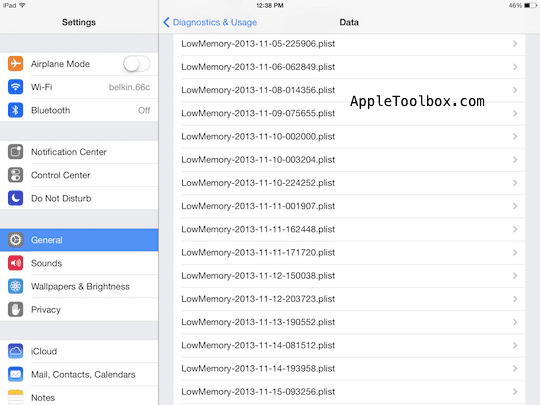
You can see your crash reports by going to Settings > General > About > Diagnostic & Usage > Diagnostic & Usage Data. As you can see blow:
If you are having this problem, here is what you can do to fix:
Close all apps. If you close your apps that are currently running in the background, then you will free up RAM on your device. Double-click the Home button and swipe your Apps upwards. Tap the Home Button when you are done.
Reset your iPad by pressing and holding the Home and Sleep/Wake buttons simultaneously until the Apple logo appears. RAM can be cleared through resetting.
Turn off Background App Refresh option by going to Settings > General > Background App Refresh
If you are not using, turn off Spotlight Search indexing by going to Settings > General > Spotlight Search and uncheck all options.
Change your Wallpaper from Dynamic to Stills. Tab Settings > Wallpapers & Brightness. Tap on the Wallpaper section. You will see “Dynamic” and “Stills” under Apple Wallpaper. Tap on the Stills and select the one you like to set your wallpaper.
Let Apple know. Tap Settings > General > About > Diagnostic & Usage and check Automatically Send option to help Apple improve its products by sending your daily diagnostics reports.
Obsessed with tech since the early arrival of A/UX on Apple, Sudz (SK) is responsible for the original editorial direction of AppleToolBox. He is based out of Los Angeles, CA.
Sudz specializes in covering all things macOS, having reviewed dozens of OS X and macOS developments over the years.
In a former life, Sudz worked helping Fortune 100 companies with their technology and business transformation aspirations.
my ipad air 16gb wifi on ios 8.1.1 i have no problem no crash no freeze but the time i update my ipad on ios 8.1.2 whenever i charge my ipad air it always reboot but only of couple of times sometimes blue screen and then reboot what maybe the cause of this rebooting on my ipad












It crashes on a game of 200 megs and a storage of 128 gigs why
Thankyou ! very helpful!
Ipad reboots itself EVERY three minutes Wont stay on! HELP please
my ipad air 16gb wifi on ios 8.1.1 i have no problem no crash no freeze but the time i update my ipad on ios 8.1.2 whenever i charge my ipad air it always reboot but only of couple of times sometimes blue screen and then reboot what maybe the cause of this rebooting on my ipad
Myipad air keeps crashing. I have been able to restore via my mac. Now it has crashed and cannot restore.