iPhone 13 users may sometimes have trouble calling via car Bluetooth. Many users have complained their devices often disconnect from car Bluetooth during calls. Unfortunately, this problem affects all iPhone 13 models, including the Pro versions.
This is a major issue as it may distract your attention while driving. You know what they say: eyes on the road, hands on the wheel. But if your call drops unexpectedly, you’re tempted to look at your phone and even grab it in an attempt to fix the problem. However, that’s not a good idea, especially if you’re driving at a high speed.
Without further ado, let’s see what you can do if your iPhone 13 hangs up on people at random intervals when connected to car Bluetooth.
What to Do if iPhone 13 Disconnects From Car Bluetooth
Install the Latest Updates
Be sure to update your iOS version and apps to the latest version. Many users confirmed that iOS 15.3 and later solved the problem for them. Outdated software may cause your device to behave strangely. Navigate to Settings, select General, and then tap Software Update.
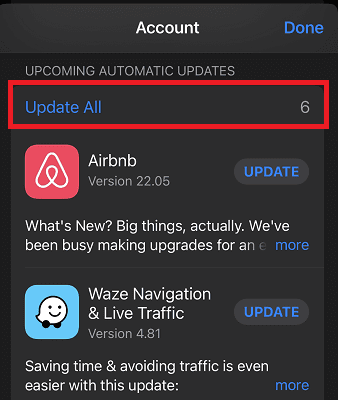
To update your apps, launch App Store, and tap your profile picture. Then, scroll down to Upcoming Automatic Updates, and tap Update All. Make sure your GPS and navigation apps are up-to-date.
Then, turn Bluetooth off in Settings, and restart your iPhone. Check if you notice any changes.
Route Call Audio to Bluetooth Headset
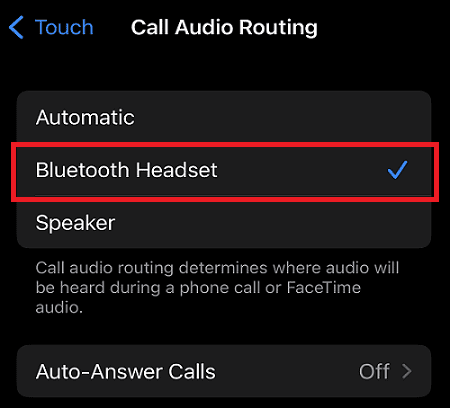
Try changing call audio routing from Automatic to Bluetooth headset.
Navigate to Settings.
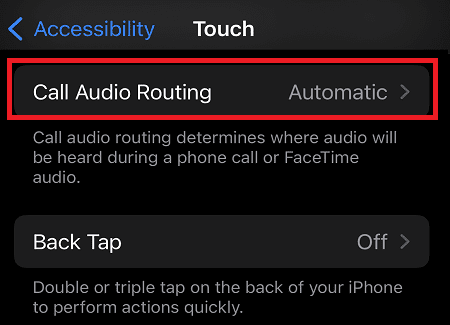
Go to Accessibility, and tap Touch.
Then, go to Call Audio Routing.
Select Bluetooth Headset as the desired location to receive your calls.
While this workaround may not solve the problem for all users, it should significantly reduce its frequency. Your iPhone may still drop some calls, but most of them should be fine.
Forget All Bluetooth Devices
Go back to Settings.
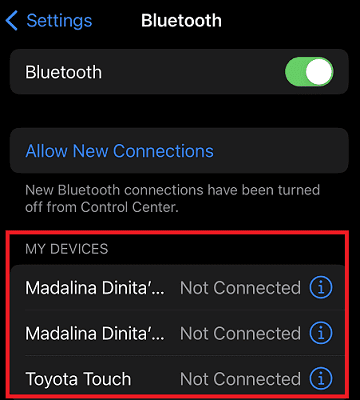
Navigate to the Bluetooth menu.
Tap on the Info icon next to the Bluetooth devices connected to your iPhone.
Tap Forget This Device.
This applies to your car’s Bluetooth connection as well. Then, pair your iPhone with your car Bluetooth again.
Don’t forget to restart your device. You can also take out your SIM card, wait for a couple of minutes, and then put the card back in. If the issue persists, contact Apple Support for further help.
Conclusion
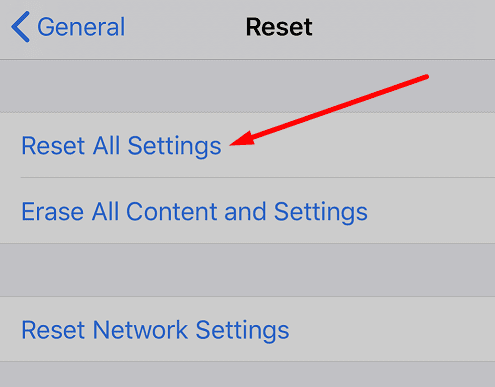
To fix the issue where iPhone 13 disconnects from your car’s Bluetooth during calls, update iOS and all of your apps to the latest version. Then, route Call Audio to your Bluetooth headset. Additionally, forget all Bluetooth devices, and re-pair your iPhone to your car’s Bluetooth. If the issue persists, reset all iPhone settings, and contact Apple Support.
Has your iPhone ever dropped calls while connected to your car’s Bluetooth? Did you find other ways to troubleshoot the problem? Let us know in the comments below.
Madalina has been a Windows fan ever since she got her hands on her first Windows XP computer. She is interested in all things technology, especially emerging technologies — AI and DNA computing in particular.
iPhone 13 all updates done car updates done. When on Bluetooth calls connect but no sound through car speakers. Tried all setting on phone and car nothing so far helped. Old iPhone se works perfectly. Very disappointed any help please. Thanks
2018 Honda Accord with a recently purchased overly expensive iPhone 13 Pro Max BS.. connects to BT and works fine until I turn off the engine. The next start up..no connectivity. I called dealer service..clueless. Bring it in and we’ll charge you $200 because we can. No wonder there are more car accidents in the US. I don’t know if this is Hondas or Apple’s issue, but ridiculous that these world leaders?? in tech cannot sustain the tech. My old iPhone XR NEVER had this issue. BTW, my kids frickin 2018 Sonata works fine with it.. the Korean kick the cra..out of the Japanese software again. Come on!!
My car bluetooth works great on the Interstate, but driving in town, my screen will say “No Device Connected” during a call, and then it will connect back to the call, and then drop it again. I get the feeling that the car is trying to connect to someone else. This is a new car and it happened with iPhone 7 and iPhone 13.
The dealer suggested that I connect thru the USB cable, but car still loses the phone. The phone call does not get dropped, just goes from car to phone and back to car.
I have a 2012 BMW 320d(F30). It is pre iDrive. I have had iPhone X, iPhone 12 and now have iPhone 13 Pro. The previous iPhones displayed zero connectivity issues with my bluetooth connection to telephone hands-free in the car. Since I have had the iPhone 13 Pro, I cannot hold a successful call on my Car audio. It connects on startup but will disconnect shortly after commencing a call. If I opt to switch to speaker on the phone, it works for a minute or 2 but then the car takes the call over but there is no incoming or outgoing audio. This will continue on and off for the duration of the call. Sometimes I will have more time to talk before it fails, but it is especially bad if I am using WhatsApp to call. Using data call is far worse than GSM call but both will fail during a call. The call does not drop but the connection to the car fails. I have tried all of the steps above but the problem persists.








iPhone 13 all updates done car updates done. When on Bluetooth calls connect but no sound through car speakers. Tried all setting on phone and car nothing so far helped. Old iPhone se works perfectly. Very disappointed any help please. Thanks
2018 Honda Accord with a recently purchased overly expensive iPhone 13 Pro Max BS.. connects to BT and works fine until I turn off the engine. The next start up..no connectivity. I called dealer service..clueless. Bring it in and we’ll charge you $200 because we can. No wonder there are more car accidents in the US. I don’t know if this is Hondas or Apple’s issue, but ridiculous that these world leaders?? in tech cannot sustain the tech. My old iPhone XR NEVER had this issue. BTW, my kids frickin 2018 Sonata works fine with it.. the Korean kick the cra..out of the Japanese software again. Come on!!
iPhone disconnect also wipe playing music or video what is the solution
My car bluetooth works great on the Interstate, but driving in town, my screen will say “No Device Connected” during a call, and then it will connect back to the call, and then drop it again. I get the feeling that the car is trying to connect to someone else. This is a new car and it happened with iPhone 7 and iPhone 13.
The dealer suggested that I connect thru the USB cable, but car still loses the phone. The phone call does not get dropped, just goes from car to phone and back to car.
Tried all of the suggestions and the problem persists. Very very irritating
Yes, iPhone 13 pro won’t connect or stay connected to car speaker for calls
I have a 2012 BMW 320d(F30). It is pre iDrive. I have had iPhone X, iPhone 12 and now have iPhone 13 Pro. The previous iPhones displayed zero connectivity issues with my bluetooth connection to telephone hands-free in the car. Since I have had the iPhone 13 Pro, I cannot hold a successful call on my Car audio. It connects on startup but will disconnect shortly after commencing a call. If I opt to switch to speaker on the phone, it works for a minute or 2 but then the car takes the call over but there is no incoming or outgoing audio. This will continue on and off for the duration of the call. Sometimes I will have more time to talk before it fails, but it is especially bad if I am using WhatsApp to call. Using data call is far worse than GSM call but both will fail during a call. The call does not drop but the connection to the car fails. I have tried all of the steps above but the problem persists.