While we continue awaiting the arrival of the Apple Watch Series 7, current Watch owners can start getting excited. At WWDC 2021, Apple introduced watchOS 8, the company’s latest wearable operating system. While there aren’t as many features coming compared to the Mac, iPhone, or iPad, there are still plenty of new things on the roadmap.
New App Experiences: apps now provide more glanceable information, along with new ways to interact with your Apple Watch. For instance, you can access Control Center just by pressing the Side Button. And if you’re wondering what happened to your Recently Used app drawer, just double-click the Digital Crown. Plus, the App Drawer has been slightly tweaked to provide a more enjoyable experience.
Widgets and Smart Stack: The defining feature of watchOS 10 is the addition of widgets and the Smart Stack. All you need to do is rotate the Digital Crown in order to reveal any of the widgets found in the Smart Stack. Much like using Smart Stacks on your iPhone or iPad, you’ll see the most important widgets based on what you’re doing and the time.
Cycling Workouts: Within Workout Views, you’ll see sections for Heart Rate Zones, Elevation, Race Route, and Cycling Speed. Apple has also made it possible for your Apple Watch to be connected with Bluetooth-enabled cycling accessories, complete with support for Indoor and Outdoor cycling workouts.
Hiking Workouts: Hiking was the other Workout that received a major update as the built-in Compass app “automatically generates two new waypoints.” The first of which is Last Cellular Connection Waypoint, which estimates the last place with cellular reception. The second is Last Emergency Call Waypoint which estimates “where on the route their device had the last connection to any available carrier’s network so that an emergency call can be made.”
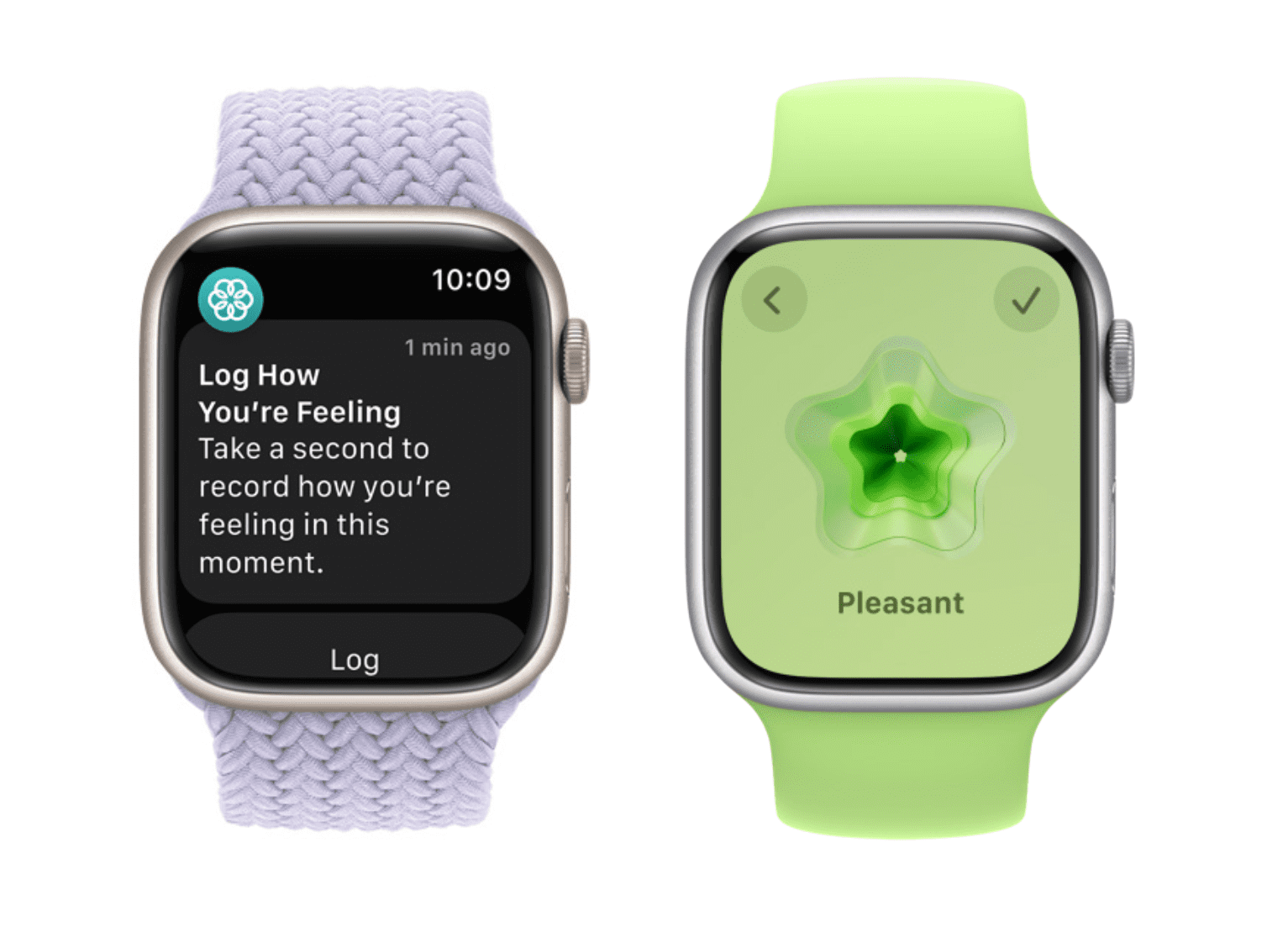
Mental Health: On the Apple Watch, the Mindfulness app has been updated allowing users to “conveniently log their momentary emotions and daily moods”. There are a variety of pre-populated prompts available to describe how you are feeling, “select what is having the biggest impact on them, and describe their feelings.”
What Apple Watch Models Are Compatible With watchOS 10?
Usually, whenever a new version of an Apple operating system is released, that means it’s the end of the line for older products. However, just like iOS 17 with the iPhone X, Apple is bringing watchOS 10 to the oldest Watch in the lineup.
That means that your Apple Watch Series 4 from 2018 will get the latest version. The only catch here is that Apple has already confirmed that not all of the new features will be coming to older Watch models.
Apple Watch Series 4
Apple Watch Series 5
Apple Watch SE (1st and 2nd gen)
Apple Watch Series 6
Apple Watch Series 7
Apple Watch Series 8
Apple Watch Ultra
When Is watchOS 10 Being Released?
We’re getting into the watchOS 10 Developer Preview cycle, just like with the other Apple software versions. We’re expecting to see the first watchOS 10 Public Beta made available sometime in July.
Even if you can install the watchOS 10 Developer Preview, we don’t recommend doing so. If something goes awry and your Apple Watch stops working, you’ll need to take it to the Apple Store to get the software downgraded.
The final version of watchOS 10 is currently expected to arrive in September. It’s likely that’s when we’ll be seeing the next Apple Watch model unveiled, as Apple likes to release new software versions with new hardware.
Andrew Myrick is a freelance writer based on the East Coast of the US. He enjoys everything to do with technology, including tablets, smartphones, and everything in between. Perhaps his favorite past-time is having a never-ending supply of different keyboards and gaming handhelds that end up collecting more dust than the consoles that are being emulated.












Write a Comment