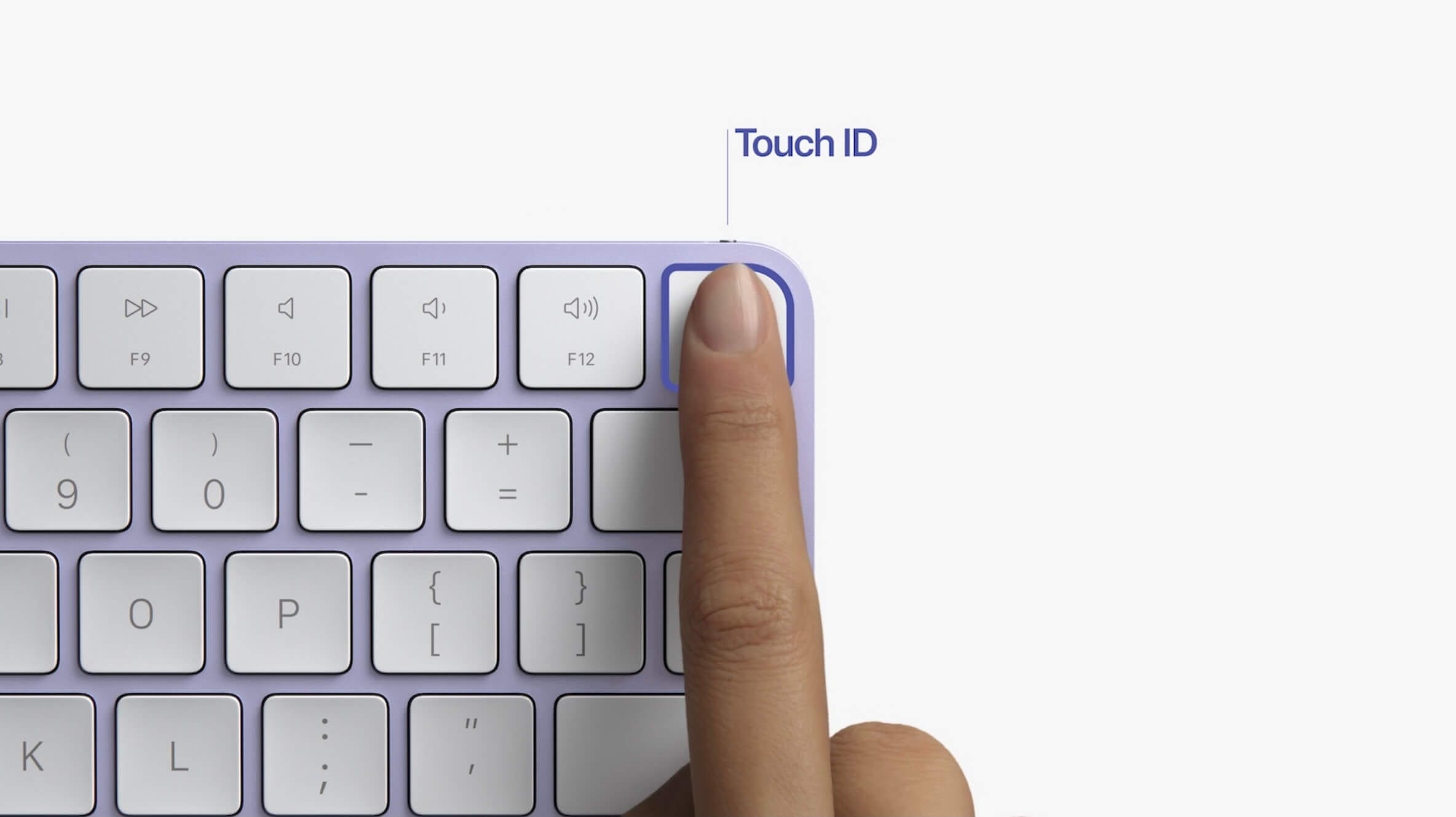
When the 2021 24-inch iMac was announced, Apple also introduced a few new accessories that ship with the redesigned computer. When it comes to the new Magic Trackpad the edges have simply been rounded off, and the changes to the Magic Mouse are minor. The real story here comes via the all-new Magic Keyboard which not only has rounded off corners, but also has an integrated Touch ID sensor.
Until now, the only way that you could get any of these new accessories was if you purchased the redesigned M1-powered 24-inch iMac. That has all changed as of today (via Rene Ritchie). All four accessories Mac accessories are available from Apple’s online storefront. Here are all of the new accessories Apple released today:
The Magic Keyboard with Touch ID is priced at $149, while the Magic Keyboard with Touch ID and Numeric Keypad comes in at $179. Both of these offer a built-in Touch ID fingerprint scanner placed in the top right corner. In addition to being able to authenticate your login, Touch ID is also used with Apple Pay purchases, App Store purchases, and more.
Apple is also making available a new Magic Keyboard with rounded edges, sans the Touch ID. This is the least expensive Magic Keyboard of the bunch, and is the better option for those with an Intel Mac.
Not Without Pitfalls
Unfortunately, the biggest downside is that you aren’t able to get either of these in any color other than Silver/White. That means that if you wanted a cool Blue Magic Keyboard with Touch ID sensor, you’ll still need to shell out for an iMac. The same goes for the extended keyboard, along with the updated Magic Trackpad, which is also only available in Silver/White.
A few months ago, Apple discontinued its Space Gray lineup of accessories, likely to make room for these new ones. But it’s rather disappointing to be stuck to just one color, especially when Apple is already making them in others.
In terms of a functionality standpoint, the biggest pitfall to these new keyboards is the Touch ID sensor. On the listings from Apple’s website, the title states “for Mac models with Apple silicon”. While you’ll still be able to use the Magic Keyboard with any of your macOS computers, there’s a catch.
System Requirements: Mac with Apple Silicon using macOS 11.4 or later
Those who want to use the Touch ID sensor with an Intel-powered Mac are simply unable to. Apple explicitly states that this is limited to M1-powered machines, and there is no indication of that changing.
Andrew Myrick is a freelance writer based on the East Coast of the US. He enjoys everything to do with technology, including tablets, smartphones, and everything in between. Perhaps his favorite past-time is having a never-ending supply of different keyboards and gaming handhelds that end up collecting more dust than the consoles that are being emulated.











Write a Comment