Apple fans report that their new model iPhones are overheating, sometimes as soon as they start playing music, videos, downloading files or any operation that requires a lot of computing power. Others notice iPhone overheating when charging up their phones, restoring a lot of data from iCloud, and even when using Facebook.
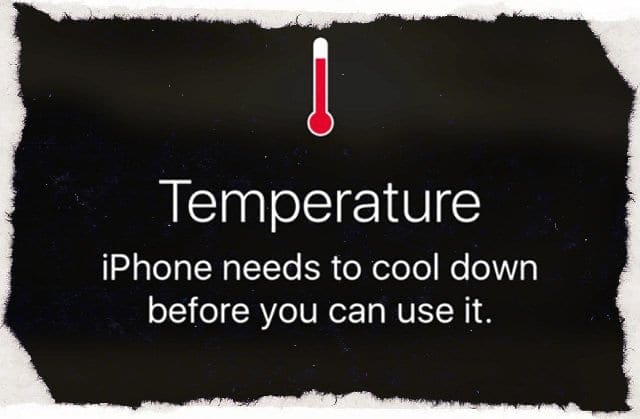
Also, a couple of our readers experienced this iPhone overheating to the point where their phones displayed the warning “iPhone needs to cool down before you can use it!” Well, that’s not okay and isn’t the “Apple Way.”
iPhone overheating is not new to iPhone models. Unfortunately, through the years and iPhone generations, many iFolks experienced these same issues. There’s a lot of computing power on these devices, all generating heat from the processor as it performs complex calculations. So finding ways to offload that heat is a major design challenge.
But these all should be solved BEFORE the iDevice hits the market! Alas, that isn’t always the case, and the early adopters are often the ones discovering issues as they experiment and work with their iPhones and other iDevices.
Apple has some info about acceptable temperature ranges for your iPhone and another iDevice. To sum up, iPhones are designed to work in ranges between 32-95 F and 0-35 C. Very cold, very hot, very dry, or very humid temperatures and conditions affect overall performance. BUT, your iPhone should return to normal as conditions and temps fall into acceptable range.
This is a Homer Simpson moment, but I’ll say it anyhow. Don’t leave your iPhone or another iDevice in your parked vehicle! Outside of increasing your risk of a break-in, the interior temps in a parked car fluctuate enormously from day to night, clouds to sunshine. So just don’t do it!
You might notice that your device feels warmer in these situations
When you set up your device the first time
When you charge the battery, the device might get warm
When you restore from a backup
When apps reindex or reanalyze data, like Photos tagging for faces, places, or keywords after a software update
These conditions are considered normal.
Some of the higher ambient temperature conditions and activities that cause iDevices to change performance and behavior
Leaving the device in a car on a hot day…as Homer Simpson exclaims “Doh!”
Leaving the device in direct sunlight for an extended period
Using certain features in hot conditions or direct sunlight for a long period of time, such as GPS tracking or navigation in a car, or playing a graphics-intensive game
Hot During a Restore?
If you’re setting your iPhone up for the first time or restoring data via iTunes or iCloud, your iPhone’s processor is working very hard. Consequently, during a set-up or restore your iPhone heats up–this is normal and expected. Once all your data is restored, you should NOT continue to experience that same level of heating.
Restoring via iCloud tends to generate more heat than iTunes since your iPhone needs to connect to iCloud to download data. With an iTunes restore, that burden shifts to your computer. For that reason, we recommend restoring via iTunes.
Okay, But How Do We Fix This Overheating Issue?
There’s a good chance that a third-party app is causing your iPhone overheating, especially on iPhone 7 models. To check this, force close all open apps on your iPhone and then restart your phone. And finally, update to latest iOS.
Force Close iPhone apps
Double Click Home to see all open apps
Swipe up on app preview to close
Slide right or left to find all open apps and close them ALL
Restart iPhone
Perform a Forced Restart
On an iPhone X and newer: Press and quickly release the Volume Up button. Press and quickly release the Volume Down button. Then, press and hold the Side button until you see the Apple logo
On an iPhone 7 or iPhone 7 Plus: Press and hold both the Side and Volume Down buttons for at least 10 seconds, until you see the Apple logo
On an iPhone 6s and earlier, iPad, or iPod touch: Press and hold both the Home and the Top (or Side) buttons for at least 10 seconds, until you see the Apple logo
Update to Latest iOS
Once you restart your iPhone, check that you are working on the latest version of iOS. Often, updating your operating system fixes the iPhone overheating issues as the updates contain fixes.
And of course, make sure you backup before you update your iOS. Try and make this your routine by backing up regularly via iTunes, iCloud, or whatever backup app your prefer.
To update your iPhone, go to Settings > General > Software Update and choose to Download and Install the update. This could take an hour or more.
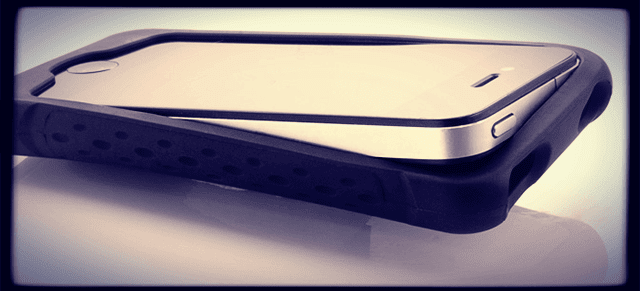
Heat issues are often caused by our iPhone and other iDevice cases insulating our iPhone’s backsides. When our iPhone battery charges, it emits heat. This heat is dispersed via the backsides of our phones. So covering the back of your iPhone with a case makes it harder for your phone to release that built up heat.
In effect, cases often act as insulators, trapping heat inside the case and inside our iPhones. Just think of your water heater–all manufacturers recommend wrapping your heater to keep the water hot–so the heat doesn’t dissipate via the water heater’s surface. Good for hot water BUT terrible for our electronics!
Reset
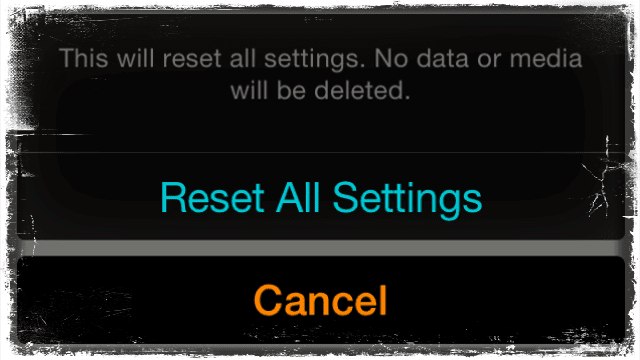
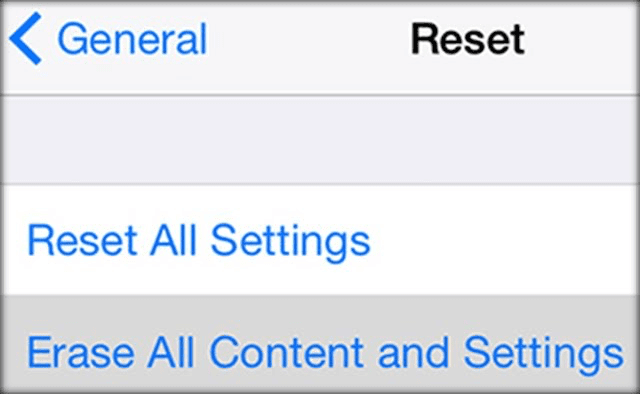
Sometimes all you need is a bit of a refresh on your settings. So try this: Settings > General > Reset > Reset All Settings.
This resets all your settings. It doesn’t delete any data. So if you’ve got lots of GBs worth of music, videos, and photos, selecting this option won’t remove it! It won’t even delete your texts, emails, or any real data.
It does reset to default all the settings for WiFi, Bluetooth, Do Not Disturb, Notifications, General, Sounds, Brightness & Wallpaper, and Privacy.
Turn OFF Some Settings
There are a few settings that consistently work in the background and may be the cause of or a contributor to overheating. So take a look at these settings and make some adjustments to reduce the burden on your iPhone’s processor.
Settings to Check
Background App Refresh
Settings>General>Background App Refresh
Turn OFF for certain apps
OR Turn completely OFF for all apps
Also, saves battery!
Location Services
Settings>Privacy>Location Services
Change app settings from Always to While Using or Never
Turn Share My Location OFF
System Services
Scroll all the way down under Location Services
Turn OFF Emergency SOS, HomeKit, Popular Near Me, Improve Maps, Compass Calibration, Diagnostics & Usage, Location-Based Ads and Location-Based Suggestions, and any other system setting not necessary for your use
Notifications
Settings>Notifications
Turn OFF for certain apps
OR Turn completely OFF for all apps
Also, saves battery!
Brightness
Settings>Display & Brightness
Turn Auto-Brightness ON
Or Turn Auto-Brightness OFF and set Brightness to the lower settings
Also, saves battery!
Fitness Tracking
Settings>Privacy>Motion & Fitness
Turn Fitness Tracking OFF
Do this if you pair to an Apple Watch
Also, saves battery!
Erase Content and Settings
Using this isn’t ideal, but sometimes it’s your only next option. Selecting this erases everything on your iPhone and iDevice, from music to photos to email and messages. It even erases your apps! It sets your iDevice back to factory defaults. And sometimes this is necessary. But tread with care.
Remember that while this process deletes your apps, music, etc. Apple keeps a record of your purchase history in both the iTunes and App Store, so it’s easy to download again.
If you select this option, please backup first. Again, backup BEFORE you erase content and settings.
To Erase
Navigate to Settings > General > Reset
Select Erase All Content and Settings. Tap button twice to confirm
Erase all content iPhone
After restart, go through the setup process
No Time? Check Out Our Video!
When Nothing Works
If after you made changes to your settings, cables, and other suggestions and you still experience iPhone overheating, the time has come to visit your local Apple Store or call Apple Support.
Apple is replacing iPhone 7 models and select other models (like 6S+) with consistent overheating issues.
Reader Tips
Use a setting in Display & Brightness called “Nightshift.” When it’s turned on to the maximum “warmest” setting then apps and even games generate at least half as much heat!
For most of her professional life, Amanda Elizabeth (Liz for short) trained all sorts of folks on how to use media as a tool to tell their own unique stories. She knows a thing or two about teaching others and creating how-to guides!
Her clients include Edutopia, Scribe Video Center, Third Path Institute, Bracket, The Philadelphia Museum of Art, and the Big Picture Alliance.
Elizabeth received her Master of Fine Arts degree in media making from Temple University, where she also taught undergrads as an adjunct faculty member in their department of Film and Media Arts.













Write a Comment