Game Center is one of the great features of iOS (iPad, iPhone, iPod) or OS X. However, many users find Game Center notifications, prompts and greetings annoying. When you open Game Center, you can sign in using your Apple ID. It seems that once signed into Game Center, there is no way to completely disable it. However, you can disable your Game Center account. You have a few options:
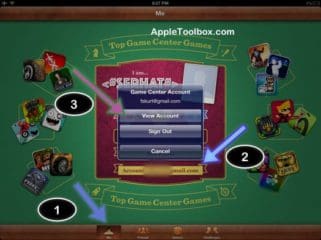
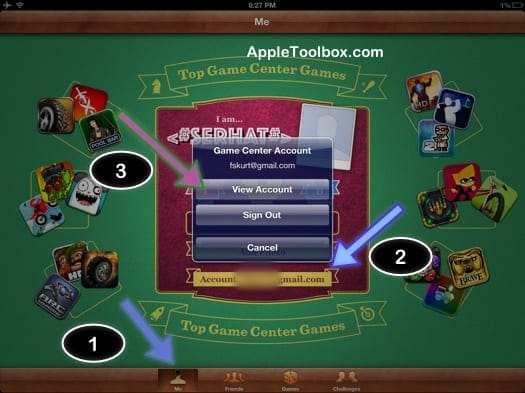
The first option is disabling your Game Center Account. This way you can remove all of your account info. To do this, launch the Game Center, tap Me > Account: > View Account. Turn off your Public Profile. Then tap your verified Email and select “Remove Email from Account.” You may also want to change your username to something else. After that, sign out of Game Center by tapping Me > Account: > Sign Out.
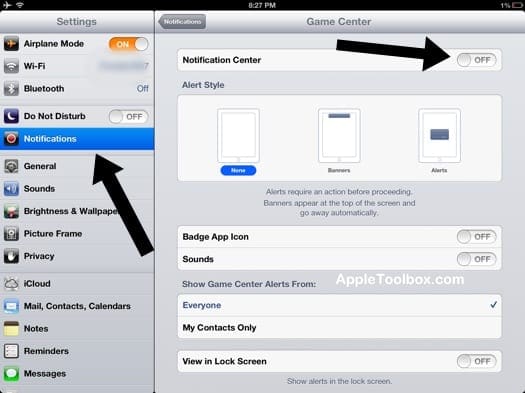
The option described above will remove your public profile and email addresses. But when you launch a game, a Game Center will still show up asking you to sign in. You can disable Game Center notifications. To do so tap “Settings” and select “Notifications.” Find Game Center and turn off the Notification Center for Game Center. (related: iPod, iPad and iPhone Notifications: What you Need to Know)
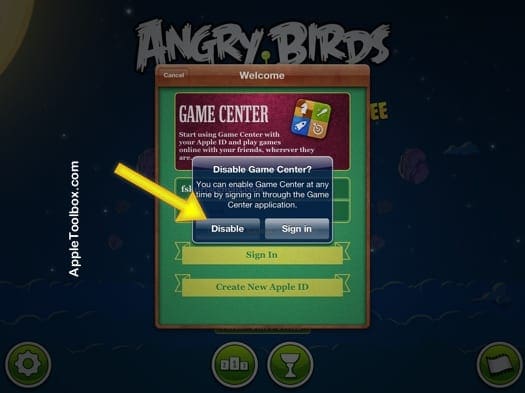
Both options described above will not eliminate the sign in pop up when you launch a game. Every time when you open a game, Game Center will ask you to sign in. To get rid of this, first sign out of your Game Center as described above. Launch a game and when Game Center welcome popup shows up, tap cancel. Perform this step three times meaning launch a game and tap cancel once the Game Center Welcome popup shows. After 3 times, a new pop-up will come up asking if you want to disable Game Center, then simply tap disable. Now you will not see any pop ups or other notifications.
Note 1: you can also disable Multiplayer games and Adding Friends in Game Center by turning on restrictions. To do that simply tap Settings > General > Restrictions. (related: How to Setup Parental Controls)
Note 2: Game Center is part of the iOS software and thus cannot be removed.
Obsessed with tech since the early arrival of A/UX on Apple, Sudz (SK) is responsible for the original editorial direction of AppleToolBox. He is based out of Los Angeles, CA.
Sudz specializes in covering all things macOS, having reviewed dozens of OS X and macOS developments over the years.
In a former life, Sudz worked helping Fortune 100 companies with their technology and business transformation aspirations.
Game Center has access to my contacts list. They’re using SimCity build it to do so since I don’t have GAME CENTER APP. My privacy has been invaded without authorization. Please remove Game Center access to my contacts. Block all attempts by them to access any information from my phone. Please respond asap.
Stop the damned “sign in to game center” notifications. I am not a child, i am NEVER, EVER going to participate in that childish stupidity. After a hundred “no’s” your dumbassed app should take the hint!
Game Center has access to my contacts list. They’re using SimCity buildit to do so since I don’t have GAME CENTER APP. My privacy has been invaded without authorization. Please remove Game Center access to my contacts. Block all attempts by them to access any information from my phone. Please respond asap.
I have a problem similar to this or it’s along the same vein. Every time I open iCloud game center has turned itself back on I do not play games and I’ve never downloaded I’ve never opened an account with game Center and yet it turns itself on and I keep getting advertisements and notifications that I don’t want. Can I not remove the game center completely or why is it turning itself back on if it’s not an option removing the toggle would have been the best design choice because it’s just frustrating and confusing otherwise.
Thank you SOOOOOO much for explaining how to disable the incredibly annoying Game Center. The “launch and tap three times” tip worked like a charm. Thank you again for saving my sanity .
The process u listed to remove a public profile fro the gaming App doesn’t actually work on an iPhone alone but it should. Shame on Apple for making profiles public by default. Instead u should make profiles private by default.
hi! I am requesting for help on how should I completely disable non Installed game center and ads notifications in my Tecno W2 because it is not one of the devices you have mentioned obove?. so how can I desable or stop that notifications because am totally fade up of this esue so please HELP Me.
Do you use a different Apple ID for Game Center than the Apple ID for iCloud? If so, iOS automatically toggles off the game center in iCloud.
Try logging OUT of game center via Settings > Game Center > Sign Out. Then turn it ON in iCloud. Restart and now your game center Apple ID is the same as your iCloud Apple ID.
This is still problem on an IPad, even after all the negative feedback and customer pleas for relief. Our family found a solution: the Grandkids now game on a Surface. Sorry, Apple, but you had your chance and you blew it.
I was having this problem, too. I tried all of the suggestions regarding Game Center and Notifications in iPad Settings. Nothing worked. Then I had an epiphany; I went to Settings on the individual games. Lo and behold, there was a switch to Enable or Disable Game Center!
May the force be with you.
Hello there I’m not sure if it’s me or perhaps your blog site but it is launching absolutely slowly , it took me like a couple of minutes to load still gmail does work totally for me.
Nevertheless, I have to thank you very much for putting wonderful content.
I assume this has been beneficial to lots of
individuals who came on this page. This one is without a doubt great what you actually have done here and
wish to discover even more fascinating posts from your website.
Immediately after viewing your articles, I’ve book-marked your web page.
Even my comment got changed … Just like microsoft. You have to double check everything if you want it correct…… “their” not “there”!
Just removed the few “games” i had.
This is one way to solve the game center problem!
Perhaps if all annoyed users do the same, a message might be received by Apple!
Game Center (you can’t even spell it right) is kiddie crap. I really don’t want to play against anyone or tell the world what I scored. It’s just a blatant disregard of your own privacy statement to have this appearing every time I open certain games
I’ve tried several different steps, nothing works to disable the notification. I can’t figure out why I keep getting the pop-up, all my games are linked to Facebook, I’ve never once used Game Center. This didn’t happen until my last iOS update and I had to update iCloud (which I don’t even use!), now stupid Game Center pops up every time I start playing one of my games. Apple seriously needs to get rid of Game Center, it’s nothing but an annoyance.
This game centre pop up is so anoying that I will stop recommanding ipad to my friends and colleagues. Why every new version of IOS ads stupid and useless tricks? Grrrrr!!!
Game Center is a virus planted by Apple intended to annoy and restrict your enjoyment. This virus is so deeply imbedded that it cannot be removed. Even when you think you have got rid of it it repropagates. The only way to get rid of it permanently is through consumer resistance and direct pressure on Apple.
Game Center is like Herpes- keeps coming back no matter what. It’s Apple’s internal malware and they won’t let you stop using it. HOW THE HELL don’t they have a turn off for it??
How can Apple have come up with this evil, evil piece of crap? Don’t they realize thousands and thousands of users will switch to Android phones just to get rid of this!!! I have always loved my iPhone but I positively hate it now, just because of this annoying, annoying horrible piece of bloatware. GET RID OF IT APPLE!
So, I also had the annoying game center messages appearing on my games.
My solution:
1) Turn off all notifications for game center (settings>notification> turn off > etc etc)
2) I couldn’t sing off my game center account (I have an Iphone 5S) so I deleted the game I didn’t want to be bothered with game center> games >go over the game you want “game center free” slide your finger to the left and a red delete message will appear. Select that, and a message will pop up: it will ask you if you are sure about deleting info from game center. Say yes to delete! Later a second message saying “you want game center to delete this game from your device” , press the no thanks option.
One of the great features of IOS? How much did apple pay you to say that. You mean one of the greatest blatant invasions of privacy rammed down consumer throats.
What nerve apple has not providing an option to remove this useless piece of crap.
Doesn’t work for me either. Step 1 I don’t get the option to see any profile information. All i see is the screen with my apple id and the password. Thsi really sssux.
I completely agree.This didn’t work for me either. I think you should be able to delete the stupid game center. Its just another way for apple to get info
Just wanted to add my thanks for the instructions. I failed to follow the first steps around removing my email address from within GameCenter. Once I did that and logged out the 3x rule worked fine!! At long last!!
since my iPhone is jailbreaked i opened iFile and whent into the Applications folder and looked up “Game Center~iphone.app” and “GameCenterUIService.app” and renamed both by adding a – like this “Game Center~iphone.app-” “GameCenterUIService.app-” and respringed my device, now the GS isnt poping up when playing games, its app icon doesnt even show up on the device anymore 😉 im sure apple done like this but was the only way for me to get rid of that spamming crap app
Disabling Game Center can only be temporary. You get logged back in automatically when you purchase any app or even when you check your apple id in settings under the iTunes / Applestore menu. It would appear that once you give you apple id password for things totally unrelated to Game Center, iOS 6.1 considers that an opportunity to log you back in without your knowledge and reenable it if you had previously disabled it. Also any changes of settings related to Game Center under settings will cause the login prompt to start reappearing. At this point Apple does not seem aware of these hidden features and there seem to be no plan to change this.
Game Center is part of the iOS software and thus cannot be removed” – that is the real problem. nothing else works! Really annoying. whoever genius thought it would be s good idea to add GC to be part of the original sortware should be fired.
I cannot go pass the step “..Then tap your verified Email and select “Remove Email from Account.” I tap my apple ID and a new screen opened up for me to edit the information. There was no ‘remove Email from Account’ message.
Not effective. Following all steps above has done nothing to curtail log-in requests from game center. I’d probably be less perturbed by it if wasn’t so damn laggy (seriously, it takes too much time for it load).
I don’t care what the “braintrusts” over in Cupertino say, this Game Center app is nasty bit of malware that the manufacturer will not even allow you to delete.
Yes, this is why it seems to work for some people and not others. If you sign into your apple account for any reason, like to purchase an app, you are automatically signed back into Game Center as well, so that you have to go through the whole disabling process again.
On older ios versions, there was a way to disable it through parental controls. Sadly they’ve closed that “loophole”… To many grown ups thinking they have the right to control their own social networking as well as their kids’.
I’ve figured it out! You need a second Apple ID just for Game Center:
1. Go to the sign in page for GC (sign out first if you need to – you can’t change the ID or email you are signed in with from the account page within Game Center).
2. If you have an existing second ID, sign in with that.
3. If you don’t already have multiple ID’s, click on “Create an Apple ID” and go through the process using a different email from your main Apple ID.
4. Sign out of Game Center.
5. When you are asked to sign in again when you start your game, select cancel 3 times and then disable.
6. Never look at it again.
This will not change the default Apple ID you are using for other Apple services, so you can make purchases from iTunes or the App Store with your regular ID and password, and it will not log you into Game Center. This has been working for me for a while now, no problems.
The problem is that some games are linked to your ID. By logging out and changing ID, you lose whatever progress you’ve made… I was unable to retrieve the (2 years of) progress by re-entering old ID – thanks 🙁
Not worked for me 🙁 i have an ipod 4th generation 32 kb andthis won’t work!!! I’ve wanted an ipod mainly for games and on my friends 4th generations i have never seen game center pop up! This is ridiculous! I have tried everything!!!! (Sorry to sound rude but I’m furious)
Me too – I have cancelled / declined / closed / cancelled game centre dozens of times, and it keeps popping up. Getting rid of my iPhone as a result; why do Apple have to ruin a perfectly good device? *sigh*
Sadly this does not work for me. I have lost count of how many times I have disabled Game Center after hitting cancel 3 times, but it just keeps popping up anyway. Sigh…
I have done everything described above but the Game Center keeps asking me to log in every time I start a game. I must have “disabled” this annoying pop up hundreds of times – it keeps coming back. I’m seriously thinking of getting a different tablet.
I found it worked but only temporarily. The steps worked and then out of blue it started again, Did stepps again andit is off for now.
Just curious why the workaround for something that should be a simple turnoff











Thieve instructions don’t work. I did the 3x cancel, but the pop up keeps coming back
Game Center has access to my contacts list. They’re using SimCity build it to do so since I don’t have GAME CENTER APP. My privacy has been invaded without authorization. Please remove Game Center access to my contacts. Block all attempts by them to access any information from my phone. Please respond asap.
I am too old for games, or any notifications from “Game Center”. Remove me immediately from you
Game Center APP!!!
Stop the damned “sign in to game center” notifications. I am not a child, i am NEVER, EVER going to participate in that childish stupidity. After a hundred “no’s” your dumbassed app should take the hint!
Game Center has access to my contacts list. They’re using SimCity buildit to do so since I don’t have GAME CENTER APP. My privacy has been invaded without authorization. Please remove Game Center access to my contacts. Block all attempts by them to access any information from my phone. Please respond asap.
I have a problem similar to this or it’s along the same vein. Every time I open iCloud game center has turned itself back on I do not play games and I’ve never downloaded I’ve never opened an account with game Center and yet it turns itself on and I keep getting advertisements and notifications that I don’t want. Can I not remove the game center completely or why is it turning itself back on if it’s not an option removing the toggle would have been the best design choice because it’s just frustrating and confusing otherwise.
Someone opened a Game Center account w my Email and has access to my contacts. I want it disabled.
When I try myself it shows no option. No me.
Please help.
Thank you SOOOOOO much for explaining how to disable the incredibly annoying Game Center. The “launch and tap three times” tip worked like a charm. Thank you again for saving my sanity .
The process u listed to remove a public profile fro the gaming App doesn’t actually work on an iPhone alone but it should. Shame on Apple for making profiles public by default. Instead u should make profiles private by default.
hi! I am requesting for help on how should I completely disable non Installed game center and ads notifications in my Tecno W2 because it is not one of the devices you have mentioned obove?. so how can I desable or stop that notifications because am totally fade up of this esue so please HELP Me.
YEAH! It worked! Thank you so much for this!
Game centre app continually turns self on in iCloud I don’t use this please help me why is this happening.
HI Marylou,
Do you use a different Apple ID for Game Center than the Apple ID for iCloud? If so, iOS automatically toggles off the game center in iCloud.
Try logging OUT of game center via Settings > Game Center > Sign Out. Then turn it ON in iCloud. Restart and now your game center Apple ID is the same as your iCloud Apple ID.
how do i get new name on ipad or unlock for gamecenter name on ipad
Where is the Game Center disable option for iPad mini on ios9.3.1!?!
This is still problem on an IPad, even after all the negative feedback and customer pleas for relief. Our family found a solution: the Grandkids now game on a Surface. Sorry, Apple, but you had your chance and you blew it.
Why do people buy these things?
I was having this problem, too. I tried all of the suggestions regarding Game Center and Notifications in iPad Settings. Nothing worked. Then I had an epiphany; I went to Settings on the individual games. Lo and behold, there was a switch to Enable or Disable Game Center!
May the force be with you.
Not all games have settings to switch of GC
GC is such a piece of crap. I’ve stopped playing / paying any game that pops up the stupid GC. Get rid of it CrApple!
Hello there I’m not sure if it’s me or perhaps your blog site but it is launching absolutely slowly , it took me like a couple of minutes to load still gmail does work totally for me.
Nevertheless, I have to thank you very much for putting wonderful content.
I assume this has been beneficial to lots of
individuals who came on this page. This one is without a doubt great what you actually have done here and
wish to discover even more fascinating posts from your website.
Immediately after viewing your articles, I’ve book-marked your web page.
Even my comment got changed … Just like microsoft. You have to double check everything if you want it correct…… “their” not “there”!
Just removed the few “games” i had.
This is one way to solve the game center problem!
Perhaps if all annoyed users do the same, a message might be received by Apple!
Game Center (you can’t even spell it right) is kiddie crap. I really don’t want to play against anyone or tell the world what I scored. It’s just a blatant disregard of your own privacy statement to have this appearing every time I open certain games
I’ve tried several different steps, nothing works to disable the notification. I can’t figure out why I keep getting the pop-up, all my games are linked to Facebook, I’ve never once used Game Center. This didn’t happen until my last iOS update and I had to update iCloud (which I don’t even use!), now stupid Game Center pops up every time I start playing one of my games. Apple seriously needs to get rid of Game Center, it’s nothing but an annoyance.
This game centre pop up is so anoying that I will stop recommanding ipad to my friends and colleagues. Why every new version of IOS ads stupid and useless tricks? Grrrrr!!!
Game Center is a virus planted by Apple intended to annoy and restrict your enjoyment. This virus is so deeply imbedded that it cannot be removed. Even when you think you have got rid of it it repropagates. The only way to get rid of it permanently is through consumer resistance and direct pressure on Apple.
Game Center is like Herpes- keeps coming back no matter what. It’s Apple’s internal malware and they won’t let you stop using it. HOW THE HELL don’t they have a turn off for it??
This does not work with ios 9 🙁
I deleted my game center account and it has removed my game progress for Hidden Artifacts. Can I restore this data?
When i hit cancel it does nothing anyways
How can Apple have come up with this evil, evil piece of crap? Don’t they realize thousands and thousands of users will switch to Android phones just to get rid of this!!! I have always loved my iPhone but I positively hate it now, just because of this annoying, annoying horrible piece of bloatware. GET RID OF IT APPLE!
So, I also had the annoying game center messages appearing on my games.
My solution:
1) Turn off all notifications for game center (settings>notification> turn off > etc etc)
2) I couldn’t sing off my game center account (I have an Iphone 5S) so I deleted the game I didn’t want to be bothered with game center> games >go over the game you want “game center free” slide your finger to the left and a red delete message will appear. Select that, and a message will pop up: it will ask you if you are sure about deleting info from game center. Say yes to delete! Later a second message saying “you want game center to delete this game from your device” , press the no thanks option.
I hope this can help!
No it didn’t unfortunately still can’t install updates I’m so angry with myself for getting an iPad now
Mac OSX is becoming Window-ish
Whenever I try to press cancel on the pop ups it doesn’t cancel. U can press it multiple times but it doesn’t do anything
How do u sign out of gamcenter after iOS 7 update?
in settings
Apple, get rid of GameCenter.
Didn’t work for me. Fed up with Apple imposing this on me. At beat it should be entirely optional. My next phone will be an android
One of the great features of IOS? How much did apple pay you to say that. You mean one of the greatest blatant invasions of privacy rammed down consumer throats.
What nerve apple has not providing an option to remove this useless piece of crap.
Thank u that was great , i closed the popping up from game center :))))
how can i get rid of game centre it keeps popping up i disabled the notifications and still.nothing
I love to share knowledge that will I’ve accrued with the yr to help improve team performance.
Doesn’t work for me either. Step 1 I don’t get the option to see any profile information. All i see is the screen with my apple id and the password. Thsi really sssux.
I completely agree.This didn’t work for me either. I think you should be able to delete the stupid game center. Its just another way for apple to get info
This is a security problem as when you log out it will automatically log you back in with your password when you don’t want it to.
Just wanted to add my thanks for the instructions. I failed to follow the first steps around removing my email address from within GameCenter. Once I did that and logged out the 3x rule worked fine!! At long last!!
Thanks!
Hey bless you! I apply earbuds out and about because on their portability, even though I prefer over your ear.
Worked like a charm for me. Thanks!
what i did was this.
since my iPhone is jailbreaked i opened iFile and whent into the Applications folder and looked up “Game Center~iphone.app” and “GameCenterUIService.app” and renamed both by adding a – like this “Game Center~iphone.app-” “GameCenterUIService.app-” and respringed my device, now the GS isnt poping up when playing games, its app icon doesnt even show up on the device anymore 😉 im sure apple done like this but was the only way for me to get rid of that spamming crap app
Thnx, lanceb. Working so far 🙂
this is the worst app that Apple has for the Apple Iphones, everyone that has one needs to make a complaint to Apple to get rid of this app.
It worked for me. Just follow all the steps correctly.
Disabling Game Center can only be temporary. You get logged back in automatically when you purchase any app or even when you check your apple id in settings under the iTunes / Applestore menu. It would appear that once you give you apple id password for things totally unrelated to Game Center, iOS 6.1 considers that an opportunity to log you back in without your knowledge and reenable it if you had previously disabled it. Also any changes of settings related to Game Center under settings will cause the login prompt to start reappearing. At this point Apple does not seem aware of these hidden features and there seem to be no plan to change this.
Thank you SO much… this was driving me crazy and my kids too!
I turned on Restrictions under the General tab & then scrolled down to Game Center. Turned both to On.
This works!
Game Center is part of the iOS software and thus cannot be removed” – that is the real problem. nothing else works! Really annoying. whoever genius thought it would be s good idea to add GC to be part of the original sortware should be fired.
So far so good, thanks!
THANK YOU THANK YOU
I finally got rid of this annoying app!
JAY!
I cannot go pass the step “..Then tap your verified Email and select “Remove Email from Account.” I tap my apple ID and a new screen opened up for me to edit the information. There was no ‘remove Email from Account’ message.
عايشه انا امون
عايشه محمد
Not effective. Following all steps above has done nothing to curtail log-in requests from game center. I’d probably be less perturbed by it if wasn’t so damn laggy (seriously, it takes too much time for it load).
I don’t care what the “braintrusts” over in Cupertino say, this Game Center app is nasty bit of malware that the manufacturer will not even allow you to delete.
Think different, my ass.
Worked perfectly on my iPhone 4S. Thanx a lot. 🙂
I was trying to get rid of it so I could make a new gamecenter with my same apple ID. But it still isn’t working…
I’ve found that after disabling notification and I download apps from the App Store it restarts the Game Center.
Same here. No matter what I do, it keeps enabling itself!
Yes, this is why it seems to work for some people and not others. If you sign into your apple account for any reason, like to purchase an app, you are automatically signed back into Game Center as well, so that you have to go through the whole disabling process again.
On older ios versions, there was a way to disable it through parental controls. Sadly they’ve closed that “loophole”… To many grown ups thinking they have the right to control their own social networking as well as their kids’.
I’ve figured it out! You need a second Apple ID just for Game Center:
1. Go to the sign in page for GC (sign out first if you need to – you can’t change the ID or email you are signed in with from the account page within Game Center).
2. If you have an existing second ID, sign in with that.
3. If you don’t already have multiple ID’s, click on “Create an Apple ID” and go through the process using a different email from your main Apple ID.
4. Sign out of Game Center.
5. When you are asked to sign in again when you start your game, select cancel 3 times and then disable.
6. Never look at it again.
This will not change the default Apple ID you are using for other Apple services, so you can make purchases from iTunes or the App Store with your regular ID and password, and it will not log you into Game Center. This has been working for me for a while now, no problems.
The problem is that some games are linked to your ID. By logging out and changing ID, you lose whatever progress you’ve made… I was unable to retrieve the (2 years of) progress by re-entering old ID – thanks 🙁
I retract that last comment, logging a few times more fixed it
It worked for me too. Thank you, thank you, thank you….
disablint the game center does not work. Apple needs to remove this from the OS
Not worked for me 🙁 i have an ipod 4th generation 32 kb andthis won’t work!!! I’ve wanted an ipod mainly for games and on my friends 4th generations i have never seen game center pop up! This is ridiculous! I have tried everything!!!! (Sorry to sound rude but I’m furious)
Me too – I have cancelled / declined / closed / cancelled game centre dozens of times, and it keeps popping up. Getting rid of my iPhone as a result; why do Apple have to ruin a perfectly good device? *sigh*
Sadly this does not work for me. I have lost count of how many times I have disabled Game Center after hitting cancel 3 times, but it just keeps popping up anyway. Sigh…
I agree with you. The game center is annoying. I am thinking to change my mobile. Sigh…
It does work but only after the first two steps mentioned above , otherwise you can cancel forever and it comes back
A great relief to be rid of it thanks
It worked for me. I don’t care that the icon is still there, but I don’t get the prompts every time I play a game now. Thank you!
I have done everything described above but the Game Center keeps asking me to log in every time I start a game. I must have “disabled” this annoying pop up hundreds of times – it keeps coming back. I’m seriously thinking of getting a different tablet.
i just need to delete my account so i can go back to my old one that has the same email. its sucks
I found it worked but only temporarily. The steps worked and then out of blue it started again, Did stepps again andit is off for now.
Just curious why the workaround for something that should be a simple turnoff