• Skip to primary navigation
  • Skip to main content
  • Skip to primary sidebar
  • Skip to footer

AppleToolBox

Tools and Fixes for Mac, iPad, iPhone & iWatch

Search posts

  • About
  • Contact

CONNECT WITH US

CATEGORIES

  • iPhone
  • iPad
  • iPod
  • Apple Watch
  • Mac/MacBook
  • AirPods
  • Apple TV
  • News
  • Apple Services
  • HomePod
  • Reviews

SITE

  • Home
  • About Us
  • Contact
  • Advertise

Search posts

You are here: Home / iPhone / 5 Signs It’s Time to Replace Your iPhone Battery

5 Signs It’s Time to Replace Your iPhone Battery

By Louis Roundtree 0 comments Last updated March 27, 2026

Things to Know
  • iPhone batteries are powerful but degrade over time.
  • It could be time to replace iPhone battery hardware if your device won’t hold a charge or switches off.
  • Physical signs, such as a slightly swollen phone, can also indicate battery problems.

Is your iPhone battery life much worse than it used to be? Or maybe your device suddenly dies while watching a video? These could be signs that it’s time to replace the battery in your iPhone. Hardware failures aren’t as common as software issues on iPhones. But all smartphone batteries can degrade over time (although newer batteries last longer), leaving you with a device that could eventually give up at the most inconvenient time.

These five signs could be warning you that it’s past time to replace your iPhone battery.

Contents

  • Time to Replace iPhone Battery
    • Sign 1 – Short Battery Life
    • Sign 2 – Swelling iPhone Case
    • Sign 3 – Battery Health Is Poor
    • Sign 4 – Battery Capacity Has Dropped Dramatically
    • Sign 5 – iPhone Shuts Down Without Warning
  • Replacing Your iPhone Battery

Time to Replace iPhone Battery

Sign 1 – Short Battery Life

The first and most obvious sign of a failing battery is that it doesn’t hold a charge very long. Your iPhone battery should last several hours, even when in use. If it’s dying after two hours or less, it’s time to consider a new battery.

Sign 2 – Swelling iPhone Case

No, not the case you bought to protect the smartphone. The actual outer metal shell of your iPhone can swell if the battery has become damaged or has degraded. Stop using your iPhone, as a swollen battery can be dangerous. Contact Apple if the device is in warranty, or a third-party repair service if it’s not.

Sign 3 – Battery Health Is Poor

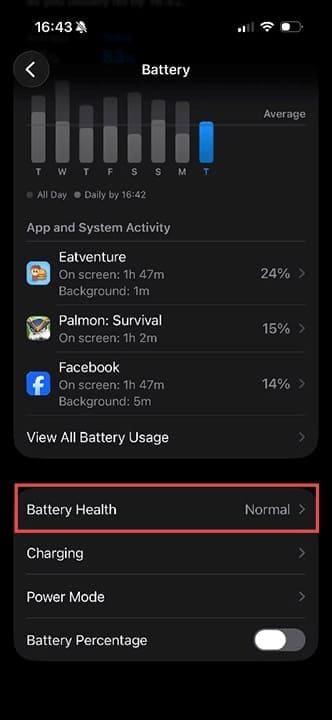
Head to Settings > Battery and look at Battery Health.

Signs It's Time to Replace Your iPhone Battery 1

In most cases, you should see “Normal.” If it doesn’t say “Normal,” it could indicate a physical problem with the battery. You may also get a pop-up message saying, “Your battery’s health is significantly degraded.” This is another sign that a new battery is required.

Sign 4 – Battery Capacity Has Dropped Dramatically

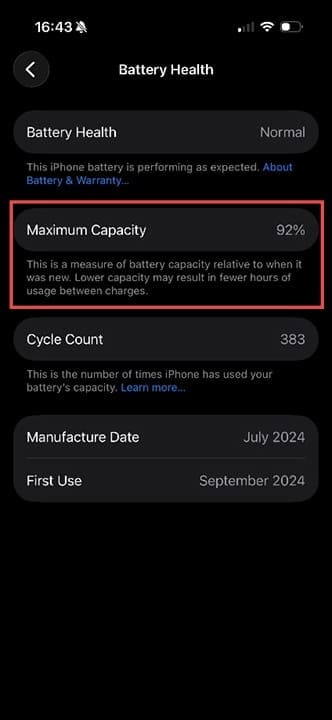
Tap on “Battery Health,” and you’ll see a new screen with more details. The maximum capacity for your battery should be over 80%. If it’s not, it’s telling you that you cannot hold more than 4/5 of its potential battery capacity.

Signs It's Time to Replace Your iPhone Battery 2

Sign 5 – iPhone Shuts Down Without Warning

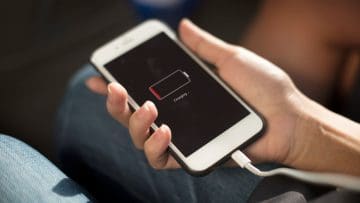
You normally get frequent warnings when the battery on your iPhone is running low. These may include a prompt to put your phone into Low Power Mode to save power. However, if the iPhone shuts down without any warning at all, it’s a sure sign that the battery is in poor condition.

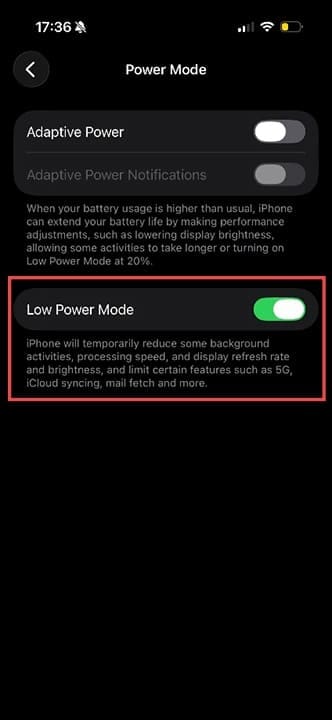
Pro tip: If you miss the prompt to put your iPhone in Low Power Mode, you can go to Settings > Battery > Low Power Mode, then toggle Low Power Mode to on. The toggle button will turn green.

Signs It's Time to Replace Your iPhone Battery 3

Replacing Your iPhone Battery

You can, in theory, replace your iPhone battery yourself with some skill and the right components. However, here are some things to consider:

  • Technically, while you can repair your own phone without violating the terms of agreement, using non-genuine third-party parts risks triggering a “Non-Genuine Parts” warning on your phone. You may also still invalidate any existing warranty.
  • Sourcing the correct components can be challenging, so you may want to get a trusted and experienced third party to do this repair.
  • If your iPhone battery life became critical while in warranty, Apple may fix it for you for free. Contact them using the support channels on their website.

Related Posts:

  • iPhone 15 Pro unboxing
    How To Extend Your iPhone Battery Life
  • 2023 Mac Studio lifestyle - 1
    macOS Could Not Be Installed, How-To Fix
  • Update Apple ID settings on your iPhone, iPad, or Mac after changing your password
    Getting a Message to Update Apple ID Settings on…
  • Person holding an iPad over a desk.
    What to Do If Your iPad Battery Jumps From a High to…
  • an iphone on a book
    How To Reset the Screen Time Passcode on iOS,…
  • photo of an iphone with ios 16 downloaded on it
    iOS 16 Tips and Tricks: The Definitive List
  • sidecar on iPadOS and macOS
    Sidecar not working in iPadOS and macOS? How to fix…
  • iphone SE 2022
    iPhone SE Review 2022: Everything You Need to Know
  • How to Find Lost AirPods Pro 2 with Precision Finding - Locate earbud
    I Lost My AirPods! How To Find Your Lost AirPods or…
Louis Roundtree
Louis Roundtree

As an avid gamer, I’ve run into my fair share of error codes and weird faults that have forced me to find fixes to problems I never anticipated. That gave me a passion for sharing those fixes with others so we can all game without feeling like our hardware is rebelling against us.
Reader Interactions

Write a Comment Cancel reply

Primary Sidebar

Recent Posts

  • How to Manage Your iPhone Call Log
  • Are Apple’s Safety Precautions Enough for AirTags?
  • How to Hide Username and Photo on the Mac Lock Screen
  • Microsoft Resume vs. Apple Handoff – Which Wins for Cross-Device Work?
  • How to Export iTunes Library to New Computer
  • What the Gemini Desktop App Will Bring to Mac

Connect with us

Footer

ABOUT

  • About Us
  • Contact us
  • Advertise
  • Privacy
  • Terms of Use

GUIDES

  • iOS & iPadOS
  • Apple ID
  • iCloud
  • App Store
  • iTunes
  • FaceTime
  • iMessage
  • Siri
  • Books and iBooks
  • Game Center
  • AirPlay

CONNECT

  • Facebook
  • Twitter
  • FeedBurner
  • YouTube

© Copyright 2010-2024 Guiding Tech Media · All Rights Reserved

This site and its content are in no way affiliated or endorsed by Apple, Inc. · Reproduction without explicit permission is prohibited

Last Updated on March 29, 2026 by Louis Roundtree