Whether you’re in high school or college, tools that can help you succeed as a student are plentiful. So if you own an Apple Watch, why not put some of those tools right on your wrist for quick and easy access?
For planning your day or week, looking up information, and studying with a simple tap, these are some of the best Apple Watch apps for students.
You might be carrying a full load this year or just tackling a few courses. Either way, you need to keep track of class times, assignments, and exams while managing outside tasks like work and a social life.
Student planners are some of the most valuable apps you can use to manage it all and these options are perfect for your Apple Watch.
iStudiez Pro Legendary Planner
iStudiez Pro on Apple Watch
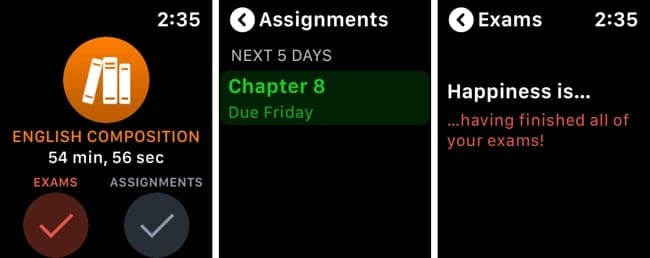
For a complete student planner with terrific features, check out iStudiez Pro. Grab your iPhone and enter your classes, instructors, assignments, exams, and more. You can not only see your schedule but when you have free time too.
See what’s all on your plate for the current and next day with times, room numbers, and instructors.
View upcoming assignments and scheduled exams so that you’re always prepared.
Switch between list and grid views for your items using Force Touch.
You’ll never miss a class or assignment if you use iStudiez Pro on Apple Watch. Plus, the number of features that help you throughout the school year on iPhone is impressive. You have calendar integration, grade and GPA tracking, class and instructor information, and much more.
The iStudiez Pro Legendary Planner app is available on the App Store for free for iPhone, iPad, Apple Watch, and Mac. If you’re interested in multiplatform cloud sync, you can take a look at the in-app subscription option.
myHomework Student Planner
myHomework on Apple Watch
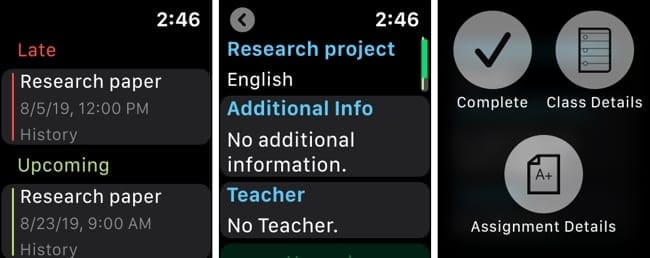
Another great student planner for Apple Watch is myHomework. Add your classes, schedule, and instructors, and then pop in those all-important assignments in the iPhone app. Then, open myHomework on Apple Watch to make sure you’re up to date with everything.
View assignments with dates, classes, and times.
Look at assignment details you’ve included like notes and instructors.
Mark your assignments complete using Force Touch.
If your instructors use Teachers.io, then this really is a must-have app because you can view announcements and news that they share. For more than just your assignments, myHomework holds your calendar, class details, and more,
The myHomework Student Planner app is available for free on the App Store for free for iPhone, iPad, Apple Watch, and Mac. For multiplatform sync, web access, and attractive themes, you can check out the in-app purchases.
Get info fast with reference apps
Whether you need to get the definition or spelling of a word quickly or remind yourself of something you often forget, reference apps for Apple Watch are simply convenient. And these two options will help you anytime, anywhere.
Merriam-Webster Dictionary
Merriam-Webster Dictionary on Apple Watch
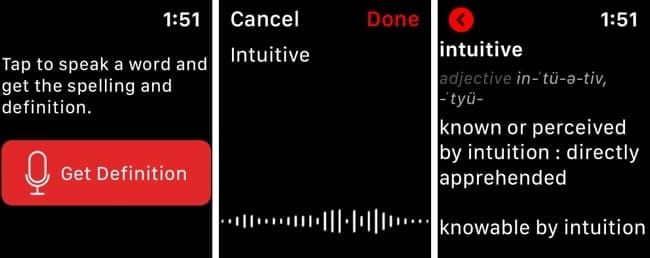
On Apple Watch, getting a word definition or spelling couldn’t be easier than with the Merriam-Webster Dictionary app.
Open the app, tap the button, speak the word, and then see the details.
View the definition, pronunciation, part of speech, and spelling just like a physical dictionary.
Save words with Force Touch and then instantly access them in the Favorites section of the iPhone app.
You don’t realize how handy having a dictionary can be until you need one. So, get ready for class with a simple word lookup tool like Merriam-Webster Dictionary.
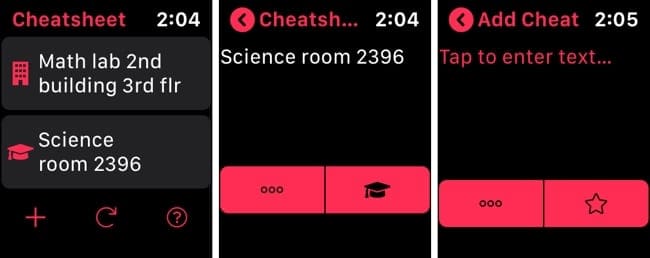
Are there things that you have to remember not to forget? Maybe it’s a classroom number, how to pronounce your instructor’s name, or that a class is moving to a new spot temporarily. It’s situations like this, and many more, when you need the Cheatsheet Widget.
The app on your iPhone can be used in your Notification Center to see things you need to at a fast glance. And on Apple Watch it’s even simpler because not only can you open the app and see what you need fast, but you can use a Complication and put it right on your Watch face.
View all of your cheats on the main app screen and tap one to make edits, move it to the top of the list, remove from the Complication, or delete it.
Add new cheats with dictation or scribble and include an icon.
Refresh or add cheats using Force Touch.
Cheatsheet Widget is super helpful for many scenarios and for those things you absolutely cannot forget.
The Cheatsheet Widget app is available on the App Store for free for iPhone, iPad, iMessage, and Apple Watch. You can remove the ads on iPhone or iPad and unlock additional features like iCloud sync with a one-time in-app purchase.
Study anywhere with flash card apps
When we think about flash cards as learning tools, we normally remember these from elementary school. But flash cards are excellent for studying at any age and most any topic.
For a quick way to test yourself with a glance at your wrist, check out these flash card apps for Apple Watch.
Flashcards by NKO
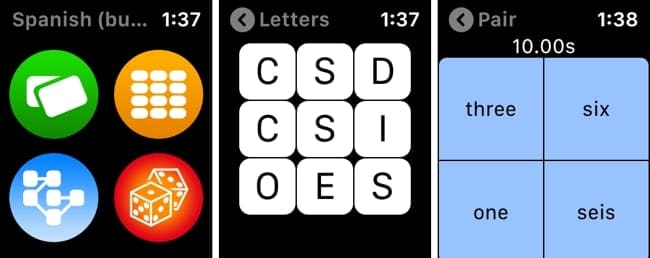
Flashcards by NKO on Apple Watch
With Flashcards by NKO, you can use Apple Watch to study with decks that you create or import to your iPhone. And there are even more features on Apple Watch than you’d probably think.
Do a quick review where you see the front and just tap to view the answer on the back of the cards.
Explore a list of cards where you just tap for the answer for each one.
Use letters to spell out words in the card deck, which is great for learning languages.
Play a fast match game where you pair up the words and answers.
Once you download Flashcards by NKO and get your decks ready, using them on Apple Watch is a piece of cake. Open the deck, tap the Watch button on the bottom of the screen, and enable the slider for Use On Watch.
The Flashcards by NKO app is available on the App Store for free for iPhone, iPad, and Apple Watch. If you’d like to upgrade and receive additional games and tools, you can check out the in-app subscription options.
SmartCards+ Spaced Repetition
SmartCards+ on Apple Watch
Another good flash card app is SmartCards+. Get started on your iPhone by creating or importing card decks. Then, use your Apple Watch for a handy review on-the-go.
See your decks with those that have new items and are ready to review.
View side one, tap to see the answer on side two, and if you’re correct, tap the checkmark.
Check your stats to see how many correct answers you received along with your recall rate.
The stats from your Apple Watch are also available on the iPhone app so you can keep track of how well you’re doing from either device. And there’s nothing special you have to do for the card decks to show up on your wrist. Those you have in the app will be there when you’re ready for them.
The SmartCards+ Spaced Repetition app is available on the App Store for free for iPhone, iPad, and Apple Watch. You’ll receive 25 daily reviews but can unlock unlimited reviews with the in-app subscription option.
Ready to check out these Apple Watch apps for students?
With a planner, reference tool, and flash card app, you can be one step ahead when the school year starts or get more help during the semester.
Are you going to check out one or more of these Apple Watch apps for students? Or maybe you have one that you would like to share with our readers? Feel free to comment below!
And remember, you can always hit us up on Twitter or Facebook.
Sandy worked for many years in the IT industry as a project manager, department manager, and PMO Lead. She then decided to follow her dream and now writes about technology full-time. Sandy holds a Bachelors of Science in Information Technology.
She loves technology– specifically – terrific games and apps for iOS, software that makes your life easier, and productivity tools that you can use every day, in both work and home environments.
Her articles have regularly been featured at MakeUseOf, iDownloadBlog and many other leading tech publications.












Write a Comment