Anyone who’s had a pair of AirPods knows how dirty they can get. That either means that the collective public has dirty ears or that AirPods are just prone to collecting dust, residue, and other particulates that add up. Either way, learning how to clean your AirPods is something that all Apple enthusiasts should learn how to do, as a lot of these techniques are applicable to other Apple products, too. To find out more about the best ways to clean your AirPods, read below.
Here are some of the best ways to clean your AirPods to ensure that they stay aesthetically pleasing and fully functional. You wouldn’t want the quality of your music or podcast to deteriorate because you have some earwax in there.
Microfiber Cloth
Spray water onto your cloth to remove marks.
Microfiber cloths are great for cleaning a wide array of objects and products and are a staple for tech items. The soft material of the cloth means that you can rub away at any grime or residue without damaging or scratching the exterior construction. Although that might not mean much with AirPods, seeing as they might get battered around a bit if you drop them frequently, it’s great for phone screens and such. If you need, you can dab the microfiber cloth in a little water to help you out a bit. You want to avoid any harsh cleaners with bleach or any kind of acid, as it will ruin your AirPods.
Cotton Swab
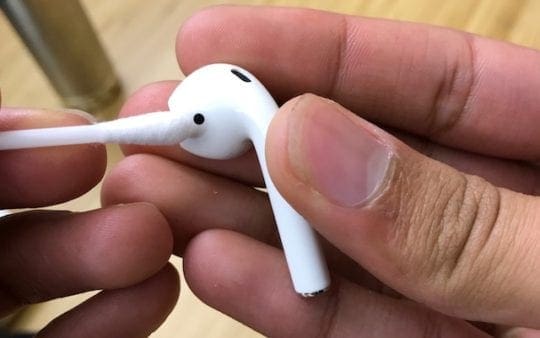
Use a clean, dry cotton swab to get clean the grill and seams on your AirPods. Image from iMore.
A cotton swab is useful for getting at certain nooks and crannies. If you look at your AirPod case and earbud, you’ll notice there are soft divots across the whole thing that are hard to get with a microfiber cloth wrapped around your finger. A cotton swap can help you reach those angles and corners if you’re not able to. Dip it into water or some isopropyl alcohol and you’ll be able to get rid of a bunch of dirt and dust.
Don’t Use Excessive Amounts of Water
The number one thing you don’t want to do is use a bunch of water when trying to clean any electronics. When it comes to the best ways to clean your AirPods, we would suggest you use only a dab of water on a cloth or cotton swab and nowhere else. Unless you want destroyed circuitry, a broken battery, and an expensive piece of plastic, then stay away from excessive amounts of water.
Isopropyl Alcohol
Isopropyl alcohol is your best friend when trying to clean any electronics. It’s completely safe to use on electronics, as you can find the compound in certain cosmetics and other cleaning applications. You can usually buy tech-specific isopropyl alcohol products that might dilute the solution with water. Dab your microfiber cloth, cotton ball, or swab into the mixture and start scrubbing gently. You’ll notice that in no time, your AirPods case and earbuds look as good as new.
Clorox Wipes
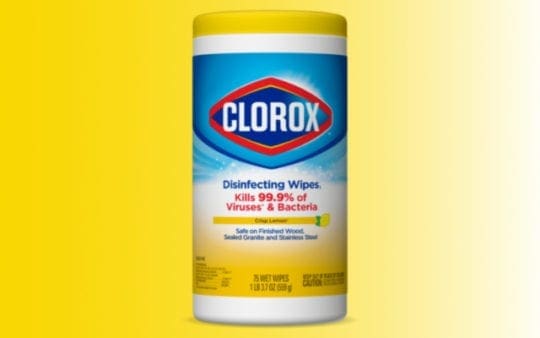
Clorox are the only brand Apple suggests to use.
Clorox wipes are an alternative to isopropyl alcohol. They’re disinfectant wipes that can clean a variety of surfaces, including general household countertops or items. Take a Clorox wipe and give your AirPods a good scrubbing. You could wrap it around a long and thin object if you struggle to get in and around the AirPods case. You can use these on the earbuds, too, without damaging anything.
Blue Tack
If you have an egregious amount of build up and grime, a pretty effective tactic is to use blue tack to “stick” it off. Take your blue tack, target the black grime, and pick at it so that it adheres to the blue tack. You’ll notice that pretty quickly, your AirPods become new and shiny. Blue tack is definitely an underrated technique and one of the best ways to clean your AirPods. Most households carry some blue tack, and if not, it’s extremely cheap to buy and widely available.










Write a Comment