You’ve probably had the question pop up in your mind at some point when using an iPad: Can I turn my iPad into a portable Windows PC? The very short answer is no. The longer answer, however, indicates that there are a few ways to actually run a version of Windows on your iPad. In this article, we’ll show you how it’s done.
iPads run on the iOS operating system. This is different from the macOS found on iMacs and MacBooks and is simpler. Quite simply, iPads are not built to handle PC operating systems. While you can certainly jailbreak your iPad to run Android OS, a PC operating system is currently out of the question.
As such, you can’t wipe your tablet and freshly install a copy of Windows. Any access to the operating system will be through iOS itself. Let’s look at three major ways.
Using Windows on iPad
There are three major ways to run Windows on your iPad and enjoy its functionality, beyond just installing certain Microsoft apps on your device. Let’s take a look at what they are.
Using an Emulator App
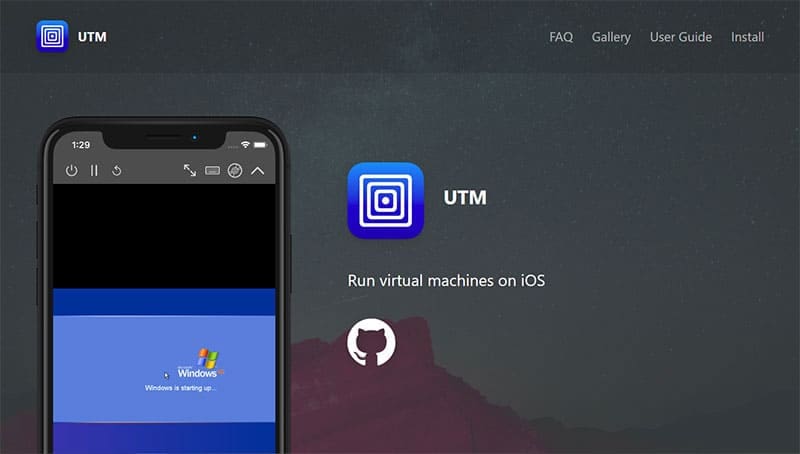
Apple built its system to reject emulators for quite some time, but recently relaxed its App Store restrictions to allow for emulators. A major emulator, UTM SE, allows users to run full operating systems on their iPads or iPhones. Many users now proudly boast about playing Windows XP pinball in their downtime, or messing around in Paint.
This app offers pre-built retro UTM operating systems ready for download, including older versions of Windows. More advanced operating systems, like Windows 11, will require a manual setup, along with a powerful iPad to handle the system requirements.
Emulators provide a somewhat authentic experience of using certain operating systems without being as tied to the hardware as virtual machines are. A potential downside is that internet connectivity on these emulators can be rather difficult to set up.
Remote Access
Another way to make use of Windows on your iPad is by using it to access a machine remotely. Remote access tools make using and controlling another machine a cinch. Freemium tools like AnyViewer and free ones like TeamViewer allow for cross-platform desktop control between devices. Provided you have access to a Windows computer that’s powered on and connected to a network, you can control it through your tablet.
Cloud-Based Access
If you don’t have a Windows PC ready to access, then you can always rent one. Windows 365 and other companies offer subscribers access to a Windows desktop machine, accessible anywhere through the Cloud. If you’re looking to work regularly on a Windows operating system, then all you usually need is an app and an internet connection to get going.
Why Use Windows on iPad?
So why all the fuss of trying to get a different OS on your iPad? Let’s take a look at some major motivations:
Portability – Being able to work on the go is always a big motivation.
Cross-platform accessibility – Windows and Mac don’t play well together, so a chance to run one operating system on the other’s device and get access to exclusive software is a huge plus.
Software development – Being able to access Windows to develop or test programs is important for software and app developers.
Nostalgia – Many people just want to experience older operating systems or learn about how things were back in the day.
Cost – Being able to access Windows rather than own an entire Windows machine can save users money.
As an avid gamer, I’ve run into my fair share of error codes and weird faults that have forced me to find fixes to problems I never anticipated. That gave me a passion for sharing those fixes with others so we can all game without feeling like our hardware is rebelling against us.












Write a Comment