Error code 4013 may sometimes prevent iTunes from updating or restoring your iPhone or iPad. Unfortunately, the tool doesn’t offer additional details about what might have caused the problem. It only says that your iPhone or iPad could not be updated due to an unknown error (4013). Let’s explore what troubleshooting methods you can use to fix this error.
Update Your Mac and Force Your iOS Device to Restart
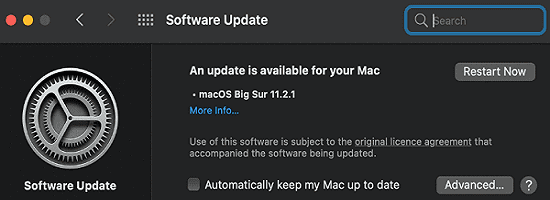
Ensure you’re running the latest macOS and iTunes versions of your Mac. Launch iTunes, click on the Help menu, and check for updates. Go to System Preferences, click on System Update and check for updates.
Then force your iPhone or iPad to restart. On your iPhone, press and release the Volume Up button. Then press and release the Volume Down button. Hold the Side button until the Apple logo appears on the screen.
If you own an iPad model with Face ID, the steps to follow are pretty similar. Press and release the Volume Up button, press and release the Volume Down button, and then hold the Top button until your iPad restarts. If your iPad has a Home button, press and hold the Top and Home buttons simultaneously until you see the Apple logo on the screen.
Use a Different Cable and Computer
If the error persists after force restarting your iPhone or iPad, use a different USB cable to update your device. Maybe your current cable is faulty. Additionally, connect your iOS device to a different computer and check if the error is gone.
Close Background Programs and Use a Different USB Port
Disconnect your iPhone or iPad from your computer. Turn off your mobile device.
Then restart your computer and disable your antivirus, firewall, and other real-time security programs.
Close all the apps and programs running in the background.
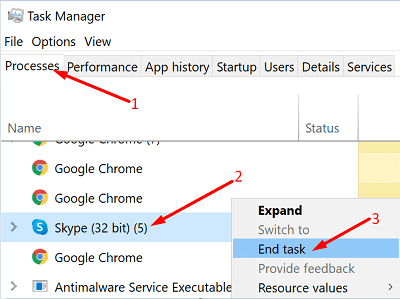
If you’re on Windows 10, launch the Task Manager, click on the Processes tab, right-click on the program you want to close, and select End Task.
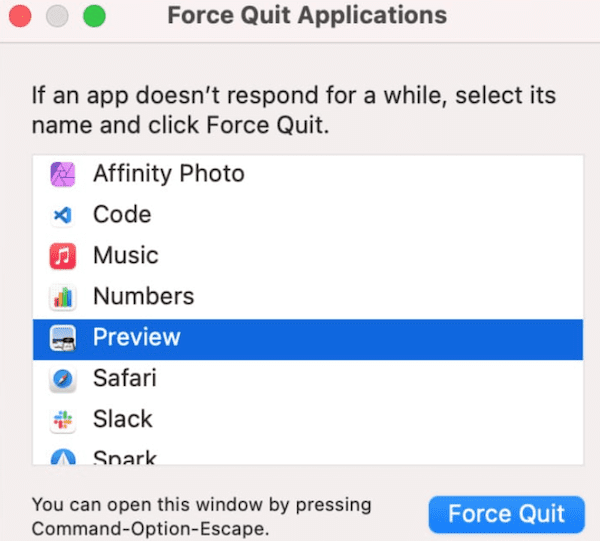
If you’re on Mac, click on the Apple menu and select Force Quit.
Launch iTunes, turn on your iPhone or iPad, and plug it in a different USB port.
Hit the Update button and check if it works.
Conclusion
To fix error 4013, update your macOS and iTunes versions and use a different cable to connect your iOS device to your computer. If the error persists, close your background programs, including your antivirus and firewall. Restart your iOS device, use a different USB port, and check the results. Did these solutions work for you? Share your feedback in the comments below.
Madalina has been a Windows fan ever since she got her hands on her first Windows XP computer. She is interested in all things technology, especially emerging technologies — AI and DNA computing in particular.
These solutions do not work. One minute my iPad is working great, the next it does nothing. Why pay so much for something that cannot be repaired. This is my 4th iPad and the previous 3 still work – my kids use them and are pretty rough on them. Is the newer technology a bust? Is Apple past it’s prime when it comes to quality and good products? So sad to see many others having the same problem as me.
Seems like this is motherboard problem if different cables, computers and firmware all fail despite the iPad being detected and the charging feature working working correctly.. iPad is about four years old and used every day for several hours so I suspect I shouldn’t complain..
This fix did not work. I went to Apple Store and had the Genius Bar take a look at it. They tried as well. Did not update/restore. I had a functioning iPad last night. Today after attempting the software update the apple store gave me the options of throwing away my current iPad and buying a new one or just throwing away my iPad.
Solid work Apple. Love the customer service. Love the ability to not fix your $1000 products.
Same exact issue and scenario on Jan 25th 2023 to my son’s iPad.. No fix just throw out the iPad. Seem kind of skeptical to say the least. what is causing this to so many?
Same bootloop failed restore with code 4013. I guess the newer gen are meant to be disposable things. Failed on my birthday. Thanks Apple for ruining my birthday weekend.
When u take to apple store they will try and if you get same error they suspect fried “logic board” and can’t fix. They offer to replace for like $250-300.











These solutions do not work. One minute my iPad is working great, the next it does nothing. Why pay so much for something that cannot be repaired. This is my 4th iPad and the previous 3 still work – my kids use them and are pretty rough on them. Is the newer technology a bust? Is Apple past it’s prime when it comes to quality and good products? So sad to see many others having the same problem as me.
Seems like this is motherboard problem if different cables, computers and firmware all fail despite the iPad being detected and the charging feature working working correctly.. iPad is about four years old and used every day for several hours so I suspect I shouldn’t complain..
This fix did not work. I went to Apple Store and had the Genius Bar take a look at it. They tried as well. Did not update/restore. I had a functioning iPad last night. Today after attempting the software update the apple store gave me the options of throwing away my current iPad and buying a new one or just throwing away my iPad.
Solid work Apple. Love the customer service. Love the ability to not fix your $1000 products.
Same exact issue and scenario on Jan 25th 2023 to my son’s iPad.. No fix just throw out the iPad. Seem kind of skeptical to say the least. what is causing this to so many?
Same bootloop failed restore with code 4013. I guess the newer gen are meant to be disposable things. Failed on my birthday. Thanks Apple for ruining my birthday weekend.
When u take to apple store they will try and if you get same error they suspect fried “logic board” and can’t fix. They offer to replace for like $250-300.
iPad still not working after trying all these, not even 3 years old. Disappointed to say the least