Windows and macOS have long been very different operating systems, and switching from one to the other has often been quite a jarring experience, as there are so many differences to adapt to. But sometimes, these famous operating systems overlap and share some very similar features.
Here, for example, are some of the new macOS Sequoia features that are already in Windows 11.
AI is an increasingly big part of many devices, apps, and operating systems nowadays. Both Apple and Microsoft have embraced this tech all the way, the former with its “Apple Intelligence” model and the latter with “Copilot.”
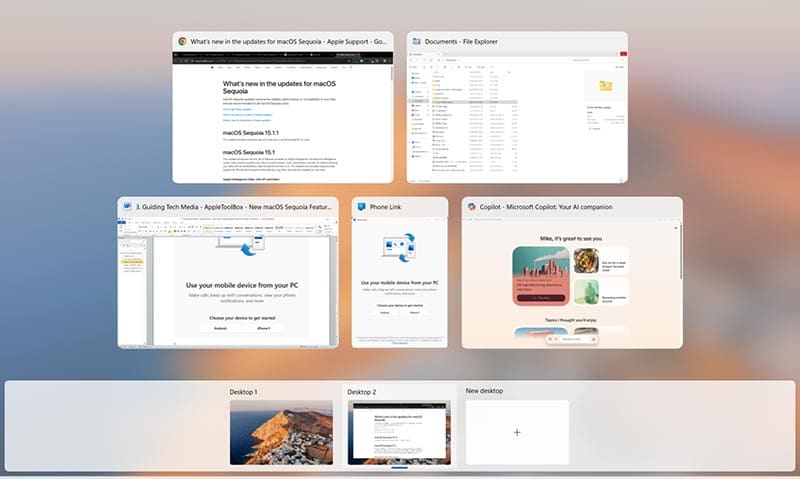
macOS Sequoia introduces Apple Intelligence to users, letting them discuss topics, make images, sum up lengthy pieces of text or messages from friends, and more. However, Windows 11 users are already quite familiar with all that, thanks to Copilot, which does more or less the exact same things.
Copilot is also now built into many leading Microsoft apps, like Word and Excel, giving users more ways to harness AI to help them in their day-to-day tasks.
Feature 2. Phone Mirroring
Phone mirroring is a feature many Apple users are eager to try. It lets you mirror your phone’s screen to your Mac, so you can see phone notifications pop up on the bigger screen and take various iPhone actions without even needing to touch your phone.
Again, though, this is already a part of Windows 11 in the form of the “Phone Link” app. That lets you mirror your phone and interact with it from your Windows device to make calls, send messages, and use your apps. It even works with iPhones, though it does have some compatibility restrictions.
Feature 3. Window Tiling
macOS Sequoia brings new organizational benefits with its superior window tiling. It lets you see multiple apps all across your screen, so you can jump from one to the other in a flash or split your screen up, with segments assigned to your browser, work apps, and so on.
Windows offers something similar, in “Snap Layouts.” With “Snap Layouts,” you can use various keyboard commands to move windows around the screen and have two, three, four, or even more apps all up on the display.
Feature 4. Reminders in Calendar
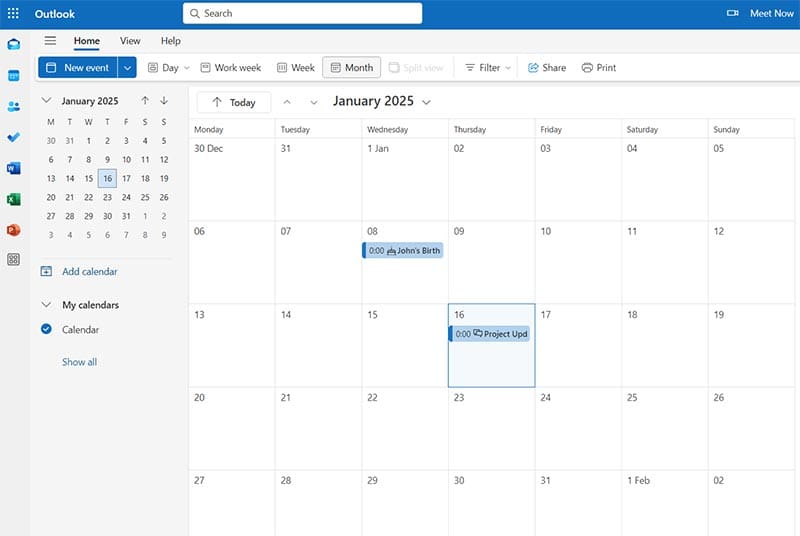
Sequoia users will be able to enjoy a better Calendar app. It’s essentially been synced up with the Reminders app. You can receive reminders about important events, appointments, meetings, and so on directly in your calendar, and you can get a full view of each month to see what’s coming up.
The closest thing to this in Windows 11 is in Outlook. Outlook has a handy calendar feature that keeps track of your key dates and automatically updates as you book things or arrange meetings – Copilot can help with this, too. It also shows notifications on the Windows desktop to remind you about events.
Feature 5. Notes Improvements
macOS’ Notes app has been given some big updates for Sequoia. It can work out equations now and record and transcribe audio. So, for instance, a student could leave Notes running to record a lecture for them, freeing them up to concentrate more on what’s being said.
Microsoft OneNote is very similar. It can also handle equations without any trouble, and it has supported audio transcription for a while now. You can record and transcribe live audio with OneNote or upload recorded files and get transcripts generated for you.
As an avid gamer, I’ve run into my fair share of error codes and weird faults that have forced me to find fixes to problems I never anticipated. That gave me a passion for sharing those fixes with others so we can all game without feeling like our hardware is rebelling against us.















Write a Comment