Over the past decade or so, Major League Soccer (MLS) has become more popular in and outside the US. You can watch games in multiple countries across the globe, including the UK. And for the upcoming 2023 season, keeping track of your favorite team is about to get even easier.
Apple has announced that the MLS Season Pass is officially ready to buy for the upcoming 2023 season. This article will tell you everything you need to know, including where in the world it’s available and when the season begins.
You’ll also find out how to get the MLS Season Pass, and without further ado, let’s get started.
Apple said in its press release that the MLS Season Pass is “now available on the Apple TV app in more than 100 countries and regions”. However, it didn’t specify each of these in more detail.
We do know, however, that the MLS Season Pass is definitely available in Canada; Apple has mentioned that users there can watch matches in French or English. Moreover, the company has announced that commentary is available in English and Spanish in the US.
You can also access the MLS Season Pass in a selection of European countries.
When Does the MLS Season Begin?
The 2023 MLS Season starts on February 25th, 2023. The campaign will kick off with Nashville SC welcoming New York City FC to the GEODIS Park.
Most of the other opening games will take place the day after. Some of the standout fixtures include Los Angeles FC and Los Angeles Galaxy facing off in a local derby, while Orlando City and New York Red Bulls take on each other at the Exploria Stadium.
The first round of fixtures will conclude on February 27th, with the Seattle Sounders hosting Colorado Rapids at Lumen Field.
You Can Enjoy Free Games During the Season
Although you’ll need the MLS Season Pass to access every game, you can still enjoy some of the action if you don’t have one. Apple announced in its press release that fans can watch a selection of matches for free during the season.
You can discover which games are available for free on the MLS website. Apple has also mentioned that it will make a selection of matches free for everyone throughout the season, with announcements on those to take place in due course.
How to Get the MLS Season Pass
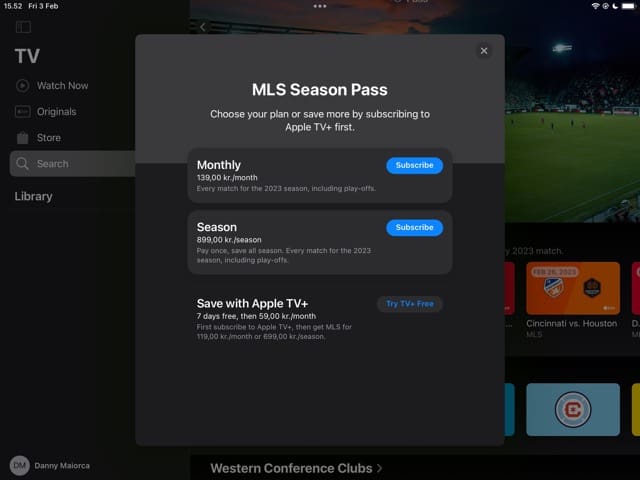
To get the MLS Season Pass, you’ll need to have access to Apple TV. Go to the Apple TV app; when you open it, you should see something called “MLS Season Pass”; select this. You will then see an option called Subscribe, which you’ll need to click on.
A pop-up window will then appear, asking you to choose your preferred subscription. You can choose whether you want to pay monthly or for the entire season; note that pricing may differ depending on where you live.
Choose Subscribe for whichever pricing plan is better for you and confirm your payment if prompted. Even before the season begins, you’ll still have access to content.
If You’re an MLS Fan, Consider Getting the Season Pass
The MLS 2023 season is set to be one of the best yet, and the league is now filled with superstars – many of whom have achieved great things in Europe. Los Angeles FC will be looking to defend their crown after winning their first-ever title last season, but they’ll face strong competition to do that.
If you choose to get the MLS Season Pass, you can keep up with all the action and watch a lot of exclusive content as well. And even if you’re not in the US or Canada, you might still be able to watch matches.
The MLS has a partnership with Apple for the next 10 years, meaning that – if you’re new to the MLS (or soccer in general) – you can treat this season as a trial run and see whether you enjoy following everything.
Danny has been a professional writer since graduating from university in 2016, but he’s been writing online for over a decade. He has been intrigued by Apple products ever since getting an iPod Shuffle in 2008 and particularly enjoys writing about iPhones and iPads. Danny prides himself on making complex topics easy to understand. In his spare time, he’s a keen photographer.













hOW CAN i GET TO WATCH THE Seattle Mariners on my apple tv