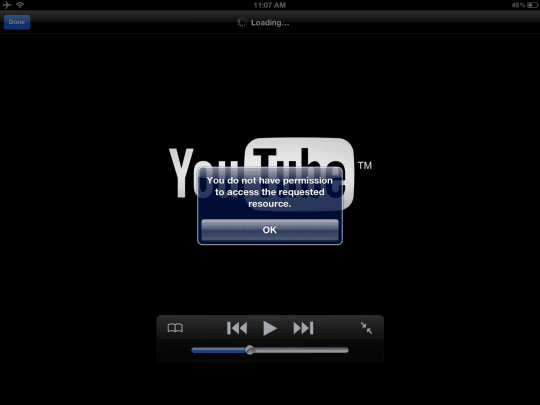
Several users have reported that they were unable to watch videos via the YouTube app. They receive this error message: “you do not have permission to access the requested resource”.
How to fix YouTube app error
Please try each step until you resolve your issue
Check your Settings > General > Restrictions to ensure that you have permissions set properly.
Restart YouTube by double clicking your home button, A list of apps will appear along the bottom of the screen. then find and press / hold the YouTube icon until the icons begin to shimmer, then tap the “minus sign” . Click home button and re-launch the YouTube app by tapping the YouTube icon.
Restart your device (iPad, iPhone or iPod) by pressing and holding the Sleep/Wake button for a few seconds until you see the red “slide to power off” then slide the slider. Then press and hold the Sleep/Wake button to turn device on.
Open your web browser (e.g. Safari), visit youtube.com, and create an account, if you do not have one. Then launch the YouTube app and sign into your YouTube account by tapping the “Sign In” button.
Obsessed with tech since the early arrival of A/UX on Apple, Sudz (SK) is responsible for the original editorial direction of AppleToolBox. He is based out of Los Angeles, CA.
Sudz specializes in covering all things macOS, having reviewed dozens of OS X and macOS developments over the years.
In a former life, Sudz worked helping Fortune 100 companies with their technology and business transformation aspirations.
I bought a movie on iTunes watched it once and was fine… Went to watch it again and is now say cannot get media on the device… What does that me and how do I fix it?!?! Please help
I tried to play a music video on Play tube or Mc Tube or Video Tube but I always received this error message: “you do not have permission to access the requested resource”.
I rented a movie from iTunes on my iPad mini and when it finished downloading I went to the video app and started watching the movie and I am getting the error: you do not have permission to access the requested resource.
The following is what happened exactly:
I started watching the movie without any problems as the clock started on my 24hr rental
I connected my iPad to the hdmi connection so that it will be projected on my TV.
My iPad froze, so I disconnect the connection from the iPad, closed the app, checked the settings, and restarted (all of the above)
Still I am getting the error
I chalk this up next to the Apple maps fiasco. It was never a problem until after iOS6 came out–and i didn’t even upgrade! Jobs’s thermonuclear war is proving to be more painful for Apple’s users than for Google.
Its not iOS6, I didn’t upgrade to iOS6 because every time i upgrade, i lose data, and I still get this über-annoying problem. It makes me want to throw my iPhone/iPad out the window. Literally. When you have a screaming 2 yr old who only wants to see “wheels on the bus”, you don’t have time for all this crap. You just want your technology to WORK.
I had the same issue, what helped me was I went into intunes and it asked for my password then I went back to the videos and it suddenly worked again. Not sure if this will help you but worth a try! I know how annoying it is, can’t find advice anywhere and none of the usual things like turning it off and on again works!
Check your Safari/YouTube.com settings to see if you aren’t staying logged in. Your session may just time out eventually no matter what if #4 is your fix. Try clearing your cache in Safari and also you could reinstall YouTube.











I bought a movie on iTunes watched it once and was fine… Went to watch it again and is now say cannot get media on the device… What does that me and how do I fix it?!?! Please help
I just received this message today, despite having no problems before that. Very annoying.
I tried to play a music video on Play tube or Mc Tube or Video Tube but I always received this error message: “you do not have permission to access the requested resource”.
I rented a movie from iTunes on my iPad mini and when it finished downloading I went to the video app and started watching the movie and I am getting the error: you do not have permission to access the requested resource.
The following is what happened exactly:
I started watching the movie without any problems as the clock started on my 24hr rental
I connected my iPad to the hdmi connection so that it will be projected on my TV.
My iPad froze, so I disconnect the connection from the iPad, closed the app, checked the settings, and restarted (all of the above)
Still I am getting the error
Resolved on step 2, thanks. I knew settings were correct but I got this on some favorites.
I chalk this up next to the Apple maps fiasco. It was never a problem until after iOS6 came out–and i didn’t even upgrade! Jobs’s thermonuclear war is proving to be more painful for Apple’s users than for Google.
Its not iOS6, I didn’t upgrade to iOS6 because every time i upgrade, i lose data, and I still get this über-annoying problem. It makes me want to throw my iPhone/iPad out the window. Literally. When you have a screaming 2 yr old who only wants to see “wheels on the bus”, you don’t have time for all this crap. You just want your technology to WORK.
I am getting this error when trying to watch the TV shows I have purchased on ITUNES…Now I can’t watch them…help
I am getting the same thing. Very annoying…
I had the same issue, what helped me was I went into intunes and it asked for my password then I went back to the videos and it suddenly worked again. Not sure if this will help you but worth a try! I know how annoying it is, can’t find advice anywhere and none of the usual things like turning it off and on again works!
I have tried all of these, but it only fixes the error for about 12-24h, then I have to do it again. Annoying.
Check your Safari/YouTube.com settings to see if you aren’t staying logged in. Your session may just time out eventually no matter what if #4 is your fix. Try clearing your cache in Safari and also you could reinstall YouTube.
Step 2 worked for me.
Thanks so much.
Thanks did Step # 3 issue resolved
Thanks….this helped me.