OS X El Capitan is the twelfth major release of OS X for Mac computers. It was released on September 30, 2015. Some users have reported an issue where Mac refuses to finish booting after updating to OS X EL Capitan. If your Mac will not start up, stalls on a gray screen with an Apple logo, here is how you troubleshoot.
Perform the steps below one-by-one until your problem resolves
Press and hold the power button for a few seconds until your computer turns off, then release the power button. Wait a few seconds and then press the power button to turn on your computer.
Try starting up in Safe Mode. To do this, turn on your Mac, when you hear the start-up sound, press and hold the Shift key until you see the Apple logo. If your Mac can start up, the problem may be that your computer does not have enough space. Did you see any low disk space warnings before this problem? Your Mac should have at least 9 GB of free space. This article explains how to free up space on your Mac.
Reset NVRAM: To do that, turn off your Mac, then turn on, when you hear the start-up sound, press and hold the Command-Option-P-R keys. Your computer will restart when you hear the second startup sound release the keys.
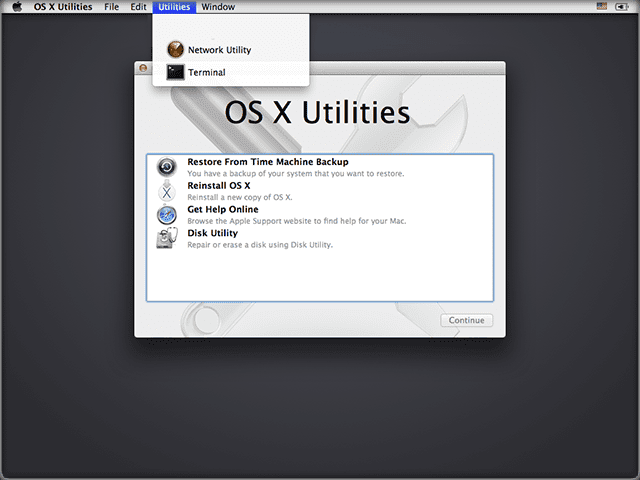
Start-up in Recovery Mode by Restating or Powering Up and holding down both the Command (⌘) + R key combination immediately upon hearing the startup chime. Select Disk Utility and check your hard drive for errors.
Restart in Recovery Mode and from the menu options, choose Reinstall OS X and click Continue. Reinstalling does not delete your files and settings.
This should solve most mac not booting issues. However, if you still experience problems, try some of the more advanced tips and reader suggestions listed below.
Use Terminal to fix the issue
Open Terminal in /Applications/Utilities or Restart your mac in Recovery Mode and from the Utilities menu in the menu bar select Utilities > Terminal to open a terminal
Enter “system_profiler SPExtensionsDataType > ~/Desktop/kextList.txt” without the quotes and hit return(this takes a while to run).
There should now be a kextList.txt file on your desktop, open it and press both the “Apple(Command)” and “F” keys to bring up the find.
In the find field insert “Obtained from: Not Signed” Copy the destination to the .kext file to a list for use later. (Click next to cycle through all of them.) Example: /System/Library/Extensions/JMicronATA.kext
Browse your drive to /System/Library/Extensions and remove any of the unsigned kext files.
Reboot and you should be all set.
Alternatively, some readers report success with Terminal using this command:
Once you paste that command into Terminal, you need to type in your admin password to process the command.
Disable FileVault
There’s speculation that FileVault (specifically, FileVault2 encryption) causes this particular problem. If your hard drive is encrypted via FileVault, you might try disabling FileVault using Terminal.
Restart your mac in Recovery Mode. From the Utilities menu in the menu bar select Utilities > Terminal to open a terminal. Type the following into Terminal:
sudo fdesetup disable
This disables FileVault. Be prepared as this process takes a few hours to decrypt your drive. So practice patience.
Reader Tips
Thanks to Adam for submitting this tip. Many of us use our Mac and MacBooks for professional audio and video editing purposes. If you happen to use any of the AVID software on your machine
Try Removing/Library/Audio/Plug-Ins/HAL/Avid CoreAudio.plugin/
OR /Library/Audio/Plug-Ins/HAL/Digidesign CoreAudio.plugin/This was the cause of three of our computers not shutting down after the El Capitan upgrade. After removing the first shutdown will require “sudo shutdown -r now” from the terminal or press and hold the power button.
Another reader suggests adding the Option key ⌥ to Command ⌘ -R keys when entering Recovery Mode. This means pressing Command⌘+ Option⌥+R (using all three fingers pressed at the same time.) This brings up OS X Internet Recovery. And forces your Mac to download its originally installed OS from Apple’s Servers
One reader provides a comprehensive fix for this particular issue.
Shut down. Restart holding down SHIFT key. Release Keys when you see the apple logo. Login when requested. Your desktop should load. If it does not, shut down and repeat.
When desktop loads, from Finder Menu, select Go and Go to Folder. Type /Library/ into the search bar. Locate the folders Caches, Cookies, Startup Assistants, Startup Daemons and move those to trash. Repeat this for your user files–from Finder Menu, select Go and Go to Folder. Type ~/Library/ into the search bar. Locate the folders Caches, Cookies, Startup Assistants, Startup Daemons and move those to trash. If you don’t see your Library, hold down the option key to reveal it.
Now Shutdown and Restart holding down CMD+OPTION+P+R. Continue holding down until you hear two chimes. Login when requested. If all goes according to plan, your desktop should now load. If it does, empty your trash.
A Reader’s More Drastic Solution
This reader tip is pretty extreme, so perform it at your own risk. But if you need data that is on your mac AND don’t have it backed up elsewhere, this tip might be the best option if all else failed.
Access your hard drive from target disk mode by holding T through the start up until you get the Target Disk Mode screen). This requires another mac and a FireWire, Thunderbolt 2, USB-C, or Thunderbolt 3 (USB-C) cable and ports. Turn off both macs and connect the two machine with a cable. Turn the good mac on before you turn on the bad machine. Once the bad mac starts up in Target Disk Mode, it appears as a disk icon on the desktop of the other good mac. Double-click the disk to open it and browse the files on that bad computer. Transfer your files by dragging them from the bad mac to the good mac.
When completed, eject the bad mac disk by dragging its icon to the Trash
The exit target disk mode by pressing and holding the power button on the bad mac (the one you just used as a disk.) Then disconnect the cable.
Next, start up the bad mac in recovery mode by holding down both the Command (⌘) + R and use the disk utility to erase your disk. Make sure you select OS X journaled format. When erased, shut down.
Now, start up in internet recovery mode (Command +Option + R) on restart. This allows you to re-install whatever version of OS X came installed on your computer when you purchased it
Once the installation is complete, go to the App Store, select Purchased page, and download and install all your previously purchased apps. If some won’t install, call Apple and they should give you a code to redeem for a new version.
Third-party apps require you to manually download. Check that you have all your product keys and other information for these applications.
Obsessed with tech since the early arrival of A/UX on Apple, Sudz (SK) is responsible for the original editorial direction of AppleToolBox. He is based out of Los Angeles, CA.
Sudz specializes in covering all things macOS, having reviewed dozens of OS X and macOS developments over the years.
In a former life, Sudz worked helping Fortune 100 companies with their technology and business transformation aspirations.
My Mac desktop pop up box requesting a reboot, i have rebooted it but it could not boot again it just show the apple logo then loads and shutdown before it opens.
Two years ago I did an udate on my macbook and the computer stopped working. It would not boot and I took it to a computer store who told me that it might be a problem with the motherboard. I then got a new macbook pro which worked perfectly until yesterday. I did an upgrade, unfortunately I did not look what it was, just proceed to install it. After a few minutes and about 20 % of installing on the bar, the computer switched off and even though it charged, I cannot even turn it on, its completely dead. I paid sixty euros just for looking at it. If its a problem with the software from Apple side, why do we have to pay ?
If your MacBook is out of warranty, Apple charges for all services rendered. However, before having a third-party look at your MacBook take a look at some of the common problems and fixes that you can do yourself to remedy the problem.
Hi there I have a Mac Pro which I tried upgrading to El Capitan and since then I only had white screen. Appreciate any assistance to restore to Snow Leopard 10.6.8
Oh Jason,
I am so sorry to read this. What terrible trouble! Are you able to reboot into Safe Mode? Or Recovery Mode? Before you downgrade back to Snow Leopard, take a look at our article on Macs getting that dreaded White Screen! Try these tips first–there’s also an accompanying video.
If none of these tips work, only then try and downgrade to Snow Leopard. Reinstalling Snow Leopard completely erases your internal hard drive. Hopefully, you have regularly backed up your mac so you don’t lose all your files, photos, etc. If you do not have a backup, then performing a reinstall wipes ALL of your data–that includes everything from applications to personal files.
Install of Snow Leopard
IF YOU CAN INSERT A DVD SUCCESSFULLY, FOLLOW THESE STEPS
1. Boot your mac using the Snow Leopard Installer Disc(s) that shipped
with your computer. Insert the disc into the DVD drive and then restart.
After the chime, press and hold down the “C” key. Release that key when you see
a small spinning gear appears below the dark gray Apple logo.
2. Follow the on-screen instructions and choose your installation preferences
IF YOU CANNOT INSERT A DVD SUCCESSFULLY, FOLLOW THESE STEPS
Restart your mac while holding the ⌥ Option key. This loads “Startup Manager”, which displays all bootable sources.
Once at the Startup Manager screen, insert your installation DVD. After a few moments, the DVD appears on the list of sources. Select it to reboot your mac from the DVD.
Follow the on-screen instructions and choose your installation preferences
Same problem here. My Macbook Pro was beautiful. Loaded El Capitan…now white screen of death. Started having problems shutting down and seemed to be hanging on something. At the same time I loaded El Capital, I loaded MS Office. I spent FOUR freaking hours on the phone with MS with a very rude difficult person to understand who I allowed to control my Comp. When she couldn’t rudely figure it out, she rudely transferred me to the Applecare guy. He was easier to deal with. He left me to finish reloading El Capitan again. Then when all seemed well. My computer started to just shut down in middle of active use. This occurred about two or three times and then the white screen. I’ve only had this computer just over 12 months. Warranty is now gone. Tried safemode, etc. Nothing. I am currently looking to purchase another computer. But I really don’t see myself buying Apple since I do not want to risk this again. Apple does nothing to remedy this. It is quite obvious that this is a problem. Who is going to spend thousands of dollars on an Apple paper weight?
Comd-Option-P-R did NOT work for me,
Nor did Command R, or any of the other things suggested above. I only get the apple and a partial bar underneath.
I did try shift command V and got a whole stream of writing on the side, two small to read…………….
Really stuck and over two hours from an Apple Store
Please helpppppp!!
The Comd-Option-P-R is simple and effective. I had to use it for some other startup issue awhile ago and it worked. I guess as in any system a bug that gets in has to be swatted.
This simple solution also worked for me. I already had El Capitan on a new MacBook Pro, and never had any problem restarting, until I used Migration Assistant to transfer information from an old MacBook Pro running OS X 10.6.8, Snow Leopard. I used a Time Machine backup of the old system, and transferred selected items of the old account plus additional files and folders, but not the Applications or Settings, to the new MacBook Pro. After transfer to the new MacBook Pro, I could log into my account to verify the transfers and to change some permissions with no problem. However, when I tried to restart, the restart would never complete. The white apple and completed progress bar remained, and the desktop never appeared. After several attempts to restart in this way, I restarted using the recovery partition already present on El Capitan (cmd-R) , got into Terminal by selecting from the menu bar, and entered these commands. I had renamed my hard drive so I substituted the new name for “Macintosh HD”. After the “reboot” command from Terminal, the startup completed and I had access to the desktop again. I can worry about rooting out the incompatible -.kext files later.
I get it. This is a blatant money grab by Apple. A coerced robbery. They have you install a “free” update (I did it so I could successfully install drivers for my new printer so I can print my resume and apply for jobs) but I see everyone on here is making trips to the “genius bar” to PAY for Apple to solve the problem they caused. Genius, indeed. Evil genius. Btw, f*** you!
I could get the Mac boot noise, but then nothing. Resetting the pram did nothing. Using SHIFT to safe-boot and then log in twice (FileVault + normal login for some reason), the installer “completed installation” and then both warm and cold boots worked without any problem.
I’m glad I didn’t flip-out and try to restore from backup… that would have taken forever.
My MacBook is now unresponsive are the latest El Cap update too. Made a trip the the Genius Bar at the Apple store an hour away and of course it worked there. The tech ran some diagnostics and could find no issues. The machine worked fine the next day but has now reverted to its previous unresponsive state. I have another appointment this Friday at the store, I hope the problem will be found this time.
Very frustrating.
Just took mine into the computer doctor after upgrading to El Capitan about a month ago
None of the fixes worked that I tried at home, disk utility, safe mode, single user etc
When I tried to reinstall os it said the hard drive was locked
It also could not find my time machine
I am sure after a few hundred dollars it will run again but I wish I had not upgraded a big PITA
/Library/Audio/Plug-Ins/HAL/Avid CoreAudio.plugin/
or
/Library/Audio/Plug-Ins/HAL/Digidesign CoreAudio.plugin/
this was the cause of three of our computers not shutting down after the El Capitain upgrade. After removing the first shutdown will require “sudo shutdown -r now” from the terminal or press and hold the power button. This solved the problem for all three computers for us.
Firstly, thank you to all who have posted suggestions and commiserated on the latest update fiasco. I found that using the safe boot seems to have worked. Hopefully I won’t need to do anything else. I miss the days when problem solving simply required moving things from one folder to another or removing extensions. I’m not sure what saddens me more, losing Steve Jobs or the consequential down turn of quality control. It would not be so bad if a warning came out in advance (or a simple toggle to reverse the process if it goes badly… Like an uninstall feature on many apps). Finished the update… Fingers crossed. Good luck!
Imac was working ok unti the latest el capitan upgrade. Now I have nothing. Talked with Apple Tech for over 2 hrs. Can’t even open in Safe Mode just a black screen. Appt with Genius Bar tomorrow. Very,very upset and agitated! Will probably lose everything on my imac. Unless a miracle happens.
This doesnt bode well for Apple.
When I initially did the upgrade to El Capitan it completely crashed my iMac. I have also left the Windows world to come over to the Apple side, but these kinds of problems are very bad news for Apple. And when I opened a ticket I was told that this problem is very unusual, etc. etc. It’s not unusual by the looks of all these kinds of problems people are experiencing (many forums, blogs, etc. tell the same story). I finally got it resolved after a trip to the genius bar, but today when I did the latest update, AGAIN, it got hung up on a gray screen.
I found a post from someone on Apple site (which is down now, by the way!!!) who said he tried everything and finally let his 11 month old son bang on the keyboard and it came back and finished the installation.
So, I tried that, and lo and behold, it worked.
C’mon Apple developers!!! I know you can do better than this. Windows is looking better all the time, unfortunately.
We have an iMac, brand new with 10.11.4 that we migrated data (thunderbolt to thunderbolt) to from an older iMac (also 10.11.4). Same boot hangups, reset NVRAM, looked for unsigned Kexts, found none. Get that same 7 mm stall in the progress bar on boot. Can get into safe mode only when unplugging all USB devices. Found some Chrome extensions that, in Activity Monitor, were eating huge amounts of CPU resources. Long discussions with Apple Tech support No joy yet. Next step will be to wipe the machine, reinstall 10.11 then pull data from Time Machine (Applications plus one user profile).
Hello! I have followed all the steps but my MacBook shows the WiFi globe with an exclamation sign. Guess it can’t connect to WiFi. Could you give me more suggestions. Thank you! I appreciate your time.
Forgot to add that when the activity bar raches the 7 mm left point the computer turns itself off.
When I do the Shift-Command-V start there is a line that kepps popping up.
“Incorrect number of thread records (4,19467). Could be part of the problem?
I have a 2009 Mac Pro beefed up according to Mac Performance Guide specs when I bought it. Top noctch! Even put a OWC Mercury Accelsior PCI Express SSD for a boot in it and have been running it mostly on Snow Leopard.
A week ago I made the mistake of upgrading to El Crapitan. It took me 3 days to get the Mail working, then I had 3 days of e perfect running Mac. It definately gave the computer a boost in speed for some things. This morning I started the computer, did what I had to and turned it off. This evening I started it again an now I get the start sound and the CRapple logo, The activity bar goes to 7 mm before finishing and it takes forever.
I tried safe boot, I tired Shift-Command-V, I tired the 2 other recommnended methods and Nothing works. Very frusturating and I run a business with that computer. Anoybody out there that can help? Guess I’ll have to pay an Apple tech to sort this out unless the Universe wants to help me.
Didn’t dare remove all Not Signed kext, since one of them was NVidia video driver. And looks like I moved one too many (I moved them to a separate folder), so had to return it (some Huawei driver). But ultimately could boot again, with El Capitan running.
UI kind of slow now, but that was an oldish Macbook Pro (2010).
Have tried all of the above. Also upgraded to El Capitan a few weeks ago, sometimes the screen goes completely white and another time went bright blue – anyone have any suggestions . Thanks
I should clarify … my issue is that my computer would not restart and install the upgrade. I could power it down and back up, but that didn’t install the upgrade.
Following the steps noted herein, I was able to get the latest update installed. However I just tried the restart function again, and it’s still not working.
I suspect the comments by Marc Feldesman are on the money. I think I have more work to do to get rid of all the incompatible kernel extensions to get the ‘restart’ function working again.
At least for now I have the latest update installed.
I was not able to upgrade from 10.11.1 to 10.11.4. It would download the upgrade, but my computer would not restart. I spent a couple of hours on the phone with apple support and no success. I found this site, and followed instructions above, and it worked!! Thank you!
Specifically:
Open Terminal in /Applications/Utilities
Enter “system_profiler SPExtensionsDataType > ~/Desktop/kextList.txt” without the quotes and hit return(this will take a while to run).
There should now be a kextList.txt file on your desktop, open it and press both the “Apple(Command)” and “F” keys to bring up the find.
In the find field insert “Obtained from: Not Signed” Copy the destination to the .kext file to a list for use later. (Click next to cycle through all of them.) Example: /System/Library/Extensions/JMicronATA.kext
Browse your drive to /System/Library/Extensions and remove any of the unsigned kext files.
Reboot and you should be all set.
I also had my iMac freeze after installing an ‘update’ from the App store; I just got a message saying that I needed to reboot to finish the installation so, without thinking, I did. Only to find that my iMac would only open to the Apple logo, show a ‘installation bar’ going up to about 70% then just freezing. For hours. So I started in Recovery mode and ran Disc Utility to repair the disc (made no difference, problem still there) so I then tried the ‘boot into safe mode’ and, from there, I again ran the ‘disc utility’ again, but I also have ‘Clean My Mac’ installed. This not only cleans up but it has a great set of Maintenance utilities. So I ran the ‘Maintenance Scripts’, the ‘rebuild launch services’ and then ‘verify Startup Disk’. It found problems in all of them but then said ‘fixed’, so I tried rebooting out of safe mode. Worked first time.
Might be worth considering this programme – and, no, I don’t work for them. But it fixed my issue of ‘not booting up’!
After many internet searches & fix tries, I found this site. The Safe Mode startup allowed me to see my beautiful login screen once again which was hopeful! Not tech savvy at all but I have managed to follow steps 1-4. Now a stupid question: how do I browse my drive to complete step 5???
Totally sucks!!!!!! I’ve also lost my iMac. Looks like I’m going to need to go into safe mode and do a complete reinstall of the OS. This update should NEVER HAVE BEEEN RELEASED!!!!!
i faced the same problem, after update to El Capitan my mac won’t start as usual, i have all files/docs in my mac now not able to do anything.. tried many tips above except to reinstall (sure will wipe all docs/files)
Apple, what have you done to my computer? I upgraded my MacBook Pro to El Capitan 10.11.4. Ever since the upgrade the computer hangs up, takes a long time to access a website and there is a long delay when trying to close a program. If I had known the update would have affected my computer the way it has, I would have passed on the update.
I have this problem and have been trying to fix the problem according to the directions, but I only make it to step 2. When I write the text it just says “No such file or directory”. Why isn’t this working??
Same problem on my MBPr, though I got stuck after entering my password to login. So for me there was a login screen (and entering as a guest user worked fine) it just wouldn’t load the user profile. Waiting for the restore to 11.3 now.
Same thing happened to me on my MacPro mid 2010 two days ago. (I much prefer the big old box that can be easily serviced by the user) Could not resolve the issue. Strongly advise passing on El “Crapitan” update 10.11.4, at least until Apple identifies this problem and gets it fixed. Fortunately it was fairly easy for me to go back to 10.11.3 from backup. This is worrisome. I’ve been a faithful Mac user for over 30 years (!) and I don’t recall a prior update that did something like this. Is Apple forgetting about the Mac? Interesting there’s been no new MacPro model for 2.5 years.
Did upgrade to 11.4 last night. On reboot my MacPro hung on a white screen with no logo, to ticker. Safe mode startup wouldn’t work either. Did OS RE-install from recovery partition – same $&@:;! Tried to boot from a full clone of 11.3 (the one that worked fine before) – same thing! Today used my MacBook Pro and tried to connect via ssh – it appears the system is fully booted, just no login screen (blank whit screen of death instead). Enabled screen sharing via command line and connected using Remote Desktop – got the screen with Apple logo and boot slider half way through and not moving at all. So it appears the .4 update screwed Desktop login. Looking through logs now using remote console. Hugely disappointed! Always respected Apple, but not anymore. Dilettantes seems to have crawled in everywhere!
Same issue. Clearing NVPRAM and deleting ALL unsigned kernel extensions partly worked. It will now boot, but only on the second startup sequence. Fails every time on first sequence. Frustrating and ridiculous. I am thinking of going back to a Microsoft OS as they actually seem to have got it together these days. Beyond disgusted with Apple. The entire Apple brand is falling apart now Steve Jobs has gone…
Message to Apple execs – Stop putting corporate profit before your users. That is what happened to IBM and look where they are now… a Chinese company to all intents and purposes!
white screen – tried the resets of sh*tyAppleThings — no joy.
Took out batt –> having apple logo, still no boot. When took out the disk, the only thing i was able to start up was Ubuntu from usb… but no drivers at all, getting I/O errors. Worse Laptop Ever. Have a lot of to learn from Tosh iba or D Ell
Had to upgrade from Mountain Lion cause programs were starting to move on. I f#$ing knew that the newest OSX would be likely be super buggy given apples resent track record but I HAD to get it cause they only allow you to get the very newest (buggiest) OSX! Even Windows lets you upgrade to 8 instead of 10. And then of course it won’t boot up after I installed El Capitan. F$%$@#^ Apple
install 10.11.3 in my Mid 2013 retina MacPro and has worked like a dream for 4 weeks hence got brave enough to upgrade iMac……looks like a mistake so far…appreciate any suggestions or help. tls
just upgraded to Mac 10.11.3 3 days ago on my old Mac Mavericks mid 2010 – worked like a charm for 3 days then got slower until it froze. Rebooted and became a door stopper.
used cmd S and managed to get into partial safe mode but hung at ………….
localhost : / root#
used cmd V and it ran the script and paused for 10 secs read more lines and dropped dead1
Just updated my 2011 MacBook Pro with this el captain upgrade and my drive has failed!! All data lost! I called apple and they are giving me 100. 00 off a new computer!! Omg my computer was fine prior to this upgrade!! I spent 200.00 trying to retrieve data which was lost and now gone forever!! I’ve lost 5 years of my life on this thing!! How can an upgrade break the whole damn thing and how can they not have a warning on this!! And offering 100.00 discount is insulting at best!!!
I upgraded to El Capitan on an older iMac a month ago. I have been through the safe mode startup and the NVRAM reset.
The first power on cycle always hangs half way through the startup cycle. The machine always starts on the second power up. How do I fix this? Its very repeatable.
What a bugger, I too moved to Apple to get away from the problem of updates that don’t work properly and this is the second time an Apple upgrade has taken me out.
I too am not that tech savvy and will have to get a tech to do it for me, no change out of $100 if I am lucky. Really disappointed to say the least!!!!!!!
I downloaded the update today. I surely wish I read about this or was warned before starting the download. Unhappy is an understatement. I am not that tech savvy and live with Parkinson’s. My MacBook Pro is too warm as well even after the charger was removed (green). Now it is a bright orange color. Bummer!
I too buy Apple for its reliability – with all of these bugs creeping into OSX is beginning to feel like a Windows PC – so why would you pay the Apple premium when choosing a computer system?
They seem so obsessed in trying to get one over on Microsoft that they nowadays seem to be prepared to risk quality & their good name to do that.
For what its worth the Guys running the show are just employees – not their Company & certainly did not play a part in it’s inception – why should they really care? For now, they’ll play & continue to pick up a pay cheque. If it all hits the fan, then they’ll jump ship into another Corporate situation.
I have stepped into the world of Apple because the problems with Windows OS. Ten years ago I had a lot of problems with my PC, so I bought an Apple. Until now I were very happy, but unfortunately I upgrade my working machine with OS 10.11 to 10.11.1 and my mac did not boot again. Now I have an unuseful computer. My mac did not boot for a month. I am thinking to throw away my mac. Bad move from Apple !!!
Me too – installed updates as suggested and went to gray screen – left now for 24hrs – completely frozen!!! Have tried to reboot in safe mode, but apple logo does not appear to be able to go further????
Any of those steps MAY help, but experience with this problem myself, as well as the extensive postings on the Apple Developer Beta Forums identified this problem several months ago. It isn’t a bug with El Capitan, but it occurs when people try to upgrade from a system that has been upgraded before from Mavericks to Yosemite, or when a old machine is migrated to a new machine using the Migration Assistant. There are a whole category of kernel extensions (kexts) that will cause this problem. The only way to find out which, if any, are causing the problem is to boot into recovery mode (your penultimate step). Activate Safari to use the help system, and then drop into terminal mode. You have to identify the incompatible kernel extensions by comparing what you have against a list put together by the developers group – Max108 in particular. My problem was eliminated completely by deleting a kernel extension from Eltima. The moment that extension was deleted, the machine booted fine and has been running well for 3 weeks now.
Loads of people ( like me) have stepped into the world of Apple for it is user friendly. The majority of us don’t have a real technical background. We are willing to pay a premium price for the apple products wile in return we receive an easy to use product . What is happening now is that that model is broken. I read you solution, but when 80 % ? of the Mac users are unable to put your suggestions in practice what can we do ? . Bad move from Apple ! Btw I have removed El capitan and rolled back to Yosemite , I’m one of the many persons who are experiencing the boot problem after the they have upgraded and not really able to do a deep diver on the kernel.
hi, now I understand that my problem ist probably as you described. Only I don#t find my way to terminall. It would help if you write more precisely: once in safari and help, how do i get to terminal mode? Then, where are the lists of Max108, where are mine, so that I can compare…
For you to know, a funny thing happened. My old MacPro, a machine updated exactly as you described, decided to stall after an El Capitan update (this OS version runs so nicely on my main MacPro). After googling my issue, I came upon this article and performed all that was suggested without any success. Then I went out for a couple of hours. When I came back, I realised the old MacPro had booted, and since then, it boots normally.











“no packages available for install
Still trying some of so many ideas! Thank you, everyone.
HI Sue – Thats what I’m getting – Any resolve since the post?
My Mac desktop pop up box requesting a reboot, i have rebooted it but it could not boot again it just show the apple logo then loads and shutdown before it opens.
Hi Gina,
Try restarting your Mac while holding down the Option key to bring up startup manager. Then choose the disk you want to start up from.
Alternatively, start up holding down the Shift Key to use Safe Mode. It runs through a series of checks to see if everything is in working order.
See this article for more details and next steps.
Sam
I did internet recovery with Apple on the phone was back up and running then next time I went to use computer I am back to square 1
My Apple products are methodically quiting first phone which I replaced the Apple TV now Mac ??? Starting to feel like a conspiracy honestly
Two years ago I did an udate on my macbook and the computer stopped working. It would not boot and I took it to a computer store who told me that it might be a problem with the motherboard. I then got a new macbook pro which worked perfectly until yesterday. I did an upgrade, unfortunately I did not look what it was, just proceed to install it. After a few minutes and about 20 % of installing on the bar, the computer switched off and even though it charged, I cannot even turn it on, its completely dead. I paid sixty euros just for looking at it. If its a problem with the software from Apple side, why do we have to pay ?
Hi Wilma,
If your MacBook is out of warranty, Apple charges for all services rendered. However, before having a third-party look at your MacBook take a look at some of the common problems and fixes that you can do yourself to remedy the problem.
This article outlines steps to take when your Mac won’t boot up.
For your information, appletoolbox is not a part of Apple Inc.
Keep us posted and hope a tips works for you!
SK
Hi there I have a Mac Pro which I tried upgrading to El Capitan and since then I only had white screen. Appreciate any assistance to restore to Snow Leopard 10.6.8
Oh Jason,
I am so sorry to read this. What terrible trouble! Are you able to reboot into Safe Mode? Or Recovery Mode? Before you downgrade back to Snow Leopard, take a look at our article on Macs getting that dreaded White Screen! Try these tips first–there’s also an accompanying video.
If none of these tips work, only then try and downgrade to Snow Leopard. Reinstalling Snow Leopard completely erases your internal hard drive. Hopefully, you have regularly backed up your mac so you don’t lose all your files, photos, etc. If you do not have a backup, then performing a reinstall wipes ALL of your data–that includes everything from applications to personal files.
Install of Snow Leopard
IF YOU CAN INSERT A DVD SUCCESSFULLY, FOLLOW THESE STEPS
1. Boot your mac using the Snow Leopard Installer Disc(s) that shipped
with your computer. Insert the disc into the DVD drive and then restart.
After the chime, press and hold down the “C” key. Release that key when you see
a small spinning gear appears below the dark gray Apple logo.
2. Follow the on-screen instructions and choose your installation preferences
IF YOU CANNOT INSERT A DVD SUCCESSFULLY, FOLLOW THESE STEPS
Best of Luck!
Cheers,
Liz
Same problem here. My Macbook Pro was beautiful. Loaded El Capitan…now white screen of death. Started having problems shutting down and seemed to be hanging on something. At the same time I loaded El Capital, I loaded MS Office. I spent FOUR freaking hours on the phone with MS with a very rude difficult person to understand who I allowed to control my Comp. When she couldn’t rudely figure it out, she rudely transferred me to the Applecare guy. He was easier to deal with. He left me to finish reloading El Capitan again. Then when all seemed well. My computer started to just shut down in middle of active use. This occurred about two or three times and then the white screen. I’ve only had this computer just over 12 months. Warranty is now gone. Tried safemode, etc. Nothing. I am currently looking to purchase another computer. But I really don’t see myself buying Apple since I do not want to risk this again. Apple does nothing to remedy this. It is quite obvious that this is a problem. Who is going to spend thousands of dollars on an Apple paper weight?
Comd-Option-P-R did NOT work for me,
Nor did Command R, or any of the other things suggested above. I only get the apple and a partial bar underneath.
I did try shift command V and got a whole stream of writing on the side, two small to read…………….
Really stuck and over two hours from an Apple Store
Please helpppppp!!
Removing the Avid plugin did it for me
The Comd-Option-P-R is simple and effective. I had to use it for some other startup issue awhile ago and it worked. I guess as in any system a bug that gets in has to be swatted.
This simple solution also worked for me. I already had El Capitan on a new MacBook Pro, and never had any problem restarting, until I used Migration Assistant to transfer information from an old MacBook Pro running OS X 10.6.8, Snow Leopard. I used a Time Machine backup of the old system, and transferred selected items of the old account plus additional files and folders, but not the Applications or Settings, to the new MacBook Pro. After transfer to the new MacBook Pro, I could log into my account to verify the transfers and to change some permissions with no problem. However, when I tried to restart, the restart would never complete. The white apple and completed progress bar remained, and the desktop never appeared. After several attempts to restart in this way, I restarted using the recovery partition already present on El Capitan (cmd-R) , got into Terminal by selecting from the menu bar, and entered these commands. I had renamed my hard drive so I substituted the new name for “Macintosh HD”. After the “reboot” command from Terminal, the startup completed and I had access to the desktop again. I can worry about rooting out the incompatible -.kext files later.
Try this:
CMD + R (boot)
Terminal
mount -rw /
cd /Volumes/Macintosh\ HD/Library/Extensions/
mkdir Unsupported
mv *.kext Unsupported
reboot
Worked fine for me
I get it. This is a blatant money grab by Apple. A coerced robbery. They have you install a “free” update (I did it so I could successfully install drivers for my new printer so I can print my resume and apply for jobs) but I see everyone on here is making trips to the “genius bar” to PAY for Apple to solve the problem they caused. Genius, indeed. Evil genius. Btw, f*** you!
I could get the Mac boot noise, but then nothing. Resetting the pram did nothing. Using SHIFT to safe-boot and then log in twice (FileVault + normal login for some reason), the installer “completed installation” and then both warm and cold boots worked without any problem.
I’m glad I didn’t flip-out and try to restore from backup… that would have taken forever.
My MacBook is now unresponsive are the latest El Cap update too. Made a trip the the Genius Bar at the Apple store an hour away and of course it worked there. The tech ran some diagnostics and could find no issues. The machine worked fine the next day but has now reverted to its previous unresponsive state. I have another appointment this Friday at the store, I hope the problem will be found this time.
Very frustrating.
Just took mine into the computer doctor after upgrading to El Capitan about a month ago
None of the fixes worked that I tried at home, disk utility, safe mode, single user etc
When I tried to reinstall os it said the hard drive was locked
It also could not find my time machine
I am sure after a few hundred dollars it will run again but I wish I had not upgraded a big PITA
If you use Avid products you might try removing
/Library/Audio/Plug-Ins/HAL/Avid CoreAudio.plugin/
or
/Library/Audio/Plug-Ins/HAL/Digidesign CoreAudio.plugin/
this was the cause of three of our computers not shutting down after the El Capitain upgrade. After removing the first shutdown will require “sudo shutdown -r now” from the terminal or press and hold the power button. This solved the problem for all three computers for us.
Firstly, thank you to all who have posted suggestions and commiserated on the latest update fiasco. I found that using the safe boot seems to have worked. Hopefully I won’t need to do anything else. I miss the days when problem solving simply required moving things from one folder to another or removing extensions. I’m not sure what saddens me more, losing Steve Jobs or the consequential down turn of quality control. It would not be so bad if a warning came out in advance (or a simple toggle to reverse the process if it goes badly… Like an uninstall feature on many apps). Finished the update… Fingers crossed. Good luck!
Imac was working ok unti the latest el capitan upgrade. Now I have nothing. Talked with Apple Tech for over 2 hrs. Can’t even open in Safe Mode just a black screen. Appt with Genius Bar tomorrow. Very,very upset and agitated! Will probably lose everything on my imac. Unless a miracle happens.
This doesnt bode well for Apple.
I had the same issue, had to wait around 20 minutes on the spinning login screen for the first time.
I get a file or directory not found when trying this.
When I initially did the upgrade to El Capitan it completely crashed my iMac. I have also left the Windows world to come over to the Apple side, but these kinds of problems are very bad news for Apple. And when I opened a ticket I was told that this problem is very unusual, etc. etc. It’s not unusual by the looks of all these kinds of problems people are experiencing (many forums, blogs, etc. tell the same story). I finally got it resolved after a trip to the genius bar, but today when I did the latest update, AGAIN, it got hung up on a gray screen.
I found a post from someone on Apple site (which is down now, by the way!!!) who said he tried everything and finally let his 11 month old son bang on the keyboard and it came back and finished the installation.
So, I tried that, and lo and behold, it worked.
C’mon Apple developers!!! I know you can do better than this. Windows is looking better all the time, unfortunately.
We have an iMac, brand new with 10.11.4 that we migrated data (thunderbolt to thunderbolt) to from an older iMac (also 10.11.4). Same boot hangups, reset NVRAM, looked for unsigned Kexts, found none. Get that same 7 mm stall in the progress bar on boot. Can get into safe mode only when unplugging all USB devices. Found some Chrome extensions that, in Activity Monitor, were eating huge amounts of CPU resources. Long discussions with Apple Tech support No joy yet. Next step will be to wipe the machine, reinstall 10.11 then pull data from Time Machine (Applications plus one user profile).
Hello! I have followed all the steps but my MacBook shows the WiFi globe with an exclamation sign. Guess it can’t connect to WiFi. Could you give me more suggestions. Thank you! I appreciate your time.
Forgot to add that when the activity bar raches the 7 mm left point the computer turns itself off.
When I do the Shift-Command-V start there is a line that kepps popping up.
“Incorrect number of thread records (4,19467). Could be part of the problem?
I have a 2009 Mac Pro beefed up according to Mac Performance Guide specs when I bought it. Top noctch! Even put a OWC Mercury Accelsior PCI Express SSD for a boot in it and have been running it mostly on Snow Leopard.
A week ago I made the mistake of upgrading to El Crapitan. It took me 3 days to get the Mail working, then I had 3 days of e perfect running Mac. It definately gave the computer a boost in speed for some things. This morning I started the computer, did what I had to and turned it off. This evening I started it again an now I get the start sound and the CRapple logo, The activity bar goes to 7 mm before finishing and it takes forever.
I tried safe boot, I tired Shift-Command-V, I tired the 2 other recommnended methods and Nothing works. Very frusturating and I run a business with that computer. Anoybody out there that can help? Guess I’ll have to pay an Apple tech to sort this out unless the Universe wants to help me.
This worked out eventually. Thanks, SK!
Didn’t dare remove all Not Signed kext, since one of them was NVidia video driver. And looks like I moved one too many (I moved them to a separate folder), so had to return it (some Huawei driver). But ultimately could boot again, with El Capitan running.
UI kind of slow now, but that was an oldish Macbook Pro (2010).
Here’s my post about OS X 10.11.3 to 10.11.4 update issues on Apple Discussions that might be of help:
https://discussions.apple.com/message/30132740#30132740
Have tried all of the above. Also upgraded to El Capitan a few weeks ago, sometimes the screen goes completely white and another time went bright blue – anyone have any suggestions . Thanks
I should clarify … my issue is that my computer would not restart and install the upgrade. I could power it down and back up, but that didn’t install the upgrade.
Following the steps noted herein, I was able to get the latest update installed. However I just tried the restart function again, and it’s still not working.
I suspect the comments by Marc Feldesman are on the money. I think I have more work to do to get rid of all the incompatible kernel extensions to get the ‘restart’ function working again.
At least for now I have the latest update installed.
What a pain!
I was not able to upgrade from 10.11.1 to 10.11.4. It would download the upgrade, but my computer would not restart. I spent a couple of hours on the phone with apple support and no success. I found this site, and followed instructions above, and it worked!! Thank you!
Specifically:
Open Terminal in /Applications/Utilities
Enter “system_profiler SPExtensionsDataType > ~/Desktop/kextList.txt” without the quotes and hit return(this will take a while to run).
There should now be a kextList.txt file on your desktop, open it and press both the “Apple(Command)” and “F” keys to bring up the find.
In the find field insert “Obtained from: Not Signed” Copy the destination to the .kext file to a list for use later. (Click next to cycle through all of them.) Example: /System/Library/Extensions/JMicronATA.kext
Browse your drive to /System/Library/Extensions and remove any of the unsigned kext files.
Reboot and you should be all set.
Madison, did you find the solution? I’m also stuck on 4.
Hope this helps someone else…
I also had my iMac freeze after installing an ‘update’ from the App store; I just got a message saying that I needed to reboot to finish the installation so, without thinking, I did. Only to find that my iMac would only open to the Apple logo, show a ‘installation bar’ going up to about 70% then just freezing. For hours. So I started in Recovery mode and ran Disc Utility to repair the disc (made no difference, problem still there) so I then tried the ‘boot into safe mode’ and, from there, I again ran the ‘disc utility’ again, but I also have ‘Clean My Mac’ installed. This not only cleans up but it has a great set of Maintenance utilities. So I ran the ‘Maintenance Scripts’, the ‘rebuild launch services’ and then ‘verify Startup Disk’. It found problems in all of them but then said ‘fixed’, so I tried rebooting out of safe mode. Worked first time.
Might be worth considering this programme – and, no, I don’t work for them. But it fixed my issue of ‘not booting up’!
After many internet searches & fix tries, I found this site. The Safe Mode startup allowed me to see my beautiful login screen once again which was hopeful! Not tech savvy at all but I have managed to follow steps 1-4. Now a stupid question: how do I browse my drive to complete step 5???
I have the same issue on my 2010 MBP. I got stuck on the reboot screen with roughly 10% progress after giving my consent to install El Capitan.
Turned the machine on and off a couple of times with no luck. I then reset the NVRAM, but it is now stuck about 3/4ths of the way.
HELP!
Totally sucks!!!!!! I’ve also lost my iMac. Looks like I’m going to need to go into safe mode and do a complete reinstall of the OS. This update should NEVER HAVE BEEEN RELEASED!!!!!
I installed the El Capitan update yesterday on my mac book-pro retina and now I can’ t even turn the laptop on.
The power cord plug was showing the green led even though the laptop would not turn on but after unplugging it a few times the led does not come on.
Been a mac user for over 20 years but if Apple doesn’t fix this I’m buying a Surface Pro and never going back!
i faced the same problem, after update to El Capitan my mac won’t start as usual, i have all files/docs in my mac now not able to do anything.. tried many tips above except to reinstall (sure will wipe all docs/files)
Apple, what have you done to my computer? I upgraded my MacBook Pro to El Capitan 10.11.4. Ever since the upgrade the computer hangs up, takes a long time to access a website and there is a long delay when trying to close a program. If I had known the update would have affected my computer the way it has, I would have passed on the update.
Hey Apple……fix your latest upgrade !!!!!!!
I have this problem and have been trying to fix the problem according to the directions, but I only make it to step 2. When I write the text it just says “No such file or directory”. Why isn’t this working??
Same problem on my MBPr, though I got stuck after entering my password to login. So for me there was a login screen (and entering as a guest user worked fine) it just wouldn’t load the user profile. Waiting for the restore to 11.3 now.
Me 2 ughhhhhhhh cumonnnnnn apple .. Wish Jobs was still here… 🙁
Now I have wait 3+ hours for friggin restore…..
Exact same issue with my 2010 Mac Pro. Wish I had read this before updating… 🙁
Same thing happened to me on my MacPro mid 2010 two days ago. (I much prefer the big old box that can be easily serviced by the user) Could not resolve the issue. Strongly advise passing on El “Crapitan” update 10.11.4, at least until Apple identifies this problem and gets it fixed. Fortunately it was fairly easy for me to go back to 10.11.3 from backup. This is worrisome. I’ve been a faithful Mac user for over 30 years (!) and I don’t recall a prior update that did something like this. Is Apple forgetting about the Mac? Interesting there’s been no new MacPro model for 2.5 years.
Did upgrade to 11.4 last night. On reboot my MacPro hung on a white screen with no logo, to ticker. Safe mode startup wouldn’t work either. Did OS RE-install from recovery partition – same $&@:;! Tried to boot from a full clone of 11.3 (the one that worked fine before) – same thing! Today used my MacBook Pro and tried to connect via ssh – it appears the system is fully booted, just no login screen (blank whit screen of death instead). Enabled screen sharing via command line and connected using Remote Desktop – got the screen with Apple logo and boot slider half way through and not moving at all. So it appears the .4 update screwed Desktop login. Looking through logs now using remote console. Hugely disappointed! Always respected Apple, but not anymore. Dilettantes seems to have crawled in everywhere!
Same issue. Clearing NVPRAM and deleting ALL unsigned kernel extensions partly worked. It will now boot, but only on the second startup sequence. Fails every time on first sequence. Frustrating and ridiculous. I am thinking of going back to a Microsoft OS as they actually seem to have got it together these days. Beyond disgusted with Apple. The entire Apple brand is falling apart now Steve Jobs has gone…
Message to Apple execs – Stop putting corporate profit before your users. That is what happened to IBM and look where they are now… a Chinese company to all intents and purposes!
white screen – tried the resets of sh*tyAppleThings — no joy.
Took out batt –> having apple logo, still no boot. When took out the disk, the only thing i was able to start up was Ubuntu from usb… but no drivers at all, getting I/O errors. Worse Laptop Ever. Have a lot of to learn from Tosh iba or D Ell
I’ve done most of these, but it has still not worked. Any other options?
This did it. Thanks!
Had to upgrade from Mountain Lion cause programs were starting to move on. I f#$ing knew that the newest OSX would be likely be super buggy given apples resent track record but I HAD to get it cause they only allow you to get the very newest (buggiest) OSX! Even Windows lets you upgrade to 8 instead of 10. And then of course it won’t boot up after I installed El Capitan. F$%$@#^ Apple
install 10.11.3 in my Mid 2013 retina MacPro and has worked like a dream for 4 weeks hence got brave enough to upgrade iMac……looks like a mistake so far…appreciate any suggestions or help. tls
just upgraded to Mac 10.11.3 3 days ago on my old Mac Mavericks mid 2010 – worked like a charm for 3 days then got slower until it froze. Rebooted and became a door stopper.
used cmd S and managed to get into partial safe mode but hung at ………….
localhost : / root#
used cmd V and it ran the script and paused for 10 secs read more lines and dropped dead1
any other suggestions….
Just updated my 2011 MacBook Pro with this el captain upgrade and my drive has failed!! All data lost! I called apple and they are giving me 100. 00 off a new computer!! Omg my computer was fine prior to this upgrade!! I spent 200.00 trying to retrieve data which was lost and now gone forever!! I’ve lost 5 years of my life on this thing!! How can an upgrade break the whole damn thing and how can they not have a warning on this!! And offering 100.00 discount is insulting at best!!!
I upgraded to El Capitan on an older iMac a month ago. I have been through the safe mode startup and the NVRAM reset.
The first power on cycle always hangs half way through the startup cycle. The machine always starts on the second power up. How do I fix this? Its very repeatable.
What a bugger, I too moved to Apple to get away from the problem of updates that don’t work properly and this is the second time an Apple upgrade has taken me out.
I too am not that tech savvy and will have to get a tech to do it for me, no change out of $100 if I am lucky. Really disappointed to say the least!!!!!!!
I downloaded the update today. I surely wish I read about this or was warned before starting the download. Unhappy is an understatement. I am not that tech savvy and live with Parkinson’s. My MacBook Pro is too warm as well even after the charger was removed (green). Now it is a bright orange color. Bummer!
I too buy Apple for its reliability – with all of these bugs creeping into OSX is beginning to feel like a Windows PC – so why would you pay the Apple premium when choosing a computer system?
They seem so obsessed in trying to get one over on Microsoft that they nowadays seem to be prepared to risk quality & their good name to do that.
For what its worth the Guys running the show are just employees – not their Company & certainly did not play a part in it’s inception – why should they really care? For now, they’ll play & continue to pick up a pay cheque. If it all hits the fan, then they’ll jump ship into another Corporate situation.
I have stepped into the world of Apple because the problems with Windows OS. Ten years ago I had a lot of problems with my PC, so I bought an Apple. Until now I were very happy, but unfortunately I upgrade my working machine with OS 10.11 to 10.11.1 and my mac did not boot again. Now I have an unuseful computer. My mac did not boot for a month. I am thinking to throw away my mac. Bad move from Apple !!!
I have one very DEAD Mac!!!!! Did restart for updates and battery charger not showing green light and won’t start!!!!!! HELP please
Me too – installed updates as suggested and went to gray screen – left now for 24hrs – completely frozen!!! Have tried to reboot in safe mode, but apple logo does not appear to be able to go further????
Am now experiencing the same thing, an apple logo on screen, now frozen for over 24hrs…can anyone help please?
Any of those steps MAY help, but experience with this problem myself, as well as the extensive postings on the Apple Developer Beta Forums identified this problem several months ago. It isn’t a bug with El Capitan, but it occurs when people try to upgrade from a system that has been upgraded before from Mavericks to Yosemite, or when a old machine is migrated to a new machine using the Migration Assistant. There are a whole category of kernel extensions (kexts) that will cause this problem. The only way to find out which, if any, are causing the problem is to boot into recovery mode (your penultimate step). Activate Safari to use the help system, and then drop into terminal mode. You have to identify the incompatible kernel extensions by comparing what you have against a list put together by the developers group – Max108 in particular. My problem was eliminated completely by deleting a kernel extension from Eltima. The moment that extension was deleted, the machine booted fine and has been running well for 3 weeks now.
Loads of people ( like me) have stepped into the world of Apple for it is user friendly. The majority of us don’t have a real technical background. We are willing to pay a premium price for the apple products wile in return we receive an easy to use product . What is happening now is that that model is broken. I read you solution, but when 80 % ? of the Mac users are unable to put your suggestions in practice what can we do ? . Bad move from Apple ! Btw I have removed El capitan and rolled back to Yosemite , I’m one of the many persons who are experiencing the boot problem after the they have upgraded and not really able to do a deep diver on the kernel.
hi, now I understand that my problem ist probably as you described. Only I don#t find my way to terminall. It would help if you write more precisely: once in safari and help, how do i get to terminal mode? Then, where are the lists of Max108, where are mine, so that I can compare…
Eltima syncmate seemed to be the cause of my my El Capitan issue. Thanks
I have an older iMac and I had to upgrade the RAM in order to install El Capitan. Step Number 4 is what helped me. Thanks so much!
For you to know, a funny thing happened. My old MacPro, a machine updated exactly as you described, decided to stall after an El Capitan update (this OS version runs so nicely on my main MacPro). After googling my issue, I came upon this article and performed all that was suggested without any success. Then I went out for a couple of hours. When I came back, I realised the old MacPro had booted, and since then, it boots normally.
What happened, I don’t know.
It’s like garlick on a curse.
ND