• Skip to primary navigation
  • Skip to main content
  • Skip to primary sidebar
  • Skip to footer

AppleToolBox

Tools and Fixes for Mac, iPad, iPhone & iWatch

Search posts

  • About
  • Contact

CONNECT WITH US

CATEGORIES

  • iPhone
  • iPad
  • iPod
  • Apple Watch
  • Mac/MacBook
  • AirPods
  • Apple TV
  • News
  • Apple Services
  • HomePod
  • Reviews

SITE

  • Home
  • About Us
  • Contact
  • Advertise

Search posts

You are here: Home / iPhone / 3 Best USB-C Chargers for iPhone and Android (Universal PD Tested)

3 Best USB-C Chargers for iPhone and Android (Universal PD Tested)

By Louis Roundtree 0 comments Last updated December 31, 2025

Things to Know
  • All modern Android and iOS devices now use USB-C chargers.
  • The best USB-C chargers for iPhone and Android should be tough, fast-charging, and connect to either USB-C or USB-A power points.
  • The chargers in this review offer universal power delivery (PD) so you can use them for both iPhone and Android devices.

Finding the best USB-C chargers for iPhone and Android devices can be challenging. You need to know what features to look out for and which are rated by the experts. We’ve pulled together this quick and easy-to-follow guide to help you source your next charger.

Contents

  • Features to Look For in the Best USB-C Chargers for iPhone and Android
    • Flexibility and Durability
    • Charging Speed
    • Minimalist Packaging
    • Correct Connector
  • The Best USB-C Chargers for iPhone and Android Right Now
    • Anker Nano 47W Charger
    • UGREEN 30W Foldable GaN Charger
    • Belkin Boost 27W Wall Charger

Features to Look For in the Best USB-C Chargers for iPhone and Android

Bookmark this checklist of top features to look out for when shopping for chargers.

Flexibility and Durability

Many cables are flexible and easy to stash away, but may kink or fray after only a few uses. Look for cables that balance flexibility with toughness. Braided cord cables or charging leads with robust ends that prevent kinks from developing are handy.

Charging Speed

Not all chargers are created equal. The best USB-C chargers for iPhone and Android devices will charge your smartphone quickly, while others trickle power in at the rate of a dripping tap. Look at the description of the cable and reviews before making your purchase.

Minimalist Packaging

If you only need a new cable, not an adapter, opt for a cable-only package. Smaller packages should have lower postage costs. Plus, they’re better for the environment. However, if you’re looking for a new fast charger, then you may need to invest in both the power adapter and the cable.

Correct Connector

Check your existing power adapter to see if it accepts USB-A, USB-C, or both. Buying a USB-C to USB-C lead only to discover your adapter only accepts USB-A connectors could be a costly mistake.

The Best USB-C Chargers for iPhone and Android Right Now

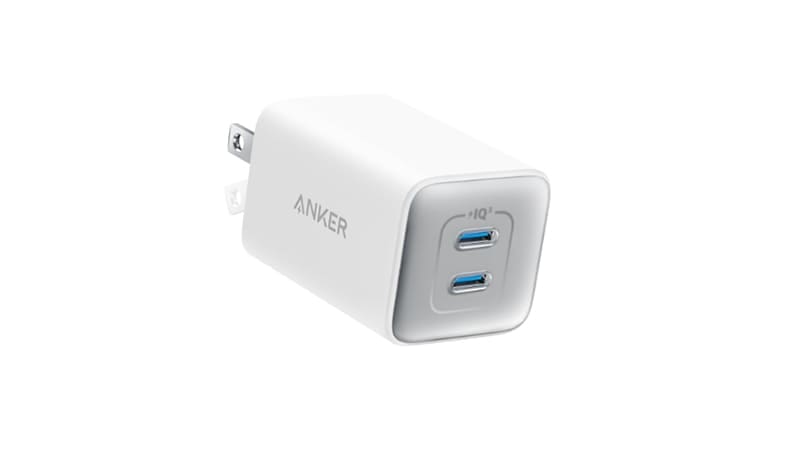
Anker Nano 47W Charger

3 Best USB-C Chargers for iPhone and Android (Universal PD Tested) 1

Anker is a respected brand for all sorts of power-related technology. This particular offering is so popular thanks to the speed at which it charges, potentially fast-charging two devices at once. It has a rating of 4.8/5 from over 5,800 reviews, and charges all USB-C compatible devices, including smartphones, but also Macs and Google Pixelbooks.

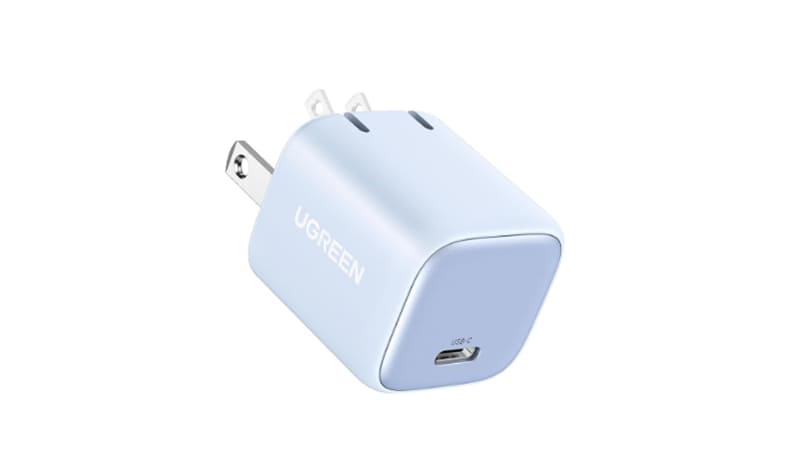
UGREEN 30W Foldable GaN Charger

3 Best USB-C Chargers for iPhone and Android (Universal PD Tested) 2

For those who prioritize space saving, the UGREEN foldable charger is ideal. It’s significantly smaller than most alternatives, and the plug prongs fold away when not in use. Amazon buyers give this charger a rating of 4.8/5 from over 12,100 reviews.

Belkin Boost 27W Wall Charger

3 Best USB-C Chargers for iPhone and Android (Universal PD Tested) 3

This charger is perfect for when you need to use both USB-C to USB-C and USB-C to USB-A cables. You can charge two devices at once, and a rating of 4.4/5 from hundreds of reviews suggests it manages this successfully.

Remember, always check the compatibility with your device in the item description, and check user reviews and ratings before making your purchase.

Related Posts:

  • How to View Web Page Source on iPhone iPad 7 Best Methods
    How to View Web Page Source on iPhone/iPad: 7 Best Methods
  • macOS Monterey Universal Control
    Universal Control Review: It Could Be Better
  • two iphones standing up
    Best iPhone 14 Accessories
  • Best iPhone 13 Accessories Hero
    Best iPhone 13 Accessories To Make The Most Out Of…
  • MacBook Pro 2021 iPad Mini iPhone 13 Pro AirPods 3 Beats Fit Pro iPad Pro Best Apple Products - 4
    How To Use Universal Control on Mac and iPad
  • iPhone 15 Pro Max - 4
    Best iPhone Lock Screen Widgets for iOS 17
  • watchOS 8 Health Features
    How To Use Health Checklist on iPhone and Apple Watch
  • 2023 Mac Studio lifestyle - 1
    macOS Could Not Be Installed, How-To Fix
  • iPhone 13 and iPhone 13 Mini Announced 21
    Best iPhone 13 Chargers From Apple And Others
Louis Roundtree
Louis Roundtree

As an avid gamer, I’ve run into my fair share of error codes and weird faults that have forced me to find fixes to problems I never anticipated. That gave me a passion for sharing those fixes with others so we can all game without feeling like our hardware is rebelling against us.
Reader Interactions

Write a Comment Cancel reply

Primary Sidebar

Recent Posts

  • How to Export iTunes Library to New Computer
  • What the Gemini Desktop App Will Bring to Mac
  • What to Do When Windows 11 Won’t Detect Your iPad
  • Outlook Outage 2026: iPhone Fixes for Sign-In Chaos
  • Guide to Changing iMessage Backgrounds on iPhone and Mac
  • Has Apple Killed Vision Pro? (Insane Sales Flop Explained)

Connect with us

Footer

ABOUT

  • About Us
  • Contact us
  • Advertise
  • Privacy
  • Terms of Use

GUIDES

  • iOS & iPadOS
  • Apple ID
  • iCloud
  • App Store
  • iTunes
  • FaceTime
  • iMessage
  • Siri
  • Books and iBooks
  • Game Center
  • AirPlay

CONNECT

  • Facebook
  • Twitter
  • FeedBurner
  • YouTube

© Copyright 2010-2024 Guiding Tech Media · All Rights Reserved

This site and its content are in no way affiliated or endorsed by Apple, Inc. · Reproduction without explicit permission is prohibited