When you try to use the Apple TV app on your Fire TV Stick, you may sometimes get an error message that says there was a problem loading the video. The bad news is that restarting the app rarely solves the problem. Let’s explore what else you can do to get rid of this message and watch Apple TV on your Fire TV Stick.
What to Do if Apple TV Says Video Is Not Available on Fire TV Stick
Check if This Is a Known Issue
Check if there are any known issues affecting the Apple TV service. Go to Apple’s System Status page and check the status of the Apple TV service. If the service is down, wait patiently for Apple’s engineers to fix the problem on their end. Try again later.
Check Your Internet Connection
Video streaming eats up a lot of bandwidth. If other devices are using too much bandwidth, there simply won’t be enough bandwidth left for Fire TV. To quickly solve bandwidth issues, disconnect all the other devices connected to your network. Make sure Fire TV is the only device connected to your network.
If the video you’re trying to stream is still unavailable, unplug your router, and leave it unplugged for two minutes to completely reset your connection.
Set Up a New Wi-Fi Connection
First, remove your current Wi-Fi network from your Fire TV Stick. To do that, navigate to Settings, select Network, and then go to Your Wi-Fi Network. Select the Forget option from the menu to delete your current network.
After you do that, unplug your TV power adapter, wait for 30 seconds, and then plug it back in. Go back online, and check the results. Alternatively, connect to a different network such as a mobile hotspot, and check if you notice any changes.
Install the Latest Fire TV and Apple TV Updates
Be sure to update Fire TV and Apple TV to the latest version. Many users confirmed that installing the latest FireOS version solved the problem for them.
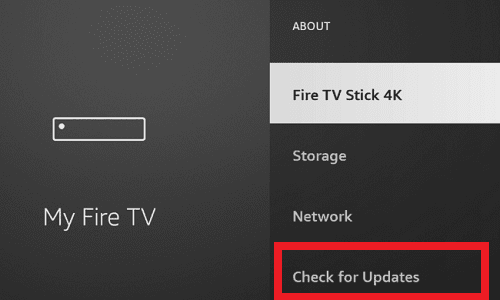
To update Fire TV, navigate to Settings, select My Fire TV, and go to About. Select Check for Update and install all pending updates. Restart your device, and try again.
To update the Apple TV app, go to your Home screen, select Your Apps & Games, select Apple TV, and then go to More options. If a new app version is available, select the Update option.
Alternatively, you can also update Apple TV automatically on your Fire TV Stick. Go to the Home screen, navigate to Settings, and select Applications. Then, select AppStore, and enable Automatic Updates.
Clear Apple TV’s Cache
Go to Settings, and select Applications.
Then go to Manage Installed Applications.
Select Apple TV.
Locate and select the Clear Cache option.
Then select Clear Data to confirm your choice.
Restart your Fire TV Stick.
Launch Apple TV again, and check if you can stream video content.
Reinstall Apple TV
Go back to Fire TV Settings, and select Applications.
Then, go to Manage Installed Applications.
Select your Apple TV app, and hit the Uninstall button.
Unplug your Fire TV Stick, wait for 30 seconds, and plug it back in.
Download, and reinstall Apple TV.
Reset Your Fire TV Stick
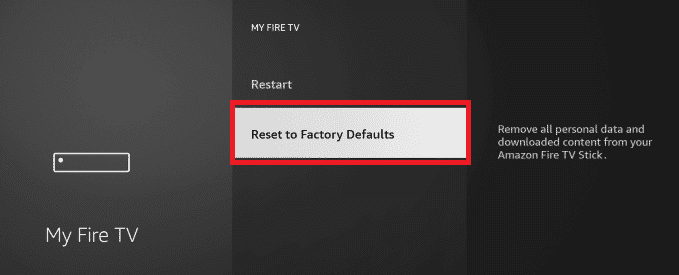
As a last resort, reset your Fire TV Stick. Keep in mind that this will delete all your data. Go to Settings, select System, and then select Reset to Factory Defaults.
If you can’t stream video content from Apple TV to your Fire TV Stick, set up a new Wi-Fi connection and unplug your router. Then, install the latest Fire TV and Apple TV updates. Additionally, clear Apple TV’s cache to delete corrupted application cache. If the issue persists, reinstall the Apple TV app, and reset your Fire TV Stick.
Did you manage to solve the problem? Hit the comments below and let us know which method worked for you.
Madalina has been a Windows fan ever since she got her hands on her first Windows XP computer. She is interested in all things technology, especially emerging technologies — AI and DNA computing in particular.
Did not work. Tried all the suggestions above. All other apps work but not Apple TV App I can watch on iPad but I want to watch it on tv. May as well cancel Apple TV.
Nothing worked. But as I didn’t expect it to I wasn’t disappointed.
Fact is the Firestick crashes at least twice a week and we just switch off, switch on and it clears.
As for the crap we are fed about ease of viewing and reliability, that’s, well ….. crap!
Apple TV is asking to update to version 13.0.0 on my fire stick, but it does not ever complete this action… it seems stuck in a loop. I tried to delete Apple TV, but it is not on the list of installed apps. But when I try to install it, I only get the option to update. I don’t understand what the problem is. Please advise!!





Did not work. Tried all the suggestions above. All other apps work but not Apple TV App I can watch on iPad but I want to watch it on tv. May as well cancel Apple TV.
Nothing worked. But as I didn’t expect it to I wasn’t disappointed.
Fact is the Firestick crashes at least twice a week and we just switch off, switch on and it clears.
As for the crap we are fed about ease of viewing and reliability, that’s, well ….. crap!
Apple TV is asking to update to version 13.0.0 on my fire stick, but it does not ever complete this action… it seems stuck in a loop. I tried to delete Apple TV, but it is not on the list of installed apps. But when I try to install it, I only get the option to update. I don’t understand what the problem is. Please advise!!
I have the exact same issue! I feel like I’m losing my mind.
Same with me only it is happening a year and a half after you had the problem! Did you ever find a solution?