Zoom now relies on the AES 256-bit GCM encryption standard to secure your meetings and protect your data. But the catch is that GCM requires all Zoom users to upgrade to Zoom client or Zoom Rooms version 5.0. If you don’t do that, you won’t be able to join any meetings, so you don’t really have a choice.
The only problem is that many MacBook users are still struggling to update their Zoom app. Either nothing happens when they check for updates, or they get an error message saying the update failed to install. If you’re experiencing similar issues, follow the troubleshooting tips below to fix the problem.
Why Won’t My Mac Download the Latest Zoom Updates?
Use the Web App
If you can’t use Zoom on your Mac because you’re running an outdated app version, use the Zoom Web client or mobile app. Check if you can join your meeting. You can try to update your desktop app after the meeting is over.
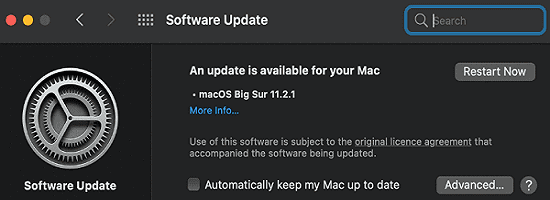
Also, make sure you’re running the latest macOS version on your computer. A number of users said that updating their OS version fixed their Zoom installation errors. Click on your Apple Menu, go to System Preferences, and click on System Update to check for updates.
Use Your Mac Admin Credentials
During the update process, Zoom may prompt you to enter your administrator name and password. If you enter your Zoom login details instead, you won’t be able to complete the update process. When the app asks you to enter your username and password, you would normally think you need to enter your Zoom username and account password. But you actually need to type in your Mac admin username and password.
Reinstall the App
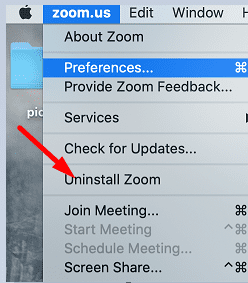
As Zoom suggests, if the update process fails with an obscure error code, uninstall the old app. Launch Finder, go to Applications, locate Zoom and simply drag the app to the Trash folder. Or click on the Zoom menu and select Uninstall Zoom. Then empty your Trash folder, restart your machine and install a fresh copy of Zoom.
By the way, if you can’t download the app from Zoom’s main download page, you can use one of the direct download links below:
If your Zoom menu doesn’t have an uninstall option, download the latest app version through Safari and double-click on the file to launch it. Your Mac should automatically launch the newest app version.
Contact Your IT Admin
On the other hand, if your desktop client was installed by your IT admin, they may have removed the AutoUpdate feature. That could explain why you can’t install the latest Zoom updates on your computer. You need to contact your IT admin and ask them to help you update the app.
Conclusion
If you can’t update Zoom on Mac, make sure to enter your Mac admin username and password when prompted, not your Zoom credentials. If the issue persists, uninstall Zoom, restart your Mac and use one of Zoom’s direct download links to install a fresh copy of the app. Hit the comments below and let us know if these solutions helped you fix the problem.
Madalina has been a Windows fan ever since she got her hands on her first Windows XP computer. She is interested in all things technology, especially emerging technologies — AI and DNA computing in particular.
I receive indeed and error message that the update cannot be installed. But If I uninstall it and download the recent app version, does it mean I loose my profile, etc. What about the fact that I have a paid version in order to run longer calls than with the free version?
I have been having the same error message, but when I installed the new Zoom app it says I need macOS 11.0 or later and I only have 10.15.7 that my computer “software update” says is up to date!
Can you please help?
When I go to update my Zoom client, it claims the highest update is 5.1, however I need 5.3 to run my PowerPoint as a virtual background. This is also all I see when I go to the Zoom website to download the latest Zoom client (5.1) . I live in New Zealand – does that make a difference?












I receive indeed and error message that the update cannot be installed. But If I uninstall it and download the recent app version, does it mean I loose my profile, etc. What about the fact that I have a paid version in order to run longer calls than with the free version?
I have been having the same error message, but when I installed the new Zoom app it says I need macOS 11.0 or later and I only have 10.15.7 that my computer “software update” says is up to date!
Can you please help?
What model Mac do you have? macOS 11 (Big Sur) may not be compatible with your device. https://support.apple.com/en-us/HT211238
When I go to update my Zoom client, it claims the highest update is 5.1, however I need 5.3 to run my PowerPoint as a virtual background. This is also all I see when I go to the Zoom website to download the latest Zoom client (5.1) . I live in New Zealand – does that make a difference?
I am having the same issue too
somehow I am unable to start Zoom even after uninstalling and reinstalling zoom on my macbook air… Why???? what is going on here????