• Skip to primary navigation
  • Skip to main content
  • Skip to primary sidebar
  • Skip to footer

AppleToolBox

Tools and Fixes for Mac, iPad, iPhone & iWatch

Search posts

  • About
  • Contact

CONNECT WITH US

CATEGORIES

  • iPhone
  • iPad
  • iPod
  • Apple Watch
  • Mac/MacBook
  • AirPods
  • Apple TV
  • News
  • Apple Services
  • HomePod
  • Reviews

SITE

  • Home
  • About Us
  • Contact
  • Advertise

Search posts

You are here: Home / iPhone / How To Set Custom Safari Background on iPhone and iPad

How To Set Custom Safari Background on iPhone and iPad

By Andrew Myrick 0 comments Last updated October 6, 2021

Over the past few months, Safari has been the subject of much debate, as Apple attempted to introduce an overhauled redesign to the browser. This came along with the addition of support for Safari Extensions, along with a few other more minor tweaks available. Apple continues to try and bring feature-parity across all of its devices, especially now that devices like the iPad Pro and 2020/2020 Mac lineup are powered by the same processor.

Related Reading

  • How To Stop Safari From Changing Colors on iOS, iPadOS, and the Mac
  • Best Safari Extensions for iOS 15 and iPadOS 15
  • How To Install Safari Extensions on iPhone and iPad
  • How To Use Safari Tab Bar on iOS 15
  • Comparing the Best Web Browsers For iPhone or iPad

After facing so much controversy regarding the overall layout of the new Safari and the decision to move the address bar to the bottom, Apple has softened its stance a bit. This new Apple looks to be a bit more about letting users have control over how their devices look and feel within certain apps, including Safari.

How To Set Custom Safari Background on iPhone and iPad

In addition to allowing users to switch between the “old” tab bar layout in Safari, with the bar at the top, and the “new” version based on swipe gestures and an address bar on the bottom, Apple also added a nice little customization option to Safari. Starting with iOS 15, iPadOS 15, and macOS Monterey, you can change set a custom Safari background on your devices. Previously, you were just stuck with whatever boring and bland option was available by default. But now, you can either pick from a selection of pre-populated backgrounds or use an image of your own.

Here’s how you can set a custom Safari background:

  1. Open the Safari app on your iPhone or iPad.
  2. Open a new and empty Safari page.
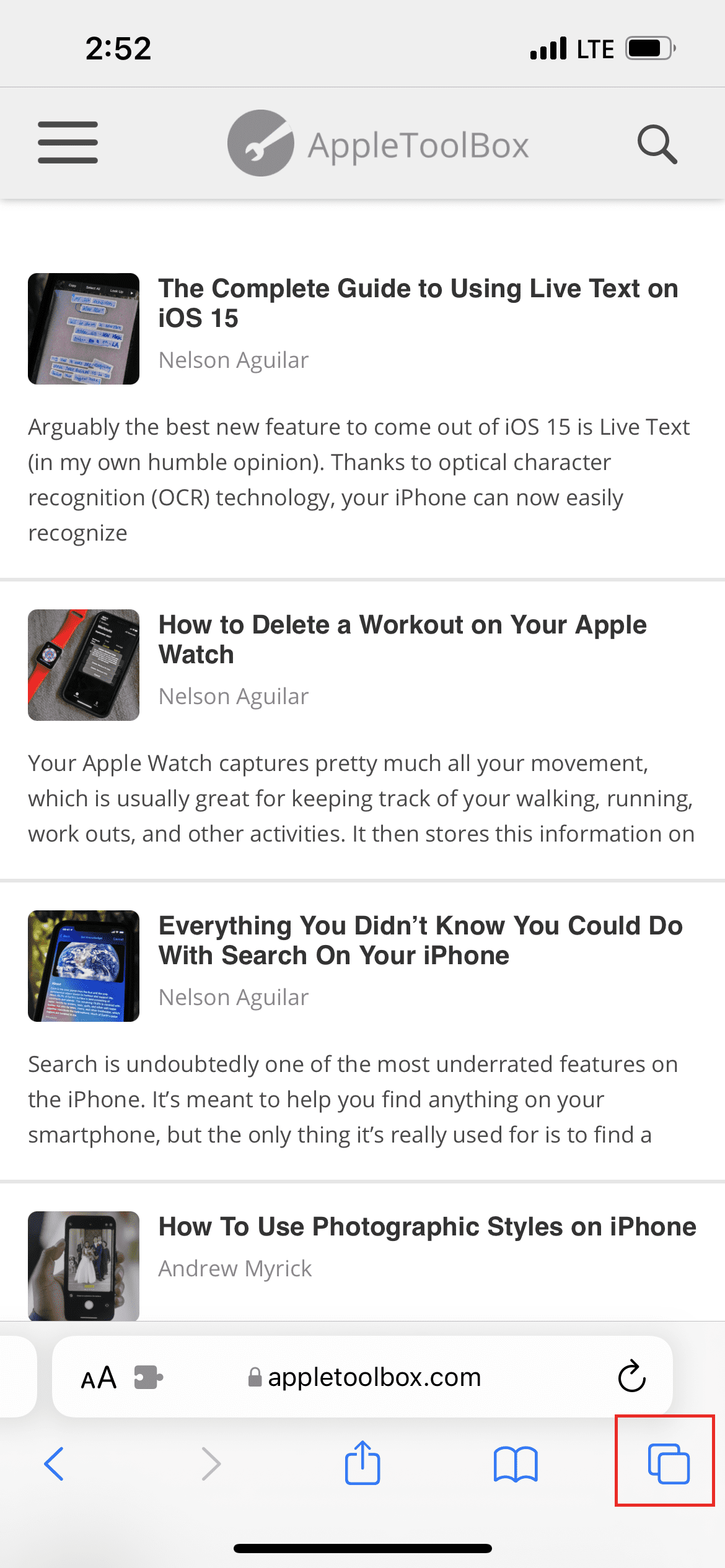
    1. Tap the two-square icon in the bottom right corner.
    2. Then, tap the + icon.
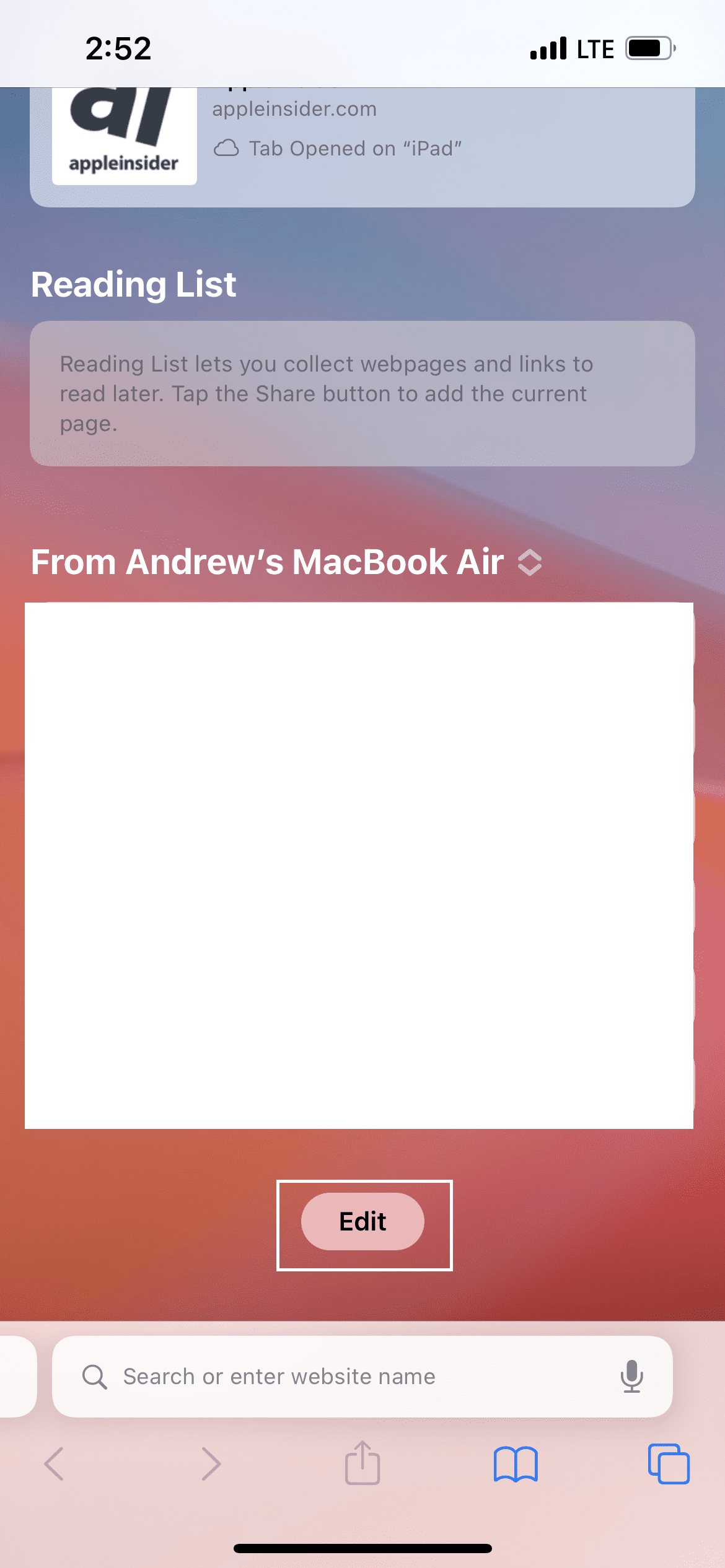
  3. Scroll all the way to the bottom of the page.
  4. Tap the Edit button.
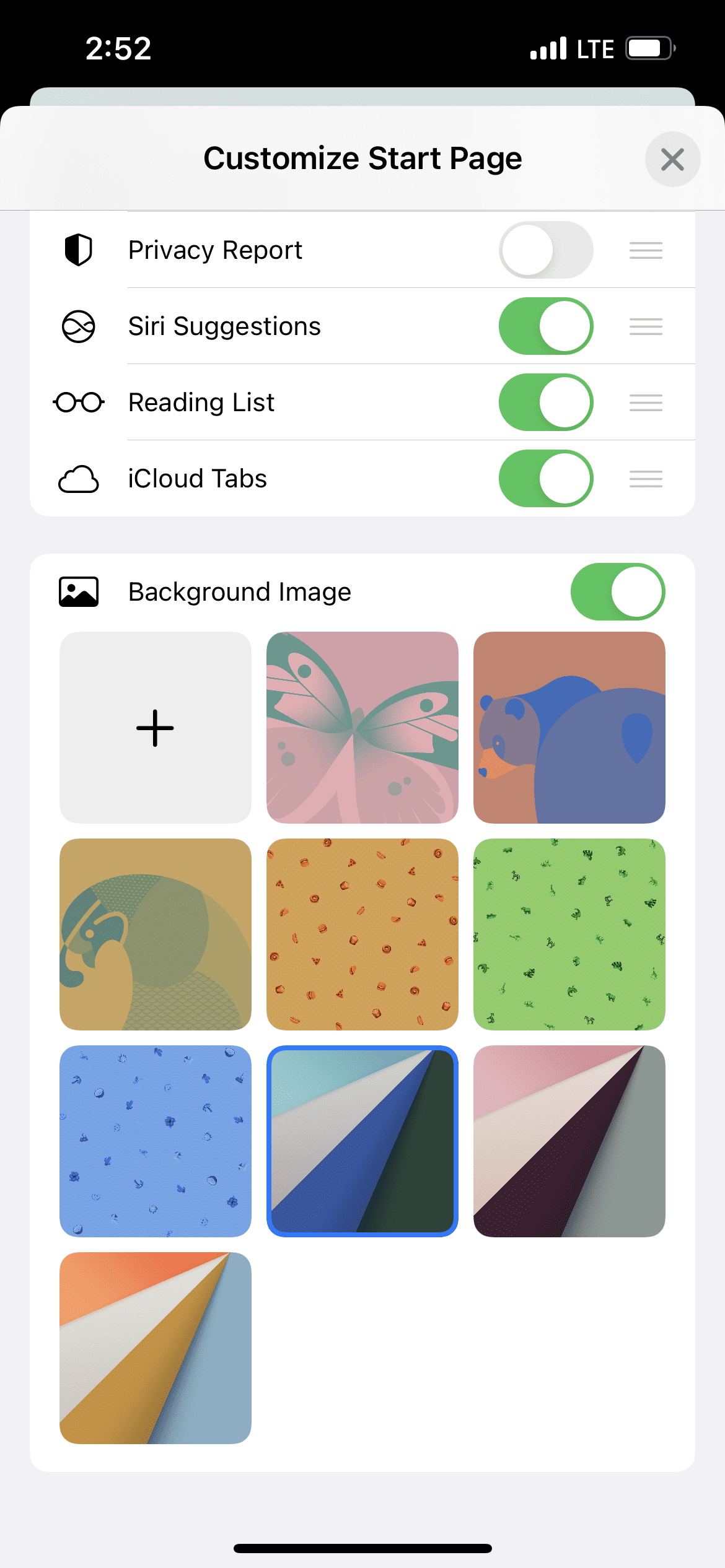
  5. Tap the toggle next to Background Image.
  6. Select one of the pre-populated pictures, or tap the + box to add your own.
Custom Safari Background 3
Custom Safari Background 4

When navigating to this portion of Safari, you might also notice quite a few options to customize the general layout of Safari. This includes toggles for things like the Privacy Report, iCloud Tags, or just your most visited websites. But you can also customize the layout of these sections via the three horizontal lines next to each of the options. Now, you can hide the sections of Safari that you don’t care about, while re-arranging sections that you want quicker access to when using Safari.

Related Posts:

  • iPhone 15 event - iPhone 15 Pro and iPhone 15 Pro Max A17 Pro Video Recording Promo
    iPhone 14 vs. iPhone 15: Should You Upgrade?
  • photo of an iphone with ios 16 downloaded on it
    iOS 16 Tips and Tricks: The Definitive List
  • Apple Vision Pro at desk
    Everything to Know About Apple Vision Pro
  • iphone and airpods on a table
    These Apps Have the Best iOS 17 Widgets
  • AirPods Pro 2 - 1
    AirPods Max vs AirPods Pro 2: Making The Right Purchase
  • iPhone 13 Pro Max on Keyboard
    iPhone 13 Pro Max vs iPhone 14 Pro Max: Should You Upgrade
  • iPhone 14 Pro Back
    iPhone 15 Pro: What To Expect
  • Apple iPhone 15 Event Logo
    Everything Announced at Apple's iPhone 15 Event
  • pexels-cottonbro-5082579
    Getting Started With iOS 15: Everything Good And Bad
Andrew Myrick
Andrew Myrick

Andrew Myrick is a freelance writer based on the East Coast of the US. He enjoys everything to do with technology, including tablets, smartphones, and everything in between. Perhaps his favorite past-time is having a never-ending supply of different keyboards and gaming handhelds that end up collecting more dust than the consoles that are being emulated.

Reader Interactions

Write a Comment Cancel reply

Primary Sidebar

Recent Posts

  • How to Set Up iCloud Passwords on a Windows PC?
  • How to Turn Off Apple Music’s Dark Mode
  • How to Disable Predictive Text in iOS 26
  • How to Stop Sharing Analytics in iOS 26
  • How to Manage Your iPhone Call Log
  • Are Apple’s Safety Precautions Enough for AirTags?

Connect with us

Footer

ABOUT

  • About Us
  • Contact us
  • Advertise
  • Privacy
  • Terms of Use

GUIDES

  • iOS & iPadOS
  • Apple ID
  • iCloud
  • App Store
  • iTunes
  • FaceTime
  • iMessage
  • Siri
  • Books and iBooks
  • Game Center
  • AirPlay

CONNECT

  • Facebook
  • Twitter
  • FeedBurner
  • YouTube

© Copyright 2010-2024 Guiding Tech Media · All Rights Reserved

This site and its content are in no way affiliated or endorsed by Apple, Inc. · Reproduction without explicit permission is prohibited