• Skip to primary navigation
  • Skip to main content
  • Skip to primary sidebar
  • Skip to footer

AppleToolBox

Tools and Fixes for Mac, iPad, iPhone & iWatch

Search posts

  • About
  • Contact

CONNECT WITH US

CATEGORIES

  • iPhone
  • iPad
  • iPod
  • Apple Watch
  • Mac/MacBook
  • AirPods
  • Apple TV
  • News
  • Apple Services
  • HomePod
  • Reviews

SITE

  • Home
  • About Us
  • Contact
  • Advertise

Search posts

You are here: Home / iPhone / iOS continuity: How to turn off (and turn on) iPhone continuity calling on your iOS and Mac OS X devices

iOS continuity: How to turn off (and turn on) iPhone continuity calling on your iOS and Mac OS X devices

By Sudz Kar 1 comment Last updated December 30, 2022

The new iOS 8 Continuity feature lets you make and receive phone calls on your iPad, iPod touch or Mac. If you use this feature, when you receive a phone call, all your devices will ring as long as your devices running iOS 8 (or Mac OS X Yosemite)  are on the same Wi-Fi network. You may want to disable this feature on a device, so that this particular device could not be used to make or receive calls. Here is how:

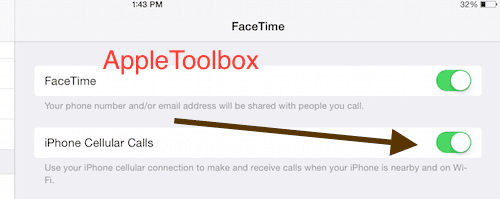
How to enable/disable continuity calling on iPad and iPod touch:

  • Go to Settings > FaceTime. Here you can enable or disable iPhone Cellular Calls:

iOS 8 iPhone Cellular Calls

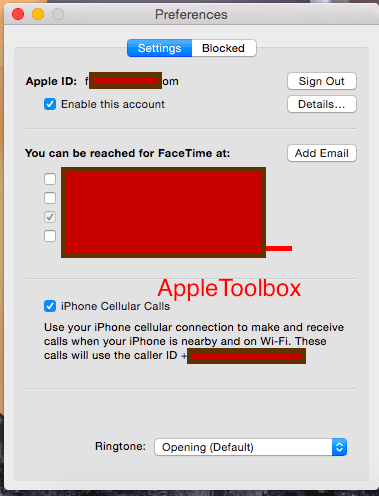
How to enable/disable continuity calling on Mac OS X Yosemite:

  • Note that Mac Yosemite is not publicly available yet. To enable/disable this feature, launch FaceTime then Preferences. Check or Uncheck iPhone Cellular Calls setting.

Facetime > iPhone Cellular Calls

Related: iOS 8.0.2 available: How to update

Related Posts:

  • two people calling on facetime
    Group Facetime Not Working? Here's How You Can Fix It
  • Facetime Mac Header
    How Do I Fix Failed FaceTime Calls?
  • solen-feyissa-15v6smjHVHQ-unsplash
    How To Close Your Apple Watch Rings Everyday
  • 2023 Mac Studio lifestyle - 1
    macOS Could Not Be Installed, How-To Fix
  • Facetime Mac Header
    Can’t Sign In to FaceTime on Mac: 12 Best Fixes
  • Photo of an iPhone being taken out of its box
    How To Use Dual SIM and eSIM on Your iPhone
  • The FaceTime logo on a green background
    FaceTime for Mac Not Working: How to Fix
  • FaceTime Help & Tips - How to Fix Your Problems
    No FaceTime App on my iPad, iPhone, or iPod Touch
  • photo of an iphone with ios 16 downloaded on it
    iOS 16 Tips and Tricks: The Definitive List
sudz - apple
Sudz Kar

Obsessed with tech since the early arrival of A/UX on Apple, Sudz (SK) is responsible for the original editorial direction of AppleToolBox. He is based out of Los Angeles, CA.

Sudz specializes in covering all things macOS, having reviewed dozens of OS X and macOS developments over the years.

In a former life, Sudz worked helping Fortune 100 companies with their technology and business transformation aspirations.
Reader Interactions

Write a Comment Cancel reply

Show 1 Comments

  1. Don says

    April 13, 2015 at 5:08 PM

    How to turn off iPhoto library in Snow Leopard from showing up in iOS 8 devices?

    Reply

Primary Sidebar

Recent Posts

  • How to Set Up iCloud Passwords on a Windows PC?
  • How to Turn Off Apple Music’s Dark Mode
  • How to Disable Predictive Text in iOS 26
  • How to Stop Sharing Analytics in iOS 26
  • How to Manage Your iPhone Call Log
  • Are Apple’s Safety Precautions Enough for AirTags?

Connect with us

Footer

ABOUT

  • About Us
  • Contact us
  • Advertise
  • Privacy
  • Terms of Use

GUIDES

  • iOS & iPadOS
  • Apple ID
  • iCloud
  • App Store
  • iTunes
  • FaceTime
  • iMessage
  • Siri
  • Books and iBooks
  • Game Center
  • AirPlay

CONNECT

  • Facebook
  • Twitter
  • FeedBurner
  • YouTube

© Copyright 2010-2024 Guiding Tech Media · All Rights Reserved

This site and its content are in no way affiliated or endorsed by Apple, Inc. · Reproduction without explicit permission is prohibited

Last Updated on December 30, 2022 by Mitch Bartlett