If Apple follows through its research, it is absolutely possible that one day your new iPhone and your new iPad will have the capabilities of detecting smoke or fire and assist in emergency rescue operations. Your iDevice could use a built-in smoke detector to monitor for the presence of smoke. In response to detecting smoke with the smoke detector, the device issues an alert or takes other suitable actions.
For example, your iPhone or iPad may transmit alerts to nearby electronic devices and to remote electronic devices such as electronic devices at emergency services facilities. These alerts may contain maps and graphical representations of buildings in which smoke has been detected.
It is also possible that Motion detectors and other sensors and circuitry embedded in your iPhone may be used in determining whether electronic devices are being used and determines where those electronic devices are located. Alerts could even contain information on the location of detected smoke and building occupants.
Related Apple Patents
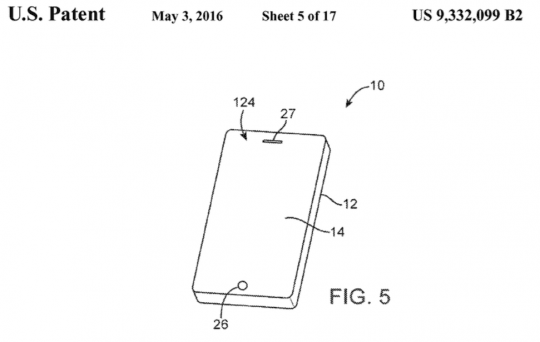
According to this patent filed by Apple (9,332,099) in Nov 2015, the iDevices may use information from sensors, aritifical intelligence engines, and other components to determine whether or not a user of an electronic device is present in the vicinity of an electronic device.
For example, if a motion sensor detects motion of your iPhone, it can be concluded that the device is being carried or otherwise handled by a user. As another example, if touch commands and button presses are being supplied to an electronic device, or if the electronic device is being used to conduct a telephone call or handle other user activity, it may be concluded that the user is present in the vicinity of an electronic device.
Similarly, Camera data and proximity sensor data may also be used to determine of a user is present in the vicinity of a device. Coupled with information from a satellite navigation system receiver and/or information from surrounding wireless local area networks this can provide the location of the user’s device.
Information on the identity of the user of each device may be determined by ascertaining the owner of each device and/or the name of the user of a device who has actively logged into that device.
If Apple were to go through with this emergency feature on its new iPhones and iPads, it could definitely be a game changer when it comes to Safety and rescue during emergencies. Imagine the intelligence that this will provide to first responders when they are faced with these emergency situations.
Apple does publish and patent a large number of potential use cases on a regular basis. Very few of them actually become features on the new devices. We think that there may be something really valuable in this novel application of iPhones.
Would you feel safer carrying an iPhone equipped with emergency sensors?
Obsessed with tech since the early arrival of A/UX on Apple, Sudz (SK) is responsible for the original editorial direction of AppleToolBox. He is based out of Los Angeles, CA.
Sudz specializes in covering all things macOS, having reviewed dozens of OS X and macOS developments over the years.
In a former life, Sudz worked helping Fortune 100 companies with their technology and business transformation aspirations.











More safer ?