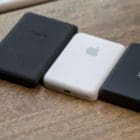
Many iPhone users have complained their batteries keep on draining with the MagSafe pack attached. Instead of charging your device, the MagSafe Battery Pack appears to be discharging it. But that’s not really the case, things are more complex than that. Let’s explore why the MagSafe Battery Pack can’t prevent battery drain on certain iPhone models.
The MagSafe Battery Pack is not a powerful charger or power bank. Think of it as an extension to your iPhone’s battery. Its main role is to extend the battery life of your iPhone. MagSafe manages battery power depending on your usage patterns. That’s why sometimes it doesn’t charge your device and lets the battery drain instead, which confuses users.
To check if the MagSafe Battery Pack does what it promises, charge your iPhone battery to 100 percent and then check the overall screen time at the end of the day with the battery pack attached. Then, fully charge your battery again, and check the overall screen time without MagSafe.
The MagSafe Battery Pack will charge your iPhone properly when you are not using the device. Unfortunately, when you’re actively using your iPhone, MagSafe may often let your battery drain normally without charging it.
MagSafe and iPhone Pro Models
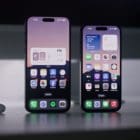
The MagSafe Battery Pack works best with iPhone mini and standard iPhone models. Battery consumption is higher on the Pro models. MagSafe simply can’t keep up with the battery drain rate. Simply put, your iPhone’s battery drains faster than the MagSafe Battery Pack can charge it.
There’s also an internal switch that automatically stops the power transfer once your iPhone has reached a certain temperature. The MagSafe Battery Pack itself can sometimes generate a lot of heat. The power bank then lets your iPhone battery drain to around 80 percent to avoid overheating issues.
As you can see, MagSafe is not actually draining your battery. It simply can’t charge it fast enough to compensate for battery drain during high use times or decides to stop the power transfer to prevent overheating issues. That explains why your battery percentage keeps dropping even with the MagSafe pack attached.
On the other hand, iPhone mini and standard iPhone devices use less battery power and don’t heat up as quickly which allows MagSafe to visibly extend your battery life.
If you’re still convinced your MagSafe Battery Pack doesn’t work as intended, contact Apple Support for further help.
Conclusion
The MagSafe Battery Pack may sometimes fail to reduce or prevent battery drain on iPhones. Simply put, your iPhone battery drains faster than your MagSafe can charge it. When running demanding tasks on your iPhone, iOS may block MagSafe from charging your battery to prevent overheating issues.
Do you often use your MagSafe Battery Pack to extend your iPhone’s battery life? Has your MagSafe ever appeared to be draining your battery instead of charging it? Let us know in the comments below.
Madalina has been a Windows fan ever since she got her hands on her first Windows XP computer. She is interested in all things technology, especially emerging technologies — AI and DNA computing in particular.
My Apple Battery Pack case actually draws down my available power faster than if it wasn’t attached to my Apple I-phone XS co Max Pro ! The first Apple battery pack protective case seemed to be Ok although it didnt seem to really give me any extra battery longevity, however, the case ripped on the sides and looked terrible so I bought another Apple I-Phone Battery Protective Case as well as an aftermarket case and both appeared to DISCHARGE my I-Phone Battery quicker than if not connected !!!! Very Lousy Product !
Placed on charger over night at 42%
8.5 hours later, charge is at 5%
Phone is a new 14 pro max.
New, as in less than 24 hours old.
The article does not address the issue.
What say ye?
I have a new iPhone 14 and bought a MagSafe battery pack to accompany it. Last night I charged both the phone and the MagSafe pack to 100 percent capacity, attached the pack to the phone, and then turned the phone off completely. When I got up this morning the battery pack was totally discharged but the phone was at 100 percent. Can you explain this? Do I have a defective MagSafe battery?
The Magsafe battery pack keeps your iphone on at all times. So when you turned it off and attached the battery pack, the battery pack turns the phone back on. However, it shouldnt have completely drain your battery pack though.
I was actually experiencing this and even reached out to apple as I wasn’t comfortable but this article has just cleared my doubts. I reckon I’ll cancel the case









My Apple Battery Pack case actually draws down my available power faster than if it wasn’t attached to my Apple I-phone XS co Max Pro ! The first Apple battery pack protective case seemed to be Ok although it didnt seem to really give me any extra battery longevity, however, the case ripped on the sides and looked terrible so I bought another Apple I-Phone Battery Protective Case as well as an aftermarket case and both appeared to DISCHARGE my I-Phone Battery quicker than if not connected !!!! Very Lousy Product !
Placed on charger over night at 42%
8.5 hours later, charge is at 5%
Phone is a new 14 pro max.
New, as in less than 24 hours old.
The article does not address the issue.
What say ye?
Defective. Return to store or send for warranty repair.
I have a new iPhone 14 and bought a MagSafe battery pack to accompany it. Last night I charged both the phone and the MagSafe pack to 100 percent capacity, attached the pack to the phone, and then turned the phone off completely. When I got up this morning the battery pack was totally discharged but the phone was at 100 percent. Can you explain this? Do I have a defective MagSafe battery?
The Magsafe battery pack keeps your iphone on at all times. So when you turned it off and attached the battery pack, the battery pack turns the phone back on. However, it shouldnt have completely drain your battery pack though.
My MagSafe battery goes dead even when not in use.
I was actually experiencing this and even reached out to apple as I wasn’t comfortable but this article has just cleared my doubts. I reckon I’ll cancel the case