• Skip to primary navigation
  • Skip to main content
  • Skip to primary sidebar
  • Skip to footer

AppleToolBox

Tools and Fixes for Mac, iPad, iPhone & iWatch

Search posts

  • About
  • Contact

CONNECT WITH US

CATEGORIES

  • iPhone
  • iPad
  • iPod
  • Apple Watch
  • Mac/MacBook
  • AirPods
  • Apple TV
  • News
  • Apple Services
  • HomePod
  • Reviews

SITE

  • Home
  • About Us
  • Contact
  • Advertise

Search posts

You are here: Home / Mac / Spotify for Mac: What’s New?

Spotify for Mac: What’s New?

By Danny Maiorca 0 comments Last updated October 5, 2022

Since first revolutionizing the music consumption scene in the 2000s, Spotify has gone from strength to strength. And as the company continues to grow, the Stockholm-headquartered tech giant has made several changes to its Mac app.

Related Reading:

  • How to Download Spotify Songs to Your Apple Watch
  • How to Play Spotify on Your Apple HomePod
  • Apple Podcasts vs. Google Podcasts vs. Spotify: Which Is Better?
  • Tips and Tricks for the Spotify iOS App
  • How to See How Many Songs You Have in Your Apple Music or Spotify Library

In September 2022, Spotify introduced a subtle update for its desktop app. If you use the service on your Mac, you might notice a couple of small changes; we’ll discuss what’s new in this article.

Contents

  • The Search Bar Placement
  • A New Home Icon
  • The Friend Activity Tab
  • Small Changes to the User Interface on Spotify for Mac

The Search Bar Placement

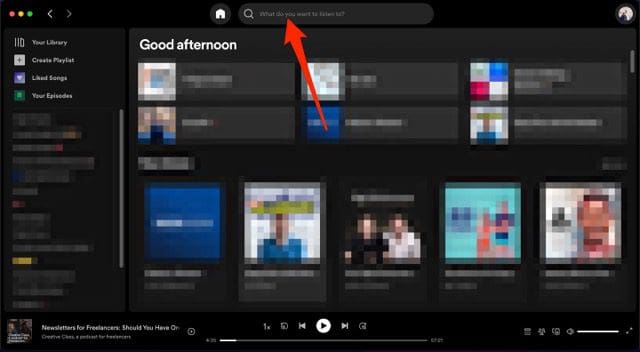
Screenshot showing the new search bar tab on Spotify for Mac

Once the Spotify app on your Mac has updated, you will notice that the search bar is in a different spot than it was before. Previously, you would see it in the top left-hand corner; it would feature above the Your Library option.

After updating Spotify on your Mac, you will still see the search bar toward the top of your screen. However, it will now feature in the middle. You can use it precisely as you did before without too many issues.

A New Home Icon

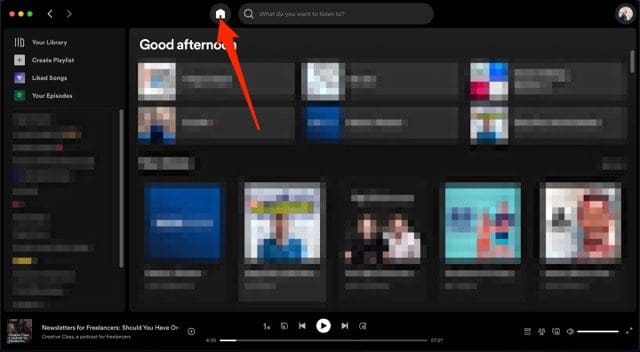
Screenshot showing the new home icon on Spotify for Mac

With the new Spotify update, switching back to your homepage has become much easier. The app now has a home icon, which you can press to return to the screen you see when first opening Spotify on your Mac.

When you click the home icon, your recently-played podcasts and playlists will appear – along with recommendations based on your listening history.

The Friend Activity Tab

Screenshot showing the friend activity icon on spotify for mac

Perhaps the biggest change you’ll notice is that the Friend Activity bar on the right is no longer visible. If you liked seeing what your friends were up to, however, you don’t need to worry; all that’s happened is that you now have more control over whether you see it or not.

At the bottom of your screen, you will notice an icon with three people. When you click on this, the tab will reappear – and the icon will turn green. You can hide the section again by simply clicking the Close option or once again selecting the Friend Activity icon.

Small Changes to the User Interface on Spotify for Mac

Spotify’s September 2022 updates were by no means drastic, but these small user experience updates are still pretty helpful. Now, you can search for music and podcasts with greater ease. Moreover, you can return to your home screen without many issues – and controlling whether you want to see what your friends are up to is also simpler.

You shouldn’t have to worry about needing to manually download your app. You might receive a notification in Spotify for Mac telling you that you can update your app; once you close and reopen it, the changes should take effect immediately.

Related Posts:

  • HomePod mini handoff on iPhone
    How to Reset HomePod or HomePod Mini
  • Photo of someone using Apple Music on their smartphone
    How to Fix Apple Music Not Working on iPhone / iPad
  • Apple Watch Ultra Tips and Tricks
    Apple Watch Tips and Tricks for 2023
  • Apple HomePod (2nd Generation) Stereo Pair
    HomePod 2 Review Roundup: You Won't Want Just One
  • What to Expect From Apple's Next HomePod
    What to Expect From Apple's Next HomePod
  • HomePod Mini
    Can't Set Up HomePod? How-to Fix
  • Apple HomePod (2nd Generation) Hero
    Apple Brings Back the HomePod with Updated Internals…
  • photo of a pair of headphones on top of a keyboard
    Everything You Need to Know About Apple Podcasts on Mac
  • podcasts on a phone screen
    Apple Podcasts vs. Google Podcasts vs. Spotify…
Danny Maiorca

Danny has been a professional writer since graduating from university in 2016, but he’s been writing online for over a decade. He has been intrigued by Apple products ever since getting an iPod Shuffle in 2008 and particularly enjoys writing about iPhones and iPads. Danny prides himself on making complex topics easy to understand. In his spare time, he’s a keen photographer.

Reader Interactions

Write a Comment Cancel reply

Primary Sidebar

Recent Posts

  • How to Hide Username and Photo on the Mac Lock Screen
  • Microsoft Resume vs. Apple Handoff – Which Wins for Cross-Device Work?
  • How to Export iTunes Library to New Computer
  • What the Gemini Desktop App Will Bring to Mac
  • What to Do When Windows 11 Won’t Detect Your iPad
  • Outlook Outage 2026: iPhone Fixes for Sign-In Chaos

Connect with us

Footer

ABOUT

  • About Us
  • Contact us
  • Advertise
  • Privacy
  • Terms of Use

GUIDES

  • iOS & iPadOS
  • Apple ID
  • iCloud
  • App Store
  • iTunes
  • FaceTime
  • iMessage
  • Siri
  • Books and iBooks
  • Game Center
  • AirPlay

CONNECT

  • Facebook
  • Twitter
  • FeedBurner
  • YouTube

© Copyright 2010-2024 Guiding Tech Media · All Rights Reserved

This site and its content are in no way affiliated or endorsed by Apple, Inc. · Reproduction without explicit permission is prohibited

Last Updated on October 5, 2022 by Mitch Bartlett