• Skip to primary navigation
  • Skip to main content
  • Skip to primary sidebar
  • Skip to footer

AppleToolBox

Tools and Fixes for Mac, iPad, iPhone & iWatch

Search posts

  • About
  • Contact

CONNECT WITH US

CATEGORIES

  • iPhone
  • iPad
  • iPod
  • Apple Watch
  • Mac/MacBook
  • AirPods
  • Apple TV
  • News
  • Apple Services
  • HomePod
  • Reviews

SITE

  • Home
  • About Us
  • Contact
  • Advertise

Search posts

You are here: Home / iPhone / How to use Siri to identify songs from over 100 countries

How to use Siri to identify songs from over 100 countries

By Sudz Kar 1 comment Last updated December 30, 2022

Users running iOS 8 (and later) on their iPhone, iPad or iPod touch can now find out what song is playing with Siri. Here is how:

1.Start playing the song you want to identify (a song on the same device such as iPhone / iPad or on a different device such as radio, TV, CD player etc).  Then ask Siri any of the following questions:

  • Shazam this song
  • Shazam this
  • Identify this song
  • Tell me this song
  • Who is singing
  • Name this song
  • What’s this song
  • Siri, name that tune
  • What song is this
  • What’s playing

2.Then Siri will respond by saying:

  • Let me listen
  • Naming that tune
  • Listening…

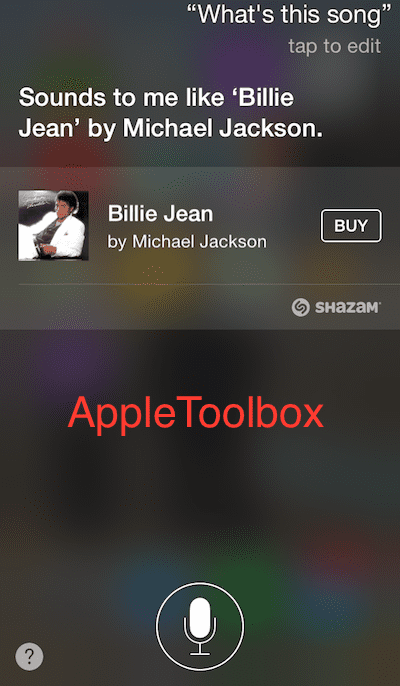
3.It may take a few seconds for Siri to recognize the song. When Siri done, it will say something like “I can name that tune.” or “Ooh, I know this song!” If it is available, a link to purchase via iTunes will also appear.

Siri identifying songs

One thing that really amazed me was that Siri can recognize songs in many languages, even though currently Siri is available only in the following languages:

  • English
  • French
  • German
  • Japanese
  • Spanish
  • Italian
  • Mandarin
  • Cantonese
  • Korean

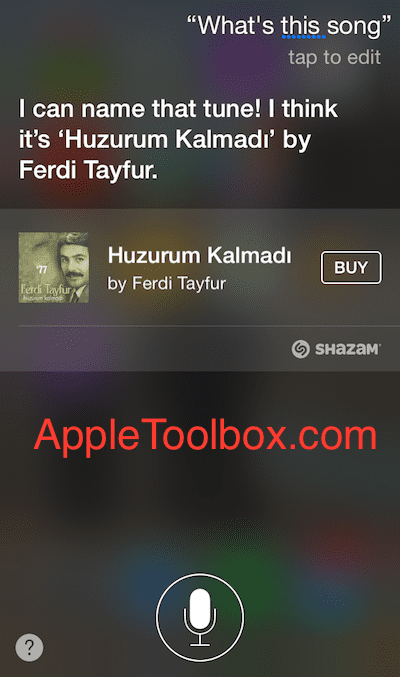
I tested Turkish, Indian, Arabic, Portuguese songs and Siri successfully identified them all.

Siri identifying a Turkish song
Siri and a Turkish song

Related Posts:

  • OLYMPUS DIGITAL CAMERA
    The Fastest Way To Shazam A Song On Your iPhone
  • Auto Shazam Enabled on iPhone
    Shazam for iOS 16 Makes it Easier to Find Songs with Siri
  • Photo of someone using Apple Music on their smartphone
    How to Fix Apple Music Not Working on iPhone / iPad
  • pexels-suvan-chowdhury-144429
    The Best Karaoke Apps For Apple TV In 2021
  • pexels-flo-dahm-699459
    Best Music Apps for Mac
  • pexels-designecologist-1779487
    The Best iPhone And Mac Shortcuts For Beginners
  • Apple Watch Series 7 - 9
    How to Download Songs to Your Apple Watch
  • MacBook Pro 2021 iPad Mini iPhone 13 Pro AirPods 3 Beats Fit Pro iPad Pro Best Apple Products - 3
    What’s New With iOS 15.7.1?
  • macOS Monterey Universal Control
    Best Media Player Apps for Mac
sudz - apple
Sudz Kar

Obsessed with tech since the early arrival of A/UX on Apple, Sudz (SK) is responsible for the original editorial direction of AppleToolBox. He is based out of Los Angeles, CA.

Sudz specializes in covering all things macOS, having reviewed dozens of OS X and macOS developments over the years.

In a former life, Sudz worked helping Fortune 100 companies with their technology and business transformation aspirations.

Reader Interactions

Write a Comment Cancel reply

Show 1 Comments

  1. Zandi Varbegam says

    March 5, 2015 at 9:50 PM

    Indian is NOT a language?

    Reply

Primary Sidebar

Recent Posts

  • How to Hide Username and Photo on the Mac Lock Screen
  • Microsoft Resume vs. Apple Handoff – Which Wins for Cross-Device Work?
  • How to Export iTunes Library to New Computer
  • What the Gemini Desktop App Will Bring to Mac
  • What to Do When Windows 11 Won’t Detect Your iPad
  • Outlook Outage 2026: iPhone Fixes for Sign-In Chaos

Connect with us

Footer

ABOUT

  • About Us
  • Contact us
  • Advertise
  • Privacy
  • Terms of Use

GUIDES

  • iOS & iPadOS
  • Apple ID
  • iCloud
  • App Store
  • iTunes
  • FaceTime
  • iMessage
  • Siri
  • Books and iBooks
  • Game Center
  • AirPlay

CONNECT

  • Facebook
  • Twitter
  • FeedBurner
  • YouTube

© Copyright 2010-2024 Guiding Tech Media · All Rights Reserved

This site and its content are in no way affiliated or endorsed by Apple, Inc. · Reproduction without explicit permission is prohibited

Last Updated on December 30, 2022 by Mitch Bartlett